

Hello,
please show this problem on screenshot.
Regards,
Stan Russell.

Hello,
please try following code:
.shopping-cart-widget {
  position: fixed!important;
  right: 100px;
}
Regards,
Stan Russell.
Hello,
please show this problem on screenshot.
Regards,
Stan Russell.
Hello,
you are welcome!
Regards,
Stan Russell.
Hello,
please provide us with admin and FTP credentials for your site in private content.
Please note that you must use WordPress 3.9 or higher and PHP 5.3 or higher to use WooPress.
Regards,
Stan Russell.
Hello,
please provide us with link to your site and show on screenshot where do you want to have this button placed.
Regards,
Stan Russell.
Hello,
you are welcome!
Regards,
Stan Russell.
Hello,
you are welcome!
Regards,
Stan Russell!
Hello,
please make backup, delete “woocommerce” folder in the directory wp-content/themes/royal/ and reupload this folder from the latest theme package.
Also update all required plugins. You can download them here: https://www.8theme.com/download-plugins/
Regards,
Stan Russell.
Hello,
we have sent you ‘Contact page 2’ and ‘Contact us’ pages to your email so you can import them in Dashboard > Tools > Import > WordPress. Please do not forget to click on ‘Download and import file attachments’.
As for icons, they are added using following css code:
.fa-phone:before {
  content: "\f095";
}
for phone
.fa-envelope-o:before {
  content: "\f003";
}
for envelope.
You can use this css code for other elements if you have appropriate skills.
Regards,
Stan Russell.
Hello Mothpre,
thank you for your reply. We are working on new translation forum at the moment. Thank you for understanding.
Regards,
Stan Russell.
Hello,
we are happy that you have solved your problem!
Regards,
Stan Russell.
Hello,
please show us on screenshot what elements color do you want to edit and how.
Regards,
Stan Russell.
Hello,
please update to latest version all plugins bundled with theme and check your site. You can download them here: https://www.8theme.com/download-plugins/
If this will not help – please provide us with FTP credentials for your site in private content.
Regards,
Stan Russell.
Hello,
please specify – you have updated Woocommerce plugin or changed any template files in theme folder?
Regards,
Stan Russell.
Hello,
we still can not connect to your FTP server due “connection timeout error”. Please check.
Regards,
Stan Russell.
Hello,
we have added needed css code to child theme style.css. Please check your site.
Regards,
Stan Russell.
Hello,
please provide us with FTP credentials for your site in private content.
Regards,
Stan Russell.
Hello,
please check these articles for detailed description:
http://codex.wordpress.org/WordPress_Optimization
http://techtage.com/speeding-up-wordpress-sites/
Regards,
Stan Russell.
Hello,
you are welcome!
Regards,
Stan Russell.
Hello,
please check this manual: http://docs.woothemes.com/document/editing-product-data-tabs/
Please note that we recommend you to do this customization only in Child theme: codex.wordpress.org/Child_Themes
Regards,
Stan Russell.
Hello,
please check you site. We have set your Visual Composer’s element ‘Products’ to display products as Slider and have set quantity of products shown in one row for different resolutions.
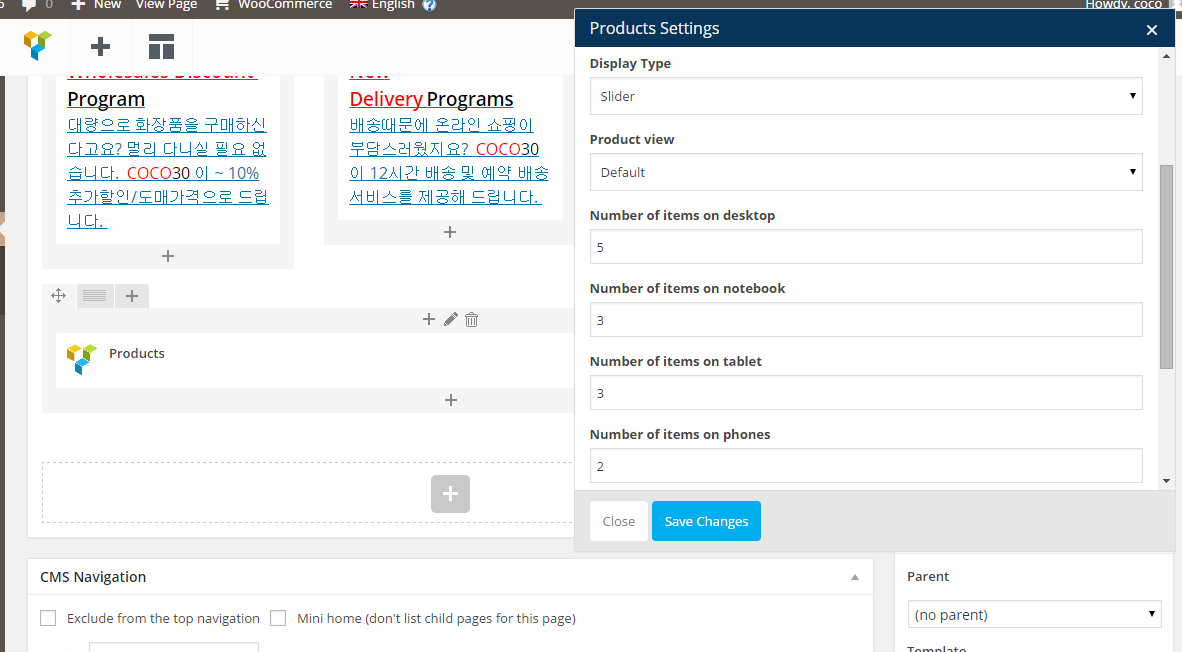
Regards,
Stan Russell.
Hello,
you can edit these widget areas in Dashboard > Appearance > Widgets > ‘Footer copyrights’ and Footer ‘links’
Just add there needed widgets (or empty text widgets if you want to hide them)
Regards,
Stan Russell.
Hello,
please check this article for detailed information about Woocommerce translation: http://docs.woothemes.com/document/woocommerce-localization/
Regards,
Stan Russell.
Hello,
we have temporary switched from your child theme to parent Woopress v1.5 theme and mobile menu started working correctly:

Please check your child theme customization.
Regards,
Stan Russell.
Hello,
please show us on screenshot how you want to change menu for header and fixed header.
Regards,
Stan Russell.
Hello,
please provide us with admin credentials for your site in private content.
Regards,
Stan Russell.
Hello,
is your problem solved now?
Regards,
Stan Russell.
Hello,
you are welcome!
Regards,
Stan Russell.
Hello,
you do not need key to use Visual Composer with our theme. It can be installed and activated in Dashboard > Plugins > Install required plugins.
You can download latest versions of bundled plugins here: 8theme.com/download-plugins/
In case you want to have premium support from plugin developer – you need to buy this plugin.
Regards,
Stan Russell.
Hello,
custom.css file will not be overridden on theme update.
Regards,
Stan Russell.

Free AI store scan · SalesMax
Paste your store address. SalesMax AI shows which upsell moments are missing. No signup.

Free AI speed test · FlashMax
Paste your site address. FlashMax runs Google Lighthouse for phone and desktop, checks Core Web Vitals and lists what to fix. No signup.
 Car Parts StoreCars & bikes
(live demo, opens in a new tab)
 DesignersWPBakery
(live demo, opens in a new tab)
 Plumbing StoreWPBakery
(live demo, opens in a new tab)
 Gym StoreSports & travel
(live demo, opens in a new tab)
 Sneakers StoreSports & travel
(live demo, opens in a new tab)
 Wedding StoreFashion
(live demo, opens in a new tab)
 Organic milk farmFood & drinks
(live demo, opens in a new tab)
 BusinessBusiness
(live demo, opens in a new tab)
 BookStoreBooks & art
(live demo, opens in a new tab)
 Minimal Fashion StoreFashion
(live demo, opens in a new tab)
 Minimal Fashion 03 StoreFashion
(live demo, opens in a new tab)
 Cosmetics StoreBeauty
(live demo, opens in a new tab)
 Bike StoreSports & travel
(live demo, opens in a new tab)
 Sport StoreSports & travel
(live demo, opens in a new tab)
 Kids StoreToys & games
(live demo, opens in a new tab)
 Organic Cosmetics StoreBeauty
(live demo, opens in a new tab)