Forum Replies Created

Viewing 30 posts - 33,931 through 33,960 (of 68,231 total)
  • Avatar: Rose Tyler
    Rose Tyler
    Support staff
    May 23, 2021 at 15:38

    We’ve found out that the problem is independent of our theme, it comes from your custom changes in the .htaccess file.
    Anyway you should contact your hosting provider
    http://prntscr.com/13b2r2w – the main problem is with this file
    http://prntscr.com/13b2uyw – when we return htaccess file to default settings like on prev screenshot then it works ok for admin – http://prntscr.com/13b2tqp

    Regards

    Avatar: Rose Tyler
    Rose Tyler
    Support staff
    May 23, 2021 at 15:03

    Hello,

    Change paddings, as was mentioned, I can’t do this because it shows that you are currently editing the static block, and the hover effect will be correct, for example –
    or just add the next code in the Custom CSS area http://prntscr.com/13b1p56

    .et-menu-list .subitem-title-holder a {
        padding: 5px 0px;
    }

    Regards

    Avatar: Rose Tyler
    Rose Tyler
    Support staff
    May 23, 2021 at 14:51

    Hello,

    I’ve made some changes.
    Edit your Obstetrics & Gynecology static block and change padding for menu items – http://prntscr.com/13b18q7

    Regards

    Avatar: Rose Tyler
    Rose Tyler
    Support staff
    May 23, 2021 at 14:26

    Edit page using Elementor > settings of Contact form element > Submit button – http://prntscr.com/13b0bgo

    Regards

    Avatar: Rose Tyler
    Rose Tyler
    Support staff
    May 23, 2021 at 13:52

    Hello,

    I can’t access Dashboard. Please check the login link.

    Regards

    Avatar: Rose Tyler
    Rose Tyler
    Support staff
    May 23, 2021 at 13:49

    Hello @Abhijeet,

    WooCommerce > Settings > Accounts & Privacy > Account creation – http://prntscr.com/13ayx1i

    Regards

    Avatar: Rose Tyler
    Rose Tyler
    Support staff
    May 23, 2021 at 13:45

    Hello,

    Go to settings of the Mobile panel > delete all default elements and add new from scratch. Check how it works then.

    Regards

    Avatar: Rose Tyler
    Rose Tyler
    Support staff
    May 23, 2021 at 13:11

    Add the next code in Theme Options > Theme custom CSS > Global custom CSS:

    /*======================*/
    /*         Blog         */
    /*======================*/
    .archive .post-heading-inner .entry-title a, .blog .post-heading-inner .entry-title a {
        font-size: 30px;
        color: #debb65;
        letter-spacing: 5px;
    }
    .archive .post-comments-count span, .entry-date, .blog .post-comments-count span, .meta-post, .meta-post a, .post-comments-count,
    .archive .read-more, .blog .read-more {
        color: #ffffff;
    }
    @media only screen and (min-width:1200px){
       .archive .content article:nth-child(odd) .post-data, .blog .content article:nth-child(odd) .post-data{
            text-align:center;
            padding:64px;
            border-radius:75px;
            background:#013a30;
            position:relative;
            left:-70px;
            z-index:99;
            display: inline-table;
            width: 610px;
        }
        .archive .content article:nth-child(even) .post-data, .blog .content article:nth-child(even) .post-data{
            text-align:center;
            padding:64px;
            border-radius:75px;
            background:#013a30;
            position:relative;
            right:-70px !important;
            z-index:99;
            display: inline-table;
            width: 610px;
        }
    }

    Regards

    Avatar: Rose Tyler
    Rose Tyler
    Support staff
    May 23, 2021 at 13:07

    Hello,

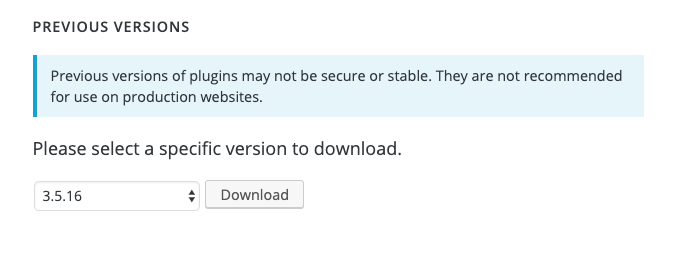
    Please downgrade the version of the vendor plugin to 3.5.16, you can download it from this page – https://wordpress.org/plugins/dc-woocommerce-multi-vendor/advanced/ https://i.gyazo.com/6f761588b69a7a23bac1d87befaf989c.png
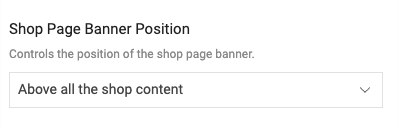
    Theme Options > WooCommerce > Shop > Shop page layout > https://i.gyazo.com/141e26c16aa8e2b4d52bfa3fff00a710.png

    Regards

    Avatar: Rose Tyler
    Rose Tyler
    Support staff
    May 23, 2021 at 12:58

    Hello,

    Theme Options > Styling > Dark buttons, or provide URL of page with the form, we will help you to change the color using Custom CSS code.

    Theme Options > Footer > Footer styling

    Regards

    Avatar: Rose Tyler
    Rose Tyler
    Support staff
    May 23, 2021 at 12:27

    Hello,

    Thanks for the reply. Please provide temporary FTP access also.

    Regards

    Avatar: Rose Tyler
    Rose Tyler
    Support staff
    May 23, 2021 at 12:15
    Avatar: Rose Tyler
    Rose Tyler
    Support staff
    May 23, 2021 at 12:13

    Hi,

    Ecotransport demo doesn’t have Contact or About us pages. When you click on links in the Main menu it just strolls the Home page.
    Do you want to import these pages from other demo versions? Here is video – https://youtu.be/wkIKN2IyEZI

    Regards

    Avatar: Rose Tyler
    Rose Tyler
    Support staff
    May 23, 2021 at 10:59

    Hello,

    Contact WooCommerce support about this.

    Regards

    Avatar: Rose Tyler
    Rose Tyler
    Support staff
    May 23, 2021 at 10:58

    Describe the desired displaying in more detail, please.

    Regards

    Avatar: Rose Tyler
    Rose Tyler
    Support staff
    May 23, 2021 at 10:22

    Theme options > Woocommerce > Shop elements > brands > Show Product Brands On Grid/List > off

    Regards

    Avatar: Rose Tyler
    Rose Tyler
    Support staff
    May 23, 2021 at 10:01

    Hello,

    Go to WooCommerce > Settings > Advanced > Account endpoints > remove endpoint you don’t want to have in the My Account menu.

    WooCommerce > Settings > Accounts & Privacy > XStore “My account” page settings >
    Account page type – Default

    Regards

    Avatar: Rose Tyler
    Rose Tyler
    Support staff
    May 23, 2021 at 09:41

    Hello,

    You can use the next custom CSS code to change style of product titles –

    .content-product .product-title a {
        font-size: 15px;
        color: #ff7fa2;
        line-height: 1.6 !important;
    }

    Regards

    Avatar: Rose Tyler
    Rose Tyler
    Support staff
    May 23, 2021 at 09:39

    Hello,

    Our theme has search by the products, product SKU, pages, posts (Theme Options > Header builder > Search). If you want to have any other types of search (by category title, tags etc) you can use an additional plugin or submit additional customization requests to WPKraken team

    Regards

    Avatar: Rose Tyler
    Rose Tyler
    Support staff
    May 23, 2021 at 08:55

    Hello,

    Theme Options > CUstom CSS > Custom CSS for mobile:

    .products-grid .product {
        width: 50% !important;
    }
    .products-grid .product .btn {
        padding: 5px 3px;
        font-size: 10px;
    }

    Regards

    Avatar: Rose Tyler
    Rose Tyler
    Support staff
    May 23, 2021 at 08:37

    Hello,

    Theme Options > WooCommerce > Single product builder > Gallery > Zoom > On.
    If this doesn’t work, provide temporary wp-admin and FTP access. We will take a closer look.

    Regards

    Avatar: Rose Tyler
    Rose Tyler
    Support staff
    May 23, 2021 at 08:34

    Hello,

    Theme Options > WooCommerce > Shop > Products style > Product Content Effect – Light, Product Content Elements – enable Add to cart button.

    Try to disable all the third-party plugins (including cache plugins), that do not come bundled with XStore https://www.8theme.com/documentation/xstore/plugins/included-plugins/ , clear cache of browser, and check how Quick View works then.

    Regards

    Avatar: Rose Tyler
    Rose Tyler
    Support staff
    May 23, 2021 at 08:29

    Hello,

    Do you want to show the progress bar in the cart off-canvas on mobile too?

    Also can this sales booster go in checkout stage?

    – no, but you can edit the Checkout page, and add content before the checkout shortcode.

    Regards

    Avatar: Rose Tyler
    Rose Tyler
    Support staff
    May 23, 2021 at 08:04

    Hello,

    We can see a lot of js errors that are independent of our theme via the browser console.
    Try to disable 3rd party plugins by re-naming via FTP and check how it works then.
    Did you make changes in files of the child theme? Check additional customization there.
    Try to remember what you did before it broke.
    Check server error log, are there any errors?
    Let us know results, provide temporary FTP access, so we can take a closer look.

    Regards

    Avatar: Rose Tyler
    Rose Tyler
    Support staff
    May 23, 2021 at 07:43

    Hello,

    Thanks for using our theme.
    Contact your hosting provider about this, because it is server-side.
    GTMetrix changed its testing system, and all the sites that had A, B scores get C, E or F. Try to test your site here – https://tools.pingdom.com/ , read this article https://kinsta.com/blog/make-fewer-http-requests/

    Regards

    Avatar: Rose Tyler
    Rose Tyler
    Support staff
    May 23, 2021 at 07:38

    We are glad that you sorted it out. Thanks for letting us know.

    Regards

    Avatar: Rose Tyler
    Rose Tyler
    Support staff
    May 23, 2021 at 07:30

    Hello,

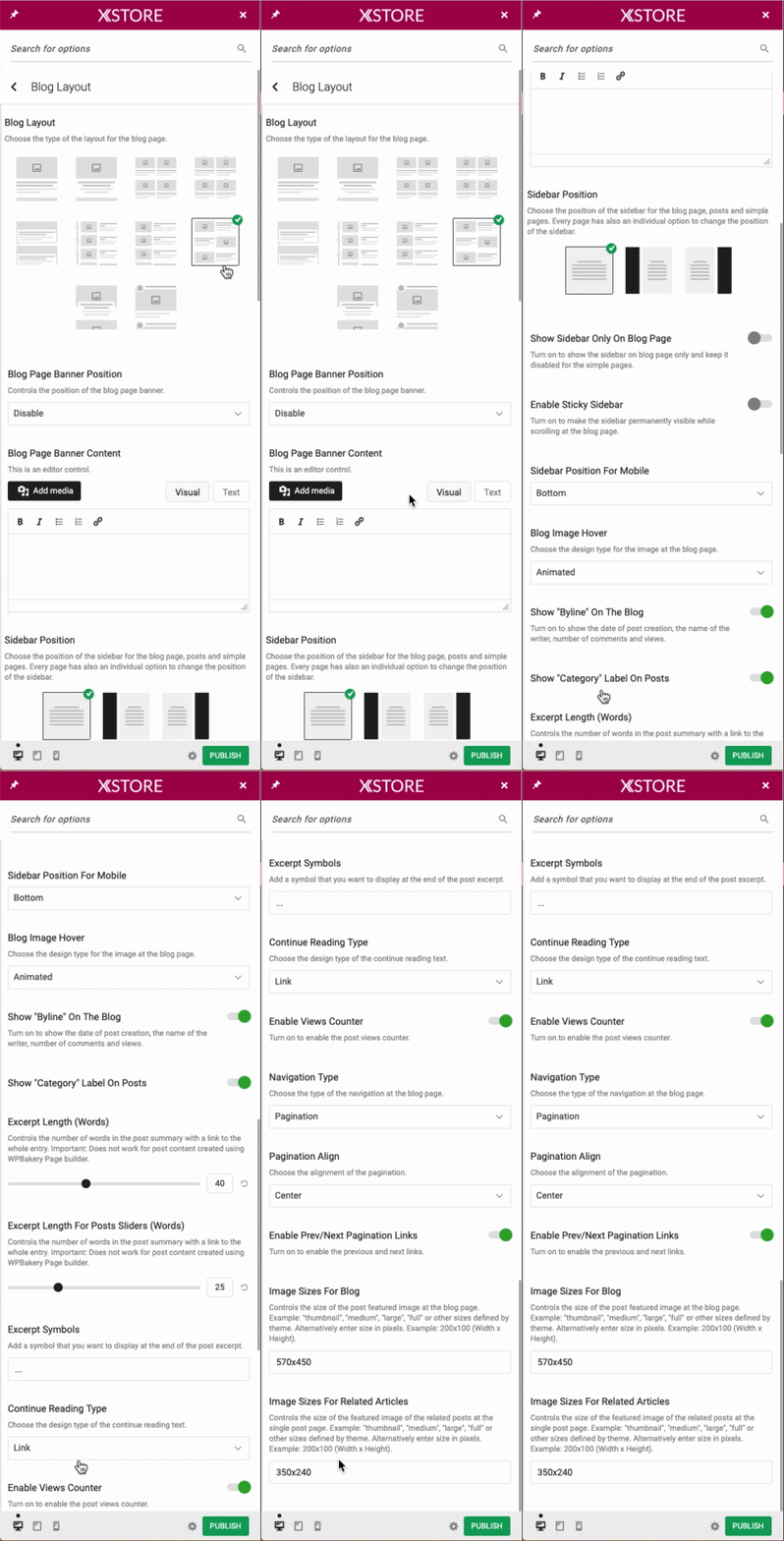
    Theme Options > Blog > Blog layout > https://i.gyazo.com/9f456bcf4be20df85cd0b4423c47746c.gif
    Also, some custom CSS code should be added. Provide URL and temporary wp-admin access, we will do this.

    Regards

    Avatar: Rose Tyler
    Rose Tyler
    Support staff
    May 23, 2021 at 07:10

    Hello,

    Add the next code in Theme Options > Theme custom CSS > Global custom CSS:

    .et-toggle-mob-sidebars-inner svg {
        fill: #6c1ed7 !important;
    }

    Regards

    Avatar: Rose Tyler
    Rose Tyler
    Support staff
    May 23, 2021 at 07:08

    Hello,

    Update the theme – https://www.8theme.com/documentation/xstore/theme-installation/theme-update/ and Core plugin – https://www.8theme.com/documentation/xstore/plugins/plugins-update/ Clear cache and check how it works then.

    Regards

    Avatar: Rose Tyler
    Rose Tyler
    Support staff
    May 23, 2021 at 07:03

    Hello,

    Thanks for using our theme.
    Please check this topic – https://www.8theme.com/topic/slider-revolution-templates/

    Regards

  • 1 2 3 1,131 1,132 1,133 2,273 2,274 2,275
    Viewing 33,960 results - 33,931 through 33,960 (of 68,231 total)
Viewing 30 posts - 33,931 through 33,960 (of 68,231 total)
We're using our own and third-party cookies to improve your experience and our website. Keep on browsing to accept our cookie policy.