Besides, you have a lot of menu items and seems reached the max input vars limit, that’s why if you choose the design type WP does not save it. Increase PHP max input vars limit to 5000.
Regards

Besides, you have a lot of menu items and seems reached the max input vars limit, that’s why if you choose the design type WP does not save it. Increase PHP max input vars limit to 5000.
Regards
Hello,
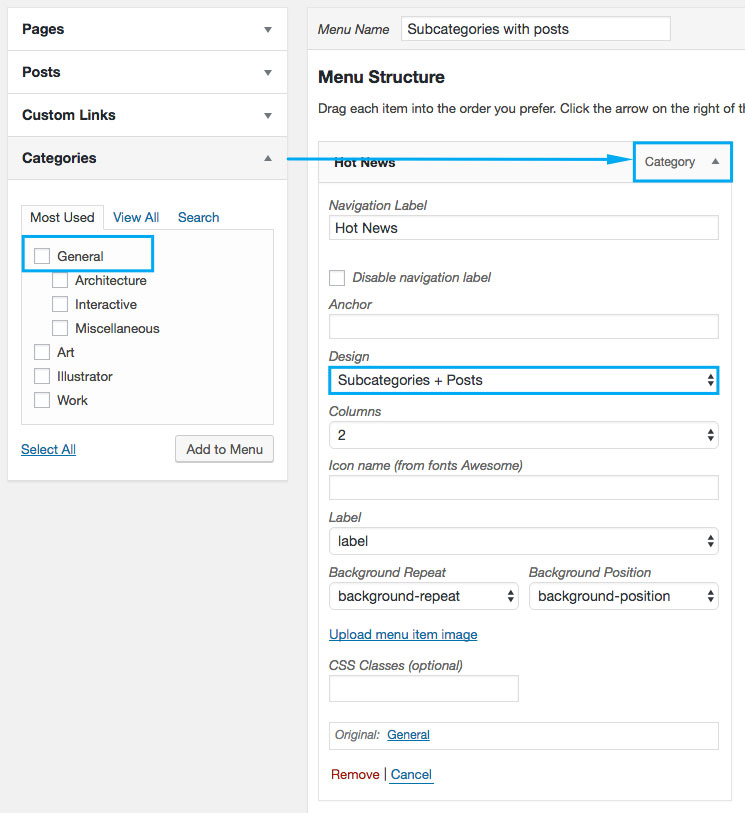
This type of the mega menu design displays only post subcategories and posts. It will display them automatically and you don’t need to add subitems for your item. But post category that you add to menu should have subcategories http://prntscr.com/eurtdl Then it will display posts from these categories. Got it?
Regards
Hello,
Because you have chosen 1/12 for the column width http://prntscr.com/eurqes
Choose 1/1 if you want to show it full width for iPads.
Regards
You are welcome!
Regards
Hello,
Use Insert Headers and Footers plugin to add Google analytics code. I would not recommend adding code in the template files because you will lose it once switch to another theme.
Regards
Hello,
1) You can use text widget and add html code with your links or you can use custom menu widget, everything depends on how it should look (Appearance > Widgets > right top bar widget area).
2) Unfortunately, there is no option to change fixed header content without additional customization.
Regards
You are welcome!
Regards
Hello,
I have updated VC, theme, Redux plugin and did not face problem. Also, I have tried to save project http://i.prntscr.com/d5764e90eac24845ac651d705b20d8ce.png Everything is ok for me.
Regards
Hello,
I’m glad to hear that. You are welcome!
Regards
You are welcome!
Regards
Hello,
These files are in your child theme. If you have copied files into child theme you need to add changes that were made in parent theme to fix these notices. Compare your child theme files that are out of date with changed files and fix the problem.
Parent theme is up to date. We are responsible for the parent theme only.
Regards
Hello,
Unfortunately, there is no such option.
Regards
Hello,
Make sure that you are using the latest version of our theme 3.11.1 and latest version of Redux plugin. Also, clean Chrome cache because there are a lot of users who has this issue because of the browser cache https://www.8theme.com/topic/theme-options-issue-after-theme-update/#post-158601
Regards
Hello,
Please, follow the documentation to adjust plugin settings https://www.8theme.com/documentation/xstore/plugins/woocommerce-infinite-scroll-and-ajax-pagination-settings/
Let me know if you still have problem after that.
Regards
Hello,
You have copied the old file into child theme – xstore-child/woocommerce/checkout/form-billing.php. Now you ned to update it. Compare old file and the new file from theme and make the neccessary changes to update it.
Regards
Hello,
1) provide me admin panel access, so I’ll be able to add the switcher and help you with its settings.
2) a) go to Appearance > Widgets > add the widgets into Filers widget area.
b) Go to Theme Options > E-Commerce > Shop > Open filter by default > On.
Regards
Hello,
Looks like some fatal error appears. Please, provide admin panel and FTP access. We’ll help you.
Regards
Hello,
Thank you for choosing our theme!
First of all, you need to save your menu to get custom fields for the menu, they appear only after saving. You can watch our video tutorial to get some information about mega menu https://www.8theme.com/documentation/xstore/video-tutotials/03-how-to-create-a-mega-menu/
I have sent you the .xml. Check the registration email.
Regards
Ok, great. Thank you for using our theme!
Regards
Hello,
I have checked your site and don’t see these problems. Have you sorted out?
Regards
Hello,
@pas01_445, @chrisoneal Please, update theme to version 3.11.1 to make it compatible with WC version 3.0.1.
@iadnane have you updated theme or WC plugin? Do you use third-party plugins that are not compatible with WC 3.0? What do you mean by “lost footer”? Have you checked widget areas? Maybe you just need to add widgets into correct widget areas? What is wrong with products page? Provide me link to your site and screenshot of the problem for better understanding.
Regards
Hello,
Unfortunately, products do not have fixed height. So, either use all the images with the same size and edit vertical images before uploading (for example instead of http://prntscr.com/eu9i1f image use squared http://prntscr.com/eu9ihx) or enable hard crop in WooCommerce image settings, but then all your vertical images will be cropped and won’t look nice I think.
You may also enable masonry grid option in Theme Options > E-Commerce > Product Page Layout, then your products will appear one below the other without white gap.
Regards
Hello,
Please, update theme to version 3.11.1, it’s compatible with WC 3.0.1 that you have.
Regards
Hello,
If problem appears even with default WC theme you need to contact WC support on their support forum. We are able to help only in case problem is related to our theme only.
Also, if you already updated WC to 3.0 you won’t be able to downgrade the plugin version just by uploading older archive because WC 3.0 updates DB fields.
Regards
Hello,
There is option to create the different menu for the mobile without images etc http://prntscr.com/eu9fkb
Regards
Hello,
If you are using version 3.0 of our theme or higher then auto update option is available for you. Go to Dashboard > Updates > choose XStore theme and press update.
Also, you can use manual update via FTP, watch our video tutorial https://www.8theme.com/documentation/xstore/video-tutotials/how-to-update-rate/
Before the update, please, do the backup of all your files, DB and Theme Options just in case.
Regards
Hello,
Do you mean that you have added meta description for your page in plugin fields but it does not work? Does it work with default WP theme?
Also, please, provide link to your site and temporary admin panel access.
Regards
Hello,
Read theme documentation. To be able to Show subcategories + posts you should add the category with subcategories into menu http://d33v4339jhl8k0.cloudfront.net/docs/assets/5809d09590336070ba24798e/images/580f1b7c9033604deb0ea2d0/file-6j0ACqu9UB.jpg
Make sure that you used categories for these 2 menu items.
Regards
Hello,
Alignment and font-size of the copyrights depend on what code/elements you use to show that content. Also, copyrights have 2 widget areas: 1/2+1/2 and there in no way to change it.
If you need 3 columns I would recommend you to use custom footer and static block options, for example http://prntscr.com/eu99k4
Regards