

Hello,
Check now, please.
Regards

Hello,
Check now, please.
Regards
Hello,
Try now, please.
Regards
Hello,
What version of Subscription plugin do you use?
Provide us temporary admin panel and FTP access to your site, we’ll contact plugin author to solve this issue.
Regards
Hello,
All the available layout settings for the Shop and Single product page you can find in Theme Options > E-Commerce. We don’t have product or shop page builder at present. But we plan such feature for future updates.
Regards
Hello,
Use the following custom code to change the position of the back to top button
.back-top {
    right: auto;
    left: 30px;
}
Regards
Hello,
You told us that your hosting provider checked theme requirements and said the requirements is okay. But min required version of PHP is 5.3 (you can check theme documentation). You have 5.2 http://prntscr.com/hw086r
That’s why you have problems after theme activation. So, please, follow the instructions and check the requirements again https://www.8theme.com/documentation/xstore/theme-installation/xstore-theme-requirements/
Regards
Hello,
Admin panel access that you provided in the previous message is incorrect. Please, provide me correct credentials. Also, what version of PHP do you use?
Regards
Hello,
Check now.
Regards
Hello,
Admin panel access is incorrect. Please, provide me correct credentials. Also, what version of PHP do you use?
Regards
Hello,
Looks like FTP account is for different site because I don’t see our theme in themes directory http://prntscr.com/hvwe9n and there are no plugins http://prntscr.com/hvwfqc that you have in Dashboard http://prntscr.com/hvwg37
Besides, describe me step by step your actions to reproduce the error. If we need to go through this authorization http://prntscr.com/hvwjhw we need FB access to continue.
Regards
Hello,
There is no such option by default for the single product tabs but you may try to implement it using custom CSS and “before” pseudo element to add the icon to the tab title.
Regards
Hello,
I don’t see these products in your slider but when I check them on grid I don’t see the problem https://prnt.sc/hvk0ax
Regards
Hello,
2) Where did you get that code? From MailChimp authors? Then you need to ask them in what place should it be added to work in right way.
3) To change the global breadcrumbs image go to Theme Options > General > Breadcrumbs > change the breadcrumbs image. To change the image on some page only use page featured image to change it.
4) Could you provide me screenshot for better understanding, please?
5) Go to Appearance > Menus and check what page or custom link have you added to your menu with label Home, looks like it’s not the real home page but some other page.
6. If you don’t like some elements you may remove them and add the other elements that suit your needs.
Regards
Hello,
1) Explain in more details your issue with the menu, maybe provide screenshots for better understanding
2) There is no option to show 10 categories per row. But you may split the row into 2 columns and add the element with 5 columns per row https://prnt.sc/hvjvki in element settings.
Regards
Hello,
We used the simple image for that slideshow https://www.8theme.com/demo/woopress/watches/wp-content/uploads/sites/31/2015/07/slider1.jpg and unfortunately, we don’t have PSD for the slideshow.
Regards
Hello,
We don’t have the special area to add the image there. You need to edit header + custom CSS styles to add it. What header type do you use?
Regards
Hello,
Provide us Dashboard and FTP access to your site to check what causes the issue on your site. Also, ask your hosting provider and provide me the list of server error logs.
Regards
Hello,
We’ll fix this issue in next theme update.
Regards
Hello,
We support all the default WC options if you use some official plugin from WooCommerce our theme also should be compatible with official extensions https://woocommerce.com/product-category/woocommerce-extensions/
Did you face any compatibility issues with one of these plugins?
Regards
Hello,
FTP that you provided goes to the empty directory. So, please, provide us FTP access to the directory where your WP installation is located and also provide WP Dashboard access. We’ll check if it’s possible to add compatibility with this plugin.
Regards
Hello,
Seems problem was related to WP Memory issue https://prnt.sc/hvhj7e
I have increased WP Memory and can see the page content.
Regards
Hello,
I have enabled WP Debug and faced WP Memory limit issue https://prnt.sc/hvhj7e
I have increased WP Memory and can edit the page now.
Regards
Hello,
We don’t have iPad pro to test and we have tested on iPad (both portrait and landscape mode, you may check screenshots).
Also, I have checked using chrome tools (screenshot in private content area) and don’t see problems. Do you have the issue with iPad pro only and everything works fine with iPad?
Regards
You are welcome!
Regards
Hello,
Checked your site and don’t see prolem on iPad
Regards
Hello,
Step #1
Open up your existing language PO file with Poedit software.
Step #2
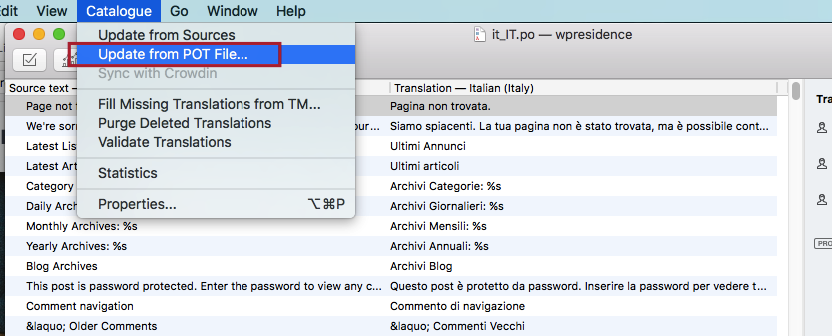
Go to Catalogand selectUpdate from POT file
Step #3
Then select the new xstore.pot file from latest theme update folder (xstore/languages).
Step #4 (OPTIONAL)
Next, you’ll see a mini box which includes all the new strings as well as obsolete string from the new POT file. Proceed by clicking the ok button.
Step #5
Once the import is completed, all the new string from the new PO file will be added and your existing (translated) string will remain intact as well.
Step #6
Finally, proceed to translate all the new string into your preferred language. Save. Move the updated .po and .mo language file back to wp-content/languages folder.
Regards
Hello,
1) You may try to set min-heiht or the product title
.content-product .product-title a {min-height: 70px;}
2) Because some of your original images still have the different size, for example https://www.vinopura.nl/wp-content/uploads/2017/11/202002-2.png
https://www.vinopura.nl/wp-content/uploads/2017/11/202007-3.png etc
I have changed the WC image settings. Check the products grid now.
Regards
Hello,
Could you provide me screenshot for better understanding? Because at precent I don’t see products with tooltip hover effect.
Regards
Hello,
I have created test page and added blog carousel element and don’t see prolem. Please, provide me link to page where carousel brakes the page.
Regards












