Forum Replies Created

Viewing 30 posts - 4,231 through 4,260 (of 5,361 total)
  • Avatar: Justin
    Luca Rossi
    Support staff
    May 10, 2024 at 08:15

    Dear Jamal,

    We hope this message finds you well. We kindly request your assistance with implementing the following upgrades and modifications to our system:

    1. Upgrade the MySQL database to version 8.x.
    2. Upgrade the PHP version to version 8.x.
    3. Change the maximum execution time to 600 seconds.

    We appreciate your attention to these matters and look forward to your prompt action. Should you have any questions or require further details, please do not hesitate to contact us.

    Best regards,
    The 8Theme Team

    Avatar: Justin
    Luca Rossi
    Support staff
    May 10, 2024 at 08:04

    Dear @amamatdi,

    We are pleased to inform you that we have successfully updated your discount to 5% for purchases of $250 or more.

    Please review the changes at the following links:
    – Mini Cart: [https://prnt.sc/Z-4sKwafPzZG](https://prnt.sc/Z-4sKwafPzZG)
    – Cart Page: [https://prnt.sc/YiFd84AxybSm](https://prnt.sc/YiFd84AxybSm)
    – Checkout Page: [https://prnt.sc/pPSGFm87X0EA](https://prnt.sc/pPSGFm87X0EA)

    As you are utilizing the WP-Rocket plugin, it is essential to purge the caches after adjusting the settings to ensure that the changes are correctly applied.

    Should you require any further assistance, please do not hesitate to contact us.

    Best Regards,
    The 8Theme Team

    Avatar: Justin
    Luca Rossi
    Support staff
    May 10, 2024 at 07:19

    Hi @Felipe Rojas,

    We’ve updated the custom CSS codes to this:

    .elementor-widget-woocommerce-product-etheme_related ul.st-swatch-size-normal li.type-label span {
        width: 30px !important;
        height: 30px !important;
    		font-size: 16px !important;
    }

    Could you pleas check again?

    https://prnt.sc/q_fmAs1e-m79

    Best Regards,
    The 8Theme Team.

    Avatar: Justin
    Luca Rossi
    Support staff
    May 10, 2024 at 05:42

    Hi @Jamall,

    Could you please fix the following issues on Site Health?

    https://prnt.sc/cCDUrx75t9BZ

    We could see that you’re using the Litespeed server. Instead of using WP-Rocket, you can try with Litespeed Cache plugin:

    https://wordpress.org/plugins/litespeed-cache/

    Best regards,
    The 8Theme Team

    Avatar: Justin
    Luca Rossi
    Support staff
    May 10, 2024 at 04:10

    Hi @Shehzad Ghazi,

    We’ve hidden your URL from the public. Please check Private Content area.

    Please contact administrator
    for this information.
    Avatar: Justin
    Luca Rossi
    Support staff
    May 10, 2024 at 04:09

    Hi @Jamall,

    You’ve placed 2 Checkout Elements on your checkout page. Could you please delete one?

    https://prnt.sc/f2vWCwmrBUsq

    Can you please help us to deactivate all plugins except these plugins below?

    – Elementor
    – PRO Elements
    – WooCommerce
    – WooPayments
    – XStore Core
    – WP Rocket
    – Google Analytics for WooCommerce
    – Yoast SEO

    After that check again the checkout & register features.

    Best regards,
    The 8Theme Team

    Avatar: Justin
    Luca Rossi
    Support staff
    May 9, 2024 at 18:16

    Hi @Shehzad Ghazi,

    What about the video I shared above about the header please check that, and let me know how can I make it smother.

    We’ve disabled the XStore Sticky Header and enable the Motion Effect > Sticky for 2 containers of header. Now it’s working correctly.

    Find the screenshot, this is the mess I was talking about above. How can I shift the product page to default instead of any customizer or elementor same as our actual site,

    Please go to the link to edit the Single Product Builder and remove the condition, after your product will use the default template.

    https://***distributors.com/wp-admin/admin.php?page=elementor-app&ver=3.21.5#/site-editor/templates/product

    https://prnt.sc/WH87A50HgpJ5

    Best regards,
    The 8Theme Team

    Avatar: Justin
    Luca Rossi
    Support staff
    May 9, 2024 at 17:58

    Hi @Nicolo,

    To disable the mouse transformation effect, please try adding this custom CSS under XStore > Theme Options > Theme Custom CSS > Global CSS:

    
    body .swiper-entry:not(.swipers-couple-wrapper) .swiper-wrapper {
        cursor: default;
    }
    

    If you need further assistance or have any other questions, please feel free to contact us. We are more than happy to help!

    Best Regards,
    8Theme’s Team

    Avatar: Justin
    Luca Rossi
    Support staff
    May 9, 2024 at 17:49

    Hi @tartakmeble,

    Which page are you using the Hotspot element? Please share the URL.

    Could you please also provide temporary wp-admin and FTP access?

    To grant WP-Admin access, please proceed to create a new user account with an administrator role through your WordPress Dashboard. Once the account is established, you may securely transmit the username and password to us via the Private Content section designated for this purpose.

    For FTP access, we require the following details: FTP host, FTP username, FTP password, FTP port, and FTP encryption type. If you need assistance in creating these credentials, please reach out to your hosting provider who will guide you through the process.

    Best Regards,
    8Theme’s Team

    Avatar: Justin
    Luca Rossi
    Support staff
    May 9, 2024 at 17:43

    Hi @Chandru,

    To achieve this, please disable the show stock status option in our previous replies. After that add this custom CSS codes under XStore > Theme Options > Theme Custom CSS > Global CSS:

    
    .etheme-product-grid-item.outofstock {
        position: relative;
    }
    .etheme-product-grid-item.outofstock::before {
        content: 'Out of Stock';
        background-color: red;
        color: #fff;
        padding: 5px 10px;
        position: absolute;
        right: 10px;
        top: 10px;
        z-index: 999;
    }

    Results: https://prnt.sc/HaeHJbcdLQSU

    Hope it helps!

    Avatar: Justin
    Luca Rossi
    Support staff
    May 9, 2024 at 09:25

    Hi @Deep,

    Sorry for the confusion!

    The correct code shoud be:

    
    @media (max-width: 480px){
        .woocommerce-checkout form.checkout.woocommerce-checkout input[type="text"],
        .woocommerce-checkout form.checkout.woocommerce-checkout input[type="tel"],
        .woocommerce-checkout form.checkout.woocommerce-checkout input[type="email"] {
            font-size: 18px !important;
            height: 50px;
        }
    }
    

    Regards!

    Avatar: Justin
    Luca Rossi
    Support staff
    May 9, 2024 at 08:45

    Hi @Deep,

    Please delete the previous code and add this code instead:

    
    @media (max-width: 480px){
        .woocommerce-checkout form.checkout.woocommerce-checkout input {
            font-size: 18px !important;
            height: 50px;
        }
    }
    

    Hope it helps!

    Avatar: Justin
    Luca Rossi
    Support staff
    May 9, 2024 at 07:44

    Dear @Deep,

    I hope this message finds you well. To achieve the desired functionality swiftly, please insert the following custom CSS code by navigating to Theme Options > Theme Custom CSS > Global CSS in your admin panel:

    
    @media (max-width: 480px){
        body.woocommerce-checkout,
        body.woocommerce-checkout *{
            font-size: 18px;
        }
    }
    

    We trust this code will assist you in enhancing your website’s mobile responsiveness. Should you require any further assistance, please do not hesitate to contact us.

    Best Regards,
    The 8Theme Team

    Avatar: Justin
    Luca Rossi
    Support staff
    May 9, 2024 at 07:36

    Hi @tartakmeble,

    Currently, there is no hooks to customize that title. Please take a look at this file:

    /wp-content/plugins/et-core-plugin/app/controllers/elementor/general/hotspot.php line 2239

    – Find this code:

    
    <h2 class="etheme-hotspot-tooltip-title"><?php echo $hotspot['hotspot_tooltip_title']; ?></h2>
    

    – And change to this:

    
    <h3 class="etheme-hotspot-tooltip-title"><?php echo $hotspot['hotspot_tooltip_title']; ?></h3>
    

    Hope it helps!

    Avatar: Justin
    Luca Rossi
    Support staff
    May 9, 2024 at 06:22

    Dear Nicolo,

    We hope this message finds you well. We regret to inform you that the feature you requested is currently unavailable.

    However, we suggest creating a category titled “All Products” and assigning all your products to this category as an alternative solution.

    Thank you for your understanding and cooperation.

    Best Regards,
    The 8Theme Team

    Avatar: Justin
    Luca Rossi
    Support staff
    May 9, 2024 at 04:47

    Hi @Felipe Rojas,

    Please try adding this custom CSS codes under XStore > Theme Options > Theme Custom CSS > Global CSS:

    
    .elementor-widget-woocommerce-product-etheme_related ul.st-swatch-size-normal li.type-label span {
        width: 30px;
        height: 30px;
    }

    Hope it helps!

    Avatar: Justin
    Luca Rossi
    Support staff
    May 9, 2024 at 04:35

    Hi @sethr,

    Please try adding the following CSS codes under XStore > Theme Options > Theme Custom CSS > Global CSS:

    
    .page-id-3411 .et-popup-wrapper.et-age-verify-popup {
        display: none !important;
    }
    

    Hope it helps!

    Avatar: Justin
    Luca Rossi
    Support staff
    May 9, 2024 at 04:24

    Hi @alexmdm89,

    Please add the following CSS code under XStore > Theme Options > Theme Custom CSS > Global CSS:

    
    .blog div#etheme-menu {
        margin-bottom: 0;
    }
    .blog footer.prefooter .elementor-social-icon {
        display: inline-flex;
    }
    

    Best Regards,
    8Theme’s Team

    Avatar: Justin
    Luca Rossi
    Support staff
    May 9, 2024 at 04:16

    Hi @Shehzad Ghazi,

    Your actual site is using the default template for products(not using Customizer/Elementor Builder) so the table will display automatically.

    The site you are building is using the Elementor Builder for products page so you have to copy the shortcode to the HTML/Text Element.

    We’ve copied the shortcode to HTML element for and the table is displaying. Could you please check again?

    https://prnt.sc/H0JHYxfHqlUI

    https://prnt.sc/goxLRn-ctli4

    Best regards,
    The 8Theme Team

    Avatar: Justin
    Luca Rossi
    Support staff
    May 8, 2024 at 16:55

    Hi @Derek0310,

    Please navigate to the provided in Private Content.

    After that click on the Screen Options > check on Product Categories: https://prnt.sc/rE1WkIFzNN8I

    Then remove the categories related to the posts and add the Product Categories from the left hand side: https://prnt.sc/FGJxpD9XpMsF

    Hope it helps!

    Please contact administrator
    for this information.
    Avatar: Justin
    Luca Rossi
    Support staff
    May 8, 2024 at 16:43

    Hi @maloti,

    You can disable them under:

    – XStore > Theme Options > WooCommerce(Shop) > Wishlist > switch to OFF: https://prnt.sc/aL6USZl_ikah
    – XStore > Theme Options > WooCommerce(Shop) > Shop Elements > Product Badges > “NEW” LABEL SETTINGS > Days Limit > change to 0: https://prnt.sc/Zk02lFDA6MdD

    Hope it helps!

    Avatar: Justin
    Luca Rossi
    Support staff
    May 8, 2024 at 16:30

    Hi @maloti,

    To make the JS scripts work, you have to disable the Ajaxify of elements:

    https://prnt.sc/5NXPAz0bNGrk

    We’ve disabled it and the links are working.

    Can you check again?

    Best Regards,
    The 8Theme Team.

    Avatar: Justin
    Luca Rossi
    Support staff
    May 8, 2024 at 16:00

    Hi @Taalaki Abaya,

    This is what we see now:

    https://prnt.sc/dzQgxKQAZOtc

    But if the demo text is still appearing on your end, please try with this tool: https://support.google.com/webmasters/answer/7041154?hl=en&sjid=3739888343059222153-AP.

    Hope it helps!

    Avatar: Justin
    Luca Rossi
    Support staff
    May 8, 2024 at 12:22

    Hi @Goostaf,

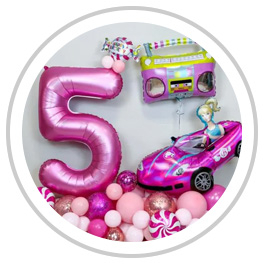
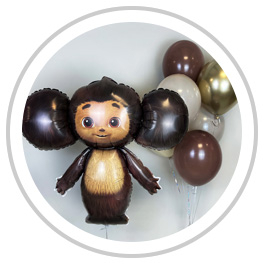
    We’ve checked that the category images are square now:

    https://meshar.ru/wp-content/uploads/2023/08/barbi-1.jpg
    https://meshar.ru/wp-content/uploads/2023/09/cheburashka.jpg

    In this case, you have to crop the images to rectangle after that add this custom CSS under XStore > Theme Options > Theme Custom CSS > Global CSS:

    
    .category-grid img {
        border-radius: 0;
    }
    

    Hope it helps!

    Please contact administrator
    for this information.
    Avatar: Justin
    Luca Rossi
    Support staff
    May 8, 2024 at 08:15

    Hi @Goostaf,

    You can try with this code:

    
    if( !is_product_category( array('multgeroi','tsvety') ) ) {
        remove_action('woocommerce_before_subcategory_title', 'woocommerce_subcategory_thumbnail', 10);
    }
    

    For more information, please take a look at this: https://developer.woocommerce.com/docs/conditional-tags-in-woocommerce/.

    Best Regards,
    8Theme’s Team

    Avatar: Justin
    Luca Rossi
    Support staff
    May 8, 2024 at 08:08

    Hi @Red8,

    We suggest you to enable to Lazy Load option for all images under XStore > Theme Options > Speed Optimization > Image Loading Type > select Lazy:

    https://prnt.sc/OqBWjJ1LUlpS

    Also enable the Ajaxify for all widgets: https://prnt.sc/-5ygO7-rW95G

    If it still doesn’t help, you can try with WP-Rocket plugin: https://www.8theme.com/documentation/xstore/troubleshooting/how-to-improve-wp-rocket-settings-with-xstore/

    Best Regards,
    8Theme’s Team

    Avatar: Justin
    Luca Rossi
    Support staff
    May 8, 2024 at 07:17

    Hi @sethr,

    It’s under Custom CSS field of Posts element:

    https://prnt.sc/01lRJHXMsEvm

    Best Regards,
    8Theme’s Team

    Avatar: Justin
    Luca Rossi
    Support staff
    May 8, 2024 at 05:58

    Dear Derek,

    We hope this message finds you well. We would like to inform you that we are currently unclear about the specifics of your request.

    Could you kindly provide us with some screenshots or videos to better understand your requirements? This will enable us to assist you more effectively.

    Thank you for your cooperation.

    Best Regards,
    The 8Theme Team

    Avatar: Justin
    Luca Rossi
    Support staff
    May 8, 2024 at 05:53

    Hi @maloti,

    Could you please activate the child theme so we can make a test?

    We could see that you’re using the XStore parent theme.

    Best Regards,
    The 8Theme Team.

    Avatar: Justin
    Luca Rossi
    Support staff
    May 8, 2024 at 05:30

    Dear Taalaki Abaya,

    We hope this message finds you well. We would like to inform you that the Google Bot is scheduled to crawl the following metadata from your website for display in Google Search results:

    
    <meta name="description" content="براند تألقي ABAYA هو متجر إلكتروني يتمتع بخبرة تزيد عن ٦ سنوات في عالم العبايات، حيث يقدم تجربة تسوق استثنائية وفريدة لعشاق الأزياء التقليدية. نحن نفتخر بتقديم مجموعة واسعة من العبايات، سواء كانت للرأس أو الكتف، مع توفير لمسات عصرية تعكس ذوق المرأة العصرية في مجتمعنا." />
    

    To ensure that your website’s information is accurately updated in the Google Search results, we recommend that you log into your Google Search Console, submit your website URL, and request a re-crawl.

    For detailed instructions on how to proceed, please visit the following link: [Google Developers Documentation on Requesting a Re-crawl](https://developers.google.com/search/docs/crawling-indexing/ask-google-to-recrawl)

    Should you require any further assistance or have any questions, please do not hesitate to contact us.

    Best regards,
    The 8Theme Team

  • 1 2 3 141 142 143 177 178 179
    Viewing 4,260 results - 4,231 through 4,260 (of 5,361 total)
Viewing 30 posts - 4,231 through 4,260 (of 5,361 total)
We're using our own and third-party cookies to improve your experience and our website. Keep on browsing to accept our cookie policy.