

Hello,
To display categories you should use woocommerce shortcode [product_categories number="12" parent="0"]: http://docs.woothemes.com/document/woocommerce-shortcodes/
Regards,
Jack Richardson

Hello,
To display categories you should use woocommerce shortcode [product_categories number="12" parent="0"]: http://docs.woothemes.com/document/woocommerce-shortcodes/
Regards,
Jack Richardson
Hello,
Please provide us with FTP and wp-admin credentials. We’ll check your problem.
Regards,
Jack Richardson
Hello,
Yes, it is possible. For this you need:
1) Create new static block.
2) Using Visual Composer add to created static block “Posts Grid” or “Posts Slider” element and select “etheme_portfolio” posts type in “Posts Grid” or “Posts Slider” settings.
3) Add created static block to the desired widget area.
Regards,
Jack Richardson
Hello,
Glad to hear that! If you have some questions feel free to contact us.
Regards,
Jack Richardson
Hello,
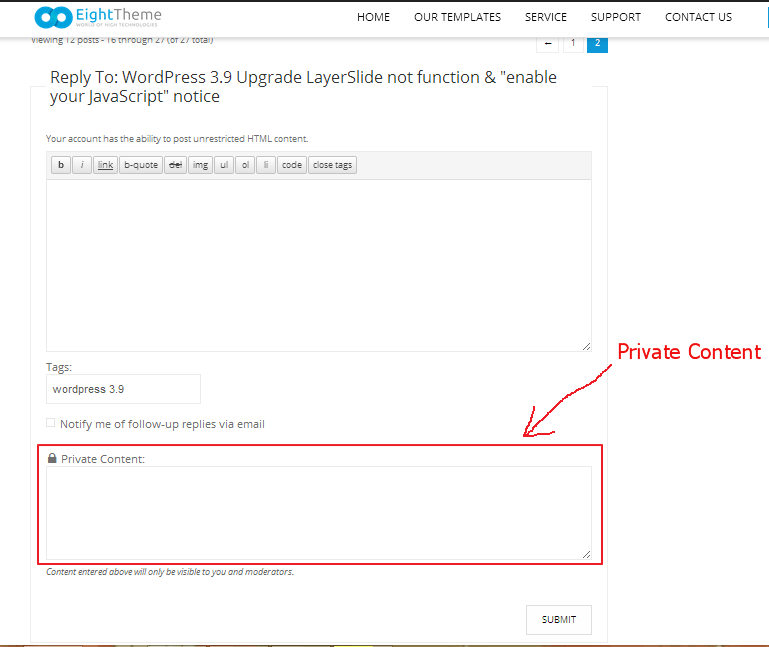
In the reply form there is a field, which is called Private Content. Please use it to send us your site credentials.
Regards,
Jack Richardson
Hello,
1) Edit your homepage and there find shortcode for product slider (“[etheme_new title=”Latest Products” ]”) and change it’s title.
2) Active menu item in our theme is allocated in different color by default. There is no such option in Theme Options to change it. It only can be done using CSS, but not only for first load of main page.
Regards,
Jack Richardson
Hello,
You have old theme version 1.4.1, which is not compatible with 2.1.x WooCommerce version. That’s why you should update your theme to the latest version.
Before theme upgrading, please remove woocommerce folder from the theme directory and read instructions how to upgrade: https://www.8theme.com/demo/docs/legenda/index.html#!/upgrade
Regards,
Jack Richardson
Hello,
We’re unable to enter in Administration panel. Please check provided wp-admin and FTP credentials.
Regards,
Jack Richardson
Hello,
We’ve made some changes in your Child theme. Please check it now.
Regards,
Jack Richardson
Hello,
Please provide us with link to your site. Could you clarify us color of what element exactly you want to change?
Regards,
Jack Richardson
Hello,
Please read this documentation section carefully: https://www.8theme.com/demo/docs/blanco/#!/upgrade
Regards,
Jack Richardson
Hello,
We’re sorry, but neither WooCommerce plugin nor our theme doesn’t support such feature. You might try to find some WP plugin to implement such feature.
Regards,
Jack Richardson
Hello,
We’re sorry, but this counter can be used only for ascending counting.
Regards,
Jack Richardson
Hello,
Unfortunately, because of that the whole single product page layout depends on existing image block sizes, there is no such possibility to change the image size via Administration panel. To change the image sizes you should edit “product-image.php”, “product-thumbnails.php” files and also CSS styles.
Regards,
Jack Richardson
Hello,
Please add this code into your custom.css:
.button.filled.big {
  margin-left: 35%;
}
Here is a video tutorial how to create custom.css: https://www.youtube.com/watch?v=Qok2zRedRMY&feature=youtu.be .
Regards,
Jack Richardson
Hello,
You’re welcome!
Regards,
Jack Richardson
Hello,
There is your host issue: “An error occurred while connecting to the database”.
Regards,
Jack Richardson
Hello,
Go to Settings -> Reading -> “Blog pages show at most” and the set the post number value bigger than number of your products.
Regards,
Jack Richardson
Hello,
We’re unable to get into your Administration panel. Please check provided credentials.
Regards,
Jack Richardson
Hello,
Please provide us with FTP and wp-admin access in Private Content.
Regards,
Jack Richardson
Hello,
Please provide us with FTP and wp-admin credentials.
Regards,
Jack Richardson
Hello,
1) Could you please provide us with a link to your site and wp-admin access.
2) Unfortunately, our theme doesn’t support such feature.
Regards,
Jack Richardson
Hello,
1) Sorry, but you need contact Woocommerce support regarding this question as we provide support only for the issues related to our theme.
2) All elements, which can be enabled/disabled in the header you can find in Theme Options -> Header.
Regards,
Jack Richardson
Hello,
You can not add your font in theme options, but you can add it to custom.css with @font-face, see example:
@font-face {
font-family: 'Aleo-Regular';
src: url('css/fonts/aleo-regular-webfont.eot');
src: url('css/fonts/aleo-regular-webfont.eot?#iefix') format('embedded-opentype'),
url('css/fonts/aleo-regular-webfont.woff') format('woff'),
url('css/fonts/aleo-regular-webfont.ttf') format('truetype'),
url('css/fonts/aleo-regular-webfont.svg#aleoregular') format('svg');
font-weight: normal;
font-style: normal;
}

h1,h2,h3,h4,h5,h6{
font-family:"Aleo-Regular";
}
Regards,
Jack Richardson
Hello,
We don’t understand what do you mean under “subscription order options”. Please, could you clarify question with more details.
Regards,
Jack Richardson
Hello,
Please add this code into your custom.css:
.slide-item .product .product-name, .slide-item .product .products-page-cats, .slide-item .product .price, .slide-item .product .add-to-container {
text-align: center;
}
Regards,
Jack Richardson
Hello,
Please provide us with a link to your site.
Regards,
Jack Richardson
Hello,
Please provide us with FTP username and password! We’re unable to do changes without access to your files.
Regards,
Jack Richardson
Hello,
The problem is in your customization. Please revert back all changes and if you need to change css styles place the code in custom.css. Here is a video tutorial how to create custom.css: https://www.youtube.com/watch?v=Qok2zRedRMY&feature=youtu.be . Also if you want to make product image with the less height just upload wider image.
If you want to disable zoom go to Theme Options > Single product page > Zoom effect > Disable.
Regards,
Jack Richardson
Hello,
We have done the changes. Please check it. Also keep safe “content-single-product.php” file from the woocommerce folder and “woo.php” from the framework folder before the theme upgrading.
Regards,
Jack Richardson









