

Hello,
You can add your styles either to custom.css of parent theme or to styles.css of child theme. Both variants are safe.
Regards,
Jack Richadrson

Hello,
You can add your styles either to custom.css of parent theme or to styles.css of child theme. Both variants are safe.
Regards,
Jack Richadrson
Hello,
You’re welcome!
If you have any questions please feel free to ask.
Regards,
Jack Richadrson
Hello,
You’re welcome!
Yes, adding code into the custom.css is completely safe.
Regards,
Jack Richardson
Hello,
Please try to add the following code into the custom.css:
.owl-carousel .owl-item.loading .product-image-wrapper {
min-height: 170px;
}
Here is a video tutorial how to create custom.css: https://www.youtube.com/watch?v=Qok2zRedRMY&feature=youtu.be.
Regards,
Jack Richardson
Hello,
We’ve added code into the style.css of child theme to change title font color in the dropdown menu.
Please check, is it correct now?
Regards,
Jack Richardson
Hello,
To make your images show up uniformly across the site catalog you should set up height of image in Theme Options as height of smallest image on the site.
On single product page image is limited by container block width. If you want to make your image shorter you have to upload wider image.
In the Legenda theme WooCommerce image settings is used only for post thumbnails. To set up your images you should go to Theme Options > Product Page Layout and put desired dimension values for images.
The default values are:
Theme Options > Product Page Layout:
Product Images Width: 500px
Product Images Height: 700px
Theme Options > Single product page
Product Thumbnails Width: 120px
Product Thumbnails Height: 130px
Regards,
Jack Richardson
Hello,
This is variable products. You can read about it here: http://docs.woothemes.com/document/product-variations/.
Regards,
Jack Richardson
Hello,
This article should be helpful for you: http://contactform7.com/faq/#After_submitting_the_form_I_get_an_error_message.
Unfortunately there is no other way to hide pop-up window in our theme.
Regards,
Jack Richardson
Hello,
We can’t see any problems with pop-up windows. When “Do not show this popup again” is checked the pop-up window doesn’t show anymore.
As we can see you’re using 3rd-party plugin for contact form. Please check it with default theme and if problem still persist you should contact contact form plugin support team.
Regards,
Jack Richardson
Hello,
Please provide us with wp-admin access in Private Content.
To change favicon you should replace favicon.ico in blanco/images folder with your desired favicon.
Regards,
Jack Richardson
Hello,
Please provide us with wp-admin access in Private Content.
Regards,
Jack Richardson
Hello,
Please provide us with wp-admin and FTP credentials in Private Content.
Regards,
Jack Richardson
Hello,
If you want to change site box width you need go to Theme Options > Responsive > set 1600 for example instead of default 1200px. And page wrapper width will be 980px for screens less than 1600px. Set more than 1600 if you want 980px width even on large screens.
Regards,
Jack Richardson
Hello,
It requires modification in JS files. This is additional customization and is a paid service.
Regards,
Jack Richardson
Hello,
You’re welcome!
Regards,
Jack Richadrson
Hello,
We’ve adjusted the arrows. Please check it now!
Regards,
Jack Richardson
Hello,
We’ve made it a little bit less.
Regards,
Jack Richardson
Hello,
We’ve made some changes please check it now.
Regards,
Jack Richadrson
Hello,
Please provide us with wp-admin credentials in Private Content.
Regards,
Jack Richardson
Hello,
You’re welcome!
Regards,
Jack Richardson
Hello,
The following article should help you: http://php.about.com/od/learnphp/qt/php_comments.htm
Regards,
Jack Richardson
Hello,
Please provide us with wp-admin and FTP credentials in Private Content and we’ll help you with that!
Regards,
Jack Richardson
Hello,
You should comment out this two lines (368, 369).
To remove leave a reply section you should edit comments.php file and comment out the following line comment_form(); (line number 43).
Regards,
Jack Richardson
Hello,
As we can see on the blog page there is no post data:
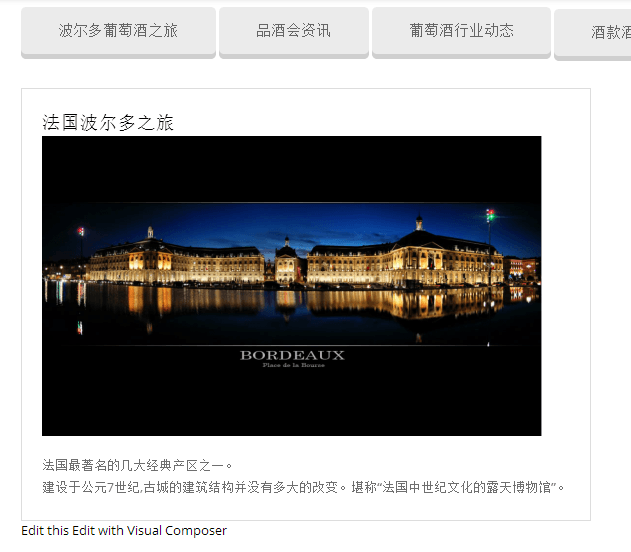
Regards,
Jack Richardson
Hello,
As we can see there is no post data in the page: http://maiboerduojiu.com/%E4%BA%AB%E5%8F%97%E6%B3%A2%E5%B0%94%E5%A4%9A/%E8%91%A1%E8%90%84%E9%85%92%E8%A1%8C%E4%B8%9A%E5%8A%A8%E6%80%81/
Could you please clarify with more details what is wrong?
Regards,
Jack Richardson
Hello,
It is necessary to edit woocommerce/content-single-product.php file. That’s why we can’t help you without FTP access.
Regards,
Jack Richardson
Hello,
We’re sorry but we unable to log in because you forgot to include link to the site.
Regards,
Jack Richardson
Hello,
Then could you please provide us with wp-admin and FTP credentials in Private Content and we’ll take a look at you problem?
Regards,
Jack Richardson
Hello,
Did you set up custom.css as it described in our documentation before code inserting?
Here is a video tutorial how to set up custom.css: https://www.youtube.com/watch?v=Qok2zRedRMY&feature=youtu.be.
Regards,
Jack Richardson
Hello,
About difficulties with Revolution Slider you should contact Revolution Slider support team.
For the information about parallax effect set up you can refer to our documentation: https://www.8theme.com/demo/docs/legenda/#!/visual_composer.
Regards,
Jack Richardson









