Forum Replies Created

Viewing 30 posts - 29,281 through 29,310 (of 31,382 total)
  • Avatar: Eva
    Eva Kemp
    Participant
    July 13, 2014 at 11:55

    Hello,

    Unfortunately, as you’ve already written, we don’t guarantee full compatibility of 3rf-party plugins with our theme. We’re sorry but we didn’t test all plugins with the theme. You should wait for an answer from their support team.

    Thank you for understanding.

    Regards,
    Eva Kemp.
    Avatar: Eva
    Eva Kemp
    Participant
    July 13, 2014 at 11:49

    Hello,

    Sorry, but unfortunately we don’t have such possibility.

    Regards,
    Eva Kemp.

    Avatar: Eva
    Eva Kemp
    Participant
    July 13, 2014 at 11:49

    Hello,

    We recommend you to create a ticket at https://support.8theme.com/ regarding this issue and our specialists will look into it more deeply.
    Please include your login details to FTP and admin panel in the ticket.
    Thank you.

    Regards,
    Eva Kemp.

    Avatar: Eva
    Eva Kemp
    Participant
    July 13, 2014 at 11:44

    Hello,

    Please provide us with wp-admin panel credentials.

    Thank you.

    Regards,
    Eva Kemp.

    Avatar: Eva
    Eva Kemp
    Participant
    July 13, 2014 at 11:43

    Hello,

    To remove the submenu you need add this code into custom.css file:
    .submenu-dropdown { display: none; }

    Please watch this tutorial how to create custom.css.

    Regards,
    Eva Kemp.

    Avatar: Eva
    Eva Kemp
    Participant
    July 13, 2014 at 11:36

    Hello,

    As price filter is a Woocommerce widget you should contact their support regarding your request.

    Regards,
    Eva Kemp.

    Avatar: Eva
    Eva Kemp
    Participant
    July 13, 2014 at 11:35

    Hello,

    You’re welcome.

    Regards,
    Eva Kemp.

    Avatar: Eva
    Eva Kemp
    Participant
    July 13, 2014 at 11:34

    Hello,

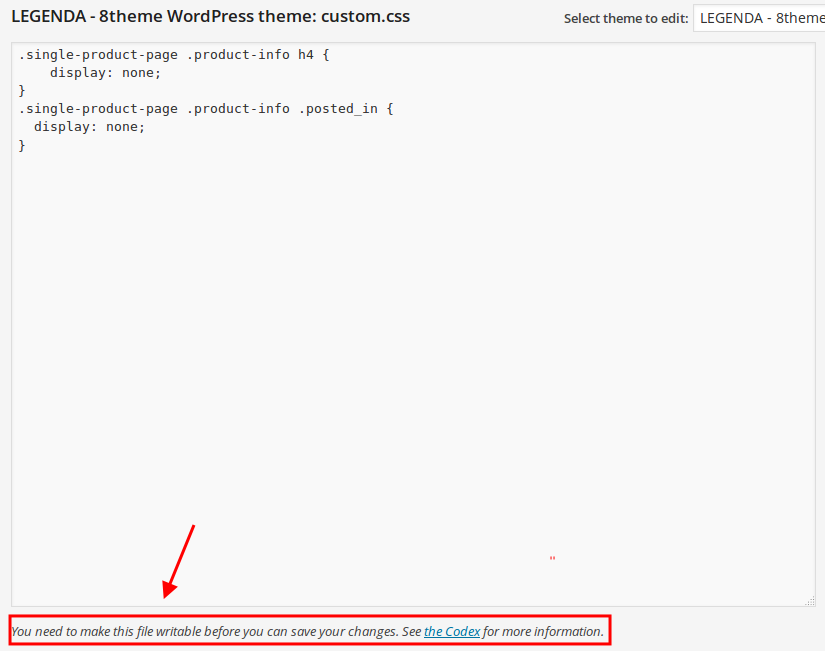
    As I see you’ve removed the previous code from custom.css. Please add it again to remove the category name:

    .single-product-page .product-info .sku_wrapper {
        display: none !important;
    }

    We’re unable to do this as you didn’t give us permissions:

    Regards,
    Eva Kemp.

    Avatar: Eva
    Eva Kemp
    Participant
    July 13, 2014 at 11:28

    Hello,

    To translate the Checkout fields you need edit the file class-wc-countries.php in the directory /wp-content/plugins/woocommerce/includes (from the line 729).

    Regards,
    Eva Kemp.

    Avatar: Eva
    Eva Kemp
    Participant
    July 13, 2014 at 11:26

    Hello,

    In this case we recommend you to create a ticket at http://support.8theme.com/ regarding this issue and our specialists will look into it more deeply.
    Don’t forget to include your FTP and admin panel credentials in the ticket.

    Regards,
    Eva Kemp.

    Avatar: Eva
    Eva Kemp
    Participant
    July 13, 2014 at 11:17

    Hello,

    Please make sure you’ve added featured products correctly. Here are our instructions how to do this:
    https://www.8theme.com/demo/docs/blanco/index.html#!/demo_data_installation > Home page
    http://support.8theme.com/index.php?/Knowledgebase/Article/View/9/0/how-to-mark-products-as-featured-and-new-ones

    If everything is correct please provide us with wp-admin panel credentials in Private Content.

    Regards,
    Eva Kemp.

    Avatar: Eva
    Eva Kemp
    Participant
    July 13, 2014 at 11:15

    Hello,

    Please read these articles how to add featured and latest products on home page:
    https://www.8theme.com/demo/docs/blanco/index.html#!/demo_data_installation > Home page
    https://support.8theme.com/index.php?/Knowledgebase/Article/View/9/0/how-to-mark-products-as-featured-and-new-ones

    How to change color you you can find in admin panel > Blanco – Theme Settings > Color Scheme.

    Regards,
    Eva Kemp.

    Avatar: Eva
    Eva Kemp
    Participant
    July 12, 2014 at 12:02

    Hello,

    Yes, we recommend you to use the latest versions of browsers.
    Please update it and let us know if the issue still persists.

    Regards,
    Eva Kemp.

    Avatar: Eva
    Eva Kemp
    Participant
    July 12, 2014 at 11:46

    Hello @Flexibilis,

    I’ve removed the code you inserted in custom.css and parallax effect is working fine in Chrome and Firefox browsers.
    To update the plugins you need re-download the theme archive at http://themeforest.net/item/legenda-responsive-multipurpose-wordpress-theme/5888906
    After you unzip the archive you’ll find the plugins in legenda/framework/plugins directory. Upload the new version via FTP and remove the old one.

    Regards,
    Eva Kemp.

    Avatar: Eva
    Eva Kemp
    Participant
    July 12, 2014 at 11:27

    You can proceed in this topic.

    Regards,
    Eva Kemp.

    Avatar: Eva
    Eva Kemp
    Participant
    July 12, 2014 at 11:09

    Hello,
    If you want to use specific widgets in VC, you need create a custom sidebar area and drag the needed widget into there, then select this area in the Widgetised Sidebar element.
    Please view our documentation how to create custom widget area:
    https://www.8theme.com/demo/docs/legenda/index.html#!/custom_widget_areas

    Regards,
    Eva Kemp.

    Avatar: Eva
    Eva Kemp
    Participant
    July 12, 2014 at 10:48

    Hello @Naomi,

    Unfortunately there is a bug for Ajax Filter in the theme. We’ve taken it into our account and it should be fixed in our future update.
    We’re sorry for inconveniences.

    Regards,
    Eva Kemp.

    Avatar: Eva
    Eva Kemp
    Participant
    July 12, 2014 at 10:41

    You’re welcome.
    We’ve sent a reply regarding the price to your email address. Please check it.

    Regards,
    Eva Kemp.

    Avatar: Eva
    Eva Kemp
    Participant
    July 12, 2014 at 10:31

    You need select Content Types for Visual Composer in admin panel > Settings > Visual Composer > General Settings tab and choose where you want VC editor to be shown.

    Regards,
    Eva Kemp.

    Avatar: Eva
    Eva Kemp
    Participant
    July 12, 2014 at 10:22

    You can use any email you want (even yours). Please create a user for us and provide with the login details in Private Content.
    Thank you.

    Regards,
    Eva Kemp.

    Avatar: Eva
    Eva Kemp
    Participant
    July 12, 2014 at 09:45

    Hello @Flexibilis,

    Please provide us with wp-admin panel credentials in Private Content.
    We didn’t update the theme files, just reuploaded the plugins Visual Composer and Revolution Slider with new versions.

    Regards,
    Eva Kemp.

    Avatar: Eva
    Eva Kemp
    Participant
    July 12, 2014 at 09:33

    Hello @Naomi,

    As I see you still have VC Version 4.1.2, not the latest one.
    Please provide us with FTP credentials and we’ll update it for you.

    Regards,
    Eva Kemp.

    Avatar: Eva
    Eva Kemp
    Participant
    July 12, 2014 at 09:29

    Hello,

    Please provide us with wp-admin panel credentials in Private Content to check the issue with VC.
    You can edit Footer area in Appearance > Widgets > Footer Copyright area, Footer Links area.

    Regards,
    Eva Kemp.

    Avatar: Eva
    Eva Kemp
    Participant
    July 12, 2014 at 09:26

    Hello,

    Sorry but your request is a bit unclear. Please clarify with more details what you’re trying to achieve.
    Thank you.

    Regards,
    Eva Kemp.

    Avatar: Eva
    Eva Kemp
    Participant
    July 12, 2014 at 09:24

    Hello,

    1. When a user visits your site on a mobile device it’s automatically redirected to the mobile version if you have enabled responsiveness in Theme Options > Responsive > Enable Responsive Design > On.

    2. Please provide us with wp-admin panel and FTP credentials in Private Content to check the issue with payment.

    Regards,
    Eva Kemp.

    Avatar: Eva
    Eva Kemp
    Participant
    July 12, 2014 at 09:14

    Hello,

    Unfortunately we don’t have xml file for that shop page to import. You have to create a shop page yourself.
    To add banners to product categories you need go to Products > Categories > select a category to edit > “Category Header” field and insert your image into there.

    Regards,
    Eva Kemp.

    Avatar: Eva
    Eva Kemp
    Participant
    July 12, 2014 at 09:05

    Hello,

    We’ve made changes in header.php file of the child theme.
    Please check the site now.

    Regards,
    Eva Kemp.

    Avatar: Eva
    Eva Kemp
    Participant
    July 12, 2014 at 08:53

    Hello,

    You need drag the Brands widget into the desired sidebar widget area in Appearance > Widgets.

    Regards,
    Eva Kemp.

    Avatar: Eva
    Eva Kemp
    Participant
    July 12, 2014 at 08:51

    Hello,

    Unfortunately there is no such option in our theme. Sorry.

    Regards,
    Eva Kemp.

    Avatar: Eva
    Eva Kemp
    Participant
    July 12, 2014 at 08:50

    Hello,

    Unfortunately we have page layout created such way in our theme and it is clearly seen in our demo. To change the layout completely is possible only with additional customization. As our company is always trying to satisfy our customers, we have made a little change of styles for you and now tabs are located under the image and description. But if you want to do the same for related products as well, then it requires paid customization. Or you can try to customize the theme yourself. Note that in this case you have to create a child theme.

    To reduce the sidebar for a bit you can replace “Our offers” to the bottom as related products. To achieve this you need select in Theme Options > Single Product Page > Location of upsell products > After Content.

    Regards,
    Eva Kemp.

  • 1 2 3 976 977 978 1,045 1,046 1,047
    Viewing 29,310 results - 29,281 through 29,310 (of 31,382 total)
Viewing 30 posts - 29,281 through 29,310 (of 31,382 total)
We're using our own and third-party cookies to improve your experience and our website. Keep on browsing to accept our cookie policy.









