
Hello,
You’re welcome.
Regards,
Eva Kemp.

Hello,
You’re welcome.
Regards,
Eva Kemp.
Hello,
“Checkout” button is being showed correctly now. Please check it via proxy: http://anonymouse.org/cgi-bin/anon-www.cgi/http://www.lavieglam.com/?add-to-cart=192
Also clear your browser cache.
Regards,
Eva Kemp.
Hello,
Sorry, but you have to contact Woocommerce support as tabs settings are related to them.
Regards,
Eva Kemp.
Unfortunately it’s still incorrect.
Could you please set the password without any special symbols?
Thank you.
Regards,
Eva Kemp.
You’re welcome.
Regards,
Eva Kemp.
Hello,
I’ve removed the banner and now Cart page is working fine.
Please check on your side.
Regards,
Eva Kemp.
Hello,
Unfortunately we didn’t test our theme with infinite scroll plugins. So we can’t advise you any of them.
Please take our apologies.
Regards,
Eva Kemp.
Hello,
Unfortunately our theme is not designed for zooming and this issue may depend on the image size. Try to upload bigger image in this case.
Regards,
Eva Kemp.
Hello,
We recommend you to create a ticket at https://support.8theme.com/ and our specialists will look more deeply what code needs to be changed.
Regards,
Eva Kemp.
Hello,
I’ve changed the height for product images in custom.css file. Please check the Shop page now and clear browser cache before.
Please read Woocommerce documentation regarding image sizes:
http://docs.woothemes.com/document/using-the-appropriate-product-image-dimensions/
It should be helpful for you.
Regards,
Eva Kemp.
Hello,
Unfortunately if our theme doesn’t support it, the code won’t work.
Sorry.
Regards,
Eva Kemp.
Hello,
I’ve checked the search box and it’s working fine. I’ve searched with the word “LINEN” and the result I’ve received is this product – LINEN WITH POCKET DRESS.
Please clarify with more details what exactly isn’t working.
Thank you.
Regards,
Eva Kemp.
Hello,
There is a bug in the theme. We’ve taken it into our account and it should be fixed in future update. Meanwhile we’ve enabled “AJAX Infinite Posts Loading” and set the number of posts – 4. So now it’s showing fine.
Please take our apologies.
Regards,
Eva Kemp.
Hello,
You need use [etheme_bestsellers] shortcode. Please note it will work only for WP e-Commerce plugin, not for Woocommerce. Please refer to our documentation:
https://www.8theme.com/demo/docs/blanco/index.html#!/demo_data_installation > Home page
Regards,
Eva Kemp.
Hello @P90Pete,
Could you please show us a screenshot of what you wish to do with the menu border?
To change hover color for each menu item add this code into custom.css file:
li.menu-item.menu-item-type-post_type.menu-item-object-page.current-menu-item.page_item.page-item-722.current_page_item.menu-item-724 > a:hover {background: red !important;}
li.menu-item.menu-item-type-post_type.menu-item-object-page.current-page-ancestor.current-page-parent.menu-item-355 > a:hover {background: red !important;}
li.menu-item.menu-item-type-post_type.menu-item-object-page.menu-item-357 > a:hover {background: red !important;}
li.menu-item.menu-item-type-post_type.menu-item-object-page.menu-item-356 > a:hover {background: red !important;}
li.menu-item.menu-item-type-post_type.menu-item-object-page.menu-item-358 > a:hover {background: red !important;}
Change color values to yours.
To have the fixed size of each nav box you need change the width of the box:
.main-nav .menu > li {width: 150px;}
Had the url of the pages been without “home-page” slug before the update?
Have you made any changes after update?
Please provide us with FTP credentials to check it.
Regards,
Eva Kemp.
You’re welcome.
Regards,
Eva Kemp.
Hello,
We are unable to access your site. Is there something wrong at your host? Also please check if you spelled the domain name correctly.
Regards,
Eva Kemp.
Hello,
1. Unfortunately it can’t be done.
2. Please provide us with the link to your blog and wp-admin panel credentials to check the issue with “Read more” button.
3. You can add any widgets you want into the “Place in header top bar” widget area in Appearance > Widgets.
Regards,
Eva Kemp.
Hello,
Have you changed permissions for 8theme user in wp-admin panel? We’re unable to view custom.css file.
Please add this code into custom.css:
.et_section.parallax-section {
background-attachment: local !important;
}
Let us know if it helps.
Regards,
Eva Kemp.
Hello,
Please provide us with wp-admin panel credentials as well and upload the new theme archive to some folder (for example, “themes”) via FTP.
Also please specify what error you are getting when updating the theme.
Thank you.
Regards,
Eva Kemp.
Hello,
We are informed that there are might be some bugs with our theme and 3rd-party plugins. Concerning your issue we didn’t receive such complaints from other clients regarding “All in One SEO” plugin compatibility with our theme. We can have a look at your problem and investigate what is causing it to prevent such issues in future.
If you agree to provide us with the login credentials to FTP and wp-admin panel, then please create a ticket at https://support.8theme.com/ and our developers will look into it more deeply.
Please take our apologies for inconveniences.
Regards,
Eva Kemp.
Hello,
Please provide us with wp-admin panel credentials as well.
Thank you.
Regards,
Eva Kemp.
Hello,
Please read this article how to remove the errors:
http://www.phoca.cz/documents/50-phoca/625-strict-standards-non-static-method
Regards,
Eva Kemp.
Hello,
Could you please provide us with the login credentials to wp-admin admin panel and FTP in Private Content? We’ll check this issue.
Regards,
Eva Kemp.
I’ve replaced quotes in legenda-child/style.css as they were copied incorrectly. Now the child theme is working fine. Please check from your side and clear browser cache before.
Regards,
Eva Kemp.
Hello,
We’re unable to access your site. Is there any problem at your host?
Concerning your second question, unfortunately we don’t have such feature. You may try to upload bigger images to achieve this.
Regards,
Eva Kemp.
You’re welcome.
Regards,
Eva Kemp.
As I see the link for promo code is showing fine:
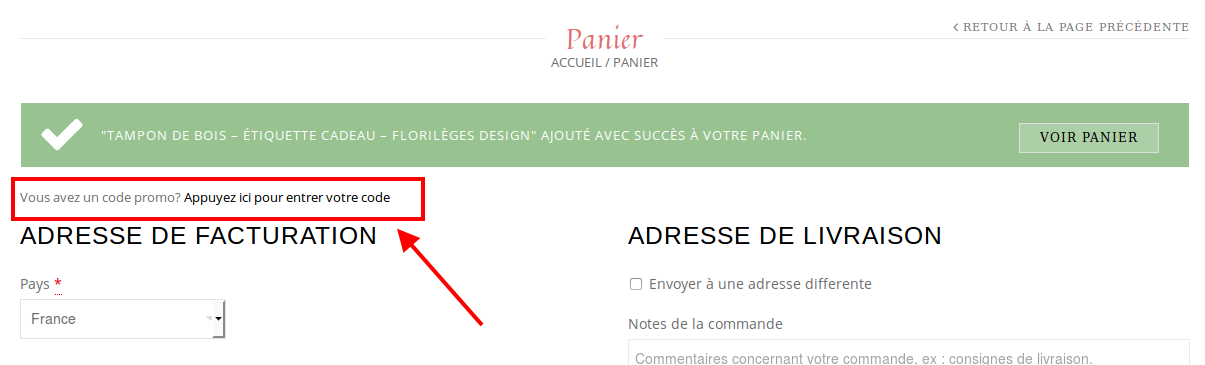
Is it not displaying on your side?
Regards,
Eva Kemp.
Hello @scolwell,
I’ve made some changes in style.css of your child theme. Please check if it’s fine now.
Please provide us with wp-admin panel credentials as well.
Regards,
Eva Kemp.
I’ve updated VC and now it’s being showed in admin panel.
Please check.
Regards,
Eva Kemp.









