
Login details to FTP are incorrect.
Please check them and provide us with the correct credentials.
Thank you.
Regards,
Eva Kemp.

Login details to FTP are incorrect.
Please check them and provide us with the correct credentials.
Thank you.
Regards,
Eva Kemp.
I don’t see any banners on the Blog page, just posts.
Please insert the banner for us to be able to view your issue.
Thank you.
Regards,
Eva Kemp.
Hello,
1. To change “Quantity” text edit this file wp-content/themes/legenda/woocommerce/global/quantity-input.php (line 14)
“Items”/”item” words can be translated in the file wp-content/themes/legenda/framework/woo.php, find the code ? __('items', ETHEME_DOMAIN) : __('item', ETHEME_DOMAIN) ; ?> (on line 925) and replace the words.
Keep these files safe to avoid losing changes after theme update.
2. Please provide us with wp-admin panel credentials to check the issue with Portfolio page.
Regards,
Eva Kemp.
Please add the banner to the Blog page and provide us with wp-admin panel credentials and FTP access in Private Content.
Regards,
Eva Kemp.
Hello,
If you wish you can use some plugin to have all search options you need. For example: http://wordpress.org/plugins/woocommerce-predictive-search/
Regards,
Eva Kemp.
Hello,
If you’re using a 3rd-party plugin, then you need use their custom hooks or customize the theme additionally as we don’t always save all standard woocommerce hooks due to new features including.
Sorry.
Regards,
Eva Kemp.
Hello @toby19,
To create links for language icons you need edit header.php (from the line 147) in wp-content/themes/legenda directory.
We recommend you to make changes in a child theme not to lose the modifications after theme update.
Regards,
Eva Kemp.
To change blog template you need edit one of the files: content.php, content-grid.php, content-timeline.php. It depends on what blog layout you’re using (you can check it in admin panel > Theme Options > Blog Layout).
We recommend you to make any changes of the theme files in a child theme.
Regards,
Eva Kemp.
Hello,
Unfortunately this requires additional customization to be able to edit each menu item. This service is paid. If you agree please create a ticket at https://support.8theme.com/ and our specialists will provide you with more information.
Thank you.
Regards,
Eva Kemp.
Hello,
We recommend you to make all changes in a child theme.
Add the following code into style.css of the child theme:
.logo { width: 600px; }
#search {float: right;}
#search #site-description {display: none;}
To add tagline text you need edit header.php (copy it from the theme directory to your child theme folder). Add this code <div id="site-description"><?php bloginfo( 'description' ); ?></div> after the line 73 <a href="<?php echo home_url(); ?>"><img src="<?php echo $logoimg ?>" alt="<?php bloginfo( 'description' ); ?>" /></a>
Regards,
Eva Kemp.
Hello,
Could you please clarify with more details? Please show us a link of Portfolio page and what you want to show there.
Thank you.
Regards,
Eva Kemp.
Hello,
You need go to admin panel > Products > select your feature product and the bottom you’ll find “Custom Settings” box and “Hover img” field in it. Just upload your hover image there.
Do this for all featured products.
Regards,
Eva Kemp.
Hello,
Please refer to Woocommerce documentation regarding your question:
http://docs.woothemes.com/document/importing-woocommerce-dummy-data/
Regards,
Eva Kemp.
Hello,
Please provide us with wp-admin panel credentials as well.
Blog page uses default template. Do you wish to make any changes in it?
Regards,
Eva Kemp.
Hello,
If you’re using a 3rd-party plugin, then you need use their custom hooks or customize the theme additionally as we don’t always save all standard woocommerce hooks due to new features including.
If the issue is only with alignment then we’ve fixed it for you with the code in style.css of the child theme:
.fancy-product .fpd-container{
 margin-left: 20px !important;
}

@media (min-width:1200px){
 .fancy-product .fpd-container{
  margin-left: 30px !important;
 }
}
Regards,
Eva Kemp.
Hello,
1. To display cart on mobile devices you need add this code into custom.css file:
@media (max-width: 979px) {.top-bar .shopping-cart-link {
    display: block;
}}
Here you can watch how to create custom.css.
2. I’ve checked Checkout page and card payment is being showed correctly:
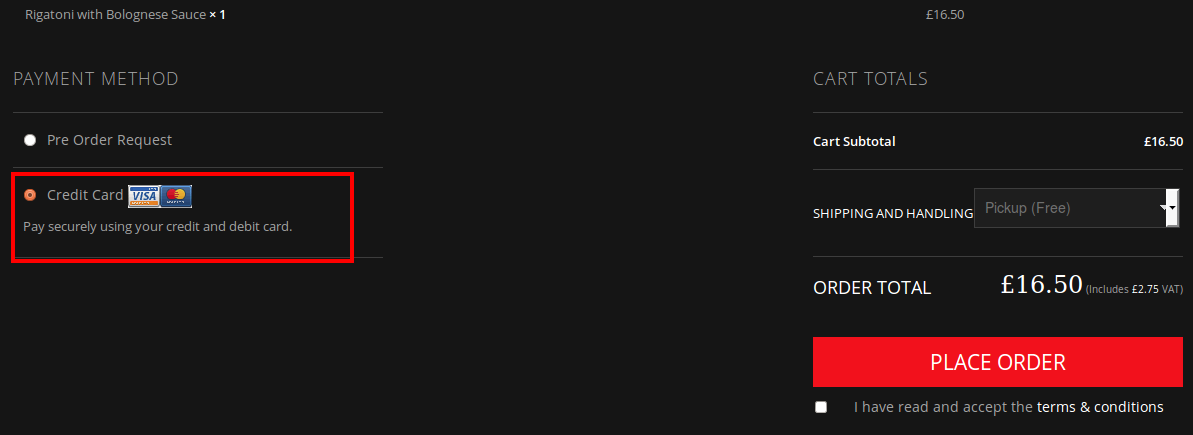
After clicking “Place Order” button I’ve been redirected to this page:

Regards,
Eva Kemp.
Hello,
Please provide us with the correct FTP and wp-admin panel credentials to check what is causing the issue.
Thank you.
Regards,
Eva Kemp.
Hello,
Sorry but we don’t provide customization for 3rd-party plugins. If you want the header to be scrolled you need use fixed header option in the Theme Options.
Regards,
Eva Kemp.
Hello,
Please check if it works with some other theme and try to disable 3rd-party plugins one by one. Some of them may cause the issue.
If the problem is still there after all your actions please provide us with FTP and wp-admin panel credentials in Private Content.
Regards,
Eva Kemp.
Hello,
If you have any questions feel free to ask us.
Regards,
Eva Kemp.
Hello,
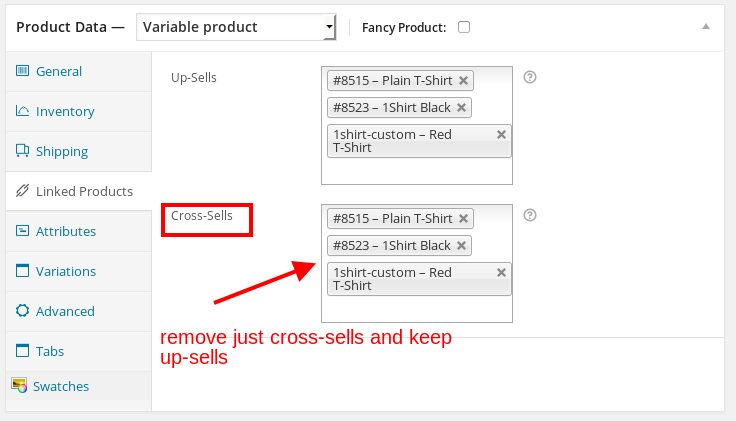
To remove products from the Cart page you need remove only cross-sells and keep up-sells:
I’ve removed the widget “Brands filter” from Single product page and the link has disappeared, only brand image is being showed in the sidebar above “Our offers”.
Please check.
Regards,
Eva Kemp.
Hello,
Please provide us with wp-admin panel credentials in Private Content.
Regards,
Eva Kemp.
Please try to use this code to create borders for menu items:
.main-nav .menu > li > a {
    border-left: 1px solid #FFF;
}
.main-nav .menu > li:last-child > a {
    border-right: 1px solid #FFF !important;
}
.menu > li.current-menu-item > a {
    border-left: 1px solid red !important;
    border-bottom: 1px solid red !important;
    border-top: 1px solid red !important;
}
.main-nav .menu > li > a {
    border-top: 1px solid red;
    border-bottom: 1px solid red;
}
If you don’t have FTP account created, then you can provide us with the credentials to your hosting control panel.
Was url slug changed immediately after update or you made any changes for the pages?
Regards,
Eva Kemp.
Hello,
You need disable cross-sells for products to remove them from the Cart page:
http://docs.woothemes.com/document/related-products-up-sells-and-cross-sells/
Regards,
Eva Kemp.
As I see you’ve already updated the theme to 2.2 version. I’ve checked your site and found no errors.
Could you please specify where you’re getting it?
Thank you.
Regards,
Eva Kemp.
Hello,
Sorry, but Woocommecre Price filter widget is showed only on Products page, not on a Single Product Page. Please refer to Woocommerce documentation:
http://docs.woothemes.com/document/woocommerce-widgets/
Regards,
Eva Kemp.
You’re welcome.
If you need more help don’t hesitate to contact us.
Regards,
Eva Kemp.
The issue was fixed by customizing styles in css file. You didn’t see changes on the site because it was cached in your browser.
Please note, after making some changes on the site you need clear browser cache to be able to view changes effect.
Regards,
Eva Kemp.
You’re welcome.
Regards,
Eva Kemp.
Thank you for resetting the password.
I’ve checked your site and Revolution Slider settings. Everything seems to be fine, but this issue persists with default “Twenty Fourteen” theme too. So this problem isn’t related to our theme. We recommend you to contact Revolution Slider support team. They should advise you some solution.
Regards,
Eva Kemp.









