Forum Replies Created

Viewing 30 posts - 28,501 through 28,530 (of 31,382 total)
  • Avatar: Eva
    Eva Kemp
    Participant
    August 21, 2014 at 19:31

    Hello,

    1. Please specify exactly what you want to change and show us the links where the changes need to be made.
    2. Unfortunately there is no such option for categories.
    3. To have left sidebar enabled for each product item you need select the appropriate Sidebar position in Theme Options > Single Product Page. Then drag the desired widgets into the “Single Product Page Sidebar” widget area.

    Regards,
    Eva Kemp.

    Avatar: Eva
    Eva Kemp
    Participant
    August 21, 2014 at 18:45

    Hello @Surgeprotector,

    Yes, unfortunately you have to ask us for the update of VC plugin or buy the license yourself.

    Regards,
    Eva Kemp.

    Avatar: Eva
    Eva Kemp
    Participant
    August 21, 2014 at 18:43

    Hello,

    Could you please clarify what issue you’re experiencing with Checkout page?
    Thank you.

    Regards,
    Eva Kemp.

    Avatar: Eva
    Eva Kemp
    Participant
    August 21, 2014 at 18:23

    Hello,

    Thank you for the correct access to wp-admin panel.
    Could you please contact Godaddy and ask them for FTP login details?
    Thank you.

    Regards,
    Eva Kemp.

    Avatar: Eva
    Eva Kemp
    Participant
    August 21, 2014 at 17:47

    You’re welcome.

    Regards,
    Eva Kemp.

    Avatar: Eva
    Eva Kemp
    Participant
    August 21, 2014 at 17:46

    Hello,

    Could you please clarify what exactly you want to change in the products display?
    Thank you.

    Regards,
    Eva Kemp.

    Avatar: Eva
    Eva Kemp
    Participant
    August 21, 2014 at 17:31

    Hello,

    Are you checking the site on some mobile device or adjusting the browser window? I’ve checked your site in Chrome browser using iPhone 5 emulation and the icon is shown:

    Regards,
    Eva Kemp.

    Avatar: Eva
    Eva Kemp
    Participant
    August 21, 2014 at 17:24

    I’m trying to log in to wp-admin panel via this link http://fashionistas-styles.com/wp-admin and using the login details you’ve provided, but I’m still getting the error that authentication failed.
    Please provide us with the correct login details to wp-admin panel.
    Thank you.

    Regards,
    Eva Kemp.

    Avatar: Eva
    Eva Kemp
    Participant
    August 21, 2014 at 17:15

    Hello @Surgeprotector,

    I’ve updated VC plugin. Please check it. Also the login details to wp-admin panel aren’t working. Please check them.

    Regards,
    Eva Kemp.

    Avatar: Eva
    Eva Kemp
    Participant
    August 21, 2014 at 16:39

    Hello,

    As I see your site is working fine and wp-admin panel is available for access.
    Please clarify your issue with more details. And if you still need our help please provide us with the credentials to wp-admin panel as well.
    Thank you.

    Regards,
    Eva Kemp.

    Avatar: Eva
    Eva Kemp
    Participant
    August 21, 2014 at 16:35

    Hello,

    We’ll wait for your reply.
    Let us know if further help is needed.

    Regards,
    Eva Kemp.

    Avatar: Eva
    Eva Kemp
    Participant
    August 21, 2014 at 16:10

    Hello,

    Please try to edit this file wp-content/themes/legenda/framework/theme-functions.php.
    We recommend you to make changes in a child theme not to lose modifications after the theme update.
    Also make a back up of the file before editing.

    Regards,
    Eva Kemp.

    Avatar: Eva
    Eva Kemp
    Participant
    August 21, 2014 at 16:00

    Hello,

    We’ll probably implement this feature in one of our updates, but unfortunately we don’t know the exact date for now when it’s going to happen.
    Sorry.

    Regards,
    Eva Kemp.

    Avatar: Eva
    Eva Kemp
    Participant
    August 21, 2014 at 15:44

    Hello,

    Please upload your theme archive into the themes folder via FTP and provide us with FTP credentials in Private Content. Also please give us access to wp-admin panel.
    Thank you.

    Regards,
    Eva Kemp.

    Avatar: Eva
    Eva Kemp
    Participant
    August 21, 2014 at 15:42

    Hello,

    I’ve reupdated Permalinks settings in wp-admin panel > Settings > Permalinks and now the page is working fine.
    Please check.

    Regards,
    Eva Kemp.

    Avatar: Eva
    Eva Kemp
    Participant
    August 21, 2014 at 14:02

    Your code in custom.css file won’t work. For example, if you want to change the font for titles on the FAQ page you need write this code in custom.css:
    .toggle-element .toggle-title {font-family: Open Sans;}

    And such way you’ll be able to change font for other sections on the site, but not adding the font to Typography.

    Regards,
    Eva Kemp.

    Avatar: Eva
    Eva Kemp
    Participant
    August 21, 2014 at 13:48

    Hello,

    There are a lot of errors in firebug when checking your site in Chrome:

    We recommend you to create your child theme exactly as described at this link:
    http://codex.wordpress.org/Child_Themes

    Also name the child theme folder something like “legenda-child”, not “cartayrade”. Just follow all the instructions described in WordPress Documentation.
    Thank you.

    Regards,
    Eva Kemp.

    Avatar: Eva
    Eva Kemp
    Participant
    August 21, 2014 at 13:37

    You’re welcome.
    Unfortunately there is no such possibility to add your own fonts into Typography section. You can change font for some section on the site only via custom.css.
    Please take our apologies for inconveniences.

    Regards,
    Eva Kemp.

    Avatar: Eva
    Eva Kemp
    Participant
    August 21, 2014 at 12:12

    Hello,

    We need the access to wp-admin panel, where we can see Theme Options, Woocommerce Settings, Pages.
    Can you provide us with it?
    Thank you.

    Regards,
    Eva Kemp.

    Avatar: Eva
    Eva Kemp
    Participant
    August 21, 2014 at 12:08

    Hello,

    1. Do you mean you want products to be shown from low to high price on the Cart page? If so you have to contact Woocommerce support regarding this question.
    2. I’ve disabled Ajax “Add to Cart” in Theme Options > Single Product Page and now it’s redirecting to the Cart page after adding a product to the cart.
    3. To make count of products displayed on the favicon cart widget needs to be enabled. I’ve done this via Theme Options > Header and there is products count on the favicon now.

    Please check and clear your browser cache before.

    Regards,
    Eva Kemp.

    Avatar: Eva
    Eva Kemp
    Participant
    August 21, 2014 at 11:47

    Hello,

    Could you please provide us with the access to wp-admin panel and FTP?
    Thank you.

    Regards,
    Eva Kemp.

    Avatar: Eva
    Eva Kemp
    Participant
    August 21, 2014 at 11:08

    Hello,

    I’m unable to access your wp-admin panel. It’s redirected to the main site. Do you have some redirects written in .htaccess file? Also please check FTP credentials as they are also incorrect.

    Thank you.

    Regards,
    Eva Kemp.

    Avatar: Eva
    Eva Kemp
    Participant
    August 21, 2014 at 11:01

    Hello,

    Please specify to which slug you want to change portfolio link?
    Thank you.

    Regards,
    Eva Kemp.

    Avatar: Eva
    Eva Kemp
    Participant
    August 21, 2014 at 10:58

    Hello,

    If you want to show 3 products per row you need edit Bridal page and in Visual Composer editor write 3 in the “Columns” field.
    If this is not what you want, please clarify with more details how you wish the products to be displayed.

    Thank you.
    Regards,
    Eva Kemp.

    Avatar: Eva
    Eva Kemp
    Participant
    August 20, 2014 at 18:56

    Hello,

    On the Bridal page in Visual Composer editor you’ve mentioned Categories IDs “Bridal, engagement, wedding band”. This is wrong, because you’ve specified categories titles, but should be IDs (numbers). You can find the IDs of each category page in the browser address bar via Products > Categories. For example:

    Regards,
    Eva Kemp.

    Avatar: Eva
    Eva Kemp
    Participant
    August 20, 2014 at 15:27

    Hello,

    Could you please describe how we can reproduce the problem from our side?
    Also please show us a screenshot of the error.
    Thank you.

    Regards,
    Eva Kemp.

    Avatar: Eva
    Eva Kemp
    Participant
    August 20, 2014 at 15:16

    Thank you for the feedback and you’re welcome!
    I’ve reuploaded the theme folder and installed demo pages as described in our documentation:
    https://www.8theme.com/demo/docs/idstore/index.html#!/demo_data_installation

    If you still need some help please let us know.

    Regards,
    Eva Kemp.

    Avatar: Eva
    Eva Kemp
    Participant
    August 20, 2014 at 15:12

    Hello,

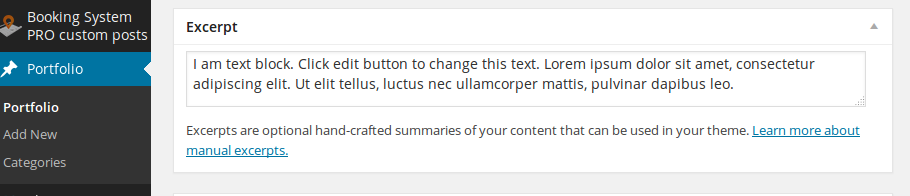
    To get rid of the error on the Huisjes page I’ve added excerpt for the project Gîte Bergans in wp-admin panel > Portfolio and edited the needed project:

    Images were not showing because you created child theme incorrectly. You had write the following in the style.css file of your child theme:

    /*
     Theme Name:   Cartayrade
     Theme URI:    https://www.8theme.com/legenda-child/
     Description:  Legenda Child Theme
     Author:       Chris Verra
     Author URI:   http://www.chrisverra.nl
     Template:     legenda
     Version:      1.0.0
     Tags:         light, dark, two-columns, right-sidebar, responsive-layout, accessibility-ready
     Text Domain:  cartayrade
    */
    
    @import url("../legenda/style.css");
    
    /* =Theme customization starts here
    -------------------------------------------------------------- */

    I’ve corrected this and images are showing now.
    Please read attentively about child theme: http://codex.wordpress.org/Child_Themes

    If you want to change portfolio slug you need to edit legenda/framework/portfolio.php , find the line 28:
    $args = array(
    and add the following code to the list (line 40 for example) :
    'rewrite' => array('slug' => 'posts')
    Change “posts” text to the one you need.

    Regards,
    Eva Kemp.

    Avatar: Eva
    Eva Kemp
    Participant
    August 20, 2014 at 14:42

    Perhaps there is some problem on your server where you host the site. We recommend you to contact your hosting provider and ask them to check logs on the server.

    Regards,
    Eva Kemp.

    Avatar: Eva
    Eva Kemp
    Participant
    August 20, 2014 at 14:30

    Hello,

    We’re very sorry for such long delay.

    After investigation we’ve found that you inserted the code for the word “From” in functions.php file. So you need translate it there.
    Concerning the footer you need remove this code in custom.css file:

    @media only screen and (max-width: 959px)
    #prefooter {
    width: 700px;
    }

    Concerning the products slider, there is a bug in the theme and the problem happens if you have 4 or less products in the slider. You should add one more product as featured. Then the slider will be enabled for responsive design. We’ll try to fix this bug in our future update.

    Please take our apologies for inconveniences.
    Thank you.

    Regards,
    Eva Kemp.

  • 1 2 3 950 951 952 1,045 1,046 1,047
    Viewing 28,530 results - 28,501 through 28,530 (of 31,382 total)
Viewing 30 posts - 28,501 through 28,530 (of 31,382 total)
We're using our own and third-party cookies to improve your experience and our website. Keep on browsing to accept our cookie policy.