
Hello,
In this case please change the code to this one:
.header-type-2.slider-overlap .header .menu > li > a {
    color: #000;
}
.menu-main-container {
width: 900px !important;
margin-left: 500px !important;
}
Thank you.
Regards,
Eva Kemp.

Hello,
In this case please change the code to this one:
.header-type-2.slider-overlap .header .menu > li > a {
color: #000;
}
.menu-main-container {
width: 900px !important;
margin-left: 500px !important;
}Thank you.
Regards,
Eva Kemp.
Hello,
Please provide us with FTP credentials we well.
Thank you.
Regards,
Eva Kemp.
Hello @kinhacura,
Some minor bugs are fixed in the latest version.
Currently we are working on a new release and it will be produced very soon.
Please wait a little.
Thank you.
Sorry for inconveniences.
Regards,
Eva Kemp.
Hello,
We’re glad you’ve found the solution.
Have a nice day.
Regards,
Eva Kemp.
Hello,
Please create a ticket at https://support.8theme.com/ and our specialists will look into this issue more deeper.
Thank you.
Regards,
Eva Kemp.
Hello,
The credentials to wp-admin panel are incorrect.
Please check them.
Thank you.
Regards,
Eva Kemp.
Hello,
Unfortunately we still can’t access the site.
Are there any restrictions for some IP addresses at your host?
Perhaps you wrote some rule in .htaccess file. Please check it.
Thank you.
Regards,
Eva Kemp.
Hello,
Sorry, but unfortunately there is no possibility to add additional fonts to the theme except of Google fonts.
Thank you for understanding.
Regards,
Eva Kemp.
Hello,
Have you cleared browser cache and cookies?
Also check your site using proxy service: http://anonymouse.org/cgi-bin/anon-www.cgi/http://bkbcuracao.com/soon/
Do you have the same issue there too?
Thank you.
Regards,
Eva Kemp.
Hello,
You’re welcome.
We really appreciate your feedback.
You need create variable products. How to do this you can find in Woocommerce documentation:
http://docs.woothemes.com/document/product-variations/
Thank you.
Regards,
Eva Kemp.
Hello,
I’ve edited the path to the icon image.
Please check Home page now.
Regards,
Eva Kemp.
Hello,
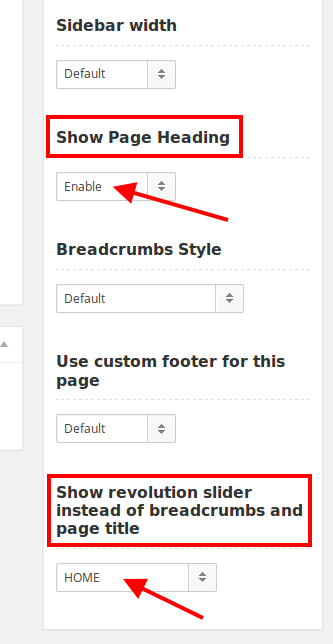
You have selected transparent header type, that is why it’s displayed such way on other pages. If you want to have the same header with Revolution slider on other pages you need edit each page and select “Show Page Heading” and “Show revolution slider instead of breadcrumbs and page title” on the right side:
Thank you.
Regards,
Eva Kemp.
Hello,
We’ll send the page demo to your email address soon.
Please wait a little.
Thank you.
Regards,
Eva Kemp.
Hello,
I’ve updated some plugins.
Please check slider now.
Thank you.
Regards,
Eva Kemp.
Hello,
You can watch video tutorial how to update the theme (it’s for Legenda theme, but the process is identical):
https://www.youtube.com/watch?v=KdWESIIPU1k
Thank you.
Regards,
Eva Kemp.
Hello,
To add images for Testimonials go to wp-admin panel > Testimonials and add featured image for your testimonial.
Thank you.
Regards,
Eva Kemp.
Hello,
You’re welcome.
Regards,
Eva Kemp.
Hello @meder@f-e-w.ch,
You’re using old theme version.
Please update it to 1.3 version.
Thank you.
Regards,
Eva Kemp.
Hello,
If you want to add images for brands you need go to Products > Brands, create a new brand or open an existing one and add a Thumbnail for the brand.
Thank you.
Regards,
Eva Kemp.
Hello,
Please create a ticket at https://support.8theme.com/ and provide FTP and wp-admin panel credentials in there. We’ll give you an IP of a specialist who will work on your issue.
Please create a mark in your ticket that this issue is already posted in our forum.
Thank you for understanding.
Regards,
Eva Kemp.
Hello,
Please try to use this code in custom.css to create a border:
.wpb_video_widget .wpb_wrapper iframe {
    border: medium solid white !important;
}
Thank you.
Regards,
Eva Kemp.
Hello,
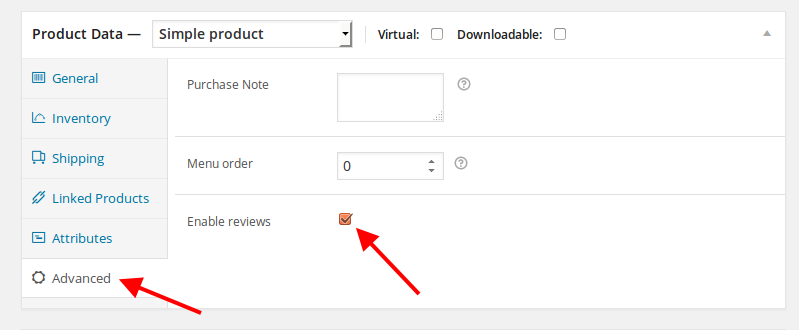
You can disable reviews in Products editor, select the needed product and edit its settings:
Thank you.
Regards,
Eva Kemp.
Hello @LindaMendible,
I’ve updated the theme to the latest version.
Please check it.
Thank you.
Regards,
Eva Kemp.
Hello,
We’re unable to open your link getting an error “Server not found”.
Please check it with your host or perhaps you spelled the domain name incorrectly.
Thank you.
Regards,
Eva Kemp.
Hello,
To change font size and color for submenu items add this code in custom.css file:
.menu .nav-sublist-dropdown ul > li > a {
    font-size: 12px !important;
    color: #767676 !important;
}
Change the values to yours.
Comments aren’t shown in Recent Comments area of the footer because you don’t have any. You can check it in wp-admin panel > Comments.
To add hover color for menu items you need add this code in custom.css:
.header-type-12 .navbar-collapse .menu > li > a:hover {
color: green !important;
}
Thank you.
Regards,
Eva Kemp.
Hello,
Sorry, but we’re unable to open the link, getting an error “Server not found”.
Please check if you spelled it correctly or contact your host.
Thank you.
Regards,
Eva Kemp.
Hello,
Sorry, but there is no such possibility in the theme.
Please take our apologies.
Regards,
Eva Kemp.
Hello,
Sorry, but this requires a lot of customization in the code.
If you have needed skills you may try to do this or contact developers concerning your request.
Thank you for understanding.
Regards,
Eva Kemp.
Hello,
As I see you’re using old theme version. Please update it to the latest one – 2.9.3. Refer to our documentation:
https://www.8theme.com/demo/docs/blanco/index.html#!/upgrade
Don’t forget to create a back up before updating!
Thank you.
Regards,
Eva Kemp.
Hello @explorework,
Please don’t worry. That warning won’t affect your site work. You can hide that notification. It will be fixed in the future update.
Thank you.
Regards,
Eva Kemp.









