Forum Replies Created

Viewing 30 posts - 22,831 through 22,860 (of 31,382 total)
  • Avatar: Eva
    Eva Kemp
    Participant
    January 14, 2015 at 09:57

    Hello,

    1. Please add this code in custom.css file:

    @media (max-width: 480px) {.phone {
       display: none;
    }}

    2. Do you want to resize phone section on mobile devices? Could you please clarify with more details?
    3. Have you translated Woocommerce files as well in wp-content/plugins/woocommerce/i18n/languages?
    Please provide us with FTP credentials in Private Content.
    4. You can insert this shortcode [share] into Text widget and put it in “Place in header top bar” widget area in Appearance > Widgets. Also you can use other code for social media icons, for example found on social networks helpbase.
    5. Unfortunately you can add widgets only in “Place in header top bar” area to make them display in the top bar.
    6. Add this code in custom.css file:

    @media (max-width: 480px) {.my-account-link:before {
        top: -5px;
    }}

    How to create custom.css you can watch in this tutorial.

    Thank you.
    Regards,
    Eva Kemp.
    Avatar: Eva
    Eva Kemp
    Participant
    January 14, 2015 at 09:19

    Hello,

    Please check your site now and clear browser cache before.
    Also when you resize a browser window you need reload a page.
    You can test your site on mobile devices too.

    Thank you.
    Regards,
    Eva Kemp.

    Avatar: Eva
    Eva Kemp
    Participant
    January 14, 2015 at 09:10

    Hello,

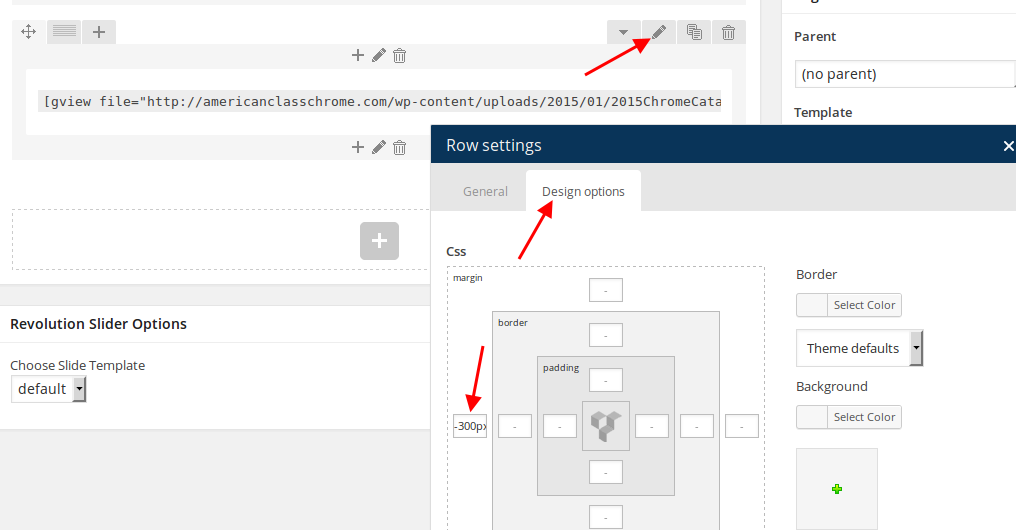
    Please view a screenshot how to edit row settings:

    You can change image dimensions in Woocommerce > Settings > Products tab, then use this plugin wordpress.org/extend/plugins/regenerate-thumbnails/ to regenerate thumbnails.

    Thank you.
    Regards,
    Eva Kemp.

    Avatar: Eva
    Eva Kemp
    Participant
    January 14, 2015 at 01:05

    Hello @hollysnails,

    You’ve been replied in a separate topic that you created.
    Please don’t create multiple queries. This topic will be closed.

    Thank you.
    Regards,
    Eva Kemp.

    Avatar: Eva
    Eva Kemp
    Participant
    January 14, 2015 at 01:03

    Hello,

    Please provide us with FTP credentials as well.

    Thank you.
    Regards,
    Eva Kemp.

    Avatar: Eva
    Eva Kemp
    Participant
    January 14, 2015 at 00:59

    Hello,

    Please provide us with FTP credentials as well.

    Thank you.
    Regards,
    Eva Kemp.

    Avatar: Eva
    Eva Kemp
    Participant
    January 14, 2015 at 00:54

    Hello,

    You’ve been already replied in other topic: https://www.8theme.com/topic/revolution-slider-wont-display/
    Please check it.

    Thank you.
    Regards,
    Eva Kemp.

    Avatar: Eva
    Eva Kemp
    Participant
    January 14, 2015 at 00:52

    Hello,

    Please provide us with FTP and wp-admin panel credentials to check the issue.

    Thank you.
    Regards,
    Eva Kemp.

    Avatar: Eva
    Eva Kemp
    Participant
    January 13, 2015 at 23:32

    Hello,

    Your Register page is working now.
    Please check it.

    Thank you.
    Regards,
    Eva Kemp.

    Avatar: Eva
    Eva Kemp
    Participant
    January 13, 2015 at 23:27

    Hello,

    You can select header type where top bar has black background in Theme Options > Header.
    Also if you don’t use multilingual site you can disable languages area adding this code in custom.css file:

    .languages-area {
       display: none;
    }

    Thank you.
    Regards,
    Eva Kemp.

    Avatar: Eva
    Eva Kemp
    Participant
    January 13, 2015 at 23:22

    Hello,

    Please provide us with wp-admin panel and FTP credentials.

    Thank you.
    Regards,
    Eva Kemp.

    Avatar: Eva
    Eva Kemp
    Participant
    January 13, 2015 at 23:21

    Hello,

    Please add this code in custom.css file:

    .shopping-cart-widget {
       border: none;
    }

    How to create custom.css you can watch in this tutorial (it’s for Legenda theme but the process is the same).

    Thank you.
    Regards,
    Eva Kemp.

    Avatar: Eva
    Eva Kemp
    Participant
    January 13, 2015 at 23:10

    Hello,

    Please check your site now.

    Thank you.
    Regards,
    Eva Kemp.

    Avatar: Eva
    Eva Kemp
    Participant
    January 13, 2015 at 22:56

    Hello,

    You’re welcome.

    Regards,
    Eva Kemp.

    Avatar: Eva
    Eva Kemp
    Participant
    January 13, 2015 at 22:54

    Hello,

    What is your site url?

    Thank you.
    Regards,
    Eva Kemp.

    Avatar: Eva
    Eva Kemp
    Participant
    January 13, 2015 at 22:53

    Hello,

    You need write only the changes you want to make in the file, not copy the whole file.

    Thank you.
    Regards,
    Eva Kemp.

    Avatar: Eva
    Eva Kemp
    Participant
    January 13, 2015 at 21:34

    Hello,

    Please add this code in custom.css file:

    img.hide-image {
    height: 300px;
    }

    How to create custom.css you can watch in this tutorial.

    Thank you.
    Regards,
    Eva Kemp.
    Avatar: Eva
    Eva Kemp
    Participant
    January 13, 2015 at 21:26

    Hello,

    You have a lot of themes in Appearance > Themes.
    Please remove them and update overwrite only one theme with the latest version – 1.5.2.
    https://www.8theme.com/demo/docs/royal/#!/installation_upgrade (paragraph “1.5 Theme Upgrade”)

    Thank you.
    Regards,
    Eva Kemp.

    Avatar: Eva
    Eva Kemp
    Participant
    January 13, 2015 at 20:31

    Hello,

    Please provide us with FTP credentials as well.
    Also as I see you don’t have Register page.
    Please read our documentation:
    https://www.8theme.com/demo/docs/royal/#!/4_registration_page

    Thank you.
    Regards,
    Eva Kemp.

    Avatar: Eva
    Eva Kemp
    Participant
    January 13, 2015 at 20:21

    Hello,

    You’re welcome.
    Regards,
    Eva Kemp.

    Avatar: Eva
    Eva Kemp
    Participant
    January 13, 2015 at 20:20

    Hello,

    We’ve passed this issue to the developers.
    Once they provide us with a reply, we’ll let you know.

    Thank you for understanding and patience.

    Regards,
    Eva Kemp.

    Avatar: Eva
    Eva Kemp
    Participant
    January 13, 2015 at 20:18

    Hello,

    Have you changed cpanel login details?
    Please provide us with new ones or create FTP user for us.

    Thank you.
    Regards,
    Eva Kemp.

    Avatar: Eva
    Eva Kemp
    Participant
    January 13, 2015 at 20:05

    Hello @hcMtom,

    You can add this code in custom.css file:

    .banner.banner-font-dark .banner-content {
        margin-top: 70px !important;
    }

    Please try it.

    Thank you.
    Regards,
    Eva Kemp.

    Avatar: Eva
    Eva Kemp
    Participant
    January 13, 2015 at 19:57

    Hello,

    We’ll try to fix this issue in our next update.
    Please take our apologies for inconveniences.

    Thank you.
    Regards,
    Eva Kemp.

    Avatar: Eva
    Eva Kemp
    Participant
    January 13, 2015 at 19:54

    Hello,

    Please provide us with wp-admin panel credentials.
    Is the image uploaded with the name in Hebrew?

    Thank you.
    Regards,
    Eva Kemp.

    Avatar: Eva
    Eva Kemp
    Participant
    January 13, 2015 at 19:42

    Hello,

    Sorry, but I don’t see the issue you described:

    Could you please show a screenshot of the problem?

    Thank you.
    Regards,
    Eva Kemp.

    Avatar: Eva
    Eva Kemp
    Participant
    January 13, 2015 at 19:39

    Hello,

    1. I’ve changed banners styles to the light one. Please check. Also you need update Visual Composer plugin. We can provide you with the archive. Give us your email address where we can send it.
    2. a. You can disable the plugin Screets Live Chat.
    b. To change strings of chat box into your language go to Chat Console > Options > Messages tab.
    3. Unfortunately there is no such option to open size guide in a separate tab. Sorry.

    Regards,
    Eva Kemp.

    Avatar: Eva
    Eva Kemp
    Participant
    January 13, 2015 at 19:20

    Hello @WaniCreative,

    Please show us a link of a new product to check.

    Thank you.
    Regards,
    Eva Kemp.

    Avatar: Eva
    Eva Kemp
    Participant
    January 13, 2015 at 19:18

    Hello,

    Thank you a lot.

    Have a nice day!

    Regards,
    Eva Kemp.

    Avatar: Eva
    Eva Kemp
    Participant
    January 13, 2015 at 19:17

    Hello,

    We’re glad you’ve found the solution.

    Have a nice day.
    Regards,
    Eva Kemp.

  • 1 2 3 761 762 763 1,045 1,046 1,047
    Viewing 22,860 results - 22,831 through 22,860 (of 31,382 total)
Viewing 30 posts - 22,831 through 22,860 (of 31,382 total)
We're using our own and third-party cookies to improve your experience and our website. Keep on browsing to accept our cookie policy.





