Forum Replies Created

Viewing 30 posts - 22,501 through 22,530 (of 31,382 total)
  • Avatar: Eva
    Eva Kemp
    Participant
    January 20, 2015 at 22:00

    Hello,

    The pages you showed as examples have background set it Visual Composer editor, but Portfolio page uses portfolio.php template.
    I’ve added a new class <div class="contback"> in wp-content/themes/royal/portfolio.php file.
    You need set background color in custom.css for this class. Add the following code:

    .contback {
    background-color: grey;
    }

    How to create custom.css you can watch in this tutorial (it’s for Legenda theme but the process is the same).

    Thank you.
    Regards,
    Eva Kemp.
    Avatar: Eva
    Eva Kemp
    Participant
    January 20, 2015 at 21:27

    Hello @thedude007,

    I’ve imported demo content manually.
    Please check your site now.

    Thank you.
    Regards,
    Eva Kemp.

    Avatar: Eva
    Eva Kemp
    Participant
    January 20, 2015 at 21:17

    Hello @pro2know,

    You can get back to the older VC plugin version or wait for a new update from the author.
    Sorry for inconveniences.

    Regards,
    Eva Kemp.

    Avatar: Eva
    Eva Kemp
    Participant
    January 20, 2015 at 20:57

    Hello,

    You’re welcome.
    Please add this code:

    .main-footer .sidebar-widget .blog-post-list .media-body strong {
        color: white;
    }

    Thank you.
    Regards,
    Eva Kemp.

    Avatar: Eva
    Eva Kemp
    Participant
    January 20, 2015 at 20:33

    Hello,

    I have someone who is customising the theme for me

    So, were theme files modified or just custom.css file?

    Thank you.
    Regards,
    Eva Kemp.

    Avatar: Eva
    Eva Kemp
    Participant
    January 20, 2015 at 20:30

    Hello,

    Sorry, but your request is unclear.
    Do you want to have possibility to search by tags in the search form?

    Thank you.
    Regards,
    Eva Kemp.

    Avatar: Eva
    Eva Kemp
    Participant
    January 20, 2015 at 20:24

    Hello,

    I’ve checked your site in Chrome and this image http://adamcronan.brookscreativeco.com/wp-content/uploads/2014/12/wallpaper134.jpg is shown as a background for the row. Are you checking in the latest browser version?
    Could you please show a screenshot of the row you see in Chrome?

    Thank you.
    Regards,
    Eva Kemp.

    Avatar: Eva
    Eva Kemp
    Participant
    January 20, 2015 at 20:13

    Hello @Mods,

    We’ve sent a new version of Visual Composer to your email address.
    Please update the plugin and check how it works after that.

    Thank you.
    Regards,
    Eva Kemp.

    Avatar: Eva
    Eva Kemp
    Participant
    January 20, 2015 at 20:08

    Hello,

    You’re welcome.

    Regards,
    Eva Kemp.

    Avatar: Eva
    Eva Kemp
    Participant
    January 20, 2015 at 20:07

    Hello,

    You’re welcome.

    Regards,
    Eva Kemp.

    Avatar: Eva
    Eva Kemp
    Participant
    January 20, 2015 at 20:06

    Hello,

    You’re welcome.

    Perhaps some plugins caused conflicts or the changes were caused by plugins updates.

    Regards,
    Eva Kemp.

    Avatar: Eva
    Eva Kemp
    Participant
    January 20, 2015 at 20:03

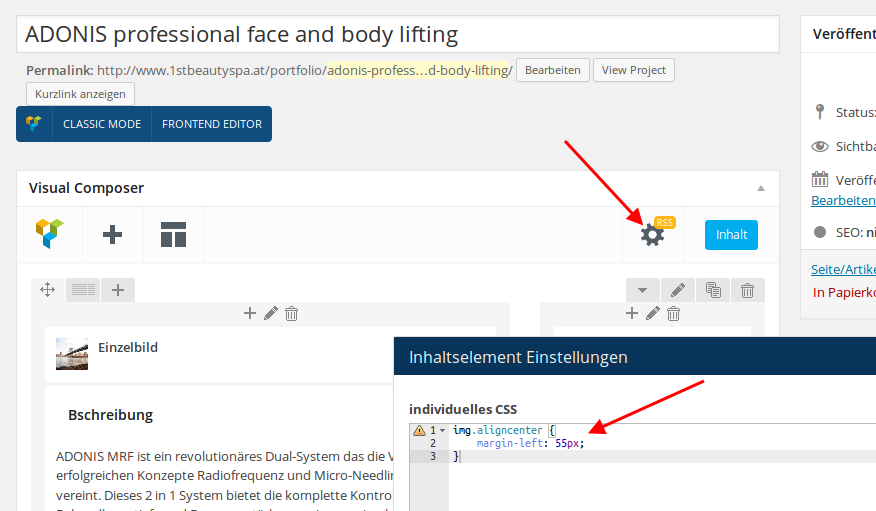
    Hello,

    I’ve added the following code in CSS block of Visual Composer editor:

    Please check the page now.

    Thank you.
    Regards,
    Eva Kemp.

    Avatar: Eva
    Eva Kemp
    Participant
    January 20, 2015 at 19:56

    Hello,

    Yes, it will. You can safe the modified file to your local PC and then reupload it after update or add the file to child theme.

    Thank you.
    Regards,
    Eva Kemp.

    Avatar: Eva
    Eva Kemp
    Participant
    January 20, 2015 at 19:52

    Hello,

    Some plugin is causing the issue with footer.
    I deactivated all 3rd-party plugins and footer copyright worked fine. Please disable them one by one to find out what is causing the problem.

    Banner on the Blog page is taken from Primary Widget Area in Appearance > Widgets. You can delete it there.

    Thank you.
    Regards,
    Eva Kemp.

    Avatar: Eva
    Eva Kemp
    Participant
    January 20, 2015 at 19:17

    Hello,

    That section was created with the help of Visual Composer. We used Text element and Single Image element from Visual Composer editor. If you have problems with it we can create the section for you, just provide us with wp-admin panel credentials in Private Content.

    Thank you.
    Regards,
    Eva Kemp.

    Avatar: Eva
    Eva Kemp
    Participant
    January 20, 2015 at 19:01

    Hello @Mijat,

    Sorry, but we couldn’t log in to wp-admin panel with the previous credentials.
    Please check them.

    Thank you.
    Regards,
    Eva Kemp.

    Avatar: Eva
    Eva Kemp
    Participant
    January 20, 2015 at 18:51

    Hello,

    You set “Tienda” page as Shop page in Woocommerce > Settings > Products tab and as a front page in Settings > Reading.
    Revolution Slider won’t be shown on a shop page if you add it in a page editor, because it uses Product page banner from Theme Options > Shop > Product Page Banner. If you want to display slider you need add its shortcode in the section for Product Page Banner in Theme Options.
    Please try it.

    Thank you.
    Regards,
    Eva Kemp.

    Avatar: Eva
    Eva Kemp
    Participant
    January 20, 2015 at 18:45

    Hello,

    Have you made any changes in the original theme files?
    Please update WordPress to the latest version as well.

    Thank you.
    Regards,
    Eva Kemp.

    Avatar: Eva
    Eva Kemp
    Participant
    January 20, 2015 at 18:33

    Hello @RBInspyred,

    The plugins have been sent to your email address.
    Please check it.

    Regards,
    Eva Kemp.

    Avatar: Eva
    Eva Kemp
    Participant
    January 20, 2015 at 18:30

    Hello,

    This requires additional customization.
    You can create a ticket at https://support.8theme.com/ and our specialists will look into your issue.

    Thank you.
    Regards,
    Eva Kemp.

    Avatar: Eva
    Eva Kemp
    Participant
    January 20, 2015 at 18:22

    Hello @Mods,

    Please clarify your issue with more details.
    What exactly isn’t working?
    Please provide us with wp-admin panel and FTP credentials in Private Content.

    Thank you.
    Regards,
    Eva Kemp.

    Avatar: Eva
    Eva Kemp
    Participant
    January 20, 2015 at 18:05

    Hello,

    I’ve edited custom.css file.
    Please check your site now and clear browser cache before.

    Thank you.
    Regards,
    Eva Kemp.

    Avatar: Eva
    Eva Kemp
    Participant
    January 20, 2015 at 17:43

    Hello,

    Add this code in custom.css file:

    @media (max-width: 480px) {.header-search {
       margin-right: 40px;
    }}

    Thank you.
    Regards,
    Eva Kemp.

    Avatar: Eva
    Eva Kemp
    Participant
    January 20, 2015 at 17:34

    Hello,

    You need add this code in custom.css file:

    .main-footer .sidebar-widget .blog-post-list .media-heading a {
        color: white;
    }

    How to create custom.css you can watch in this tutorial (it’s for Legenda theme but the process is the same).

    Thank you.
    Regards,
    Eva Kemp.

    Avatar: Eva
    Eva Kemp
    Participant
    January 20, 2015 at 17:30

    Hello,

    You can edit the theme file /wp-content/themes/royal/framework/portfolio.php (line 41) 'rewrite' => array('slug' => 'portfolio') and rename “portfolio” to what you need.

    Thank you.
    Regards,
    Eva Kemp.

    Avatar: Eva
    Eva Kemp
    Participant
    January 20, 2015 at 17:25

    Hello,

    Could you please provide us with a link of a page and specify what image you want to align?

    Thank you.
    Regards,
    Eva Kemp.

    Avatar: Eva
    Eva Kemp
    Participant
    January 20, 2015 at 17:24

    Hello @thedude007,

    Have you changed wp-admin panel login details?
    We can’t log in now.

    Please check them.

    Thank you.
    Regards,
    Eva Kemp.

    Avatar: Eva
    Eva Kemp
    Participant
    January 20, 2015 at 17:19

    Hello,

    As I see the buttons are shown fine.
    Could you please show a screenshot and provide the exact link where problem occurs?

    Thank you.
    Regards,
    Eva Kemp.

    Avatar: Eva
    Eva Kemp
    Participant
    January 20, 2015 at 17:15

    Hello,

    Ok, let us know if further assistance is required.

    Thank you.
    Regards,
    Eva Kemp.

    Avatar: Eva
    Eva Kemp
    Participant
    January 20, 2015 at 17:14

    Hello,

    You need use header type 2 or 3 in Theme Options > Header to have transparent menu background.

    Thank you.
    Regards,
    Eva Kemp.

  • 1 2 3 750 751 752 1,045 1,046 1,047
    Viewing 22,530 results - 22,501 through 22,530 (of 31,382 total)
Viewing 30 posts - 22,501 through 22,530 (of 31,382 total)
We're using our own and third-party cookies to improve your experience and our website. Keep on browsing to accept our cookie policy.





