
Hello,
You’re welcome.
Regards,
Eva Kemp.

Hello,
You’re welcome.
Regards,
Eva Kemp.
Hello,
Unfortunately we don’t have such feature. It requires additional customization.
Sorry.
Regards,
Eva Kemp.
Hello,
We’re sorry for a delay.
Concerning shopping cart you should contact Woocommerce support as Cart page is configured by their team.
Please provide us with wp-admin panel credentials in Private Content to check the issue with an image.
Thank you.
Regards,
Eva Kemp.
Hello,
I’ve just tested your shop page and haven’t seen any problems. The second page is successfully opened after a product is added to cart. I’ve added it via “Quick View” option as you didn’t enable “Add to Cart” button for products list.
Please clear your browser cache and check again.
Thank you.
Regards,
Eva Kemp.
Hello,
Please check that plugin with default WordPress theme. It’s not working there too.
So you have to wait for an answer from Woocommerce support.
Sorry for inconveniences.
Regards,
Eva Kemp.
Hello,
Go to Revolution Slider > Settings and disable “Unlimited Height”, “Force Full Width” in “Main Slider Settings” section. Also you can set Layers Grid Size for your slider.
Please try it.
Thank you.
Regards,
Eva Kemp.
Hello,
You can change font weight for the menu in custom.css file:
.main-nav .menu li a {
    font-weight: lighter;
}
Change the font weight to yours.
Thank you.
Regards,
Eva Kemp.
Hello,
You’re welcome.
Regards,
Eva Kemp.
Hello,
Are you using the latest versions of plugins?
https://www.8theme.com/download-plugins/
Please provide us with wp-admin panel and FTP credentials in Private Content.
Is the error shown on site page or in admin panel?
Thank you.
Regards,
Eva Kemp.
Hello,
We’re sorry for a delay.
We’re investigating this issue. You’ll be replied as soon as possible.
Thank you for your patience.
Regards,
Eva Kemp.
Hello,
Sorry, but this was made for demo site only and revolution slider wasn’t used there.
You can refer to Revolution Slider documentation how to create buttons:
http://revolution.themepunch.com/documentation/#slide_layer_content
Thank you.
Regards,
Eva Kemp.
Hello,
Your original images are very small.
You should upload them with approximate dimensions 1 425px × 1 900px.
Also you can set products images sizes in Woocommerce settings as described in our documentation:
https://www.8theme.com/demo/docs/royal/#!/woocommerce
Thank you.
Regards,
Eva Kemp.
Hello,
Sorry, but we still can’t connect to FTP getting an error:
Login authentication failed
So, login or password is incorrect.
Also ask your host to check memory limit, because Internal Server Error is related to server configuration and not to the theme.
Thank you.
Regards,
Eva Kemp.
Hello,
You’re welcome.
Regards,
Eva Kemp.
Hello,
FTP credentials are incorrect.
Please check them.
Also “Internal Server Error” is related to server configuration at your host. The reason may be you’re lack of memory and you need ask your host to increase the value for memory_limit.
Please check it with your host.
Thank you.
Regards,
Eva Kemp.
Hello,
You’re welcome.
Regards,
Eva Kemp.
Hello,
Please update Visual Composer plugin to the latest version https://www.8theme.com/download-plugins/ as old version may create some conflicts.
Thank you.
Regards,
Eva Kemp.
Hello,
Please provide us with FTP and wp-admin panel credentials in Private Content.
Thank you.
Regards,
Eva Kemp.
Hello,
Sorry for a delay.
In this case you have to change original image sizes to more than 900px or disable zoom effect in Theme Options.
Thank you.
Regards,
Eva Kemp.
Hello,
Sorry, but we aren’t experiencing this issue visiting your site as a guest.
Please try to check it with some other browser and other Internet provider.
Thank you.
Regards,
Eva Kemp.
Hello,
We’re sorry but we still can’t access the site, getting the error:
Error – Timeout
Did you check that issue with your host?
Thank you.
Regards,
Eva Kemp.
Hello,
If you want to use our demo slide you can import it in Revolution Slider > Import slider. The archive file is located in the theme package that you downloaded in “Documentation” folder.
To replace the video you need edit a row in your page editor:
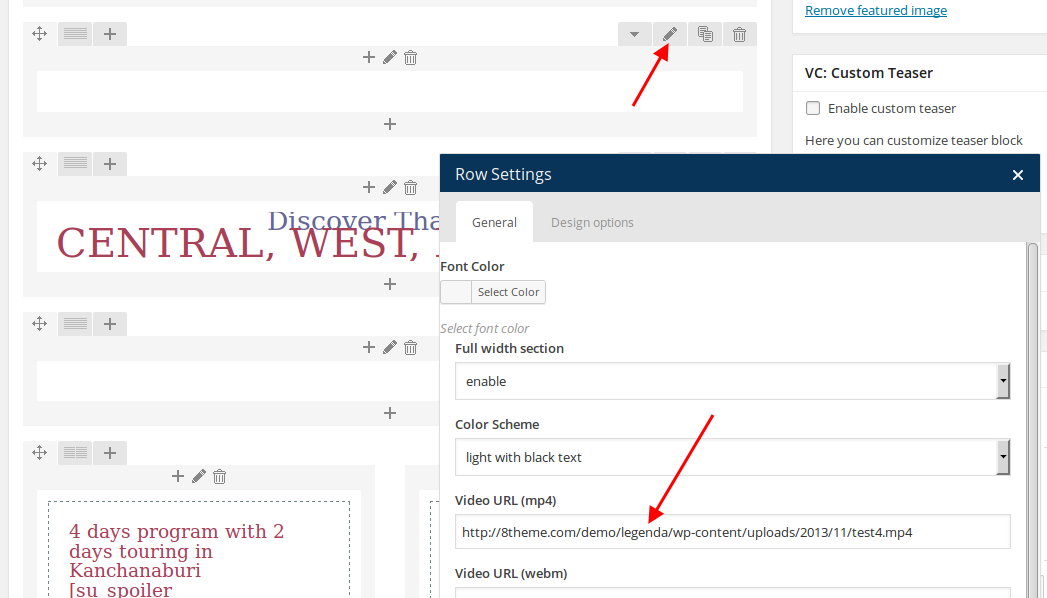
Thank you.
Regards,
Eva Kemp.
Hello,
1. You can add up-sell products as described in Woocommerce documentation:
http://docs.woothemes.com/document/related-products-up-sells-and-cross-sells/
2. Unfortunately this option is available only for single products. Sorry.
Regards,
Eva Kemp.
Hello,
I’ve added this code in style.css of the child theme:
@media (max-width: 480px) {.sidebar-position-left .main-products-loop{
position: inherit !important;
}}
Please check sidebar now.
Thank you.
Regards,
Eva Kemp.
Hello,
When you add Twitter feed widget you write your Twitter username and other information.
Please read our documentation:
https://www.8theme.com/demo/docs/legenda/index.html#!/widgets > Twitter Feed widget.
Concerning the title on home page, I’ve disabled Page Heading for the post “I cannot Believe I haven’t posted this Ireland Dream Wedding…”, find “Show Page Heading” box on the right side in post editor.
Thank you.
Regards,
Eva Kemp.
Hello,
As I see all your categories have 0 products. You need add products to the categories to make them shown.
Please try it.
Thank you.
Regards,
Eva Kemp.
Hello,
As I see the required plugins are still old versions.
Please download the new ones from this link https://www.8theme.com/download-plugins/ and update them or provide us with FTP credentials.
Thank you.
Regards,
Eva Kemp.
Hello,
You need disable ajax “Add to Cart” in Theme Options > Single Product Page > Ajax “Add to Cart” > Off.
If you want a customer to be redirected to the Cart page go to Woocommerce > Settings > Products tab > Add to cart > mark “Redirect to the cart page after successful addition”.
Thank you.
Regards,
Eva Kemp.
Hello,
You can download the latest version from our site http://themeforest.net/item/woopress-responsive-ecommerce-wordpress-wootheme/9751050 and read what was modified.
Thank you.
Regards,
Eva Kemp.
Hello,
You need add Text element in Visual Composer editor and click “Add Media” in there. At the left you’ll see “Create gallery”, click it and select your pictures for the gallery.
Thank you.
Regards,
Eva Kemp.









