
Hello,
Please provide us with your site url as well.
Thank you.
Regards,
Eva Kemp.

Hello,
Please provide us with your site url as well.
Thank you.
Regards,
Eva Kemp.
Hello,
You’re welcome.
Regards,
Eva Kemp.
Hello,
Please provide us with a page link you’re talking about. Are you checking it on mobile devices or on your PC?
Thank you.
Regards,
Eva Kemp.
Hello,
I’ve added the code below in header.php file:
<div class="clickable"><a href="http://goforkart.com/coupons-offers/">
    <img src="http://goforkart.com/wp-content/uploads/2015/02/deals.png">
</a></div>
Please check your site now.
Keep this file safe not to lose changes after the theme update.
Thank you.
Regards,
Eva Kemp.
Hello,
The reason is you have written German category “Arzneimittel Studien” in the element settings for English version of the page, but as you can see on the screenshot you don’t have such category for English version:

So, you need write other category name for English site version.
Regards,
Eva Kemp.
Hello,
Sorry, but this is related to Woocommerce configuration.
You should contact their support team.
Thank you.
Regards,
Eva Kemp.
Hello,
Sorry, but we don’t see any issues with scrolling.
What IE version are you using?
Did you clear browser cache before checking the site after inserting the code?
Thank you.
Regards,
Eva Kemp.
Hello,
Sorry, but there is no difference between 2 screenshots.
What do you want to change?
Thank you.
Regards,
Eva Kemp.
Hello,
Please provide us with wp-admin panel credentials in private content and we’ll import demo variants manually.
Thank you.
Regards,
Eva Kemp.
Hello,
You’re welcome.
Regards,
Eva Kemp.
Hello,
We’ve checked your site in IE browser and haven’t seen any issues:
http://prntscr.com/63s8x7
What browser version are you using?
Could you please show a screenshot of the problem?
Thank you.
Regards,
Eva Kemp.
Hello,
Your video isn’t shown even with default WordPress theme.
Please check if you set any restrictions for the video display in youtube settings.
Thank you,
Regards,
Eva Kemp.
Hello,
You’re welcome.
Regards,
Eva Kemp.
Hello,
As I see the widgets are shown fine and “Recently Viewed” widget starts working when some product is viewed, not only when added to cart. Please look at the screenshot:
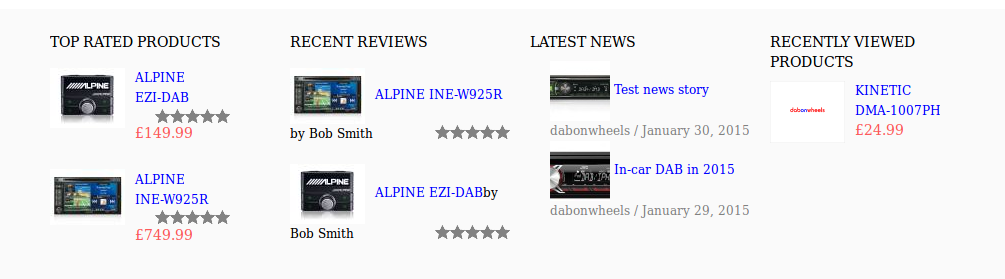
What is wrong with the 2nd widget?
To remove bullets from the 3rd widget add this code in custom.css file:
.footer_block li {
    list-style: none;
}
Thank you.
Regards,
Eva Kemp.
Hello,
Sorry, but Revolution Slider is a 3rd-party plugin and we aren’t its authors. You can refer to Revolution Slider documentation http://revolution.themepunch.com/documentation/ .
Thank you.
Regards,
Eva Kemp.
Hello,
The problem is you have uploaded the theme folder with all package, but you should only upload “woopress” folder. Now the theme is located in /wp-content/themes/WooPress_Responsive_Ecommerce_Wordpress_Theme/woopress directory, but the correct path is /wp-content/themes/woopress. So please move the theme folder “woopress” one directory upper.
Thank you.
Regards,
Eva Kemp.
Hello,
That error is related to your server configuration:
http://stackoverflow.com/questions/20040307/how-to-fix-508-resource-limit-is-reached-in-wordpress
You need contact your host concerning this issue.
Regards,
Eva Kemp.
Hello,
Sorry, but this is related to MailChimp plugin and you have to contact their support concerning this issue or refer to their documentation http://kb.mailchimp.com/
Thank you.
Regards,
Eva Kemp.
Hello,
Please add this code in custom.css file:
.etheme_add_to_cart_button {
   background-color: black;
   font-family: arial;
}
Change the values to yours.
Thank you.
Regards,
Eva Kemp.
Hello,
Please read our documentation how to create one-page menu:
https://www.8theme.com/demo/docs/royal/#!/3_one_page
Thank you.
Regards,
Eva Kemp.
Hello,
Could you please provide us with a page link where you want to add “Add to cart” button and wp-admin panel credentials in Private Content.
Thank you.
Regards,
Eva Kemp.
Hello,
You have full posts shown. You need “Read More” tag to the posts to show only teasers.
Please refer to the article:
http://www.wikihow.com/Add-Read-More-to-Wordpress
Thank you.
Regards,
Eva Kemp.
Hello,
Do you mean you even don’t have Essential Grid plugin among the required plugins for installation?
You can download the plugin from this link https://www.8theme.com/download-plugins/ and install it.
Thank you.
Regards,
Eva Kemp.
Hello,
That’s great you found the reason of the problem.
Have a nice day.
Regards,
Eva Kemp.
Hello,
Please provide us with wp-admin panel credentials in Private Content.
Thank you.
Regards,
Eva Kemp.
Hello,
You’re welcome.
Regards,
Eva Kemp.
Hello,
Could you please describe what exactly you want to customize?
Thank you.
Regards,
Eva Kemp.
Hello,
That text can be changed in Woocommerce file wp-content/plugins/woocommerce/includes/class-wc-checkout.php.
Thank you.
Regards,
Eva Kemp.
Hello,
a) Unfortunately the image frame size won’t be changed. You need edit the files as I said in the previous post.
b) In the file legenda/woocommerce/single-product/product-image.php you need change image width and height (lines 46, 47) and in the file legenda/woocommerce/single-product/product-thumbnails.php – lines 42, 43.
Concerning your 4th question, it’s also related to Woocommerce documentation:
http://docs.woothemes.com/document/editing-product-data-tabs/
Thank you.
Regards,
Eva Kemp.
Hello,
I’ve added this code in css block in Visual Composer editor:
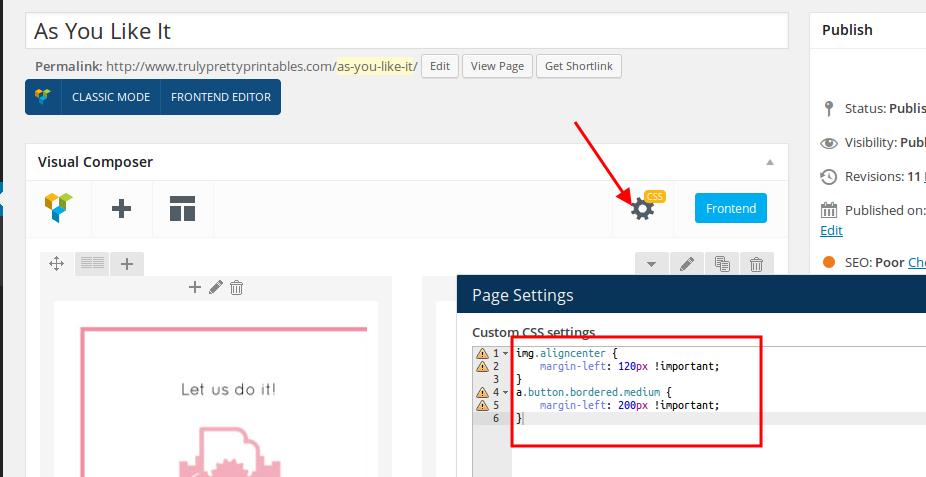
Please check the page now.
Thank you.
Regards,
Eva Kemp.









