

Hello,
Check, please, if you have this problem with default theme or with our theme only? Very likely problem is related to latest WP update and does not depend on our theme.
Regards,
Olga Barlow

Hello,
Check, please, if you have this problem with default theme or with our theme only? Very likely problem is related to latest WP update and does not depend on our theme.
Regards,
Olga Barlow
Hello,
Edit the code of you child theme functions.php and delete the following lines:
	wp_enqueue_script('jquery.shake',plugins_url($js_path.'jparallax'.$ext.'.js',__FILE__));
	wp_enqueue_script('jquery.vhparallax',plugins_url($js_path.'vhparallax'.$ext.'.js',__FILE__));
	wp_enqueue_style('ultimate-vidcons',plugins_url('assets/fonts/vidcons.css',__FILE__));
	wp_enqueue_script('jquery.ytplayer',plugins_url($js_path.'mb-YTPlayer'.$ext.'.js',__FILE__));
Regards
Hello,
Look, we appreciate that our clients like elements from our main site, but main site has many features that are not included into our themes, we can’t add them all in every template we create.
Regards
Hello,
To hide Featured Image for the Blog/Category page add the following code in custom.css
.article .article-image {display: none;}
If you want to use Video instead of Featured Image, unfortunately there is no such option in our theme.
Regards,
Sandra Ledford
Hello,
Thanks, glad to hear that you like it. This element was created for main site only. Unfortunately there is no such component in our themes.
Regards
Hello,
After rotation iPad from portrait to landscape it takes a second when header and other elements regroup layout to landscape. This is the way it works, but I don’t see zooming.
Regards
Hello,
You are welcome!
Best regards,
Sandra Ledford.
Hello,
Unfortunately to change image settings you need to edit template file legenda/woocommerce/single-product/product-image.php . Create child theme, copy this file into child theme and then change the $mainImageWidth = 600; $mainImageHeight = 900; $mainImageCrop = false; to values you need. If you provide FTP details I could help you with it.
If you want to make image block width smaller you can also enable sidebar on single product page.
Regards,
Sandra Ledford
Hello,
1) Firstly I have disabled third-party Static Block plugin, because it gives js errors. There is the same option in our theme, so don’t think you need additional one with compatibility problems. Now we can see the footer on your site.
Also I have updated Revolution Slider plugin. Would recommend to keep all the plugins and our theme up to date.
2) If you want to make all the product images on grid the same size you need to use hard crop option. I have enabled it in Theme Options > Product Page Layout > Image Cropping > ON. If you disable/enable this option keep in mind that you need to regenerate all the images after that. You can use Regenerate thumbnail plugin.
3) Single product page. Unfortunately to change image settings you need to edit template file legenda/woocommerce/single-product/product-image.php . Create child theme, copy this file into child theme and then change the $mainImageWidth = 600; $mainImageHeight = 900; $mainImageCrop = false; to values you need. If you provide correct FTP password I could help you with it.
If you want to make image block width smaller you can also enable sidebar on single product page, see here http://www.ethiopianclothing.net/product/ambo-menen/
4) I noticed that you use additional pages to show products from specific categories, but you can use Product Categories instead. See http://prntscr.com/9c2uls
Is there anything else I could help you with?
Regards,
Olga Barlow
Hello,
Could you, please, check admin panel access, because we can’t log in.
Regards,
Olga Barlow
Hello,
Yes, we did. We use FileZilla to connect to FTP and it does not work. Please provide correct FTP credentials.
Regards,
Sandra Ledford.
Check please FTP accesses because we can’t connect.
Regards,
Sandra Ledford.
Hello,
What php memory limit do you have? We would recommend to set at least 96M. Please, provide wp-admin and FTP accesses in Private Content for better investigation of your problem.
Regards,
Sandra Ledford
Hello,
WooCommerce bestsellers shortcode has only default attributes, you can read more in WooCommerce plugin documentation https://docs.woothemes.com/document/woocommerce-shortcodes/ . To display bestsellers you can also use Visual Composer element – Products that has some additional option.
Regards,
Sandra Ledford
Hello,
To change/delete that banner go to Theme Options > Shop > Product Page Banner.
Regards,
Sandra Ledford
Hello,
We checked your site and don’t see any problems. Very likely responsive was disabled (Theme Options > Responsive > Enable Responsive Design > Off) when you made screenshots. When you disable responsive then main container width is 940px and there is no place for all the menu items.
Regards,
Sandra Ledford
Hello,
Could you clarify if you have problems only with preview or with form functionality when you add it to page?
Regards,
Olga Barlow
Hello,
Seems it was old version problems, we have updated your plugins (VC and Ultimate Addons for VC) to latest version and it fixed the issues. Check now, please.
Regards
Hello,
Check your mobile menu now, please. It was theme problem, files classico/headers/structure-10.php (lines 54-59) and structure-11.php (lines 47-53), code
<div class="mobile-menu-wrapper">
    <div class="container">
	<div class="navbar-collapse">
		<?php et_get_main_menu(); ?>
	</div><!-- /.navbar-collapse -->
    </div>
</div>
should be replaced by
<div class="mobile-menu-wrapper">
    <div class="container">
	<div class="navbar-collapse">
		<?php et_get_mobile_menu(); ?>
	</div><!-- /.navbar-collapse -->
    </div>
</div>
Also would recommend to add margin after search form in header, because at present it looks too close to the image
.header .yith_woocommerce_ajax_search.widget {margin-bottom: 30px;}
Regards,
Olga Barlow
Hello,
Let’s continue our conversation via e-mails only to avoid problems with double answers.
Regards,
Olga Barlow
Hello,
Take my apologies, I should have let you know beforehand about updates we plan to do. But if you need to change something in template files you need to use child theme, because every time when you update theme you’ll loose the changes you made!
Please, re-upload native theme files, remove all the changes or files you additionally added, disable all the third-party plugins that may cause the problem and check if the problem persists. Because we still see the same styles while inspecting some problem elements
http://prntscr.com/928c23
We are not responsible for the changes made by our clients that cause issues with theme functionality. Check our demo, do you see this problem too?
Regards
Hello,
Very likely this is local problem on your phone. Could you check if our demo works fine on your phone and check also Royal or WooPress. If you use any additional extensions disable them, sometimes it could cause problem. Try to test theme in other browser. Does problem persist?
Regards
Hello,
Your problem related to font family that you applied
font-family: 'cwTeX Yen', sans-serif;
That’s why when you have combination of english and chinese characters you see that problem.
Regards
Hello,
We are waiting for reply from WPML team about this problem with new version of WPML plugin and our theme. We’ll keep you in touch!
Regards
Hello, Ali Akil,
We have already used all the recommendations from WPML. Your problem is not related to theme! You just did not translate necessary fields. See here
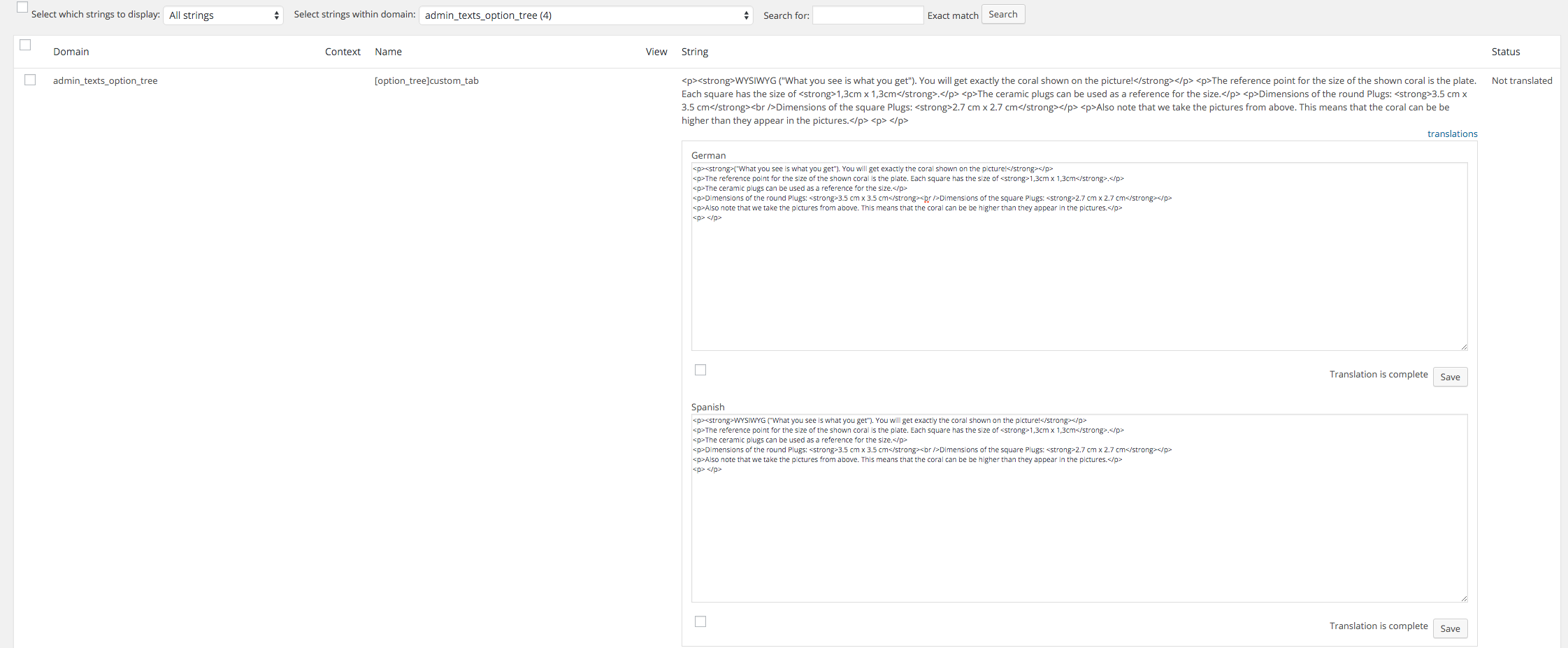
Please, go to WPML > String Translation > select admin_texts_option_tree from “Select strings within domain:” drop-down list and translate necessary strings.
Regards,
Olga Barlow
Hello,
If you need additional features for any of included plugins you need to contact with plugin authors. Our support is limited to questions regarding the features of our theme or problems with it. We are not able to provide support for code customizations or third-party plugins.
Regards,
Olga Barlow
Hello,
Is there anything else we could help you with or this topic can be closed?
Regards,
Olga Barlow
Hello,
.po file you can find in wp-content/themes/woopress/languages/ folder https://www.8theme.com/demo/docs/woopress/#!/2_how_to_translate
Use it to translate necessary strings related to registration and save as da_DK.po and da_DK.mo into the same folder. Actually necessary strings should be available also via the string translation, but not sure why they are not shown there on your site. But we checked and it 100% works if you translate .po file.
Regards,
Olga Barlow
Hello,
We checked and see that your problem was caused by compatibility between WPML plugin and Essential grid. We would recommend to contact with plugin authors to solve the problem.
Regards
Hello,
It’s not related to our theme, you may activate Storefront and check. Very likely you have installed some third-party plugin that caused compatibility problem with Visual Composer, because there are some errors in console if you open it. Try to disable all the third-party plugins except included in our theme and check if problem still persists. We are able to help you if problem exist with our theme only, but if you have issues with WP installation or third-party plugin we can do nothing, because it is beyond the scope of our support.
Keep in mind Ultimate Addons update message can’t be the reason of your problem!
Regards









