Forum Replies Created

Viewing 30 posts - 2,221 through 2,250 (of 5,361 total)
  • Avatar: Justin
    Luca Rossi
    Support staff
    December 5, 2024 at 10:26

    Dear Ben,

    We hope this message finds you well.

    Could you kindly resend the FTP account details at your earliest convenience? Editing the theme files through the WordPress admin panel is not the safest approach.

    Thank you for your understanding and assistance.

    Best regards,
    The 8Theme Team

    Avatar: Justin
    Luca Rossi
    Support staff
    December 5, 2024 at 05:51

    Hi @Rowan Keizer,

    Please try adding this custom CSS under XStore > Theme Options > Theme Custom CSS > Global CSS:

    
    .single-product form.cart table.variations {
        margin-bottom: 0 !important;
    }
    
    .single-product .single_variation_wrap {
        margin: 0;
    }
    
    .single-product .woocommerce-variation.single_variation {
        margin-bottom: 15px;
    }
    .single-product a.reset_variations {
        margin-left: 0;
    }
    .single-product .woocommerce-variation-price {
        margin: 0;
    }
    
    .single-product .woocommerce-variation-add-to-cart.variations_button {
        margin-top: 0 !important;
        gap: 15px;
    }
    
    .single-product .woocommerce-variation-add-to-cart.variations_button table label {
        margin-top: 15px !important;
    }
    
    .single-product .woocommerce-variation-add-to-cart.variations_button table label[for="wck_personalised_field_name"] {
        margin-top: 0 !important;
    }
    

    Hope it helps!

    Avatar: Justin
    Luca Rossi
    Support staff
    December 5, 2024 at 05:24

    Dear @Bagwani,

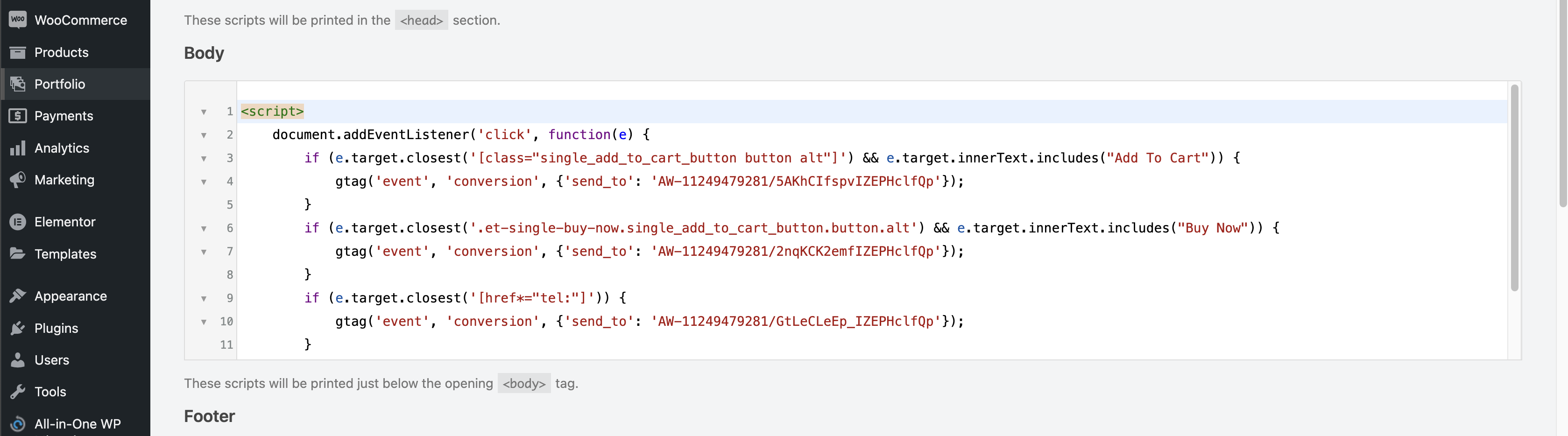
    The tracking code has been added under Body section of WP Code plugin.

    https://img001.prntscr.com/file/img001/wIsQk2J7RjOsNSX_7VAZmw.png

    Thank you for choosing XStore. We are always here to assist you.

    Best regards,
    8Theme’s Team

    Please contact administrator
    for this information.
    Avatar: Justin
    Luca Rossi
    Support staff
    December 5, 2024 at 05:12

    Dear @KB Creative,

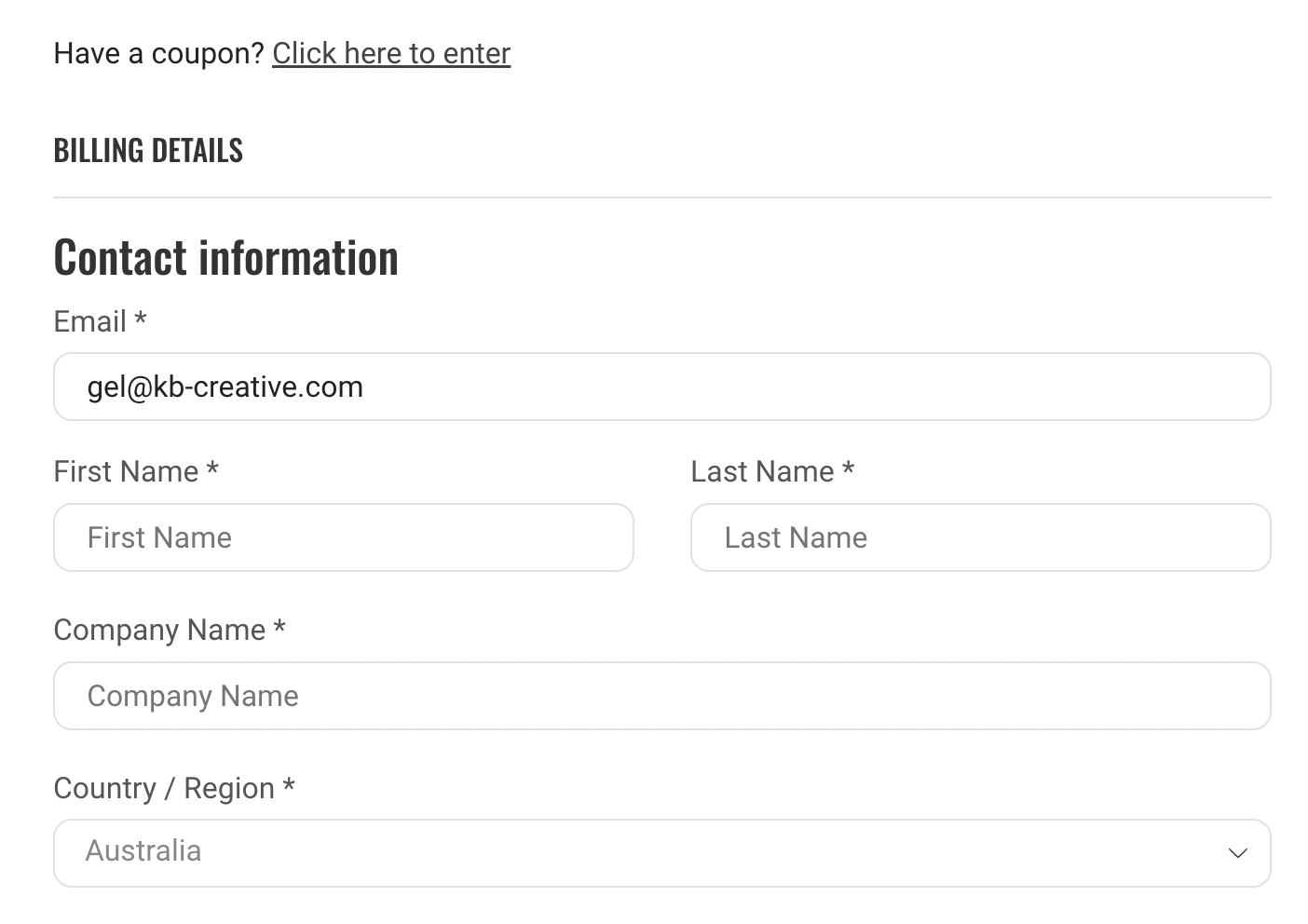
    You just need to add this custom code under functions.php file locates in your child theme:

    
    add_action('woocommerce_before_checkout_billing_form', 'n2t_fields_before_billing_details', -50);
    function n2t_fields_before_billing_details() {
    	$checkout = WC()->checkout;
    
    	echo '<div class="woocommerce-billing-fields" id="contact_details">';
    
    	echo '<h3>' . esc_html( __( 'Contact information', 'woocommerce-payments' ) ) . '</h3>';
    
    	echo '<div class="woocommerce-billing-fields__field-wrapper">';
    	woocommerce_form_field(
    		'billing_email',
    		[
    			'type'        => 'email',
    			'label'       => __( 'Email address', 'woocommerce-payments' ),
    			'class'       => [ 'form-row-wide woopay-billing-email' ],
    			'input_class' => [ 'woopay-billing-email-input' ],
    			'validate'    => [ 'email' ],
    			'required'    => true,
    		],
    		$checkout->get_value( 'billing_email' )
    	);
    
    	echo '</div>';
    	echo '</div>';
    
    	// Ensure WC Blocks styles are enqueued so the spinner will show.
    	// This style is not enqueued be default when using a block theme and classic checkout.
    	wp_enqueue_style( 'wc-blocks-style' );
    }
    

    Hope it helps!

    Avatar: Justin
    Luca Rossi
    Support staff
    December 5, 2024 at 05:06

    Dear @Yasir Alam,

    Thank you for reaching out to us.

    Could you kindly confirm if you are referring to adding the black color attribute next to the product title? For example: “Black – Magic Keyboard.”

    Please try adding this custom codes under functions.php file locates in your child theme:

    
    add_filter('the_title', 'wh_insertAfterShopProductTitle', 15, 2);
    function wh_insertAfterShopProductTitle($title, $post_id)
    {
    	$product = wc_get_product($post_id);
    	if ($product) {
            $abv = $product->get_attribute('pa_color');
            if (!empty($abv)) {
                return $abv . ' - ' . $title;
            }
        }
        return $title;
    }
    

    Best regards,
    The 8Theme Team

    Avatar: Justin
    Luca Rossi
    Support staff
    December 4, 2024 at 10:43

    Dear Gabriele,

    We hope this message finds you well.

    We recently conducted a Full Page test for your website, https://futuranail.it/, using Pingdom Tools. Below are the details of the test:

    – **Test Date:** December 4
    – **Page Load Time:** 529 ms
    – **Number of Requests:** 20
    – **Page Size:** 608.7 KB
    – **Google Page Speed Performance Grade:** 96/100

    For a more detailed analysis, you can review the full report here: [Pingdom Tools Report](https://tools.pingdom.com/#64e442f22b400000).

    Should you have any questions or require further assistance, please don’t hesitate to reach out.

    Best regards,
    The 8Theme Team

    Avatar: Justin
    Luca Rossi
    Support staff
    December 4, 2024 at 10:31

    Dear @digiklick,

    Thank you for reaching out to us.

    The customization you are requesting would require implementing custom code and utilizing third-party plugins. We recommend reviewing the following article, which provides guidance on this topic: [How to Customize the WooCommerce Registration Form](https://quadlayers.com/customize-woocommerce-registration-form/).

    Please note that any issues related to custom code or third-party plugins should be directed to the respective plugin authors, as they fall outside the scope of our standard support policy.

    Should you have any further questions or require assistance within our support scope, please do not hesitate to contact us.

    Best regards,
    The 8Theme Team

    Avatar: Justin
    Luca Rossi
    Support staff
    December 4, 2024 at 09:46

    Dear @Mario,

    We hope this message finds you well.

    1. We kindly request your assistance in creating a video to demonstrate the issue in question, as we have been unable to reproduce it on our end. Your help in this matter would be greatly appreciated.

    2. Additionally, we would like to ask you to add the following code snippet to the functions.php file located in your child theme:

    
    // Make order notes required
    add_filter( 'woocommerce_checkout_fields', 'wc_override_checkout_fields' );
    function wc_override_checkout_fields( $fields ) {
         $fields['order']['order_comments']['required'] = true;
         return $fields;
    }
    

    Thank you in advance for your support and cooperation.

    Best regards,
    The 8Theme Team

    Avatar: Justin
    Luca Rossi
    Support staff
    December 4, 2024 at 09:34

    Dear @feeldesign,

    We hope this message finds you well.

    We have identified the following errors in the log file:

    
    [Tue Dec 03 05:00:37.539284 2024] [proxy_fcgi:error] [pid 1850426:tid 139845166933760] [client 104.28.205.74:0] AH01071: Got error 'PHP message: PHP Fatal error:  Uncaught Error: Class 'TC_Events_Search' not found in /var/www/vhosts/classicgrand.com/httpdocs/wp-content/plugins/bridge-for-woocommerce/functions.php:112\nStack trace:\n#0 [internal function]: show_tc_wb_event_attributes()\n#1 /var/www/vhosts/classicgrand.com/httpdocs/wp-content/plugins/tickera/includes/classes/class.shortcode_builder.php(95): call_user_func()\n#2 /var/www/vhosts/classicgrand.com/httpdocs/wp-content/plugins/tickera/includes/classes/class.shortcode_builder.php(49): Tickera\\TC_Shortcode_Builder->form()\n#3 /var/www/vhosts/classicgrand.com/httpdocs/wp-includes/class-wp-hook.php(324): Tickera\\TC_Shortcode_Builder->show_shortcodes()\n#4 /var/www/vhosts/classicgrand.com/httpdocs/wp-includes/class-wp-hook.php(348): WP_Hook->apply_filters()\n#5 /var/www/vhosts/classicgrand.com/httpdocs/wp-includes/plugin.php(517): WP_Hook->do_action()\n#6 /var/www/vhosts/classicgrand.com/httpdocs/wp-admin/admin-footer.php(31): do_action()\n#7 /var/www/vhosts/classicgrand.com/httpdocs/wp-ad...', referer: https://classicgrand.com/events/  
    [Tue Dec 03 05:01:07.122983 2024] [proxy_fcgi:error] [pid 1850426:tid 139844420343552] [client 104.28.205.74:0] AH01071: Got error 'PHP message: PHP Fatal error:  Uncaught Error: Class 'TC_Events_Search' not found in /var/www/vhosts/classicgrand.com/httpdocs/wp-content/plugins/bridge-for-woocommerce/functions.php:112\nStack trace:\n#0 [internal function]: show_tc_wb_event_attributes()\n#1 /var/www/vhosts/classicgrand.com/httpdocs/wp-content/plugins/tickera/includes/classes/class.shortcode_builder.php(95): call_user_func()\n#2 /var/www/vhosts/classicgrand.com/httpdocs/wp-content/plugins/tickera/includes/classes/class.shortcode_builder.php(49): Tickera\\TC_Shortcode_Builder->form()\n#3 /var/www/vhosts/classicgrand.com/httpdocs/wp-includes/class-wp-hook.php(324): Tickera\\TC_Shortcode_Builder->show_shortcodes()\n#4 /var/www/vhosts/classicgrand.com/httpdocs/wp-includes/class-wp-hook.php(348): WP_Hook->apply_filters()\n#5 /var/www/vhosts/classicgrand.com/httpdocs/wp-includes/plugin.php(517): WP_Hook->do_action()\n#6 /var/www/vhosts/classicgrand.com/httpdocs/wp-admin/admin-footer.php(31): do_action()\n#7 /var/www/vhosts/classicgrand.com/httpdocs/wp-ad...', referer: https://classicgrand.com/events/  
    

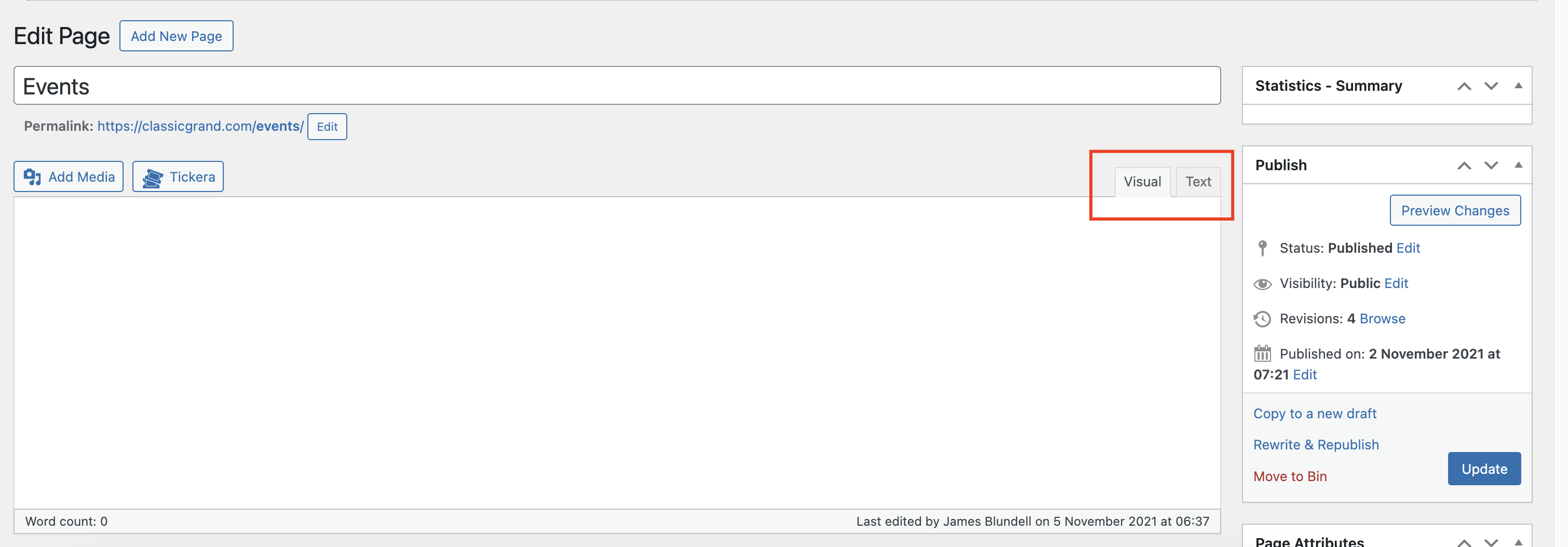
    Additionally, we are unable to edit the events page(https://img001.prntscr.com/file/img001/MPxbz_f-T46BEey699Pm1w.png). Could you kindly assist us by reaching out to the plugin’s author for further support? You can contact them via the following link: [https://tickera.freshdesk.com/](https://tickera.freshdesk.com/).

    We would greatly appreciate your help in resolving this issue.

    Best regards,
    8Theme Team

    Avatar: Justin
    Luca Rossi
    Support staff
    December 4, 2024 at 06:38

    Hi @Gracu_,

    Please add this custom code under functions.php file locates in your child theme:

    
    add_action('wp_footer', '_n2t_wp_footer');
    function _n2t_wp_footer(){
        if(is_checkout()){
            ?>
            <script>
                jQuery(document).ready(function($) {
                    setTimeout(function (){
                        $('tr.woocommerce-shipping-totals.shipping td[data-title="Wysyłka"]').attr("colspan", 2);
                    }, 2000);
                });
            </script>
            <?php
        }
    }
    

    Hope it helps!

    Avatar: Justin
    Luca Rossi
    Support staff
    December 4, 2024 at 05:29

    Hi @KB Creative,

    Could you please check again?

    https://img001.prntscr.com/file/img001/ddPKHPeyRICq3KFP5rsdAw.png

    Thank you!

    Avatar: Justin
    Luca Rossi
    Support staff
    December 3, 2024 at 18:42

    Hi @KB Creative,

    We already added that code in your staging site.

    Best regards,
    The 8Theme Team

    Avatar: Justin
    Luca Rossi
    Support staff
    December 3, 2024 at 18:41

    Dear @ryanasm81,

    Thank you for reaching out to us.

    We would like to inform you that the “Filter Products by Tags” widget is not currently available in our XStore theme. However, you may consider using a third-party plugin to achieve this functionality. We recommend the following plugin: [Woo Product Filter](https://wordpress.org/plugins/woo-product-filter/).

    Please note that any issues or inquiries related to this plugin should be directed to the plugin’s author via their support page: [Woo Product Filter Support](https://wordpress.org/support/plugin/woo-product-filter/).

    If you have any further questions or need assistance with the XStore theme, please do not hesitate to contact us.

    Best regards,
    The 8Theme Team

    Avatar: Justin
    Luca Rossi
    Support staff
    December 3, 2024 at 18:30

    Dear @KB Creative,

    We hope this message finds you well.

    To resolve the issue you are experiencing, we would like to propose two possible solutions:

    **1. Adding Custom Code to the functions.php File in Your Child Theme**
    Please add the following code snippet to the functions.php file of your child theme:

    
    add_action('woocommerce_before_checkout_billing_form', 'n2t_fields_before_billing_details', -50);
    function n2t_fields_before_billing_details() {
    		$checkout = WC()->checkout;
    
    		echo '<div class="woocommerce-billing-fields" id="contact_details">';
    
    		echo '<h3>' . esc_html( __( 'Contact information', 'woocommerce-payments' ) ) . '</h3>';
    
    		echo '<div class="woocommerce-billing-fields__field-wrapper">';
    		woocommerce_form_field(
    			'billing_email',
    			[
    				'type'        => 'email',
    				'label'       => __( 'Email address', 'woocommerce-payments' ),
    				'class'       => [ 'form-row-wide woopay-billing-email' ],
    				'input_class' => [ 'woopay-billing-email-input' ],
    				'validate'    => [ 'email' ],
    				'required'    => true,
    			],
    			$checkout->get_value( 'billing_email' )
    		);
    
    		echo '</div>';
    		echo '</div>';
    
    		// Ensure WC Blocks styles are enqueued so the spinner will show.
    		// This style is not enqueued be default when using a block theme and classic checkout.
    		wp_enqueue_style( 'wc-blocks-style' );
    	}
    

    **2. Using the Checkout Element from the Elementor Plugin**
    Alternatively, you can utilize the Checkout element provided by the Elementor plugin. Please refer to the following screenshot for guidance: [Screenshot Link](https://prnt.sc/al5YIVtnesK2).

    If you have any questions or require further assistance, please do not hesitate to reach out.

    Best regards,
    The 8Theme Team

    Avatar: Justin
    Luca Rossi
    Support staff
    December 3, 2024 at 11:23

    Dear @Doussia,

    We hope this message finds you well.

    Could you kindly ensure that all caches have been cleared? Additionally, we would greatly appreciate it if you could provide the relevant screenshots at your earliest convenience.

    Thank you for your cooperation and support.

    Best regards,
    The 8Theme Team

    Avatar: Justin
    Luca Rossi
    Support staff
    December 3, 2024 at 11:13

    Dear @Bagwani,

    We would like to bring to your attention that there are certain plugins available that can help manage and control cron events. To address the issues with the current cron events, we kindly request you to install one of the following plugins and remove the problematic cron events:

    – [WP Crontrol](https://vi.wordpress.org/plugins/wp-crontrol/)
    – [Advanced Cron Manager](https://wordpress.org/plugins/advanced-cron-manager/)

    Thank you for your understanding and cooperation. Should you have any questions or require further assistance, please do not hesitate to reach out.

    Best regards,
    The 8Theme Team

    Avatar: Justin
    Luca Rossi
    Support staff
    December 3, 2024 at 10:01

    Dear @carliczyk,

    We hope this message finds you well.

    Upon reviewing the issue, we identified that the missing JavaScript file originates from the child theme’s code. To address this, we temporarily commented out the following code, and everything is now functioning as expected:

    
    function my_theme_scripts() {  
        wp_enqueue_script( 'scripts', get_template_directory_uri() . '/js/scripts.js', array( 'jquery' ), '1.0.0', true );  
    }  
    //add_action( 'wp_enqueue_scripts', 'my_theme_scripts' );  
    

    Additionally, we have verified that the variation gallery is now working correctly. You can view the demonstration here: [Video Link](https://www.awesomescreenshot.com/video/34247765?key=69358fc6cb7380a62aa8e8489defe048).

    Please note that if the image gallery for the main product is not configured, the gallery will not display when visiting the product page. To ensure the gallery appears, you will need to select both the color and size options.

    Should you have any further questions or require additional assistance, please do not hesitate to reach out.

    Best regards,
    The 8Theme Team

    Avatar: Justin
    Luca Rossi
    Support staff
    December 3, 2024 at 09:20

    Dear @Doussia,

    We hope this message finds you well.

    We wanted to inform you that the missing styles have been restored. At your convenience, could you kindly review them and let us know if everything is now in order?

    Thank you for your time and assistance.

    Best regards,
    The 8Theme Team

    Avatar: Justin
    Luca Rossi
    Support staff
    December 3, 2024 at 06:39

    Dear @Sprobuj,

    We hope this message finds you well.

    We would like to inform you that we have disabled the “Variations as Simple Products (Beta)” feature (please see the screenshot here: [https://prnt.sc/7RvQJD2UStz1]). Following this adjustment, the filter functionality is now working correctly again.

    Could you kindly verify this on your end?

    Please note that this feature is still in its beta version, and as such, there may be some bugs or issues. We appreciate your understanding and patience as we continue to refine it.

    Thank you for your cooperation.

    Best regards,
    The 8Theme Team

    Avatar: Justin
    Luca Rossi
    Support staff
    December 3, 2024 at 06:02

    Dear @feeldesign,

    We hope this message finds you well.

    We attempted to access your events page but encountered a fatal 500 error, as shown in the following screenshot: [https://prnt.sc/enVnAq2UTWuj](https://prnt.sc/enVnAq2UTWuj).

    To assist you further and investigate the issue in detail, could you kindly provide us with the FTP account credentials?

    Thank you in advance for your cooperation. Please let us know if you have any questions or require additional information.

    Best regards,
    The 8Theme Team

    Avatar: Justin
    Luca Rossi
    Support staff
    December 2, 2024 at 10:30

    Dear Gabriele,

    We hope this message finds you well.

    We kindly request that you test your website in private/incognito mode. Please note that WP Rocket is currently configured to cache content for non-logged-in users only.

    If you would like the cache to function for both logged-in and non-logged-in users, we can enable this specific setting for you:
    [View Screenshot](https://prnt.sc/qzP-K1b8WWOJ)

    For further details, you may refer to the following documentation:
    [WP Rocket User Cache Guide](https://docs.wp-rocket.me/article/313-user-cache?utm_source=wp_plugin&utm_medium=wp_rocket)

    Should you have any questions or require assistance, please do not hesitate to reach out.

    Best regards,
    The 8Theme Team

    Avatar: Justin
    Luca Rossi
    Support staff
    December 2, 2024 at 10:22

    Dear Greg,

    Thank you for reaching out to us.

    If you have already contacted our customization team via email, please rest assured that they will respond to you shortly.

    We appreciate your patience and understanding.

    Best regards,
    The 8Theme Team

    Avatar: Justin
    Luca Rossi
    Support staff
    December 2, 2024 at 10:20

    Dear @Bagwani,

    Thank you for reaching out to us.

    We would like to kindly inform you that issues related to third-party plugins fall outside the scope of the standard support services we provide.

    For assistance with the matter, we recommend contacting the W3 Total Cache Support team directly via the following link: [https://wordpress.org/support/plugin/w3-total-cache/](https://wordpress.org/support/plugin/w3-total-cache/).

    Should you have any further questions or require assistance with our products, please do not hesitate to reach out.

    Best regards,
    The 8Theme Team

    Avatar: Justin
    Luca Rossi
    Support staff
    December 2, 2024 at 10:18

    Dear @Martin,

    We hope this message finds you well.

    We have thoroughly reviewed your single product page template and noticed that you are not currently utilizing a Single Product Template Builder. As a result, it is not possible to modify the position of the Cross-sell and Up-sell blocks, as demonstrated in this screenshot: [https://prnt.sc/A30o5i7F5is6](https://prnt.sc/A30o5i7F5is6).

    To address this, we recommend switching to the Single Product Builder with Elementor. This tool will provide you with full control over all blocks, elements, and layout customizations. For further details, please refer to the following article: [https://www.8theme.com/documentation/xstore/xstore-builders/xstore-single-product-builder-with-elementor/](https://www.8theme.com/documentation/xstore/xstore-builders/xstore-single-product-builder-with-elementor/).

    Should you have any questions or require additional assistance, please do not hesitate to reach out.

    Best regards,
    The 8Theme Team

    Avatar: Justin
    Luca Rossi
    Support staff
    December 2, 2024 at 09:58

    Dear Moshe,

    We hope this message finds you well.

    In response to your inquiry, we can confirm that the issue appears to be related to a server-side problem or potentially caused by third-party plugins. Despite our efforts to implement various solutions, the problem persists.

    We kindly request your assistance in reaching out to the hosting provider’s support team to help resolve this matter.

    Thank you for your understanding and cooperation.

    Best regards,
    The 8Theme Team

    Avatar: Justin
    Luca Rossi
    Support staff
    December 2, 2024 at 09:14

    Dear @Martin,

    We hope this message finds you well.

    We would like to inform you that we have switched the VPN to Europe; however, the issue persists, as shown in the screenshot below:
    [https://prnt.sc/N13Rq1kwGV6n](https://prnt.sc/N13Rq1kwGV6n)

    Could you kindly assist us by temporarily disabling the restriction within the next 24 hours? Your support in resolving this matter would be greatly appreciated.

    Thank you in advance for your help.

    Best regards,
    The 8Theme Team

    Avatar: Justin
    Luca Rossi
    Support staff
    December 2, 2024 at 07:57

    Dear @MonnaChu,

    Thank you for contacting us and for using XStore.

    Unfortunately, this feature is not available in our XStore theme. You can use a third-party plugin at your own risk or submit a feature request on our taskboard: https://www.8theme.com/taskboard/ -If it receives enough votes from other customers, our development team will consider adding it in one of the upcoming updates.

    Thank you for your understanding.

    Best regards,
    8Theme’s Team

    Avatar: Justin
    Luca Rossi
    Support staff
    December 2, 2024 at 06:15

    Hi @carliczyk,

    We could see that the JS file is not loading correctly: https://prnt.sc/WKv98nNTSdsa.

    Could you please fix this issue or contact to your hosting provider about this? We guess it could be related to server side issues.

    We also recommend testing for potential conflicts between the WP-Rocket plugin and third-party plugins. To do so, please temporarily disable any non-essential third-party plugins that are not part of the XStore theme package. For your convenience, you can find the list of included plugins here: [Included Plugins](https://www.8theme.com/documentation/xstore/plugins/included-plugins/).

    Once you have deactivated the unnecessary plugins, kindly clear your browser’s cache and verify whether the performance issue persists. This step is crucial, as conflicts with third-party plugins can sometimes cause unexpected issues.

    Should you require any further assistance, please do not hesitate to reach out.

    Best regards,
    The 8Theme Team

    Please contact administrator
    for this information.
    Avatar: Justin
    Luca Rossi
    Support staff
    December 2, 2024 at 05:43

    Dear @MonnaChu,

    Thank you for reaching out to us, and please accept our apologies for the delayed response due to the weekend.

    We have reviewed your concerns and would like to provide the following guidance:

    1. **Variation Swatches**
    The variation swatches you referenced in this screenshot (https://prnt.sc/UuGvWfA9oBnH) are a default feature of the XStore theme. Since you are using a third-party plugin for variation swatches, we recommend disabling this default feature to avoid potential conflicts. You can do so by navigating to:
    **XStore > Theme Options > Variation Swatches > Switch to Disabled.**

    2. **Close Icon Customization**
    To address the close icon issue, please add the following custom CSS code:

     
       .iconic-woothumbs-pswp .pswp__button.pswp__button--close svg {  
           display: none;  
       }  
    
       .iconic-woothumbs-pswp .pswp__button.pswp__button--close {  
           margin-right: 20px;  
       }

    For any additional issues related to the third-party plugin, we kindly suggest reaching out to the plugin’s author directly. As these issues fall outside the scope of our standard support services, the plugin’s author will be better equipped to assist you.

    3. **Customization Services**
    If you are interested in pursuing personalized customizations, we invite you to submit a request through our customization panel, available at the following link:
    [https://www.8theme.com/account/#etheme_customization_panel](https://www.8theme.com/account/#etheme_customization_panel).

    Through this platform, you can collaborate directly with our technical team to explore the possibilities. Please note that customization services may incur additional charges, which will be determined after a thorough review of your specific requirements.

    Should you have any further questions or need additional assistance, please do not hesitate to contact us.

    Best regards,
    The 8Theme Team

    Avatar: Justin
    Luca Rossi
    Support staff
    December 1, 2024 at 14:00

    Dear Gabriele,

    We hope this message finds you well.

    We are pleased to inform you that the Google PageSpeed Score for your website has significantly improved following the implementation of the WP-Rocket plugin.

    At your convenience, could you kindly review the updated performance via the following link?
    [Google PageSpeed Analysis](https://pagespeed.web.dev/analysis/https-futuranail-it/f8whabb9ss?hl=en&form_factor=desktop)

    Thank you for your attention, and please do not hesitate to reach out if you have any questions or require further assistance.

    Best regards,
    The 8Theme Team

  • 1 2 3 74 75 76 177 178 179
    Viewing 2,250 results - 2,221 through 2,250 (of 5,361 total)
Viewing 30 posts - 2,221 through 2,250 (of 5,361 total)
We're using our own and third-party cookies to improve your experience and our website. Keep on browsing to accept our cookie policy.