Forum Replies Created

Viewing 30 posts - 2,191 through 2,220 (of 5,356 total)
  • Avatar: Justin
    Luca Rossi
    Support staff

    Hi @sefat,

    Please provide your site’s WP Admin and credentials in the private content area of this topic, so that we can look into it further and help you:

    WP Admin URL login:
    WP Admin Username:
    WP Admin Password:

    Thank you for your cooperation and we look forward to hearing from you soon.

    Best Regards,
    8Theme’s Team

    Avatar: Justin
    Luca Rossi
    Support staff

    Hi @bdb232,

    Please try adding this custom CSS under XStore > Theme Options > Theme Custom CSS > Global CSS:

    
    body.elementor-default:not([data-elementor-device-mode]) [class*=elementor-widget-et-]>.elementor-widget-container,
    body.elementor-default:not([data-elementor-device-mode]) [class*=elementor-widget-etheme]>.elementor-widget-container,
    body.elementor-default:not([data-elementor-device-mode]) [class*=elementor-widget-woocommerce-etheme]>.elementor-widget-container,
    body.elementor-default:not([data-elementor-device-mode]) [class*=elementor-widget-woocommerce-product-etheme]>.elementor-widget-container,
    body.elementor-page:not([data-elementor-device-mode]) [class*=elementor-widget-et-]>.elementor-widget-container,
    body.elementor-page:not([data-elementor-device-mode]) [class*=elementor-widget-etheme]>.elementor-widget-container,
    body.elementor-page:not([data-elementor-device-mode]) [class*=elementor-widget-woocommerce-etheme]>.elementor-widget-container,
    body.elementor-page:not([data-elementor-device-mode]) [class*=elementor-widget-woocommerce-product-etheme]>.elementor-widget-container {
        opacity: 1;
        visibility: visible;
    }
    body.elementor-default:not([data-elementor-device-mode]) [class*=elementor-widget-et-]:before,
    body.elementor-default:not([data-elementor-device-mode]) [class*=elementor-widget-etheme]:before,
    body.elementor-page:not([data-elementor-device-mode]) [class*=elementor-widget-et-]:before,
    body.elementor-page:not([data-elementor-device-mode]) [class*=elementor-widget-etheme]:before {
        display: none;
    }


    Kind regards,
    The 8Theme Team

    Avatar: Justin
    Luca Rossi
    Support staff

    Hi @Grace,

    Sorry for the late response because of the weekend.

    Please add the following code under functions.php file locates in your child theme:

    
    add_action('wp_footer', '_n2t_wp_footer');
    function _n2t_wp_footer(){
        ?>
        <script>
            jQuery(document).ready(function($) {
                $(document).on('click touchend', '#apbd_dd_4 ul.apbd-currency-ul li a', function (e){
                    e.preventDefault();
                    window.location.href = $(this).attr('href');
                });
            });
        </script>
        <?php
    }
    

    Further customization will fall out of scope our support standard services we provide.

    If you are interested in pursuing personalized customizations, we encourage you to submit a request through our customization panel, which can be accessed via the following link: https://www.8theme.com/account/#etheme_customization_panel.

    Through this platform, you can collaborate directly with our technical team to explore the feasibility of your request. Please note that customization services may involve additional charges, which will be determined after a detailed review of your specific requirements.

    If you have any further questions or need additional assistance, please do not hesitate to contact us. We are here to help.

    Best regards,
    The 8Theme Team

    Avatar: Justin
    Luca Rossi
    Support staff

    Dear @Greg,

    We hope this message finds you well.

    Please accept our apologies for the delayed response, as the weekend and a high volume of tickets in the forum caused a slight delay.

    We kindly request your assistance in double-checking the login URL once again, as it appears to have expired.

    Thank you in advance for your support.

    Best regards,
    8Theme Team

    Avatar: Justin
    Luca Rossi
    Support staff

    Dear @Narka,

    We hope this message finds you well.

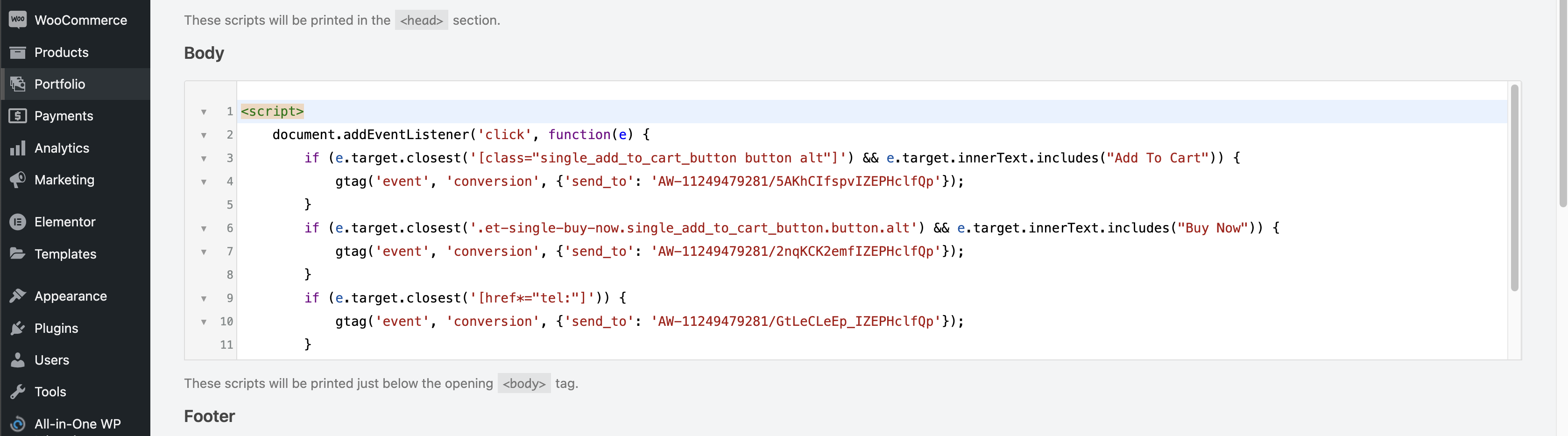
    The desired functionality can be achieved using custom JavaScript code. Please refer to the following screenshot for an example of the custom JS code: https://img001.prntscr.com/file/img001/wIsQk2J7RjOsNSX_7VAZmw.png.

    Kindly provide us with your GTM event codes, and we will be happy to assist you in implementing them on your website.

    Should you have any questions or require further clarification, please do not hesitate to reach out.

    Best regards,
    The 8Theme Team

    Avatar: Justin
    Luca Rossi
    Support staff

    Hi @azicard,

    Unfortunately, the custom “add to cart” value feature is not available in our XStore theme yet.

    If you would like our development team to consider making the XStore theme compatible with this plugin, we kindly encourage you to submit your suggestion on our Taskboard: https://www.8theme.com/taskboard/. Suggestions that receive significant support from other customers will be carefully reviewed by our team for potential inclusion in future updates.

    We appreciate your understanding and cooperation in this matter.

    Kind regards,
    The 8Theme Team

    Avatar: Justin
    Luca Rossi
    Support staff

    Dear @pakyait,

    We hope this message finds you well.

    It appears that the issue was related to a bug in WordPress version 6.7.x. We have now set the WP_DEBUG parameter back to false.

    Everything should be functioning correctly at this point. Could we kindly ask for your assistance in verifying if the issue has been fully resolved on your end?

    Thank you for your time and support.

    Best regards,
    The 8Theme Team

    Avatar: Justin
    Luca Rossi
    Support staff

    Dear @Uttam Pradhan,

    We hope this message finds you well.

    1. As per your request, we have updated the header color on mobile devices to #fffff6.

    2. Regarding the Posts Element, the “Next” and “Previous” buttons are not supported. To address this, we have configured the display to show 3 posts per page and implemented numbered pagination instead. You can view the changes here: [Screenshot](https://prnt.sc/0zRnutYBTets).

    Should you have any further questions or require additional adjustments, please do not hesitate to reach out.

    Best regards,
    The 8Theme Team

    Avatar: Justin
    Luca Rossi
    Support staff

    Dear @pakyait,

    We hope this message finds you well.

    Could you kindly update the WP_DEBUG setting in the wp-config.php file to false? For your reference, you may find detailed instructions in the following article:

    https://www.domain.com/help/article/wordpress-how-to-enable-or-disable-wp-debug

    Please let us know the outcome once the change has been made.

    Best regards,
    The 8Theme Team

    Avatar: Justin
    Luca Rossi
    Support staff

    Dear @azicard,

    We kindly request that you review our previous response once more: (https://www.8theme.com/topic/issues-on-quantity-and-custom-value-after-upgrading-to-v9-4/#post-422876).

    Please note that we only made adjustments to the custom code that was already present in your child theme prior to our intervention.

    In light of this, we recommend completely removing the custom code to determine if the “Add to Cart” functionality resumes working as expected.

    Should you have any further questions or require additional assistance, please do not hesitate to reach out.

    Best regards,
    The 8Theme Team

    Avatar: Justin
    Luca Rossi
    Support staff

    Dear Merin,

    We hope this message finds you well.

    The appropriate dimensions for the banner image should be 50×50 or one of the predefined sizes such as thumbnail, medium, or large. However, it seems that the srcset attribute generated by WordPress is forcing the image width to 100%.

    To address this issue, we recommend adding the following custom code to the functions.php file located in your child theme. This will disable the srcset functionality:

    
    add_filter( 'wp_calculate_image_srcset', '__return_false' );  
    

    Please let us know if you need further assistance or have any questions.

    Best regards,
    The 8Theme Team

    Avatar: Justin
    Luca Rossi
    Support staff

    Hi @Yasir Alam 8Theme,

    Please add this custom CSS under XStore > Theme Options > Theme Custom CSS > Global CSS:

    
    .single-product form.cart.variations_form span.st-custom-attribute::after {
        content: attr(data-name);
        order: 1;
        margin-bottom: 5px;
    }
    
    .single-product form.cart.variations_form span.st-custom-attribute span.variation-title {
        display: none;
    }
    .single-product form.cart.variations_form span.st-custom-attribute span.variation-price {
        order: 2;
    }
    .single-product form.cart.variations_form span.st-custom-attribute span.variation-price del {
        display: none;
    }
    

    https://prnt.sc/FR1jMooksUmG

    Kind regards,
    The 8Theme Team

    Avatar: Justin
    Luca Rossi
    Support staff

    Dear @pageantapp,

    We hope this message finds you well.

    We would like to inform you that we have already switched the default theme to the 2025 version and disabled almost all third-party plugins on your staging site (https://myseller.pageantapp.com/staging-site-pag/). However, despite these changes, we are still unable to add a new product via the Vendor account.

    The “Add New Product” page appears to be completely broken. You can view the issue here:
    https://myseller.pageantapp.com/staging-site-pag/dashboard/?product_id=0&action=edit&_dokan_edit_product_nonce=dc144adcbd

    Given the circumstances, we kindly recommend reaching out to the Dokan Support Team for further assistance with this issue. You can contact them via the following link: https://app.dokan.co/login

    Please let us know if there is anything else we can assist you with.

    Best regards,
    8Theme Team

    Files is visible for topic creator and
    support staff only.
    Avatar: Justin
    Luca Rossi
    Support staff

    Dear @IT-Spectrum,

    Thank you for reaching out to us.

    We understand that you are experiencing issues with third-party plugins. Please note that such plugins fall outside the scope of the standard support services we provide.

    To address the issue, we recommend contacting the plugin’s author directly via the following link: https://wpclever.net/support/.

    If you would like our development team to consider making the XStore theme compatible with this plugin, we kindly encourage you to submit your suggestion on our Taskboard: https://www.8theme.com/taskboard/. Suggestions that receive significant support from other customers will be carefully reviewed by our team for potential inclusion in future updates.

    We appreciate your understanding and cooperation in this matter.

    Kind regards,
    The 8Theme Team

    Avatar: Justin
    Luca Rossi
    Support staff

    Hi @uttam pradhan,

    In this post the table has 6 row but only the 3 are showing in mobile version (fixed).

    The table is not responsive, we’ve added the custom CSS code to show the scrollbar so we can scroll to the right hand side of tables.

    in mobile versions also i want the header color as the footer but the header colcor is remain same in white only, i am unable to do it, look on that as well, the footer color code is- #ff5c17

    Can you confirm that you want to change the background color of header on mobile to #ff5c17 or #fffff6? Because the current background color of mobile panel is: #fffff6.

    I want to add ‘Next’ and ‘Previous’ buttons to the last container on my homepage, but they are not functioning as expected. How can I fix this?

    We can only to add the arrows, we’ve added for you: https://www.awesomescreenshot.com/image/51922004?key=6bdab0f4e56b0f60b306f825d187addf.

    Best Regards,
    The 8Theme Team

    Avatar: Justin
    Luca Rossi
    Support staff

    Dear Janina,

    Thank you for reaching out to us.

    The status you are referring to is the default order status in WooCommerce after a payment has been successfully completed. For more detailed information, you may find this article helpful: [WooCommerce Order Statuses](https://woocommerce.com/document/managing-orders/order-statuses/).

    If you would like to modify the order status in WooCommerce after a payment is accepted, we recommend reviewing the following guide: [WooCommerce Payment Complete Hook](https://wpdesk.net/blog/woocommerce_payment_complete-hook/).

    We hope this information is helpful. Should you have any further questions, please do not hesitate to contact us.

    Best regards,
    The 8Theme Team

    Avatar: Justin
    Luca Rossi
    Support staff

    Dear Ben,

    We hope this message finds you well.

    We wanted to inform you that we have made some updates to the custom codes, and the products are now displaying correctly on the single product page.

    However, we would greatly appreciate your assistance in addressing an issue with the short product descriptions. Specifically, there are some unclosed HTML tags within the short descriptions, which are causing the product listings to appear broken. You can refer to the following screenshots for more details:
    – (https://www.awesomescreenshot.com/image/51921426?key=4980edd3e4e20ce976e48231f39a0bb4)
    – (https://www.awesomescreenshot.com/image/51921403?key=9359ed506928402aa8c3563f86c2d680)

    To resolve this, you might find the following tools helpful for removing or fixing the HTML code:
    – (https://www.htmlcorrector.com/)
    – (https://www.browserling.com/tools/html-strip)

    Thank you in advance for your support. Please let us know if you need any further information or assistance from our side.

    Best regards,
    The 8Theme Team

    Avatar: Justin
    Luca Rossi
    Support staff

    Dear Janina,

    We hope this message finds you well.

    To facilitate easier verification of the WordPress backend, we temporarily changed the language setting for the admin user to English. The language has now been reverted to German.

    Could you kindly check it again at your convenience?

    Thank you for your attention to this matter.

    Best regards,
    The 8Theme Team

    Avatar: Justin
    Luca Rossi
    Support staff

    Dear @azicard,

    We hope this message finds you well.

    The custom code you are referring to originates from your implementation. To address a specific issue, we have made a minor adjustment by adding the following lines:

    
    if ( !is_cart() ) {  
    
    
    }  
    

    This modification ensures that the custom code does not affect the cart page.

    We kindly suggest commenting out this adjustment and testing the functionality again to verify the results.

    Should you have any further questions or require additional assistance, please do not hesitate to reach out.

    Best regards,
    The 8Theme Team

    Avatar: Justin
    Luca Rossi
    Support staff

    Hi @Yasir Alam 8Theme,

    Please try adding this custom CSS under XStore > Theme Options > Theme Custom CSS > Global CSS:

    
    @media (max-width: 380px){
        .etheme-product-grid-item .price {
            font-size: 10px !important;
        }
    }
    

    Kind regards,
    The 8Theme Team

    Avatar: Justin
    Luca Rossi
    Support staff

    Dear @2347281,

    Thank you for reaching out to us.

    The feature you are referring to is built using custom HTML. While you are welcome to try implementing it, please note that it cannot be applied to the SaleBooster Floating Panel as it currently stands.

    If you would like the SaleBooster Floating Panel to include similar functionality, it would require extensive customization. Unfortunately, such modifications fall outside the scope of the standard support services we provide.

    However, if you are interested in pursuing personalized customizations, we encourage you to submit a request through our customization panel, which can be accessed via the following link:
    (https://www.8theme.com/account/#etheme_customization_panel)

    Through this platform, you can collaborate directly with our technical team to explore the feasibility of your request. Please note that customization services may involve additional charges, which will be determined after a detailed review of your specific requirements.

    If you have any further questions or need additional assistance, please do not hesitate to contact us. We are here to help.

    Best regards,
    The 8Theme Team

    Avatar: Justin
    Luca Rossi
    Support staff

    Dear Parshva,

    We hope this message finds you well.

    1. Kindly consider trying the solution provided in the following link: https://www.businessbloomer.com/woocommerce-redirect-checkout-add-cart/.

    2. Additionally, please add the code below under **XStore > Theme Options > Theme Custom CSS > Global CSS**:

    
    .woocommerce-notices-wrapper a {  
        display: none;  
    }  
    

    We hope this resolves your issue. Should you have any further questions or require additional assistance, please do not hesitate to reach out.

    Best regards,
    The 8Theme Team

    Avatar: Justin
    Luca Rossi
    Support staff

    Hi @Rowan Keizer,

    In the spirit of gratitude, we want to express our appreciation for your trust in our products. As a valued customer, your experience matters greatly. Would you consider sharing it by giving our theme a deserving 5-star rating on ThemeForest?

    Click here to share your thoughts: https://themeforest.net/downloads

    Being part of our community means a lot, and your feedback contributes immensely.

    Best Regards,
    The 8Theme Team

    Avatar: Justin
    Luca Rossi
    Support staff

    Dear Greg,

    We hope this message finds you well.

    We kindly seek your assistance in temporarily disabling the restriction on your website, as we are currently unable to access it. For your reference, please find a screenshot of the issue here: [https://prnt.sc/SuSACRE-Y9wR](https://prnt.sc/SuSACRE-Y9wR).

    Additionally, we kindly request that you refrain from replying to your own topics, as doing so may inadvertently move them to the bottom of the queue.

    Thank you in advance for your understanding and cooperation.

    Best regards,
    The 8Theme Team

    Avatar: Justin
    Luca Rossi
    Support staff

    Dear @2347281,

    We hope this message finds you well.

    Could you kindly provide us with your website URL? This will allow us to review it more thoroughly and assist you more effectively.

    Thank you for your cooperation.

    Best regards,
    The 8Theme Team

    Avatar: Justin
    Luca Rossi
    Support staff

    Dear @Janina,

    We hope this message finds you well.

    We would like to inform you that the default payment functionality in WooCommerce has been successfully enabled and is operating without any issues. Please find the relevant screenshots below for your reference:

    – [Screenshot 1](https://prnt.sc/c-rruLBcsWvI)
    – [Screenshot 2](https://prnt.sc/vaDx3c4YI6Q8)

    Additionally, we noticed that you are utilizing a third-party plugin for WooCommerce payments. In this regard, we kindly recommend reaching out to the plugin’s author for further assistance: [https://www.vr-payment.de/](https://www.vr-payment.de/).

    Please note that issues arising from third-party plugins fall outside the scope of the standard support services we provide.

    Should you have any further questions or require assistance with other matters, please do not hesitate to contact us.

    Best regards,
    The 8Theme Team

    Avatar: Justin
    Luca Rossi
    Support staff

    Dear @Grace,

    Thank you for reaching out to us.

    We regret to inform you that the issues you are experiencing appear to be related to third-party plugins. As such, they fall outside the scope of the standard support services we provide.

    We kindly recommend contacting the plugin’s author directly for further assistance. You can reach them via the following link: https://portal.hasthemes.com/contact/.

    We appreciate your understanding and are here to assist you with any other inquiries related to our services.

    Best regards,
    The 8Theme Team

    Avatar: Justin
    Luca Rossi
    Support staff

    Hi @Rowan Keizer,

    You can find the gap: 20px; line and change this value.

    Hope it helps!

    Avatar: Justin
    Luca Rossi
    Support staff

    Dear @IT-Spectrum,

    We hope this message finds you well.

    We kindly request your assistance in disabling the **Ajax Add to Cart** setting located under **XStore > Theme Options > WooCommerce (Shop) > Single Product Page > Layout**. For your reference, please see the following screenshot: [https://prnt.sc/r1-8cVY-Nth5](https://prnt.sc/r1-8cVY-Nth5).

    Please note that enabling the Ajax Add to Cart setting may cause custom fields on the single product page to function incorrectly.

    We would greatly appreciate it if you could let us know once this has been addressed or if you require any further clarification or support from our side. We are more than happy to assist you.

    Thank you for your attention to this matter.

    Best regards,
    The 8Theme Team

    Avatar: Justin
    Luca Rossi
    Support staff

    Dear @Yasir Alam and 8Theme Team,

    Achieving this functionality would require significant customization through coding.

    If you would like to propose the addition of a new element, we kindly encourage you to submit your suggestion on our Taskboard via the following link: [https://www.8theme.com/taskboard/](https://www.8theme.com/taskboard/). Suggestions that garner sufficient support from other customers will be thoughtfully reviewed by our development team for potential inclusion in future updates.

    Thank you for your understanding and cooperation.

    Kind regards,
    The 8Theme Team

  • 1 2 3 … 73 74 75 … 177 178 179
    2,191–2,220 of 5,356 posts
Viewing 30 posts - 2,191 through 2,220 (of 5,356 total)