Forum Replies Created

Viewing 30 posts - 1,681 through 1,710 (of 5,361 total)
  • Avatar: Justin
    Luca Rossi
    Support staff
    February 16, 2025 at 15:22

    Dear @Uttam Pradhan,

    Thank you for reaching out to us.

    Please note that Google AdSense is generated directly from Google’s servers and is not related to our XStore theme or the WordPress platform.

    In this case, we kindly recommend that you contact Google’s support team for further assistance.

    Should you have any other questions, please feel free to reach out.

    Best regards,
    8Theme Team

    Avatar: Justin
    Luca Rossi
    Support staff
    February 16, 2025 at 15:21

    Hi @Nicolo,

    Can you please check again?

    https://stg-httpselmateno-staging.kinsta.cloud/produkt/guarani-energia-yerba-mate-te/

    If it’s working, please add this custom CSS code:

    
    .single-product .has-subscription-plans .woocommerce-variation.single_variation::before {
        content: 'VELG FREKVENS:';
        color: #000;
        font-family: Staatliches;
        font-size: 16px;
        font-style: normal;
        font-weight: 400;
        line-height: normal;
        margin-bottom: 0.5em;
    }
    

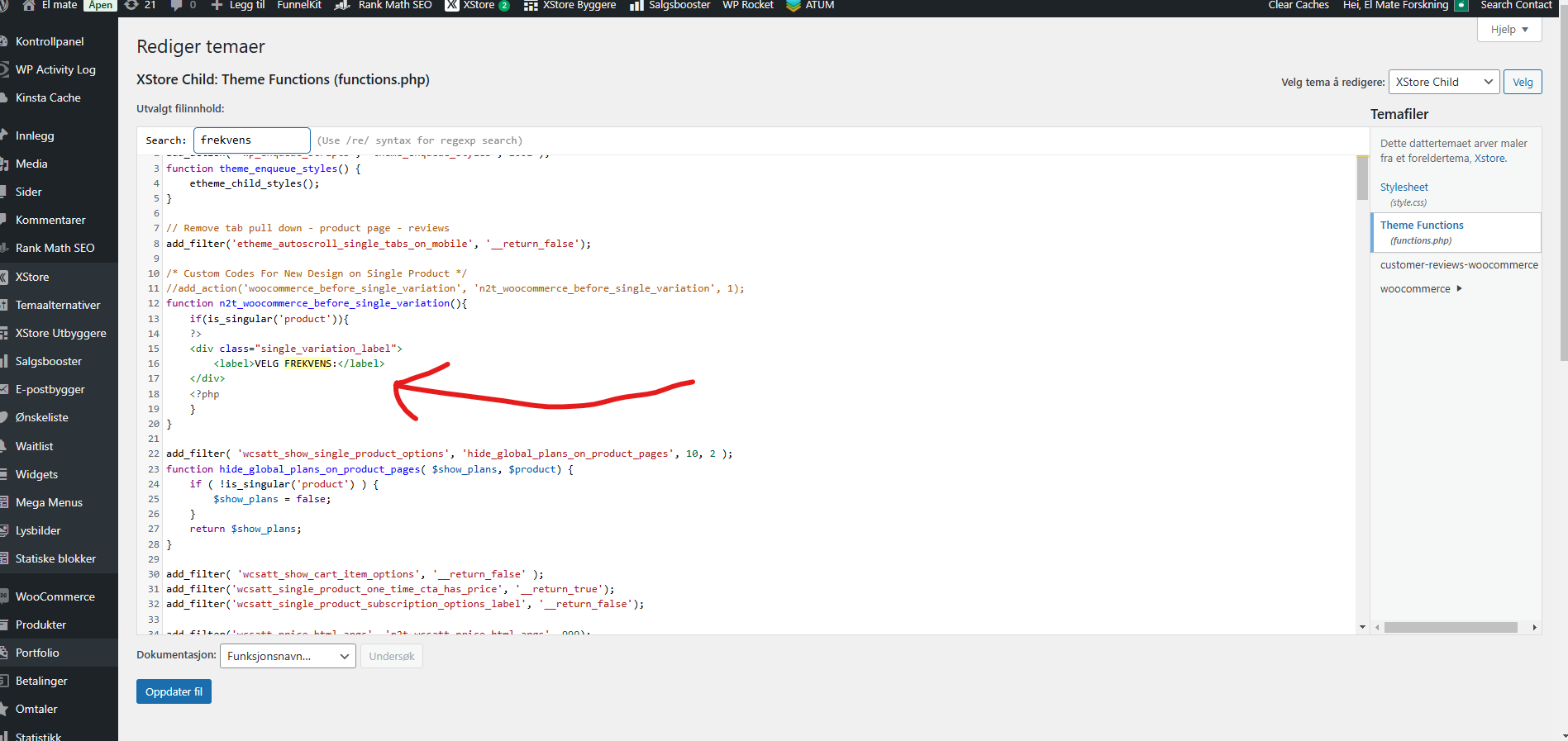
    Then add \\ to line 11 of functions.php file in your child theme from the LIVE site also.

    https://tinyurl.com/24vzax5o

    Thank you!

    Avatar: Justin
    Luca Rossi
    Support staff
    February 16, 2025 at 14:56

    Dear @Goostaf,

    Please try adding this custom CSS codes under XStore > Theme Options > Theme Custom CSS > Global CSS:

    
    @media (min-width: 768px) and (max-width: 991px){
        div#etheme-static-block-16 .menfoot1.wpb_column.vc_column_container {
            width: 50%;
        }
    }
    

    Hope it helps!

    Avatar: Justin
    Luca Rossi
    Support staff
    February 15, 2025 at 11:18

    Hi @uttam pradhan,

    We’ve just added an HTML element below the header and the Google Ads is displaying now:

    https://tinyurl.com/2by8ujnx

    Best Regards,
    8Theme’s Team

    Avatar: Justin
    Luca Rossi
    Support staff
    February 15, 2025 at 11:05

    Dear @Nicolo,

    1. Please find and remove this custom CSS code on your LIVE site:

    
    .single-product .woocommerce table.wishlist_table tr:last-child,  
    .single-product table tr:last-child {  
        display: none;  
    }
    

    2. Under functions.php file on the line 11, please remove //: https://userimg.8theme.com/storage/2025/02/07/31531-Velg%20frekvens%20not%20showing%20anymore%20-%20how%20to%20fix.png

    Hope it helps!

    Avatar: Justin
    Luca Rossi
    Support staff
    February 14, 2025 at 11:27

    Hi @Oliver,

    For any additional customizations beyond the default functionalities, we kindly invite you to submit a request through our Customization Panel at https://www.8theme.com/account/#etheme_customization_panel. Please note that customization services are subject to additional charges.

    Should you have any further questions or require assistance, please do not hesitate to contact us.

    Best Regards,
    8Theme’s Team

    Avatar: Justin
    Luca Rossi
    Support staff
    February 14, 2025 at 08:20

    Dear @devssoft,

    We have thoroughly reviewed the error logs and did not find any issues.

    Could you kindly confirm if you previously translated certain Customizer settings (such as Color/Background Color) from the XStore theme into Greek?

    We appreciate your assistance and look forward to your response.

    Best regards,
    The 8Theme Team

    Avatar: Justin
    Luca Rossi
    Support staff
    February 14, 2025 at 06:45

    Dear @Goostaf,

    We would like to login to your WordPress Admin to check but the password is not working anymore.

    Could you please double check?

    Thank you!

    Please contact administrator
    for this information.
    Avatar: Justin
    Luca Rossi
    Support staff
    February 14, 2025 at 06:44

    Hi @Armia,

    Here you are:

    
    .etheme-elementor-mobile-menu-element.etheme-elementor-mobile-menu-wp_menu ul#menu-1- li a span {
        color: #4bc335;
    }
    
    .etheme-elementor-mobile-menu-element.etheme-elementor-mobile-menu-wp_menu ul#menu-1- li ul li a span {
        color: #cc271d;
    }
    
    .etheme-elementor-mobile-menu-element.etheme-elementor-mobile-menu-wp_menu ul#menu-1- li ul li ul li a span {
        color: #ee6084;
    }
    
    .etheme-elementor-mobile-menu-element.etheme-elementor-mobile-menu-wp_menu ul#menu-1- li ul li ul li ul li a span {
        color: #e9daff;
    }
    

    If you need anything else, please let us know.

    Best Regards,
    The 8Theme Team.

    Avatar: Justin
    Luca Rossi
    Support staff
    February 14, 2025 at 06:41

    Hi @Vítor Carneiro,

    Please also add this code under functions.php file locates in your child theme or Code Snippets plugin:

    
    	function etheme_get_second_image( $size = 'woocommerce_thumbnail' ) {
    		global $product, $woocommerce_loop;
    		
    		$attachment_ids = $product->get_gallery_image_ids();
    		
    		if ( etheme_get_option('enable_variation_gallery', false) &&
    		     etheme_get_option('variable_products_detach', false) && $product->get_type() == 'variation' ) {
    		    // take images from variation gallery meta
    			$variation_attachment_ids = get_post_meta( $product->get_id(), 'et_variation_gallery_images', true );
    
    			// Compatibility with WooCommerce Additional Variation Images plugin
    			if ( !(bool)$variation_attachment_ids )
    			    $variation_attachment_ids = array_filter( explode( ',', get_post_meta( $product->get_id(), '_wc_additional_variation_images', true )));
    
    			if ( (bool) $variation_attachment_ids && count((array) $variation_attachment_ids) ) {
    			    $attachment_ids = $variation_attachment_ids;
                }
    			else {
    			    // if inherit parent second image
    				$parent = wc_get_product( $product->get_parent_id() );
    				$attachment_ids = $parent->get_gallery_image_ids();
                }
            }
    		
    		$image = '';
    		
            if ( ! empty( $attachment_ids ) ) {
                $last_attachment_id = end($attachment_ids); // Obtém o último ID diretamente
                $image = wp_get_attachment_image( $last_attachment_id, $size, false );
            }
    		
    		if ( $image != '' ) {
    			echo '<div class="image-swap">' . $image . '</div>';
    		}
    	}
    

    Hope it helps!

    Avatar: Justin
    Luca Rossi
    Support staff
    February 13, 2025 at 16:32

    Dear @Armia,

    Please remove the previous CSS code and try with this custom CSS code instead:

    
    .etheme-elementor-mobile-menu-element.etheme-elementor-mobile-menu-wp_menu ul#menu-1- li a span {
        color: red;
    }
    
    .etheme-elementor-mobile-menu-element.etheme-elementor-mobile-menu-wp_menu ul#menu-1- li ul li a span {
        color: green;
    }
    
    .etheme-elementor-mobile-menu-element.etheme-elementor-mobile-menu-wp_menu ul#menu-1- li ul li ul li a span {
        color: blue;
    }
    
    .etheme-elementor-mobile-menu-element.etheme-elementor-mobile-menu-wp_menu ul#menu-1- li ul li ul li ul li a span {
        color: pink;
    }
    

    Hope it helps!

    Files is visible for topic creator and
    support staff only.
    Avatar: Justin
    Luca Rossi
    Support staff
    February 13, 2025 at 16:14

    Hi @Nicolo,

    Could you please check again?

    https://tinyurl.com/2beh7f7l

    Thank you!

    Avatar: Justin
    Luca Rossi
    Support staff
    February 13, 2025 at 16:06

    Hi @Vítor Carneiro,

    Please sure you made changes on both files.

    Could you please provide temporary wp-admin access? We need to check your settings.

    To grant WP-Admin access, please proceed to create a new user account with an administrator role through your WordPress Dashboard. Once the account is established, you may securely transmit the username and password to us via the Private Content section designated for this purpose.

    Thank you!

    Avatar: Justin
    Luca Rossi
    Support staff
    February 13, 2025 at 09:02

    Dear @Oliver,

    Thank you for reaching out to us.

    Unfortunately, we do not have any videos available for that particular plugin. However, you can find all relevant documentation at the following link:
    (https://www.themehigh.com/docs/display-custom-fields/)

    Please let us know if you need any further assistance.

    Best regards,
    8Theme Team

    Avatar: Justin
    Luca Rossi
    Support staff
    February 13, 2025 at 08:55

    Dear @Goostaf,

    We hope you are doing well.

    Could you please copy that file to the child theme again? Once it is in place, we will be able to provide the necessary custom CSS codes.

    Additionally, the button has now been restored to the right position:
    (https://prnt.sc/TqcUruN2x43X)

    Please let us know if you need any further assistance.

    Best regards,
    The 8Theme Team

    Avatar: Justin
    Luca Rossi
    Support staff
    February 13, 2025 at 08:52

    Dear @joebuston,

    We have disabled the plugin, and the address is now working correctly: [screenshot link](https://prnt.sc/CSptWz105ArB).

    In this case, we kindly recommend reaching out to the plugin’s author for further assistance regarding this issue. Please note that support for third-party plugins falls outside the scope of our standard support services.

    Thank you for your understanding.

    Best regards,
    8Theme Team

    Avatar: Justin
    Luca Rossi
    Support staff
    February 13, 2025 at 08:41

    Hi @Vítor Carneiro,

    Please take a look these files:

    – /wp-content/plugins/et-core-plugin/app/controllers/elementor/general/product-grid.php at the line 4389
    – /wp-content/plugins/et-core-plugin/app/controllers/elementor/general/product-carousel.php at the line 3080

    Find this code:

    
            if ( ! empty( $attachment_ids[0] ) ) {
    	        $image = wp_get_attachment_image( $attachment_ids[0], $size, false );
            }
    

    And change to this:

    
    		if ( ! empty( $attachment_ids ) ) {
    			$image = wp_get_attachment_image($attachment_ids[count($attachment_ids)], $size, false );
    		}
    

    Hope it helps!

    Avatar: Justin
    Luca Rossi
    Support staff
    February 12, 2025 at 18:18

    Dear @Nicolo,

    We would like to inform you that we have removed the custom CSS code, and everything is now functioning correctly: (https://tinyurl.com/2dkhq8hn).

    Kindly exercise caution when adding custom CSS code in the future to avoid any potential issues.

    The removed CSS code was as follows:

    
    .single-product .woocommerce table.wishlist_table tr:last-child,  
    .single-product table tr:last-child {  
        display: none;  
    }
    

    Should you require any further assistance, please do not hesitate to reach out.

    Best regards,
    8Theme Team

    Avatar: Justin
    Luca Rossi
    Support staff
    February 12, 2025 at 10:24

    Dear @Goostaf,

    We hope you are doing well.

    Could you please copy the following file from the parent theme to the XStore child theme, ensuring it is placed in the same directory?

    File Path:
    /wp-content/themes/xstore/woocommerce/content-product.php

    Once the file has been copied, kindly remove the following line at line 912:

    
    woocommerce_quantity_input( $q_args, $product, true );
    

    We hope this helps. Please let us know if you need any further assistance.

    Best regards,
    8Theme Team

    Avatar: Justin
    Luca Rossi
    Support staff
    February 12, 2025 at 09:03

    Dear @Goostaf,

    Thank you for reaching out to us.

    If the custom CSS solution does not fully meet your expectations, we kindly encourage you to share your suggestion on our Taskboard at (https://www.8theme.com/taskboard/). Should your idea receive significant support from other customers, our development team will carefully assess its feasibility for inclusion in a future update.

    We appreciate your feedback and look forward to your valuable suggestions.

    Best regards,
    The 8Theme Team

    Avatar: Justin
    Luca Rossi
    Support staff
    February 12, 2025 at 07:17

    Dear @Rakesh,

    There are no specific documents available for this. We achieve this by inspecting the HTML elements and then hiding the tax label using custom CSS code:

    (https://prnt.sc/sdsfm8e3CbiH)

    We hope this information is helpful. Please feel free to reach out if you need any further assistance.

    Best regards,
    8Theme Team

    Avatar: Justin
    Luca Rossi
    Support staff
    February 12, 2025 at 07:10

    Hi @Waleed Afzal,

    There is no alternative solutions for now.

    We highly encourage you to share your suggestion on our Taskboard at https://www.8theme.com/taskboard/. If your idea garners sufficient support from other customers, our development team will carefully evaluate the possibility of including it in a future update.

    For any additional customizations beyond the default functionalities, we kindly invite you to submit a request through our Customization Panel at https://www.8theme.com/account/#etheme_customization_panel. Please note that customization services are subject to additional charges.

    Should you have any further questions or require assistance, please do not hesitate to contact us.

    Best regards,
    8Theme’s Team

    Avatar: Justin
    Luca Rossi
    Support staff
    February 12, 2025 at 07:08

    Dear @devssoft,

    We’ve replied to you on this ticket: https://www.8theme.com/topic/xstore-costumizer-infinite-loading-screen/#post-434098.

    Best regards,
    8Theme’s Team

    Avatar: Justin
    Luca Rossi
    Support staff
    February 12, 2025 at 07:06

    Dear @devssoft,

    We hope you are doing well.

    Would it be possible for you to allow us to disable all third-party plugins on your website?

    Additionally, we kindly request temporary FTP access so that we can investigate the issue and determine how we can assist you.

    For FTP access, we require the following details:

    – FTP Host
    – FTP Username
    – FTP Password
    – FTP Port

    If you need any assistance in generating these credentials, we recommend reaching out to your hosting provider, who will be able to guide you through the process.

    Please let us know if you have any questions. We appreciate your cooperation and look forward to assisting you.

    Best regards,
    8Theme Team

    Avatar: Justin
    Luca Rossi
    Support staff
    February 11, 2025 at 18:07

    Dear @alhamzamedia,

    We coulde see you have 18 active plugins in your website.

    We kindly recommend disabling all third-party plugins that are not included with XStore. You can find the list of included plugins here: (https://www.8theme.com/documentation/xstore/plugins/included-plugins/). Once you have done this, please clear your browser’s cache and check if the issue persists. It is possible that one of the additional plugins may be causing the problem.

    Once you have deactivated the unnecessary plugins, kindly clear your browser’s cache and verify whether the performance issue persists. This step is crucial, as conflicts with third-party plugins can sometimes cause unexpected issues.

    Best regards,
    8Theme Team

    Avatar: Justin
    Luca Rossi
    Support staff
    February 11, 2025 at 10:11

    If you need anything else, please let us know.

    Best regards,
    8Theme’s Team

    Avatar: Justin
    Luca Rossi
    Support staff
    February 11, 2025 at 10:11

    Hi @Rakesh,

    Please try adding this custom CSS under XStore > Theme Options > Theme Custom CSS > Global CSS:

    
    small.tax_label {
        display: none !important;
    }
    

    Kind regards,
    The 8Theme Team

    Avatar: Justin
    Luca Rossi
    Support staff
    February 11, 2025 at 10:06

    Dear @Recep,

    Please take a look at this article: https://www.businessbloomer.com/woocommerce-add-conversion-tracking-code-thank-page/.

    Hope it helps!

    Avatar: Justin
    Luca Rossi
    Support staff
    February 11, 2025 at 10:00

    Dear @GNC,

    Thank you for reaching out to us.

    We would like to inform you that the pricing displayed on the cart/checkout page is managed by the WooCommerce plugin. For your reference, you can also test this functionality on the Storefront theme here: [Storefront Demo](https://themes.woocommerce.com/storefront/product/touchscreen-mp3-player/).

    To change this, it requires a lot of customization codes and fall out of scope our support standard services we provide.

    But you can take a look at this article: https://stackoverflow.com/a/70559772/2660153.

    Or contact our customization team: https://www.8theme.com/account/#etheme_customization_panel

    Thank you for your understanding.

    Best regards,
    The 8Theme Team

    Avatar: Justin
    Luca Rossi
    Support staff
    February 11, 2025 at 09:41

    Dear @Waleed Afzal,

    We would like to inform you that we have disabled the Ajax Add to Cart setting, and as a result, the logo upload functionality is now working correctly:

    (https://prnt.sc/6dCjAKqX9F1y)

    Please note that, at this time, the custom fields for products are not functioning properly when the Ajax Add to Cart setting is enabled.

    Should you require any further assistance, please do not hesitate to reach out.

    Best regards,
    8Theme Team

  • 1 2 3 56 57 58 177 178 179
    Viewing 1,710 results - 1,681 through 1,710 (of 5,361 total)
Viewing 30 posts - 1,681 through 1,710 (of 5,361 total)
We're using our own and third-party cookies to improve your experience and our website. Keep on browsing to accept our cookie policy.