Hello,
Could you please provide us with FTP and admin panel credentials in Private Content?
Regards,
Eva Kemp.

Hello,
Could you please provide us with FTP and admin panel credentials in Private Content?
Regards,
Eva Kemp.
You’re welcome.
Regards,
Eva Kemp.
Hello,
1. I’ve reenabled the theme and the cart issue has disappered. Also you have problems with permalinks. I’ve set it to default in Settings > Permalinks. Please refer to WordPress support regarding this issue.
2. I’ve enabled cart widget in Theme Options > Header and modified custom.css file to center the logo.
3. Sorry, but unfortunately there is no such feature in our theme.
Regards,
Eva Kemp.
Hello @dgarroway98,
You’ve been replied on the other topic.
Please check the reply.
Regards,
Eva Kemp.
Hello @dgarroway98,
The files have been sent to your email.
Please check.
Regards,
Eva Kemp.
Hello,
Sorry but there is no such feature in our theme. Menu items can be visible only when you click “Menu” icon on a mobile device.
Regards,
Eva Kemp.
Hello,
To get Product Categories displayed go to Appearance > Menus and select Product Categories in Screen Options at the top of the page:
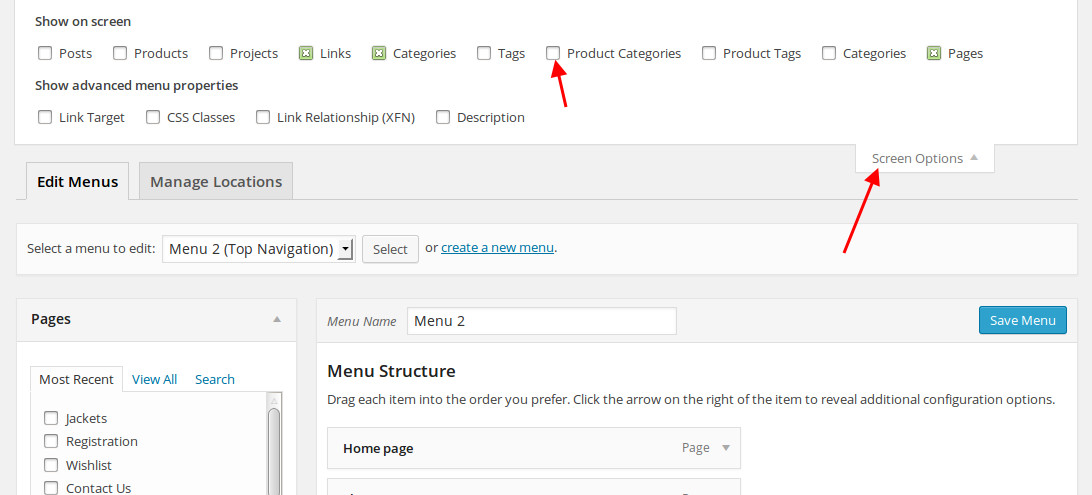
Also please provide us with your site URL and FTP/wp-admin credentials in Private Content.
Regards,
Eva Kemp.
Hello,
We provide all plugins up to date implemented in our theme. If you don’t want to buy the license key yourself you have to wait for our next update where VC will be updated to the latest version.
Regards,
Eva Kemp.
Hello,
I’m unable to connect to FTP. Please check the login details and provide us with the correct ones.
Thank you.
Regards,
Eva Kemp.
Hello,
Please add this code to custom.css:
.page-heading, .woocommerce-breadcrumb {display: none;}
.header-type-3 .main-nav {border-bottom: none;}
If the issue persists please provide us with wp-admin panel credentials.
Regards,
Eva Kemp.
Hello,
This feature makes scroll look different. When you turn it on or off the scroll on the right side of the page changes. Please check it more attentively.
Regards,
Eva Kemp.
Hello,
Sorry, but we provide support only to the issues related to our theme. You have to refer to some documentation regarding your problem.
Regards,
Eva Kemp.
Hello,
There is a bug in the theme. You have to rename “portfolio” slug to something else, for example “our-portfolio”. So you need edit Portfolio page and change its Permalink: http://mosquecarpetusa.com/portfolio/ to http://mosquecarpetusa.com/our-portfolio/ (or name it something else). After that changes you’ve saved will take effect.
Regards,
Eva Kemp.
You’re welcome.
Regards,
Eva Kemp.
Hello,
Please provide us with wp-admin panel credentials in Private Content.
Regards,
Eva Kemp.
Hello,
Set 1600 for example instead of default 1200px. And page wrapper width will be 980px for screens less than 1600px. Set more than 1600 if you want 980px width even on large screens.
To change image dimensions go to Theme Options > Products Page Layout > Product Images Width/Product Images Height.
Regards,
Eva Kemp.
Hello,
Please provide us with wp-admin panel credentials in Private Content.
Regards,
Eva Kemp.
Hello,
It can be caused for the reason you’ve increased the menu items limit. That’s why new items can’t be saved. Here are some explanations:
http://www.wpbeginner.com/wp-tutorials/how-to-fix-the-custom-menu-items-limit-in-wordpress/
https://core.trac.wordpress.org/ticket/14134
Regards,
Eva Kemp.
Please check your pages in admin panel > Pages > select the needed page if you chose Sidebar position “Without Sidebar” in Page Layout box on the right side of the page.
Regards,
Eva Kemp.
Hello,
Seems this is a bug of WP-Ecommerce plugin. We recommend you to contact their support regarding this issue.
Regards,
Eva Kemp.
Hello,
You can remove it in Appearance > Widgets > Main sideba widget area. If this block is empty and search box is displayed anyway, then you need drag an empty Text widget into there and save it.
Regards,
Eva Kemp.
Hello,
You’ll be able to set language buttons in WPML settings.
Please refer to WPML documentation: http://wpml.org/documentation/getting-started-guide/language-setup/language-switcher-options/
Regards,
Eva Kemp.
Hello,
Please provide us with FTP and admin panel credentials in Private Content.
Regards,
Eva Kemp.
Hello,
Sorry, but I’m unable to access your site, it’s under maintenance mode. If you want to change the content width you can modify it in Theme Options > Responsive > Large resolution from.
Regards,
Eva Kemp.
Hello,
You need create submenu. Here you can watch how to do this: http://www.screenr.com/z9v
Also please read this article how to add links to submenu: http://thewillinghamenterprise.com/2014/04/27/how-to-add-pages-categories-or-custom-links-to-a-wordpress-menu/
Regards,
Eva Kemp.
Hello,
You can refer to this article http://www.wpbeginner.com/wp-themes/how-add-google-web-fonts-wordpress-themes/ or use some plugin like http://wordpress.org/plugins/wp-google-fonts/
Regards,
Eva Kemp.
Hello,
Please provide us with FTP and admin panel credentials in Private Content.
Regards,
Eva Kemp.
Hello,
You can change images dimensions in Theme Options > Products Page Layout > Product Images Width/Product Images Height. Also there are setting in Woocommerce > Settings > Products tab > Product Image Sizes > Catalog images.
Regards,
Eva Kemp.
Hello,
You’re welcome.
Regards,
Eva Kemp.
Hello,
You need also translate the woocommerce file wp-content/plugins/woocommerce/i18n/languages/woocommerce-vi.po
“Latest products” text is written on your home page, go to Pages > Home page and edit it in the text editor.
Regards,
Eva Kemp.