Hello,
Have you activated the VC plugin as we separated it in our new theme version?
Please provide us with wp-admin panel to check the issue.
Regards,
Eva Kemp.

Hello,
Have you activated the VC plugin as we separated it in our new theme version?
Please provide us with wp-admin panel to check the issue.
Regards,
Eva Kemp.
Hello,
The class for “Add to cart” button is: .single-product-page .product-info .button
For example, .single-product-page .product-info .button {float: left;} makes the button align to the left.
If you have some difficulties please specify what exactly you want to do with the button.
Regards,
Eva Kemp.
Hello,
This is a theme bug and to fix it you can add an empty Text widget into the Primary Widget Area and all widgets will disappear from the Register page.
Regards,
Eva Kemp.
Hello,
You can update the theme to the latest version which has been produced recently. That bug is fixed in there.
Regards,
Eva Kemp.
Hello,
“View Cart” button didn’t work because you select the template “Custom Registration Page” for your Cart page. I’ve changed it to default.
I’ve made some changes on the home page for the tabs and now they are showing fine. Testimonials aren’t displayed because you didn’t create any of them in admin panel > Testimonials.
Regarding images in the cart you should regenerate them using the plugin http://wordpress.org/plugins/regenerate-thumbnails/
It should fix the issue.
Regards,
Eva Kemp.
You need add hover image to the featured products. Go to Products > open the product you’ve chosen for featured and find Custom Settings box under the text editor and upload Hover image. Don’t forget to update the page.
Please provide us with wp-admin panel credentials in Private Content to check the issue with “TESTIMONIAL” and “Useful information” tabs.
Regards,
Eva Kemp.
Hello,
Could you please clarify your request with more details? It’s a bit unclear for us.
Also please provide us with the link to the page you’re talking about and wp-admin panel credentials in Private Content.
Regards,
Eva Kemp.
Hello,
If you want to have a slider of featured products you need add the shortcode [etheme_featured] to the home page. To have a slider of new products you need use this shortcode [etheme_new title=""].
Please refer to our documentation: https://www.8theme.com/demo/docs/xmarket/index.html#!/xmarket_shortcodes
https://www.8theme.com/demo/docs/xmarket/index.html#!/demo_data_installation > Home page (3rd item).
https://support.8theme.com/index.php?/Knowledgebase/Article/View/9/0/how-to-mark-products-as-featured-and-new-ones
Regards,
Eva Kemp.
Hello,
Sorry, but I’m unable to log in to wp-admin panel with the credentials you provided. Please recheck them.
I’ve installed the plugin “screets-chat” via FTP and now you can activate it in admin panel > Plugins.
“Screets Chat” plugin is implemented into the theme. You don’t have to pay for it separately.
Regards,
Eva Kemp.
Hello,
Are you trying to change the footer background color? If you are unable to provide us with the site link, then please show us a screenshot of what you’re trying to achieve and we’ll try to help you as more as we can.
Thank you.
Regards,
Eva Kemp.
The problem might be caused by the Cache plugin you have. I’ve deactivated it, but you should also clear the cache via FTP. After that please check your site again.
Regards,
Eva Kemp.
Hello,
Please check if you created Blog page correctly. It’s described in our documentation: https://www.8theme.com/demo/docs/blanco/index.html#!/demo_data_installation > Blog.
If you’re unable to resolve this issue, please provide us with FTP and admin panel credentials.
Regards,
Eva Kemp.
Sorry, but it’s difficult to provide you with the correct code not seeing the site. We need to have a look at what you’re trying to modify exactly.
Regards,
Eva Kemp.
Hello,
Please provide us with the link to your site.
Regards,
Eva Kemp.
I’ve checked from my side and share buttons are on the single product pages.
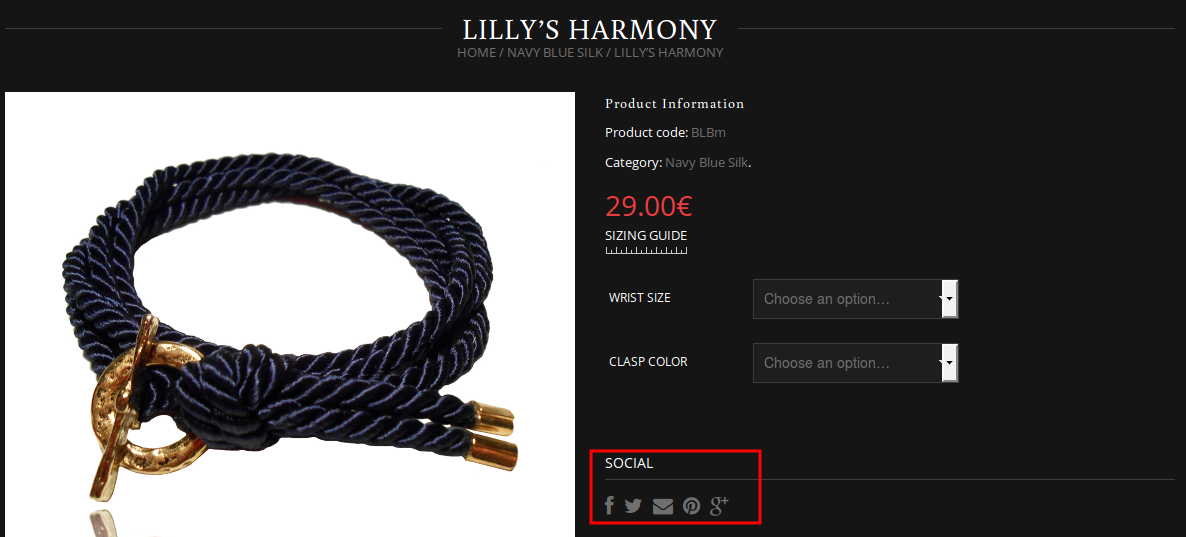
Is it not working in another browser?
Regards,
Eva Kemp.
Hello,
Now the video is working in Firefox on our side. Please try to clear your browser cache and recheck the site.
Regards,
Eva Kemp.
Please provide us with FTP and admin panel credentials in Private Content.
Regards,
Eva Kemp.
Hello,
Find the file et-styles.php in Appearance > Editor and change the line
<link href=’http//fonts.googleapis.com/css?family to
<link href=’//fonts.googleapis.com/css?family
Regards,
Eva Kemp.
Hello,
I’ve added the title <h1>Productos destacados</h1> above products on the home page. Please check.
Also as I see you have old theme version. Please update it to the latest 1.7 version. Don’t forget to create a back up of the files and database before updating.
Regards,
Eva Kemp.
Hello,
To resolve this issue you need copy the file review-order.php located in the directory wp-content/plugins/woocommerce/templates/checkout to the directory wp-content/themes/idstore/woocommerce/checkout. The old file will be overwritten.
Regards,
Eva Kemp.
Hello,
Please provide us with wp-admin panel credentials in Private Content.
Regards,
Eva Kemp.
Hello,
Please add this code into custom.css file:
img.mfp-img {
    width: 1500px;
}
Change the value to yours.
Regards,
Eva Kemp.
Are you getting any errors when trying to share the products?
Regards,
Eva Kemp.
Please provide us with FTP and wp-admin panel credentials.
Regards,
Eva Kemp.
Hello,
You can change it in the file content-product.php in the directory wp-content/themes/legenda/woocommerce. Find the code <?php _e('Out of stock', ETHEME_DOMAIN) ?></span> (line 83) and modify the text.
Keep the file safe not to lose the changes after theme update. Also we recommend to create child theme for such purposes.
Regards,
Eva Kemp.
Hello,
Please provide us with the link where the problem persists and wp-admin panel credentials in Private Content.
Regards,
Eva Kemp.
Hello,
The problem was with Permalinks settings. I’ve re-enabled them and the page is linked correctly now.
Please check and clear browser cache before.
Regards,
Eva Kemp.
We’ve created a test page where the video is working http://synovatest.unmap.org/test/ . Checking your video file at the link http://synovatest.unmap.org/Videos/NZ_Edited.mp4 we’re getting an error that the file is corrupted:

Please recheck it.
Regards,
Eva Kemp.
Hello,
Here is the explanation of columns in our documentation: https://www.8theme.com/demo/docs/xmarket/#!/xmarket_shortcodes
[etheme_column size=”one_half” last=”1″] inserts a column. You can put any content inside column, using opening and closing shortcode. Attributes: size (one_half, one_third, one_fourth, two_third, three_fourth) specify size of column; last (1, 0) specify if there be any columns after it.
And here you can see the example: https://www.8theme.com/demo/docs/xmarket/#!/demo_data_installation > Typography Page (you’ll see the code of a page with columns).
Regards,
Eva Kemp.
Hello,
The settings you’ve changed in Theme Options are related to Boxed site layout (Theme Options > General > Site layout > Boxed). If you want to change the background for wide layout you need add this code into custom.css file:
.wide .wrapper {
    background-image: url("http://www.wiltondistribuidora.com.br/wp-content/uploads/2014/06/pattern21.gif");
}
Here you can watch the tutorial how to create custom.css.
Regards,
Eva Kemp.