Forum Replies Created

Viewing 30 posts - 29,311 through 29,340 (of 31,382 total)
  • Avatar: Eva
    Eva Kemp
    Participant
    July 12, 2014 at 08:41

    Hello,

    1. Sidebar menu:
    Unfortunately custom menu in sidebar can’t be set the same way as primary menu.
    2. To remove Search bar from the Cart page you need drag an empty Text widget into Main sidebar area in Appearance > Widgets.
    3. Ajax “Add to cart” works only for simple products, not variable ones. Unfortunately it can’t be fixed for now.
    4. To remove “Custom tab” go to Theme Options > Single Product Page and remove the text for Custom Tab Title.
    5. You have to contact Woocommerce support regarding the images sizes for variable products.

    Regards,
    Eva Kemp.

    Avatar: Eva
    Eva Kemp
    Participant
    July 12, 2014 at 08:08

    Hello,

    Please try changing settings for Revolution Slider in admin panel > Revolution Slider > Settings > Main Slider Settings and change Slider Layout.

    Regards,
    Eva Kemp.

    Avatar: Eva
    Eva Kemp
    Participant
    July 12, 2014 at 08:03

    Hello,

    The code you need to insert under the slider shortcode in text editor is:

    <div class=”banner one-half”>

    [etheme_btn title=”Shop Now” url=”test_url” class=”active”]
    </div>
    <div class=”banner one-half last”>

    [etheme_btn title=”Shop Now” url=”test_url” class=”active”]
    </div>
    <div class=”clear”></div>

    Regards,
    Eva Kemp.

    Avatar: Eva
    Eva Kemp
    Participant
    July 11, 2014 at 21:57

    Hello,

    You can add the code of social icons into Text widget and place it in Appearance > Widgets > “Place in header top bar” widget area.

    Regards,
    Eva Kemp.

    Avatar: Eva
    Eva Kemp
    Participant
    July 11, 2014 at 21:50

    Hello,

    In this case you’d better contact Woocommerce support regarding this issue.
    Also please refer to this topic: http://wordpress.org/support/topic/woocommerce-adds-1-extra-item-to-cart

    Regards,
    Eva Kemp.

    Avatar: Eva
    Eva Kemp
    Participant
    July 11, 2014 at 21:35

    Hello,

    Could you please clarify your request with more details?
    Please show us the links and tell us what exactly you want to get back.
    Also provide us with the login details to FTP and wp-admin panel in Private Content.

    Regards,
    Eva Kemp.

    Avatar: Eva
    Eva Kemp
    Participant
    July 11, 2014 at 21:33

    You should edit the code which is inserted in your home page. Go to admin panel > Pages > Home page and edit it in the text editor.

    Regards,
    Eva Kemp.

    Avatar: Eva
    Eva Kemp
    Participant
    July 11, 2014 at 21:31

    Hello,

    You should contact Woocommerce support regarding your request.
    Also this article may help you: http://www.wpmayor.com/how-to-remove-the-billing-details-from-woocommerce-checkout/

    Regards,
    Eva Kemp.

    Avatar: Eva
    Eva Kemp
    Participant
    July 11, 2014 at 21:23

    You’re welcome.

    Regards,
    Eva Kemp.

    Avatar: Eva
    Eva Kemp
    Participant
    July 11, 2014 at 19:43

    You’re welcome.
    We recommend you to wait for their answer as this issue seems to be related to wpml configuration.

    Regards,
    Eva Kemp.

    Avatar: Eva
    Eva Kemp
    Participant
    July 11, 2014 at 19:41

    I’ve added the code to your home page changed settings for Revolution Slider > Position.
    Please check the site now and clear browser cache before.

    Regards,
    Eva Kemp.

    Avatar: Eva
    Eva Kemp
    Participant
    July 11, 2014 at 17:48

    Please refer to our documentation where described how to add banners on home page:
    https://www.8theme.com/demo/docs/blanco/index.html#!/demo_data_installation > Home page.

    Regards,
    Eva Kemp.

    Avatar: Eva
    Eva Kemp
    Participant
    July 11, 2014 at 17:22

    What code are you inserting? I don’t see it on the Home page in admin panel.
    Please provide us with it.

    Regards,
    Eva Kemp.

    Avatar: Eva
    Eva Kemp
    Participant
    July 11, 2014 at 17:19

    Hello,

    As I see the shop page for English version is located on this link: http://blueloulou.com/shop-2/?lang=en
    Please check your configuration for pages and wpml.

    Regards,
    Eva Kemp.

    Avatar: Eva
    Eva Kemp
    Participant
    July 11, 2014 at 16:53

    Hello,

    As I see you have very old Visual Composer version. Please update it and check if it fixes the issue. To update the plugin you need download the theme archive at http://themeforest.net/item/legenda-responsive-multipurpose-wordpress-theme/5888906 where we’ve recently included the updated versions of plugins VC and Revolution Slider. After you unzip the archive you’ll find the plugins in legenda/framework/plugins directory. Upload the new version via FTP and remove the old one.

    Regards,
    Eva Kemp.

    Avatar: Eva
    Eva Kemp
    Participant
    July 11, 2014 at 16:52

    Hello,

    Please create a ticket at support.8theme.com concerning the additional customization.

    Regards,
    Eva Kemp.

    Avatar: Eva
    Eva Kemp
    Participant
    July 11, 2014 at 16:29

    Hello @Tim1212,

    Please provide us with link where you’re trying to add the ad.

    Regards,
    Eva Kemp.

    Avatar: Eva
    Eva Kemp
    Participant
    July 11, 2014 at 16:08

    Hello @Tim1212,

    We’ve updated review-order.php file and the warning has disappeared. Please check.

    Regards,
    Eva Kemp.

    Avatar: Eva
    Eva Kemp
    Participant
    July 11, 2014 at 15:06

    Hello @dimakoren,

    Have you changed the password for wp-admin panel? We’re unable to log in now.
    Please provide us with the correct one and FTP credentials as well.
    Thank you.

    Regards,
    Eva Kemp.

    Avatar: Eva
    Eva Kemp
    Participant
    July 11, 2014 at 15:02

    Hello,

    As I see you have 2 folders of new Legenda theme version. Have you updated it correctly? You don’t need to create multiple folders, just overwrite the old files with the new ones as described in our documentation: https://www.8theme.com/demo/docs/legenda/index.html#!/upgrade

    Please try to reupload the theme folder to keep only one theme version.

    Regards,
    Eva Kemp.

    Avatar: Eva
    Eva Kemp
    Participant
    July 11, 2014 at 14:50

    Hello,

    You can configure Screets Chat settings in admin panel > Chat Console > Options.

    Regards,
    Eva Kemp.

    Avatar: Eva
    Eva Kemp
    Participant
    July 11, 2014 at 14:20

    Please try to use this code in custom.css file for the solution:

    .et_section.parallax-section {
    background-attachment: inherit !important;
    }

    Here you can watch the tutorial how to create custom.css.

    Regards,
    Eva Kemp.

    Avatar: Eva
    Eva Kemp
    Participant
    July 11, 2014 at 12:11

    You’re welcome.

    Regards,
    Eva Kemp.

    Avatar: Eva
    Eva Kemp
    Participant
    July 11, 2014 at 12:11

    You’re welcome.

    Regards,
    Eva Kemp.

    Avatar: Eva
    Eva Kemp
    Participant
    July 11, 2014 at 12:10

    Hello,

    I’ve changed permissions for /really-simple-captcha/tmp folder and the image has started showing.
    Please check from your side and clear browser cache before.

    Regards,
    Eva Kemp.

    Avatar: Eva
    Eva Kemp
    Participant
    July 11, 2014 at 12:05

    Hello,

    Please follow this instruction how to add google fonts:
    http://www.wpbeginner.com/wp-themes/how-add-google-web-fonts-wordpress-themes/

    Regards,
    Eva Kemp.

    Avatar: Eva
    Eva Kemp
    Participant
    July 11, 2014 at 11:59

    Hello,

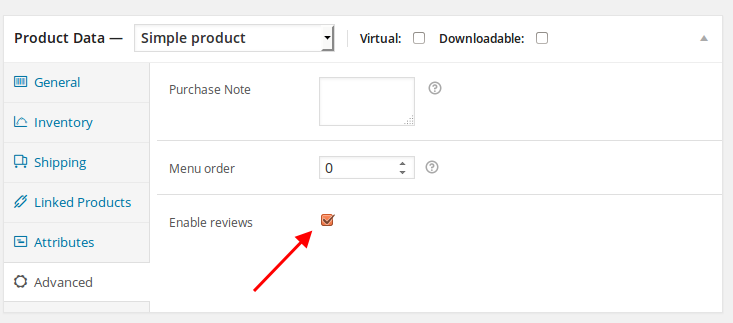
    You need enable reviews in admin panel > Products > select a product to edit and under “Product data” box there is a tab “Advanced”. It has a setting to enable reviews for that product

    I’ve enabled it for the product “Barbiella Shorties – Marke:Obsessive”. Please check it.

    Regards,
    Eva Kemp.

    Avatar: Eva
    Eva Kemp
    Participant
    July 11, 2014 at 11:22

    Hello,

    What wpml version are you using? There may be a bug: http://wpml.org/2014/04/status-wpml-wordpress-3-9/

    Regards,
    Eva Kemp.

    Avatar: Eva
    Eva Kemp
    Participant
    July 11, 2014 at 11:16

    Hello,

    Please provide us with wp-admin panel credentials in Private Content.

    Regards,
    Eva Kemp.

    Avatar: Eva
    Eva Kemp
    Participant
    July 11, 2014 at 09:52

    You’re welcome.

    Regards,
    Eva Kemp.

  • 1 2 3 977 978 979 1,045 1,046 1,047
    Viewing 29,340 results - 29,311 through 29,340 (of 31,382 total)
Viewing 30 posts - 29,311 through 29,340 (of 31,382 total)
We're using our own and third-party cookies to improve your experience and our website. Keep on browsing to accept our cookie policy.