
Hello,
Unfortunately we don’t guarantee full compatibility of 3rd-party plugins with our theme. Please take our apologies.
Regards,
Eva Kemp.

Hello,
Unfortunately we don’t guarantee full compatibility of 3rd-party plugins with our theme. Please take our apologies.
Regards,
Eva Kemp.
Hello,
Perhaps Wishlist plugin has conflicts with some 3rd-party plugins. Try To disable one by one to find it out.
Also please provide us with FTP and wp-admin panel credentials in Private Content.
Regards,
Eva Kemp.
Hello,
Please try to change permissions for js_composer folder in wp-content/plugins directory as there is 404 error for VC plugin which means you’ve not uploaded all files or you need to change permissions.
Otherwise please provide us with FTP access.
Thank you.
Regards,
Eva Kemp.
Hello,
Sorry, but we don’t see the Private Content message. Where have you sent it to?
Please insert it in Private Content box at this forum. Nobody will see it except of our administrators.
Regards,
Eva Kemp.
Hello,
Do you wish to style only the text block or the whole content?
Regards,
Eva Kemp.
Hello,
In this case we recommend you to create a ticket at https://support.8theme.com/ and our specialists will look into this issue more deeply. Don’t forget to provide your credentials to FTP and wp-admin panel in the ticket.
Thank you.
Regards,
Eva Kemp.
Yes, please, send wp-admin credentials to us in Private Content to check the issue.
Thank you.
Regards,
Eva Kemp.
Hello,
We’ve sent the archive with a new version of Visual Composer to your email address. Please check it.
Regards,
Eva Kemp.
Hello,
Please read this article http://codex.wordpress.org/Child_Themes and check if you’ve done everything correctly.
Also please provide us with FTP/wp-admin panel credentials.
Thank you.
Regards,
Eva Kemp.
To update the Visual Composer plugin you need re-download the theme archive at http://themeforest.net/item/legenda-responsive-multipurpose-wordpress-theme/5888906 where we’ve recently included the updated versions of plugins VC and Revolution Slider. After you unzip the archive you’ll find another archive Legenda_v2.2.zip, extract it as well and open this folder “legenda”. The plugins are placed inside of legenda folder under framework/plugins directory. Upload the new version via FTP and remove the old one.
Regards,
Eva Kemp.
Hello,
Please check woocommerce documentation if you’ve done everything correctly: http://docs.woothemes.com/document/related-products-up-sells-and-cross-sells/
If there are still problems please provide us with wp-admin panel credentials in Private Content and the link where upsells should be displayed.
Thank you.
Regards,
Eva Kemp.
Hello,
404 error means you don’t have custom.css file. Here you can watch the tutorial how to create it.
“Uncaught SyntaxError” means you’ve made some syntax error in the code. Please check it more carefully.
Regards,
Eva Kemp.
Hello,
Unfortunately there is a bug with frontend editor in our theme. We recommend you to use backend editor instead. Sorry. We’ve taken this issue into our account and it should be fixed in future updates.
Regards,
Eva Kemp.
Hello,
I’ve just checked Text element in your admin panel and haven’t found any issues. It took some time to load but it was loaded successfully.
You may also upldate the VC plugin to the latest 4.2.3 version. To do this you need re-download the theme archive at http://themeforest.net/item/legenda-responsive-multipurpose-wordpress-theme/5888906 where we’ve recently included the updated versions of plugins VC and Revolution Slider. After you unzip the archive you’ll find another archive Legenda_v2.2.zip, extract it as well and open this folder “legenda”. The plugins are placed inside of legenda folder under framework/plugins directory. Upload the new version via FTP and remove the old one.
Regards,
Eva Kemp.
Hello,
The error “Uncaught TypeError: undefined is not a function” is in the file wp-content/plugins/js_composer/assets/js/js_composer_front.js (line 236).
Try to replace the code as you said.
Let us know if you need more help.
Regards,
Eva Kemp.
Hello,
You’re welcome.
Regards,
Eva Kemp.
Hello,
Concerning the products issue you should contact Woocommerce support as this is related to their configuration.
Regards,
Eva Kemp.
Hello,
I’ve added the following code into style.css file of the child theme and the products started showing correctly:
.sidebar-position-without .products-grid.product-count-2 .product {
    width: 400px;
}
Please check it and clear browser cache before.
Regards,
Eva Kemp.
Hello,
Try to disable 3rd-party plugins one by one to check if some of them are causing the issue.
Regards,
Eva Kemp.
Hello,
You can find the code for social media icons at social websites (for example, https://developers.facebook.com/docs/plugins/share-button) and insert that code into Text widget, which should be dragged into “Hidden top panel” widget area. Please read our documentation: https://www.8theme.com/demo/docs/legenda/index.html#!/widgets
Regards,
Eva Kemp.
Could you please show a screenshot of what exactly you want to translate to avoid misunderstanding?
Thank you.
Regards,
Eva Kemp.
We’re unable to access the site, please provide with the permissions.
To translate “Product Page Banner” edit the file wp-content/themes/legenda/framework/theme-options.php (line 829). “Text for empty cart”, “Text for empty category”, “Return” and “Custom Tab Title” you’ll also find in this file.
We recommend you to make any changes in a child theme not to lose modifications after the theme upgrade.
Regards,
Eva Kemp.
Hello,
1. “Sale” and “New” icons are images and to translate them you need edit them with some image editor. They are located in wp-content/themes/legenda/images/label-sale.png and wp-content/themes/legenda/images/label-new.png directory.
2. Do you want to translate “Product Page Banner” text in Theme Options?
3. Text for empty cart and empty category can be translated in Theme Options > Shop. At the bottom you’ll find the needed sections.
4. You can translate Custom Tab Title and “Return” in Theme Options > Single Product Page.
Please provide us with the link to Order page in Private Content to have clear meaning what you need to translate in there.
Thank you.
Regards,
Eva Kemp.
Hello @presumedetucasa,
To update the Visual Composer plugin you need re-download the theme archive at http://themeforest.net/item/legenda-responsive-multipurpose-wordpress-theme/5888906 where we’ve recently included the updated versions of plugins VC and Revolution Slider. After you unzip the archive you’ll find another archive Legenda_v2.2.zip, extract it as well and open this folder “legenda”. The plugins are placed inside of legenda folder under framework/plugins directory.
Regards,
Eva Kemp.
You’re welcome.
Regards,
Eva Kemp.
I’ve just checked the Checkout page with default “Twenty Thirteen” theme and the issue you described persists there too. So the problem isn’t related to our theme. We recommend you to contact Woocommerce support for the solution. Also notify them that the issue appears with different themes, not only one theme.
Regards,
Eva Kemp.
Hello,
Please provide us with FTP credentials as well.
Thank you.
Regards,
Eva Kemp.
Please try to deactivate all 3rd-party plugins and check the contact form again.
Are you getting any errors after submitting the contact form?
Regards,
Eva Kemp.
You’re welcome.
Regards,
Eva Kemp.
We’ve added “Read more” buttons to Posts Grid in such way:
– selected Teaser (excerpt) for “Content” in Posts Grid settings;
– added excerpt with “Read more” link for each post as showed on the screenshot:
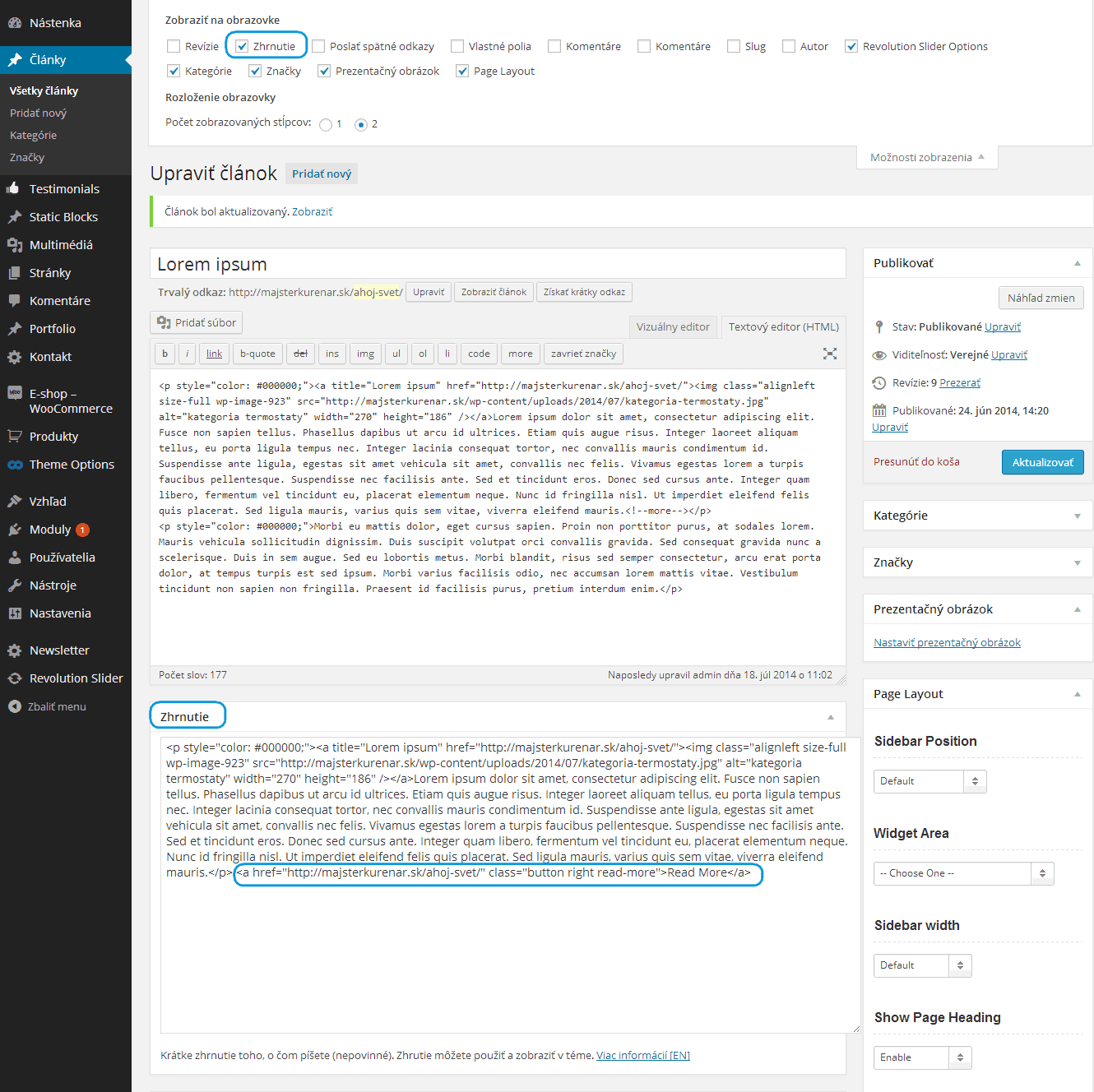
Please check your FAQ page now.
Regards,
Eva Kemp.









