
Hello,
You need deactivate Screets Chat plugin in admin panel > Plugins if you want to remove it at all.
Regards,
Eva Kemp.

Hello,
You need deactivate Screets Chat plugin in admin panel > Plugins if you want to remove it at all.
Regards,
Eva Kemp.
Hello,
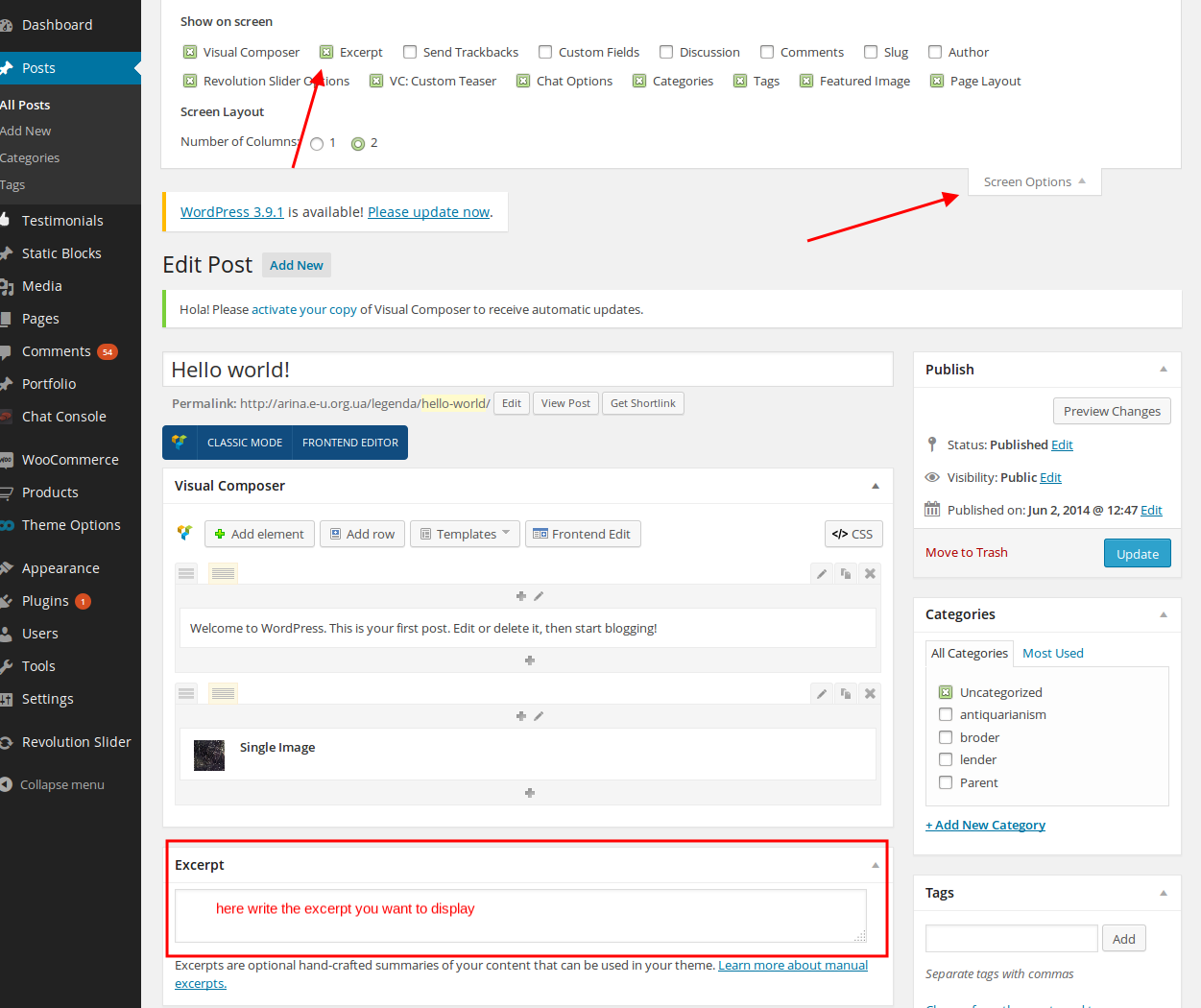
Have you written an excerpt for the post in admin panel > Posts > select the needed post?
Regards,
Eva Kemp.
Hello,
Please try to change the settings:
Go to Woocomerce > Settings > Wishlist and choose “Use shortcode” in “Position” option.
Don’t forget to save the changes.
If the issue is still there please provide us with wp-admin panel login details.
Regards,
Eva Kemp.
Hello,
The logo size on your site is the same as on the demo – 215px on mobile devices. If you want to increase it you need use this code in custom.css:
@media (max-width: 767px) { .logo img {
    max-width: 215px !important;
}}
Change the value to what you want.
Regards,
Eva Kemp.
Hello,
Google fonts code is placed in the file wp-content/themes/legenda/framework/shortcodes.php.
We recommend you to make any changes in a child theme not to lose the modifications after the theme update.
Regards,
Eva Kemp.
Hello,
We’ve added the code into custom.css to resolve the issue with sidebar on a mobile device.
Unfortunately the sidebar on home page can’t be edited as it’s added via Visual Composer. Sorry.
Regards,
Eva Kemp.
Hello,
Please provide us with the links where all these words are to provide you with the correct files to edit.
Thank you.
Regards,
Eva Kemp.
Hello,
Just to clarify. I don’t see Woocommerce plugin installed. Are you going to use it as it must be installed before the theme activation?
Regards,
Eva Kemp.
Hello,
The price $26.89 includes tax as well. If you want to display it without tax ($24.90), then you need edit it in Woocommerce > Settings > Tax tab > find the field “Display prices in the shop:” and select “Excluding tax”.
Regards,
Eva Kemp.
Hello,
Seems your site is cached on the server. I’ve added the code and now we should wait till the cache is updated.
So please wait a little.
Regards,
Eva Kemp.
Hello,
Are importing the data on your local server or at your hosting provider?
There might be some problem on the server.
Regards,
Eva Kemp.
Hello,
You can remove category banner adding this code into custom.css file:
.grid_content.no-sidebar .cat-banner {
    display: none;
}
You can watch the tutorial how to create custom.css (the video is related to Legenda theme, but the process is identical): https://www.youtube.com/watch?v=Qok2zRedRMY
Regards,
Eva Kemp.
Hello,
Please provide us with FTP credentials.
Thank you.
Regards,
Eva Kemp.
Hello,
Please specify what size you want the logo to be on mobile and desktop variants?
After that we’ll correct its displaying.
As I understood you’ll keep search form widget on, won’t you? Please confirm to be sure what modifications we should make.
Thank you.
Regards,
Eva Kemp.
Hello,
I’ve added the code for tablets as well. Please check now.
Regards,
Eva Kemp.
Hello,
Sorry, but FTP credentials are incorrect. Please check them.
Thank you.
Regards,
Eva Kemp.
Hello,
Please provide us with FTP and wp-admin panel credentials in Private Content.
Regards,
Eva Kemp.
Hello,
I’ve added the following code in custom.css file to remove parallax image on mobile device:
@media (max-width: 767px) {div.et_section.no-border.color-scheme-dark.parallax-section.a-center {
display: none;
}}
Please check it now.
Regards,
Eva Kemp.
Hello,
Unfortunately we don’t have such feature. Sorry.
Regards,
Eva Kemp.
We’re glad you were able to resolve the issue.
Enjoy your work!
Regards,
Eva Kemp.
Hello,
Sorry, but if you want to translate contact form you can do this in .po files or edit contacts.php file in the theme directory.
Regards,
Eva Kemp.
Hello,
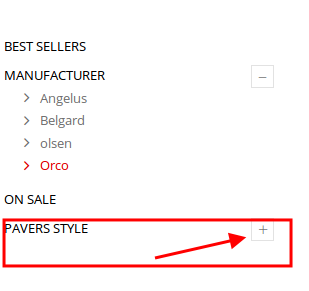
Do you wish to have the second category in sidebar opened by default?
Regards,
Eva Kemp.
Hello,
Please add this code in custom.css file to center the logo when search form widget is disabled:
@media(min-width:980px) and (max-width:1199px){
 .header5 .logo, .header6 .logo, .header1 .logo, .header7 .logo {
  position: relative;
  left: 325px;
 }
}

@media(min-width:1200px){
 .header5 .logo, .header6 .logo, .header1 .logo, .header7 .logo {
   position: relative;
   left: 330px;
   float:left !important;
 }
}
Please make sure you have Custom CSS enabled in Theme Options. How to create custom.css file you can watch here: https://www.youtube.com/watch?v=Qok2zRedRMY
And try to add this code again to make the logo bigger:
.header5 .logo img, .header6 .logo img, .header1 .logo img, .header7 .logo img {
    max-width: 400px !important;
}
.fixed-header-area .fixed-header .logo-with-menu {
    width: 300px !important;    }
Regards,
Eva Kemp.
Hello,
Have you created a new template for archive page? It requires additional customization and is a paid service. If you have needed skills you may try to customize it yourself.
Regards,
Eva Kemp.
Hello,
Just to clarify: do you want to remove the scroll from the sizing guide image?
Regards,
Eva Kemp.
Hello,
The problem was the symbol “>” in the code which you copied was interpreted like “& g t;”. I’ve corrected it and submenus are showing fine now.
Please check and clear browser cache before.
Regards,
Eva Kemp.
Hello,
Please provide us with the link to your site and wp-admin panel credentials in Private Content.
Regards,
Eva Kemp.
Hello,
You’re welcome.
Regards,
Eva Kemp.
Hello,
Go to Settings > Visual Composer > General Settings tab and select Content Types where you want VC to be displayed.
Regards,
Eva Kemp.
Hello,
I’ve edited the code. Please check your site now.
Regards,
Eva Kemp.









