
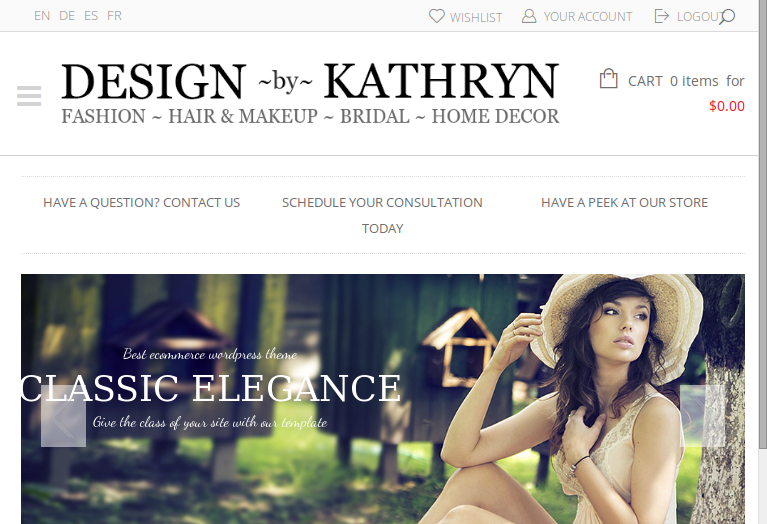
The logo is showing fine on tablets as well:
Are you checking it with browser resizing or on mobile devices?
Please show us screenshots.
Thank you.
Regards,
Eva Kemp.

The logo is showing fine on tablets as well:
Are you checking it with browser resizing or on mobile devices?
Please show us screenshots.
Thank you.
Regards,
Eva Kemp.
You’re welcome.
Regards,
Eva Kemp.
Hello,
Please add this code in custom.css to increase the height for product name:
.products-grid .product .product-name {
    height: 140px !important;
}
Regards,
Eva Kemp.
Hello,
Your logo is showing fine on mobile device:
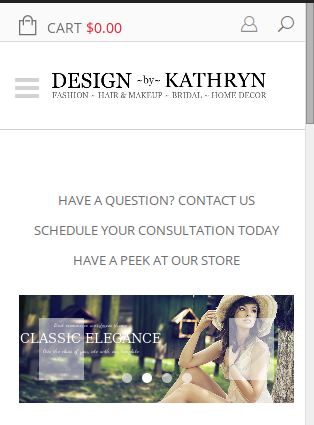
Do you want to make it bigger?
Please show us a screenshot of what you see on your side.
Thank you.
Regards,
Eva Kemp.
Hello,
Sorry, but payment questions are related to Woocommerce configuration. We recommend you to contact their support team.
Thank you for understanding.
Regards,
Eva Kemp.
Hello,
Sorry, but your question is a bit unclear. Could you please provide us with some links and screenshots to have better understanding of your issue.
Thank you.
Also please provide us with wp-admin panel credentials in Private Content.
Regards,
Eva Kemp.
Hello,
Do you mean our default contact form you’re using on the site or notifications from WordPress?
Thank you.
Regards,
Eva Kemp.
As I see you don’t have “Your Account” page created in admin panel > Pages. Please create it and insert this shortcode into text editor: [userlog]
Regards,
Eva Kemp.
You’re welcome.
Regards,
Eva Kemp.
Hello @b_guenther,
Have you created Register page?
Please refer to our documentation: https://www.8theme.com/demo/docs/blanco/index.html#!/registration_page
If the issue is still there please provide us with FTP and wp-admin panel credentials in Private Content.
Regards,
Eva Kemp.
Sorry, but your issue is unclear.
Could you please show us a screenshot?
Thank you.
Regards,
Eva Kemp.
Hello,
Have you enabled Responsive design in Theme Options > Responsive?
Please check.
Also please provide us with FTP and admin panel credentials in Private Content.
Regards,
Eva Kemp.
Hello,
I’ve added the following code into custom.css:
#products-grid.products_grid .product-grid .btn-cont {
    width: 100%;
    text-align: center;
}

#products-grid.products_grid .product-grid .price { width: 100%; }
Please check Shop page now.
Regards,
Eva Kemp.
As I see the menu is showing fine now:
Please clear your browser cache and check again.
Regards,
Eva Kemp.
Hello,
Yes, you have to wait for a new theme update where all plugins will be updated to the latest versions.
Unfortunately we don’t have the exact date of the theme release for now.
Sorry for inconveniences.
Regards,
Eva Kemp.
Please change the code to this one:
.header-type-3 .main-nav .menu {
    width: 830px !important;
}
If you still have problems please provide us with FTP credentials as well.
Regards,
Eva Kemp.
You’re welcome.
Regards,
Eva Kemp.
Hello,
There is some problem with the logo styling. Please add this code into custom.css file:
.header-type-3 .logo-with-menu img {
    width: 300px;
}

.header-type-3 .main-nav .menu {
    width: 830px;
}
Here you can watch the tutorial how to create custom.css.
We used Text element for Project details. You can insert this code in Text element using Text editor instead of Visual to have the table for project details:
<h5>Project details</h5>
<table class="table">
<tbody>
<tr>
<td><strong>Author:</strong></td>
<td>8theme</td>
</tr>
<tr>
<td><strong>Posted:</strong></td>
<td>23 June 2013</td>
</tr>
<tr>
<td><strong>Size:</strong></td>
<td>1600px x 2400px / 5.2mb</td>
</tr>
<tr>
<td><strong>Copyrights:</strong></td>
<td>Eight Theme</td>
</tr>
</tbody>
</table>
Edit the text to your needs.
Regards,
Eva Kemp.
Hello,
Thank you for notification. We really appreciate it.
We recommend you to create a ticket at https://support.8theme.com/ and our developers will investigate the issues. Please provide all details (links, screenshots) in the ticket for our specialists to have as much information as possible.
Thank you.
Regards,
Eva Kemp.
Unfortunately we don’t have the exact date of the new release for now. It may be produced in a few weeks.
Sorry for inconveniences.
Regards,
Eva Kemp.
Hello,
Please add this code into custom.css file and change the color value to yours:
.main-nav .menu > li.current-menu-item > a {
    background-color: #00F;
}
Regards,
Eva Kemp.
Hello,
Please provide us with the link to your site and wp-admin panel credentials in Private Content.
Regards,
Eva Kemp.
I’ve added this code:
#products-grid.products_grid .product-grid {
    margin-left: -1px;
}

#products-grid.products_grid .product-grid .btn-cont .button {
    margin: -2px;
}
Please check the site now.
Thank you.
Regards,
Eva Kemp.
Hello,
400 errors are a temporary disconnect between the browser and the website or data source. It could be as simple as a cache issue. We recommend you to clear any cache plugin, and if you don’t have one, clear the browser’s cache. The request sent by your browser to the server is essentially malformed, which can result from an incomplete request, such as an interruption of some kind, ultimately resulting in the call upon the server being incomplete. Since the font is called from yet another server, it seems possible that the call could be coming from your server to Google’s — which indicates it may be cached.
Regards,
Eva Kemp.
Please add this code into custom.css:
@media (max-width: 479px) {.footer_menu {
    text-align: center;
}}
Regards,
Eva Kemp.
Hello @toby19,
Please provide us with wp-admin panel credentials in Private Content.
As I understood you correctly you want to change font color for the specific menu item, don’t you?
Regards,
Eva Kemp.
Thank you for the kind words!
You’re welcome.
Enjoy your work!
Regards,
Eva Kemp.
Hello,
We provide all plugins of the latest versions with our theme. If some plugin is updated after our new theme release, then you have to buy license yourself or wait for our theme update where the plugins will be updated to the latest versions.
Regards,
Eva Kemp.
Hello @presumedetucasa,
Have you asked other hosting providers to check error logs what is causing the issue? They should see some errors and the reason why it’s not working.
Other clients install the theme successfully and don’t experience any problems.
We’re very sorry but you have to consult with your hosting providers regarding “500 error”.
Regards,
Eva Kemp.
Hello @b_guenther,
You’re welcome.
Regards,
Eva Kemp.









