
Hello,
To download the Legenda theme you need go to this link: http://themeforest.net/item/legenda-responsive-multipurpose-wordpress-theme/5888906
Let us know if you have other questions.
Thank you.
Regards,
Eva Kemp.

Hello,
To download the Legenda theme you need go to this link: http://themeforest.net/item/legenda-responsive-multipurpose-wordpress-theme/5888906
Let us know if you have other questions.
Thank you.
Regards,
Eva Kemp.
You’re welcome.
Regards,
Eva Kemp.
Hello,
I’ve commented the following code in custom.css:
@media (max-width: 767px) {.wpb_single_image img {
max-width: 60%;
float: right;
margin-top: -150px;
position: relative;
left: 20px;
}}
and the page is showing fine now.
And added this code for “back to top” button to appear:
@media (max-width: 767px) {.back-to-top.btt-shown {
    display: block !important;
}}
Please check.
Regards,
Eva Kemp.
Hello,
Unfortunately this requires additional customization and is a paid service.
If you have needed skills you may try to do it yourself. If you agree to pay, please create a ticket at http://support.8theme.com/ and our specialists provide you with the price info.
Regards,
Eva Kemp.
Hello,
We recommend you to contact Woocommerce support regarding this issue.
They should advise you some solution.
Thank you.
Regards,
Eva Kemp.
Hello,
We are able to see Wishlist button on that page too:
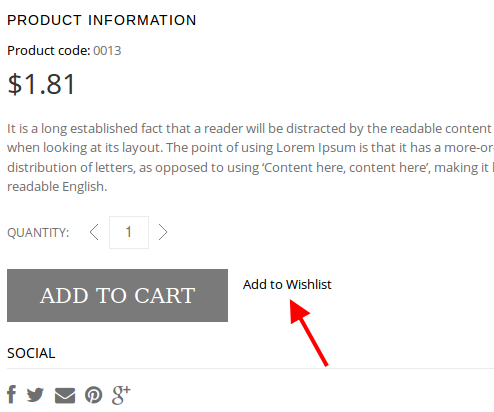
Could you please show us a screenshot of what you see?
Also please try to check your site with some other browser.
Regards,
Eva Kemp.
Hello,
In this case we recommend you to create a ticket at https://support.8theme.com/ and our specialists will investigate what the issue is. Please provide FTP and wp-admin panel credentials in the ticket.
Thank you.
Regards,
Eva Kemp.
Hello,
Please provide with wp-admin panel credentials in Private Content.
Regards,
Eva Kemp.
You’re welcome.
Regards,
Eva Kemp.
Hello,
Previously you were provided with the following reply:
To close first category, edit wp-content/themes/legenda/js/etheme.js file. Find and comment out line 1389
etCats.find('>li').first().find('.open-this').html(minusIcon).parent().addClass('opened').find('ul.children').show();
We recommend you to make changes in a child theme to avoid losing modifications after the theme update.
Regards,
Eva Kemp.
Also use this code to make the lines on the Checkout page black:
.payment_methods li:first-child, .payment_methods li {
    border-top: 1px solid #000;
}
Regards,
Eva Kemp.
Hello,
Please add this code into custom.css:
select {
   border: 1px solid #000;
}
The arrow is an image wp-content/themes/legenda/images/select-arrow.png, and to change its color you need edit this picture with some image editor.
To remove the white block on Wishlist page add the following code into custom.css:
.woocommerce table.cart .product-thumbnail {
    display: none;
}
and this one to make inner border of newsletter box black:
.widget_mc4wp_widget {
    border: 1px solid #000;
}
Regards,
Eva Kemp.
Hello,
Sorry, but your request is a bit unclear.
Could you please show on screenshots what you’re trying to achieve?
Thank you.
Regards,
Eva Kemp.
Hello,
As I see you have old versions of Visual Composer plugin and the theme. We’ve recently released the theme update. You can download it http://themeforest.net/item/legenda-responsive-multipurpose-wordpress-theme/5888906 and upgrade. Also VC is also updated with the theme to the version 4.3.1.
After you unzip the archive you’ll find another archive Legenda_v2.3.zip, extract it as well and open this folder “legenda_v2.3” > “legenda”. The plugin is placed inside of legenda folder under framework/plugins directory. Upload the new version via FTP and remove the old one.
Regards,
Eva Kemp.
Hello,
I’ve disabled Nice Scroll in Theme Options > General.
Please check it now.
Regards,
Eva Kemp.
Hello,
To confirm: do you need rename the field of the contact form or add another one?
Regards,
Eva Kemp.
You’re always welcome.
Regards,
Eva Kemp.
Hello @rsn8,
You’re welcome.
Regards,
Eva Kemp.
Hello @rsn8,
Currently we have Visual Composer version 4.3.1. We’ve updated it to this version for you. If you want to have the latest one – 4.3.2 – you have to buy the license yourself or wait for the next theme release where VC will be updated in there.
Regards,
Eva Kemp.
Hello,
Please refer to Woocommerce documentation concerning the “related products”:
http://docs.woothemes.com/document/related-products-up-sells-and-cross-sells/
Regards,
Eva Kemp.
Hello,
As I see you have very old version of Woocommerce plugin. Please update it. Also there is a new release of the Legenda theme with new versions of Visual Composer and Revolution Slider plugins implemented in there:
http://themeforest.net/item/legenda-responsive-multipurpose-wordpress-theme/5888906
Please update it as well ( https://www.8theme.com/demo/docs/legenda/index.html#!/upgrade ).
Regards,
Eva Kemp.
Hello,
I’ve been redirected to the correct demo page: http://i.imgur.com/Spr7v8K.png
If you want to edit the code for your purposes (and have necessary skills) you can do this in the file wp-content/themes/blanco/code/shortcodes.php (from the line 2).
We recommend you to make changes in a child theme to avoid losing modifications after theme update.
Regards,
Eva Kemp.
You’re welcome.
Regards,
Eva Kemp.
Hello,
You can remove reviews in admin panel > Comments.
Regards,
Eva Kemp.
Hello @desylo,
Please create a ticket at https://support.8theme.com/ and our developers will investigate what a problem may be there. Please describe your issue in the ticket and don’t forget to provide wp-admin panel and FTP credentials.
Thank you.
Regards,
Eva Kemp.
Hello,
You can translate Product Name, Unit Price, Stock Status words in the file wp-content/themes/legenda/woocommerce/wishlist.php (from the line 101).
You can edit the text in search form box in the file wp-content/themes/legenda/framework/shortcodes.php (line 98), find the code placeholder="'.__('Search', ETHEME_DOMAIN).'"/>'; and replace “Search” text with yours.
To remove wishlist title go to Woocommerce > Settings > Wishlist tab > “Wishlist title” field and remove it.
To translate chat error you need edit the plugin file class.chat.php (line 607) in the directory wp-content/plugins/screets-chat/screets-chat/core.
Regards,
Eva Kemp.
Hello,
Sorry, but featured products slider works only for Woocommerce plugin and not for WP-eCommerce.
Here you can check what shortcodes you can use: https://www.8theme.com/demo/docs/blanco/index.html#!/blanco_shortcodes
Regards,
Eva Kemp.
Hello,
As I see you have thumbnails dimensions 130*130px in Theme Options > Single Product Page > Product Thumbnails Width/Product Thumbnails Height. Change them to the ones you need.
Unfortunately there is no such option to add arrows for the thumbnails gallery, but you can enable it for the main image. In your style.css of the child theme you have the code
body.home .content .testimonials-slider .cbp-qtprogress, .product_cat_accessories .product .product-info hr, body.single-product .main-gallery .flex-direction-nav{display: none;}
You need change it to
body.home .content .testimonials-slider .cbp-qtprogress, .product_cat_accessories .product .product-info hr, body.single-product .main-gallery .flex-direction-nav{display: block;}
and the navigation arrows will appear.
Regards,
Eva Kemp.
Hello,
You can upload banner in Blanco – Theme Settings > Product Page > Product Page Banner.
Regards,
Eva Kemp.
Hello,
Please provide us with the link of a product where image gallery is shown.
Thank you.
Regards,
Eva Kemp.










