
Hello,
Sorry, but as this is Woocommerce widget, you have to contact their support concerning this issue.
Thank you for understanding.
Regards,
Eva Kemp.

Hello,
Sorry, but as this is Woocommerce widget, you have to contact their support concerning this issue.
Thank you for understanding.
Regards,
Eva Kemp.
Hello @DeathByDisco,
To correct all categories you need go to Products > Categories > open category and re-save it. Errors will disappear. The problem is related to changes made in category header editor.
Sorry for inconveniences.
Regards,
Eva Kemp.
Hello,
You need add featured image which will be the main image of your product.
After that product gallery will be shown.
Thank you.
Regards,
Eva Kemp.
Hello,
Are you using a site with our theme?
If so, please provide us with wp-admin panel access and specify what exactly you want to achieve.
Thank you.
Regards,
Eva Kemp.
Hello,
The problem is you didn’t add any products to your brands:

When mark products with brands, they will appear on the Home page.
Thank you.
Regards,
Eva Kemp.
Hello,
You’re welcome.
Regards,
Eva Kemp.
Hello,
You’re welcome.
Regards,
Eva Kemp.
Hello,
You’re using 5.2 php version. Please ask your host to update it to at least 5.3 version for your site.
Thank you.
Regards,
Eva Kemp.
Hello,
No, pagination enables if there are too many posts which can’t be viewed on one page.
Also you can select how many posts on a page to show in the Posts Grid settings.
Regards,
Eva Kemp.
Hello,
When trying to view the image http://sevenseasaustralia.com/wp-content/uploads/Screen-Print.jpg I’m getting authorization box. It may be the reason the picture can’t be seen.
Try to use other link or disable that authorization.
Thank you.
Regards,
Eva Kemp.
Hello,
Set post_max_size value to 100M.
Thank you.
Regards,
Eva Kemp.
Hello,
Please provide us with the access to wp-admin panel in Private Content.
Thank you.
Regards,
Eva Kemp.
Hello,
You didn’t add shortcode for contact form – [etheme_contacts] mentioned in our documentation: https://www.8theme.com/demo/docs/idstore/index.html#!/idstore_shortcodes
I’ve added it and now your Contact page is working fine.
Please check it.
Regards,
Eva Kemp.
Hello,
I’ve checked default WordPress theme and out of stock products aren’t shown there as well. So the problem is related to Woocommerce settings. You should contact their support concerning this issue.
Thank you.
Regards,
Eva Kemp.
Hello @Fred,
I’ve checked default WordPress theme and the issue persists there too, so the problem isn’t related to our theme. You have to contact Woocommerce support for the solution.
Regards,
Eva Kemp.
Hello @LindaMendible,
How to update WordPress you can find at this link:
http://codex.wordpress.org/Updating_WordPress
Don’t forget to create a back up of the files and database before.
Thank you.
Regards,
Eva Kemp.
Hello,
You’ve added categories items to the main menu. We recommend you to create pages and use Products element in Visual Composer editor. Then add these pages to the main menu in Appearance > Menus instead of Products Categories.
Thank you.
Regards,
Eva Kemp.
Hello,
1. You can export pages from the sites and import to a new one as described in these articles:
http://en.support.wordpress.com/export/
http://www.linkbrightmedia.com/faqs/export-single-wordpress-post-page/
2. Standard Woocommerce Product Image Sizes are:
Catalog Images: Width(270), Height(370), Hard Crop (uncheck)
Single Product Image: Width(460), Height(628), (uncheck)
Product Thumbnails: Width(75), Height(100), Hard Crop (uncheck)
3. Sorry, but your request is unclear. Please show a screenshot what you’re trying to achieve.
4. There is no such problem in the latest version of the theme and Visual Composer plugin.
5. You have to create footer for a new site yourself. There is no possibility to export footer.
Please note we provide support only to one site that uses our theme. Otherwise you have to buy license keys for other domains.
Thank you.
Regards,
Eva Kemp.
Hello,
I’ve just deactivated all plugins except of Woocommerce, Revolution Slider and LayerSluder, and the products links have started working.
You need disable plugins one by one to find out which one is causing the issue.
Thank you.
Regards,
Eva Kemp.
Hello,
Do you have out of stock products now?
Please provide us with the correct login details to wp-admin panel.
Thank you.
Regards,
Eva Kemp.
Hello,
Please look at screenshot how you can remove “Terms and Conditions” on the Checkout page in Woocommerce > Settings:
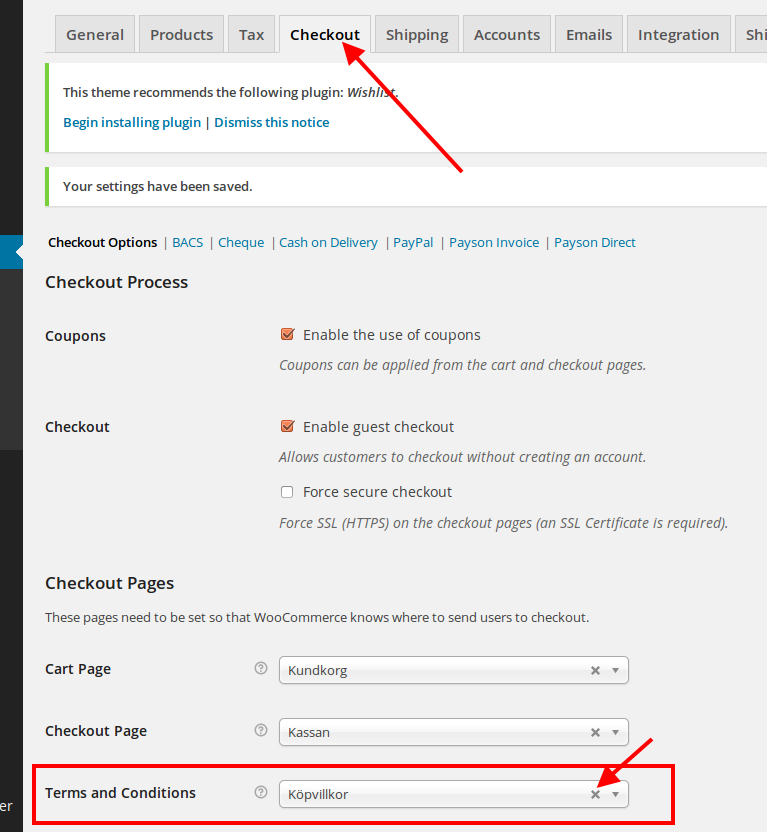
To translate the text “I have read and accept the terms & conditions” you need edit the file wp-content/themes/blanco/woocommerce/checkout/review-order.php (line 177).
Regards,
Eva Kemp.
Hello,
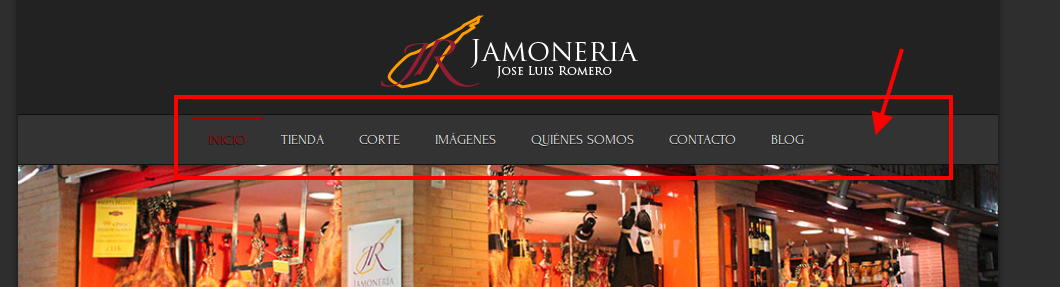
When you said “my WPML language selector is missing from main menu.”, did you mean the language switcher was added to the menu section?
Thank you.
Regards,
Eva Kemp.
Hello,
As I see the categories are shown fine.
Have you resolved the problem?
Regards,
Eva Kemp.
Hello,
Concerning this issue you need create a ticket at http://support.8theme.com/ and our developers will investigate the problem.
Thank you.
Regards,
Eva Kemp.
Hello,
Please specify on which page you’re trying to add Product Gallery.
Thank you.
Regards,
Eva Kemp.
Hello,
Yes, it’s safe to update Woocommerce plugin.
Let us know if you need more help.
Regards,
Eva Kemp.
Hello @starmila,
Logo in footer can be changed in Appearance > Widgets > Footer Copyrights widget area.
Drag Text widget into there and insert the code <img src="/wp-content/themes/legenda/images/logo-small.png" class="logo-small">
Replace /wp-content/themes/legenda/images/logo-small.png with the path to your image.
File logo-small.png can be found via FTP in the directory /wp-content/themes/legenda/images.
Thank you.
Regards,
Eva Kemp.
Hello,
Please check the page http://www.cookpower.com.tw/%E8%82%89%E9%A1%9E/ now.
The reason was you didn’t specify dimensions for images in Posts Grid settings.
Thank you.
Regards,
Eva Kemp.
Hello,
This issue may be caused by Facebook cache. You can find more information about it here:
https://www.8theme.com/knowledge-base/clearing-facebooks-share-cache/
Thank you.
Regards,
Eva Kemp.
Hello,
I’ve added the following code into custom.css file:
.price {word-wrap: break-word;}
Please check price display now and clear browser cache before.
Thank you.
Regards,
Eva Kemp.










