
You’re welcome.
Regards,
Eva Kemp.

You’re welcome.
Regards,
Eva Kemp.
Hello,
Sorry but your request is a bit unclear.
Could you please clarify what exactly you need to change?
Thank you.
Regards,
Eva Kemp.
Hello,
Meanwhile you can create a link for the image added img_link="your_link_to_image" into the VC shortcode via classic editor.
Sorry for inconveniences.
Regards,
Eva Kemp.
Hello,
Unfortunately, but we don’t have such feature by default. You can try using some Visual Composer elements to achieve what you want. Sorry.
Regards,
Eva Kemp.
Hello,
The problem is in the code in woocommerce/content-product.php file of your child theme.
Please check what changes you have done in this file. Do you have debug mode enabled in wp-config.php file? If so, disable it, change define('WP_DEBUG', true); to define('WP_DEBUG', false);
Thank you.
Regards,
Eva Kemp.
Hello,
You’re welcome.
Regards,
Eva Kemp.
Hello,
There is some restriction at your host. So, I’ve uploaded the plugins via FTP.
Let us know if you need more help.
Regards,
Eva Kemp.
Hello,
As I see you’re using old theme version.
Please update it to the latest version – 1.3.
Thank you.
Regards,
Eva Kemp.
Hello,
You need change logo image in Theme Options > Header and upload your own logo.
You can create your own footer as shown in the video tutorial from the previous post.
Thank you.
Regards,
Eva Kemp.
Hello,
Please add this code into custom.css file:
.comment-reply-title:after {
    content: none !important;
}
Regards,
Eva Kemp.
Hello,
Sorry, but the login credentials are incorrect.
Please check them.
Thank you.
Regards,
Eva Kemp.
Hello,
1. The image is added as background via Visual Composer editor. You need edit your home page.
2. Please refer to our documentation how to create registration page: https://www.8theme.com/demo/docs/royal/#!/3_registration_page
3. That text is related to Wishlist plugin and you need edit its file located in wp-content/plugins/yith-woocommerce-wishlist/class.yith-wcwl-ui.php.
4. Yes, you can update WordPress but create a back up before update process.
5. Yes, update Woocommerce plugin to the latest version.
6. You can create a menu in Appearance > Menus and use Custom Menu widget in the Shop sidebar widget area.
Regards,
Eva Kemp.
Hello,
Please provide us with a link of a page where you want to make modifications.
Thank you.
Regards,
Eva Kemp.
Hello,
Please provide us with FTP and wp-admin panel credentials in Private Content.
Thank you.
Regards,
Eva Kemp.
Hello @Royal Fan,
We’ve taken this issue into our account and it should be fixed in future update.
Sorry for inconveniences.
Regards,
Eva Kemp.
Hello,
You can select breadcrumbs style with background in Theme Options > Header and upload your own image.
Let us know if you need more help.
Regards,
Eva Kemp.
Hello,
You’re welcome.
Regards,
Eva Kemp.
Hello,
1. Could you please show on a screenshot what you want to deactivate?
2. “Sale” icon can be disabled in Theme Options > Shop.
3. Try to change images sizes in Woocommerce > Settings > Products tab and then regenerate thumbnails. If it doesn’t help provide us with wp-admin panel credentials in Private Content.
4. Please provide us with the direct link of the page where you want to hide some elements.
Thank you.
Regards,
Eva Kemp.
Hello,
Please use this code in custom.css:
.sidebar-widget .widget-title {
   font-size: 10px !important;
}
Regards,
Eva Kemp.
Hello,
Please use this code in custom.css file:
.fixed-header-area .fixed-header .logo-with-menu {
   width: 250px !important;
}
Regards,
Eva Kemp.
Hello,
Unfortunately there is a bug in Visual Composer with our theme.
It should be fixed in the next update.
Please take our apologies.
Regards,
Eva Kemp.
Hello,
You can change color only for Sale menu item this way:
Go to Appearance > Menus, open the menu tab of “Sale” and below “CSS Classes (optional)” write your css class (for example: my_class).
You can enable CSS classes at the top of admin panel, just click “Screen Options”
Then you should edit custom.css file, add the code:
.my_class a {
font-size: 16px;
color: red;
}
Regards,
Eva Kemp.
Hello,
To change social icons in footer you need edit the file footer.php (from line 13) in wp-content/themes/blanco directory via FTP.
Thank you.
Regards,
Eva Kemp.
Hello,
I’ve installed the plugins.
Please check now.
Regards,
Eva Kemp.
Hello,
Unfortunately there is no possibility to implement your own fonts in the theme.
You can change font only for some elements using custom.css or style.css of the child theme.
For example, to change font for menu items you need write the code:
.menu > ul > li > a {
    font-family: Georgia;
}
Sorry for inconveniences.
Regards,
Eva Kemp.
Hello,
1. I’ve enabled “Default Left” option for Breadcrumbs Style in Theme Options > Header.
Please check the site now.
2. You can use “more” tag to show excerpt as I’ve done for the first post:

3./4. Please provide us with FTP credentials as well.
5. Sorry, but I don’t see any problems with the header on the Contact page.
6. As you can see header type 11 doesn’t have top bar, despite of the 7th and 9th types, for example:
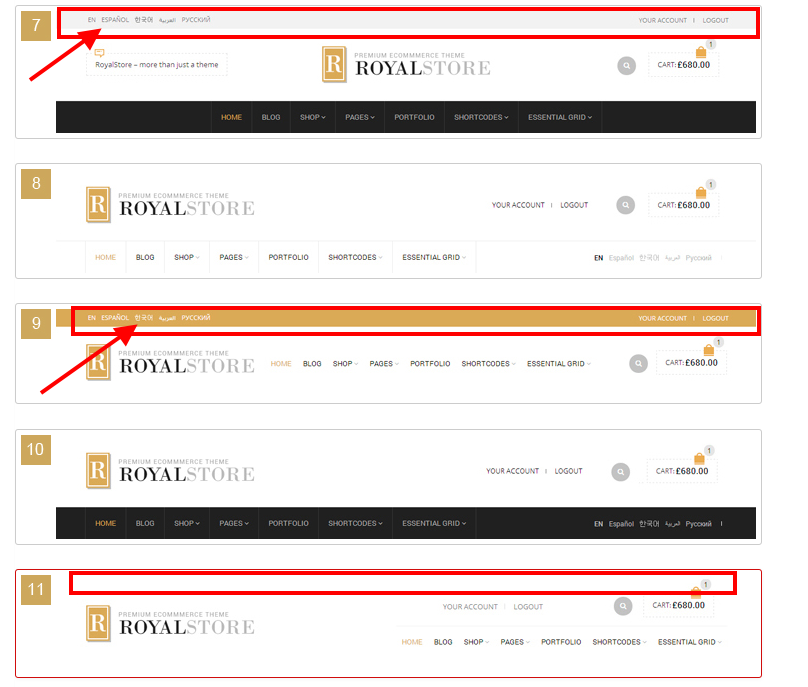
If you want to use top bar you need select other header type.
Thank you.
Regards,
Eva Kemp.
Hello,
There is also asked for Google Authenticator code. What should we write in that field?
Regards,
Eva Kemp.
You’re welcome.
Regards,
Eva Kemp.
Hello,
Here is the link you can contact Woocommerce support team at:
http://www.woothemes.com/contact-us/
Regards,
Eva Kemp.
Hello,
1. To disable “terms and conditions” you need click the cross “x” to remove the page and save the settings as shown on the previous screenshot. After that it will disappear from the Checkout page.
2. There may be some bugs that not all words are recognised.
It should be fixed in the next update.
Sorry for inconveniences.
Regards,
Eva Kemp.









