Hello,
I’ve updated Revolution Slider plugin.
Please check it now.
Regards,
Eva Kemp.

Hello,
I’ve updated Revolution Slider plugin.
Please check it now.
Regards,
Eva Kemp.
Hello,
I’ve tried deactivating all plugins and the issue has disappeared.
So you need find what plugin is causing the problem.
Try to deactivate them all except of woocommerce, WPBakery, Revolution Slider.
Thank you.
Regards,
Eva Kemp.
Hello,
Could you please show a screenshot of your second question to have clearer understanding of the issue?
Thank you.
Regards,
Eva Kemp.
Hello,
These changes can be made in style.css file of your child theme.
You need modify the view style using css code for each element.
If you have necessary skills you may try to do this. If you have any difficulties we’ll help you.
Thank you.
Regards,
Eva Kemp.
Hello,
Is there any assistance required from us?
Thank you.
Regards,
Eva Kemp.
Hello,
Please provide us with your site url.
Thank you.
Regards,
Eva Kemp.
Hello,
The images aren’t shown because you didn’t set thumbnails for products categories in Products > Categories.
Please check it.
Regards,
Eva Kemp.
Hello,
Please provide us with your site url and FTP credentials.
Please remove all the code you’ve written for those changes in custom.css.
Thank you.
Regards,
Eva Kemp.
Hello,
Please provide us with FTP credentials.
Have you made any changed in the original theme files?
Regards,
Eva Kemp.
Hello,
I’ve added the following code into custom.css file:
.btn-black {
  border: 2px solid black;
  color: black !important;
  -webkit-transition: all 0.2s ease-in-out;
  -moz-transition: all 0.2s ease-in-out;
  -ms-transition: all 0.2s ease-in-out;
  -o-transition: all 0.2s ease-in-out;
  transition: all 0.2s ease-in-out;
}
.btn-black:hover {
  border: 2px solid black;
  background-color: black !important;
  color: white !important;
}
and edited the second slide, changed btn-white to btn-black.
Please check it.
Regards,
Eva Kemp.
Hello,
Have you tried deactivating 3rd-party plugins and checking default WordPress theme?
Does the issue persists there too?
Thank you.
Regards,
Eva Kemp.
Hello,
Have you changed login credentials to wp-admin panel?
We’re unable to log in now.
Please provide us with the correct details as well as FTP access.
Thank you.
Regards,
Eva Kemp.
Hello,
I’ve reactivated the theme.
Please check login form now.
I’ve been redirected to the site account page (not WP page) after logged in via drop down form.
Thank you.
Regards,
Eva Kemp.
Hello,
I’ve checked this issue with default WordPress theme and it persists there too, so you need contact Woocommerce support team as the problem occurs even in default WordPress theme.
Thank you.
Regards,
Eva Kemp.
Hello,
I’ve imported Zoo template manually.
Please check it now.
Regards,
Eva Kemp.
Hello,
I’ve updated Ultimate VC Addons plugin.
Regards,
Eva Kemp.
Hello,
You’re welcome.
Regards,
Eva Kemp.
Hello,
I’ve just browsed the menu items and haven’t seen the error.
Are you still experiencing it?
Regards,
Eva Kemp.
Hello,
You’re welcome.
Regards,
Eva Kemp.
Hello,
Sorry but there is no such element in VC.
Concerning 3rd-party plugins, we can’t guarantee their compatibility with our theme as they weren’t tested. So you may find some plugins yourself.
Please take our apologies for inconveniences.
Regards,
Eva Kemp.
Hello,
You’re welcome.
Regards,
Eva Kemp.
Hello,
You didn’t activated VC plugin before demo data installation.
I’ve activated it and installed base demo content.
Please check the site now http://www.skssbharosa.com/skssclub/
Regards,
Eva Kemp.
Hello,
You can search for solutions via comments on their forum. For example, familiar problem http://screets.com/i/forums/topic/does-not-see-the-message/ . The issue may be related to your server configuration as the chat doesn’t work even with the default Worpress theme. So you need ask your host to check some logs on a server.
Thank you.
Regards,
Eva Kemp.
Hello,
Please provide us with wp-admin panel and FTP credentials in Private Content.
Thank you.
Regards,
Eva Kemp.
Hello,
I’m unable to view your site now.
Have you removed SSL certificate?
Please show a screenshot where exactly you see those errors.
Thank you.
Regards,
Eva Kemp.
Hello,
Unfortunately there is no such possibility.
Sorry.
Regards,
Eva Kemp.
Hello,
We’ve tested the code and unfortunately it can’t be added to the menu, but only the way you placed it in header.php.
Sorry.
Regards,
Eva Kemp.
Hello,
Could you please provide us with the direct link where that error persists?
Also please provide us with FTP credentials as well.
Thank you.
Regards,
Eva Kemp.
Hello,
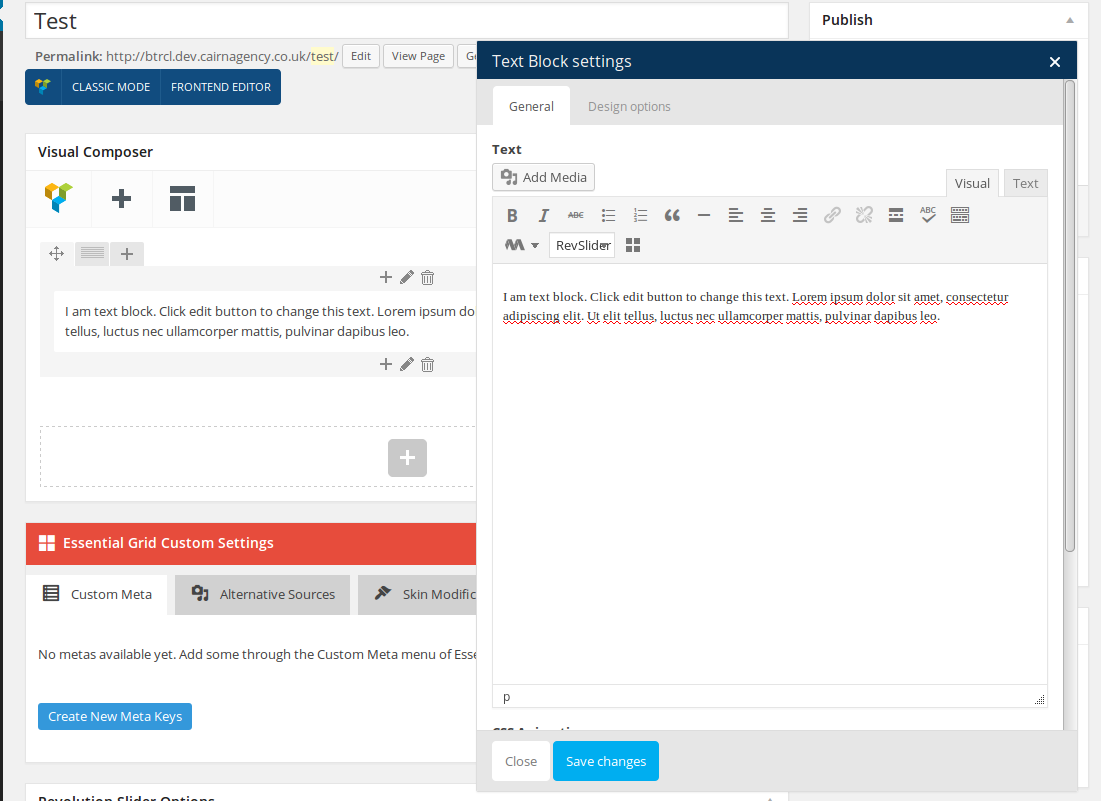
I’ve added Text element on the Test page http://btrcl.dev.cairnagency.co.uk/test/ and it’s working fine:
https://s3.amazonaws.com/fvd-data/notes/168674/1417449525-do515J/screen.png
Please try to check it with some other browser.
Thank you.
Regards,
Eva Kemp.
Hello,
Please ask your host to increase post_max_size and upload_max_filesize function to 20M and then try to install the template again.
Thank you.
Regards,
Eva Kemp.