
Hello,
As I see the registration page is working:
http://imgur.com/UDAf32U
Please clear your browser cache and check again.
Thank you.
Regards,
Eva Kemp.

Hello,
As I see the registration page is working:
http://imgur.com/UDAf32U
Please clear your browser cache and check again.
Thank you.
Regards,
Eva Kemp.
Hello,
We’re glad you’ve found the solution.
Regards,
Eva Kemp.
Hello,
To change tab title color add this code into custom.css file:
.tabs .tab-title.opened {
    color: #8C8888 !important;
}
To change font color for submenu items add this code into custom.css:
.main-nav .menu > li .nav-sublist-dropdown .container > ul > li a, .fixed-header .menu > li .nav-sublist-dropdown .container > ul > li a {color: #8C8888 !important;}
And this code for bold text:
.tabs .tab-content strong {color: #8C8888 !important;}
How to create custom.css you can watch in this tutorial.
Thank you.
Regards,
Eva Kemp.
Hello,
Have you read this instruction?
https://www.8theme.com/demo/docs/legenda/index.html#!/how_to_translate
How to create .po files is described here:
http://betterwp.net/wordpress-tips/create-pot-file-using-poedit./
Thank you.
Regards,
Eva Kemp.
Hello @webzan,
As I see your theme is updated to the latest version 2.5.
I’ve updated Visual Composer plugin for you. Also I’ve imported our demo slider for Home page in Revolution Slider.
Is there anything else we can help you with?
Thank you.
Regards,
Eva Kemp.
Hello,
You’re welcome.
Regards,
Eva Kemp.
Hello,
Please provide us with a screenshot of the test result.
Thank you.
Regards,
Eva Kemp.
Hello,
I’ve added this code into custom.css file:
.button, table td .button, .coupon .button {
color: white;
background-color: black;
}
Please check buttons now.
Regards,
Eva Kemp.
Hello,
Have you tried to connect to FTP yourself with the provided credentials?
We’re still getting an error:
Response: 530 Login authentication failed
Error: Critical error
Error: Could not connect to server
Please check the login details.
Thank you.
Regards,
Eva Kemp.
Hello,
You can add this code into custom.css file:
.header-type-3 .main-nav {
    height: 100px;
}
Please try.
Thank you.
Regards,
Eva Kemp.
Hello,
You disabled slider on mobile in Revolution Slider settings.
I’ve enabled it.
Please check it now.
Regards,
Eva Kemp.
Hello,
Please provide us with wp-admin panel credentials and we’ll create one project for you as an example.
Thank you.
Regards,
Eva Kemp.
Hello,
1. You need use Banner element in Visual Composer editor.
2. Add Text element to the row where you created parallax effect and write your text there.
3. Please read our documentation: https://www.8theme.com/demo/docs/leader/#!/widgets (Footer 1 Widget Area, Footer 2 Widget Area, Footer 3 Widget Area and so on).
Thank you.
Regards,
Eva Kemp.
Hello,
Sorry, but the password is incorrect.
Please check it.
Regards,
Eva Kemp.
Hello,
To remove https://yadi.sk/i/Qwj8MR4-dhSRC you need delete background image you’ve set for Revolution Slider element in Visual Composer editor on the Home page.
I’ve removed https://yadi.sk/i/m_GbZqRcdhSUB in Appearance > Menus, unchecked “Account Menu” at the bottom. Add this code into custom.css file to hide submenu dropdown from “My account” link at the top bar:
.submenu-dropdown {
   display: none;
}
To translate “Categories” add Woocommerce Product Categories widget to Shop Sidebar widget area and write your translation there.
How to create custom.css you can watch in this tutorial.
To change font size https://yadi.sk/i/UAOiavjQdgkkv add this code into custom.css file:
.show-quickly {font-size: 8.5px !important;}
Billing address on a Checkout page is related Woocommerce configuration, so you need refer to their documentation. You may try to use this plugin https://wordpress.org/plugins/woocommerce-checkout-manager/ or follow these instructions:
http://www.philowen.co/blog/remove-billing-shipping-address-in-woocommerce-checkout/
http://www.wpmayor.com/how-to-remove-the-billing-details-from-woocommerce-checkout/
To translate https://yadi.sk/i/D_VUPfcydgrPq you need edit the file class.yith-wcwl-ui.php (line 67) in wp-content/plugins/yith-woocommerce-wishlist directory.
To translate https://yadi.sk/i/L777CPZadgkWt edit the file wishlist.php (line 143) in wp-content/plugins/yith-woocommerce-wishlist/templates directory.
Thank you.
Regards,
Eva Kemp.
Hello @Qefx,
Please clarify your question.
We didn’t receive any details from you previously.
Is mobile menu not clickable on your site?
Please provide us your site url and wp-admin panel credentials in Private Content.
Thank you.
Regards,
Eva Kemp.
Hello,
Please provide us with wp-admin panel credentials in Private Content.
Thank you.
Regards,
Eva Kemp.
Hello @tbijeux,
Please provide us with wp-admin panel and FTP credentials in Private Content.
Thank you.
Regards,
Eva Kemp.
Hello,
I’ve updated Essential Grid plugin for you.
Please check it now.
Thank you.
Regards,
Eva Kemp.
Hello,
You’re welcome.
Regards,
Eva Kemp.
Hello,
What is the password for your FTP account?
Thank you.
Regards,
Eva Kemp.
Hello @LindaMendible,
We also need your FTP login details.
Thank you.
Happy New Year!
Regards,
Eva Kemp.
Hello,
I’ve removed padding value in the Revolution Slider column settings in Visual Composer editor.
Please check our documentation: https://www.8theme.com/demo/docs/legenda/index.html#!/how_to_translate especially pay attention to the last paragraph:
Next edit wp-config.php located in the root folder of WordPress and use the $locale with prefix with your language name which should be similar to the translation file name. For example:
$locale='de_DE';
Thank you.
Regards,
Eva Kemp.
Hello,
This is Woocommerce configuration and you have to contact their support team.
Thank you.
Regards,
Eva Kemp.
Hello @tbijeux,
Add the code mentioned in the previous post into functions.php file.
Thank you.
Regards,
Eva Kemp.
Hello @sammyslo,
Please read our documentation how to create parallax effect:
https://www.8theme.com/demo/docs/legenda/index.html#!/visual_composer
To have multilingual site you can use wpml plugin http://wpml.org/ which is fully compatible with our theme.
Hello,
Could you please clarify your question with more details?
As I see the products images on a products category page are shown fine.
Thank you.
Regards,
Eva Kemp.
Hello,
How to update theme you can watch in our video tutorial:
https://www.youtube.com/watch?v=KdWESIIPU1k
Create a back up of the files and database before update!
Thank you.
Regards,
Eva Kemp.
Hello,
Your image was too small.
I’ve reuploaded the image and add this code into CSS block of Visual Composer editor:
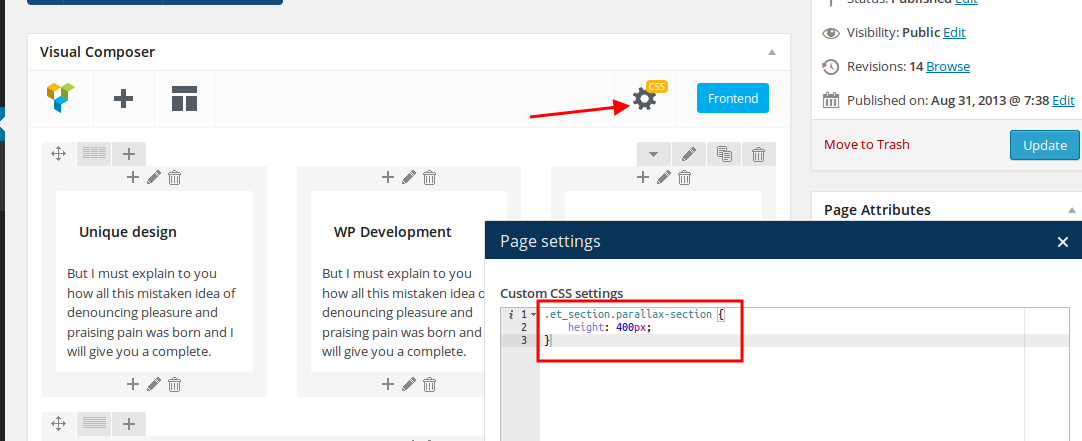
Sorry, but other pages you have to create yourself, it’s not implemented in our demo content.
Regards,
Eva Kemp.
Hello,
We’re very sorry for a delay.
There is still a bug and the issue will be fixed only after the 5th of January, because of holidays.
Please take our apologies.
We appreciate your understanding and patience very much.
Thank you.
Regards,
Eva Kemp.









