
Hello,
The information is stored in your database.
If a customer orders a product being logged in then he will see order information in his account.
Regards,
Eva Kemp.

Hello,
The information is stored in your database.
If a customer orders a product being logged in then he will see order information in his account.
Regards,
Eva Kemp.
Hello,
You’re always welcome.
Regards,
Eva Kemp.
Hello,
As I see you have copied style.css from the parent theme.
In a child theme you should write only changes you want to make for some elements.
I’ve edited your child theme style.css file and renamed functions.php and index.php via FTP.
I’ve added the following code into style.css of the child theme to remove post information on the Blog page:
.meta-post {
    display: none;
}
Please check it now.
Regards,
Eva Kemp.
Hello,
I’ve edited the code in shortcodes.php file. Please check the site and clear browser cache.
Thank you.
Regards,
Eva Kemp.
Hello,
Could you please show a screenshot of the problem and how you want the logo to be shown?
Thank you.
Regards,
Eva Kemp.
Hello,
I’ve updated style for buttons in the slider editor.
Please check now.
Thank you.
Regards,
Eva Kemp.
Hello,
I’ve added the code in Custom CSS block on the FAQ page:
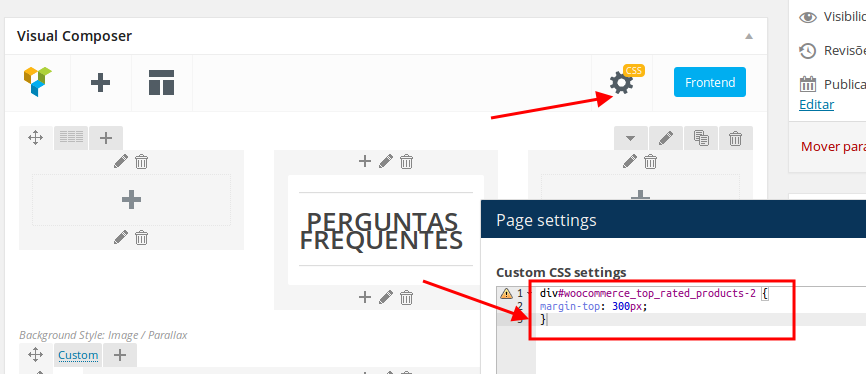
Please check the page now and clear browser cache before.
Thank you.
Regards,
Eva Kemp.
Hello,
Your domain http://equiflexsleeve.horseflydigital.com is redirecting to other link and it is http://equiflexsleeve.com/projects_cat/endurance/
Please provide us with FTP credentials to this site.
Thank you.
Regards,
Eva Kemp.
Hello,
Are you checking site on mobile devices or just resizing a browser window?
If you resize the browser window then you need to reload a page.
Could you please clarify with more details concerning the issue with “reserveer” menu item?
Thank you.
Regards,
Eva Kemp.
Hello,
Please update the theme to 2.9.4 version.
Don’t forget to create a back up of files and database before update.
Thank you.
Regards,
Eva Kemp.
Hello @jlsiefert,
In the widget you left our username – 8theme, but should use your twitter ID.
Please check the instruction carefully again.
Thank you.
Regards,
Eva Kemp.
Hello,
Such problem persists with default WordPress theme too.
So the issue is related to Woocommerce plugin. We recommend you to contact their support team for the solution.
Thank you.
Regards,
Eva Kemp.
Hello,
You can try to restore your site from back up at your host.
Ask them if there are back up files of the site and database.
If they don’t have back up. You can delete all files and database and install clear WordPress. Then install the theme as you did before.
Thank you.
Regards,
Eva Kemp.
Hello,
The credentials are incorrect.
Please check them.
Did you change permissions for image folders?
Regards,
Eva Kemp.
Hello,
Does WooCommerce Google Analytics code work with other themes, for example with default WordPress theme?
Thank you.
Regards,
Eva Kemp.
Hello @WaniCreative,
When checking product attributes in English it shows price in pounds, when I select French or German language the attributes price is changed to euro.
Please it with other browser.
Thank you.
Regards,
Eva Kemp.
Hello @creeb,
Please provide us with wp-admin panel and FTP credentials to check your translation files.
Thank you.
Regards,
Eva Kemp.
Hello,
1. You can add this code in custom.css file:
.top-bar .languages-area {
    margin-left: -28px;
}
2. Sorry, but there is no such option.
4. There is no such feature in the theme, but you may try to use some plugin or refer to this article:
https://wordpress.org/support/topic/add-button-to-the-menu
5. Add this code into custom.css file:
@media (max-width: 979px) { .header .logo img {
  margin-left: 200px;
} }
Thank you.
Regards,
Eva Kemp.
Hello,
Please ask your host to increase values for the following functions: post_max_size, upload_max_filesize (to 16M).
Thank you.
Regards,
Eva Kemp.
Hello,
Could you please show an example?
I’ve tried to add a test description to a product category, but haven’t seen it in the menu.
Thank you.
Regards,
Eva Kemp.
Hello,
You need install the theme via FTP as described in our documentation:
https://www.8theme.com/demo/docs/royal/#!/installation_upgrade
Please check.
Thank you.
Regards,
Eva Kemp.
Hello,
Sorry for a long delay.
We’ve passed your query to the developers.
Once they provide us with a reply, we’ll let you know.
Thank you for understanding and patience.
Regards,
Eva Kemp.
Hello,
Yes, you can change styles in custom.css file.
How to create custom.css you can watch in this tutorial (it’s for Legenda theme but the process is the same).
If you don’t know what code to write in the file please provide us with a link to your page and specify what elements you want to change.
Thank you.
Regards,
Eva Kemp.
Hello @kvaugust,
Login details are incorrect.
Please check them.
All plugins are external extensions which are included into theme because for each product we purchase “Extended license” and that’s why we are able to include it into them. These plugins work fine without activation and you can always get actual version if you want directly from us. Just ask and we’ll send a current version to you. We update plugins with theme updates from time to time so plugins will be also updated with each next theme update. The option with registering of the plugins has been already added to plugin and this only allows you to get automatic updates and support for this plugin directly from an author if you need. You don’t need to register the products because it is not required but if you want to get those features, then you need to purchase the plugins directly from the author. This is how it works for all themes on Themeforest and not only in our case.
Thank you.
Regards,
Eva Kemp.
Hello,
You’re welcome.
Regards,
Eva Kemp.
Hello,
Unfortunately our developers are unable to assist on additional customization due to a lot amount of work. Please take our apologies.
You can contact some web-developers for assistance.
Thank you.
Regards,
Eva Kemp.
Hello,
Your site can’t be accessed. Please check the problem at your host.
Thank you.
Regards,
Eva Kemp.
Hello @AlchemicDesign,
I’ve updated Contact page and now Google map is working as well as contact form.
Please check and clear browser cache before.
Thank you.
Regards,
Eva Kemp.
Hello,
The captcha is shown:
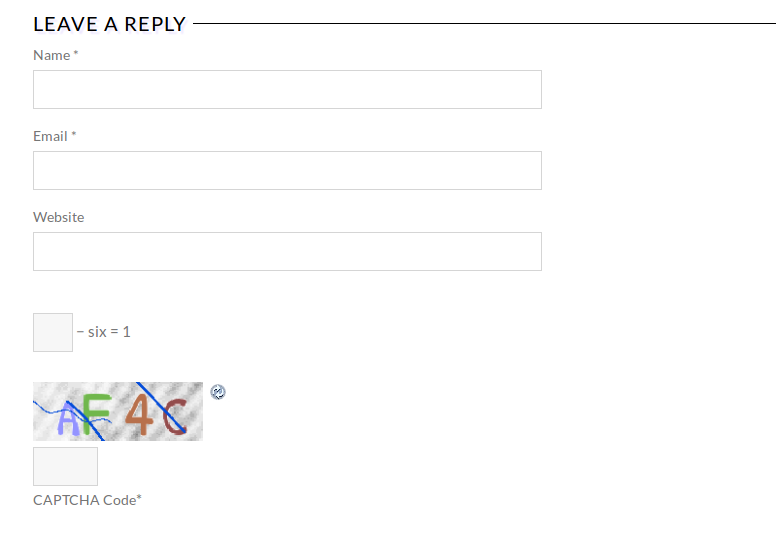
Please try to check it with some other browser.
We’ve sent Visual Composer archive to your email address.
Thank you.
Regards,
Eva Kemp.
Hello,
You can try changing permissions for the folders wp-content/uploads/2014/12 to 777.
Could you please provide us with wp-admin panel credentials to check the settings in admin panel?
Thank you.
Regards,
Eva Kemp.









