
Hello,
Please provide us with FTP credentials as well.
Thank you.
Regards,
Eva Kemp.

Hello,
Please provide us with FTP credentials as well.
Thank you.
Regards,
Eva Kemp.
Hello,
We’re sorry but we tried to configure redirects to https in .htaccess file, though it’s not the theme issue.
We recommend you to contact a web-developer for https links configuration.
Please take our apologies for such troubles.
Thank you.
Regards,
Eva Kemp.
Hello,
You need edit the file wp-content/themes/woopress/framework/shortcodes.php (line 2114), in the code http://fonts.googleapis.com/css?family= remove “http:”, or edit it to https.
Thank you.
Regards,
Eva Kemp.
Hello,
As I see you’re using 1.5 theme version:
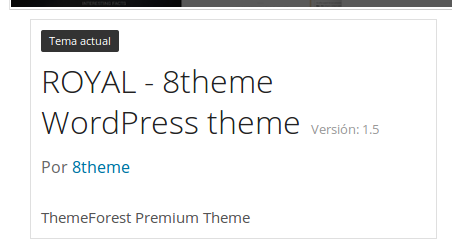
Also update the required plugins. You can get them here:
https://www.8theme.com/download-plugins/
Please provide us with FTP credentials.
Thank you.
Regards,
Eva Kemp.
Hello,
I’ve edited the code.
Please check the buttons now.
Thank you.
Regards,
Eva Kemp.
Hello,
You’re welcome.
Regards,
Eva Kemp.
Hello,
Style.css has been reuploaded.
Did you make your style changes in this file?
If so, you must make modifications in the file custom.css.
How to create custom.css you can watch in this tutorial (it’s for Legenda theme but the process is the same).
Regards,
Eva Kemp.
Hello,
Please contact our specialists via this form https://www.8theme.com/contact-us/ and they will provide you with the necessary information.
Thank you.
Regards,
Eva Kemp.
Hello,
You’re using very old theme version. You need update it to 1.5.2 version where this bug is fixed.
https://www.8theme.com/demo/docs/royal/#!/installation_upgrade (1.5 Theme Upgrade).
Also update the required plugins.
You can get them at this link:
https://www.8theme.com/download-plugins/
Don’t forget to create a back up of the files and database before update.
Thank you.
Regards,
Eva Kemp.
Hello,
Try to edit the media query located in the responsive style sheet file wp-content/themes/royal/css/responsive.css to change responsive size for mobile menu. You will find it at line 1005.
Change it from
@media only screen and (max-width: 1200px)
to
@media only screen and (max-width: 992px)
Thank you.
Regards,
Eva Kemp.
Hello,
What php version is used on a server?
Please ask your host to increase it at least to 5.3 version.
If the php version is 5.3 or higher then please provide us with wp-admin panel and FTP credentials in private content.
Thank you.
Regards,
Eva Kemp.
Hello,
You’re welcome.
Regards,
Eva Kemp.
Hello,
The issue should be fixed now.
Please clear browser cache and check your site.
Thank you.
Regards,
Eva Kemp.
Hello,
I’ve re-updated the theme and now “Add to Cart” buttons are shown.
Please check and clear browser cache before.
Thank you.
Regards,
Eva Kemp.
Hello,
You’re welcome.
Regards,
Eva Kemp.
Hello,
You’re welcome.
Regards,
Eva Kemp.
Hello,
You’re welcome.
Regards,
Eva Kemp.
Hello @widiantozhu,
Thank you for your feedback.
You’re welcome.
We’d be thankful if you post a comment on our site
http://themeforest.net/item/royal-multipurpose-wordpress-theme/8611976
We really appreciate it.
Thank you.
Regards,
Eva Kemp.
Hello @Nebulas,
You need make style changes in custom.css file.
How to create custom.css you can watch in this tutorial (it’s for Legenda theme but the process is the same).
Thank you.
Regards,
Eva Kemp.
Hello,
We also need FTP access. Please provide us with it.
Did you make any changes in original theme files?
Thank you.
Regards,
Eva Kemp.
Hello,
You may try to change permissions for these files and try to upload them again.
Thank you.
Regards,
Eva Kemp.
Hello,
This page is related to Woocommerce configuration.
You need contact them concerning this issue.
Thank you.
Regards,
Eva Kemp.
Hello,
The code for top links is located in wp-content/themes/legenda/framework/theme-functions.php file (line 1082).
Search form code is added in the file wp-content/themes/legenda/framework/woo.php (line 803).
Regards,
Eva Kemp.
Hello,
You need add this code in custom.css file and write your color value:
.pricedisplay {
  color: #FF4949 !important;
}
To create custom.css you need rename default.custom.css to custom.css in wp-content/themes/blanco directory via FTP and enable it in Blanco – Theme Settings, tick “Enable Custom CSS file”.
Thank you.
Regards,
Eva Kemp.
Hello @Mentadata,
We’re glad the issue was resolved.
If there any questions don’t hesitate to contact us.
Thank you.
Regards,
Eva Kemp.
Hello,
You’re welcome.
Regards,
Eva Kemp.
Hello,
It’s not showing for me.
Please try to clear your browser cache or check it with other browser.
Thank you.
Regards,
Eva Kemp.
Hello,
Please provide us with wp-admin panel and FTP credentials in Private Content.
Thank you.
Regards,
Eva Kemp.
Hello,
In the code for .top-bar you forgot to add }.
I’ve added it and now the code that was placed after is working now.
Please clear browser cache and check top bar.
Thank you.
Regards,
Eva Kemp.









