
Hello,
Unfortunately you can only make subcategories so they are hidden under the main category in sidebar. Other way is to find some plugin that will help you to achieve what you want.
Sorry for inconveniences.
Regards,
Eva Kemp.

Hello,
Unfortunately you can only make subcategories so they are hidden under the main category in sidebar. Other way is to find some plugin that will help you to achieve what you want.
Sorry for inconveniences.
Regards,
Eva Kemp.
Hello @stevhong,
You’re using other header type.
I’ve added this code in custom.css file:
.header1 .logo img {
    max-width: 500px;
    width: 400px;
}
Please check the logo now.
Thank you.
Regards,
Eva Kemp.
Hello,
I’ve uploaded the picture in Theme Options > Color Scheme.
Please clear browser cache and check the site.
Thank you.
Regards,
Eva Kemp.
Hello,
I’ve installed base demo content.
Please check your site now.
Thank you.
Regards,
Eva Kemp.
Hello,
Could you please upload your site to any host? Even some free host to be able to check the issue with your site.
What screen size do you have? The menu is responsive and is changeable due to screen resolution.
Try to edit the media query located in the responsive style sheet file wp-content/themes/woopress/css/responsive.css at line 957 and change it from
@media only screen and (max-width: 1200px)
to
@media only screen and (max-width: 992px)
Thank you.
Regards,
Eva Kemp.
Hello,
There were no errors, but just notices. Could you please specify what errors you’re getting? Are they shown even if debug mode is disabled?
Thank you.
Regards,
Eva Kemp.
Hello,
There is an error on your site:
Fatal error: Allowed memory size of 67108864 bytes exhausted (tried to allocate 3072 bytes)
Please contact your host and ask to increase memory_limit value.
Thank you.
Regards,
Eva Kemp.
Hello,
Please add this code in custom.css file:
.product-content-image img {
   height: 220px;
}
Thank you.
Regards,
Eva Kemp.
Hello,
I’ve checked your products categories and haven’t seen such warnings.
Please provide us with the direct link of the category where you see those notices.
Thank you.
Regards,
Eva Kemp.
Hello,
Try to change site layout to boxed in Theme Options > General > Layout > Boxed.
Thank you.
Regards,
Eva Kemp.
Hello,
The sites links you provided aren’t accessible. Please check if you spelled them correctly.
Thank you.
Regards,
Eva Kemp.
Hello,
Sorry, but it’s difficult to help you not seeing the site and the settings.
On our test sites the menu is shown fine.
Have you installed any 3rd-party plugins? Try to disable them and check the menu again.
Thank you.
Regards,
Eva Kemp.
Hello,
Your site is giving a blank page now. Are you making any changes on the site?
Have you checked Spam folder of your mail account for notifications?
Thank you.
Regards,
Eva Kemp.
Hello,
I’ve tried to add categories to the menu in default WordPress theme and the issue is present there too. It can be caused for the reason you’ve increased the menu items limit. That’s why new items can’t be saved. Here are some explanations:
http://www.wpbeginner.com/wp-tutorials/how-to-fix-the-custom-menu-items-limit-in-wordpress/
https://core.trac.wordpress.org/ticket/14134
Thank you.
Regards,
Eva Kemp.
Hello,
We’re unable to access your site now getting an error “Server not found”.
Are there any issues at your host?
Thank you.
Regards,
Eva Kemp.
Hello,
Could you please provide us with FTP credentials as well?
Thank you.
Regards,
Eva Kemp.
Hello,
If you’re talking about 2 banners under the slider you can edit them in the Home page editor in Pages > Home page:
https://www.8theme.com/demo/docs/blanco/index.html#!/demo_data_installation > Home Page.
You can create your own footer, just disable “Use Prefooter” in Blanco – Theme Settings > Footer.
https://www.8theme.com/demo/docs/blanco/index.html#!/blanco_theme_options
https://www.8theme.com/demo/docs/blanco/index.html#!/widgets
Thank you.
Regards,
Eva Kemp.
Hello,
I’ve just tried to add “Cameras” product category to the menu and I haven’t seen any issues.
Could you please show a screenshot?
Thank you.
Regards,
Eva Kemp.
Hello,
1. Yes, this is the one located in Appearance > Editor > custom.css. It depends on what changes you want to make. If you want to edit php code then you need make changes in a child theme. If you want to customize styles then you can modify custom.css file.
2. Yes, it will work the same as in custom.css file, but if you put the code on a separate page in Visual Composer editor CSS block, the changes will take effect only to that page.
3. You’re almost correct. But in the child theme style changes are made in style.css file. In this case you need copy the code from custom.css file of the parent theme to style.css of the child theme. Or you can keep custom.css file as it is and changes will be loaded from this file because style.css of the child theme will be empty.
4. When you create child theme you need copy the files you modified to the child theme folder and after update you won’t lose any changes.
5. You don’t need create a new child theme after each theme update.
Thank you.
Regards,
Eva Kemp.
Hello,
1. You need add links to your footer text widget. Go to Static Blocks > edit your footer block > edit Text element for “About” section and write a link of the page instead of “#”:
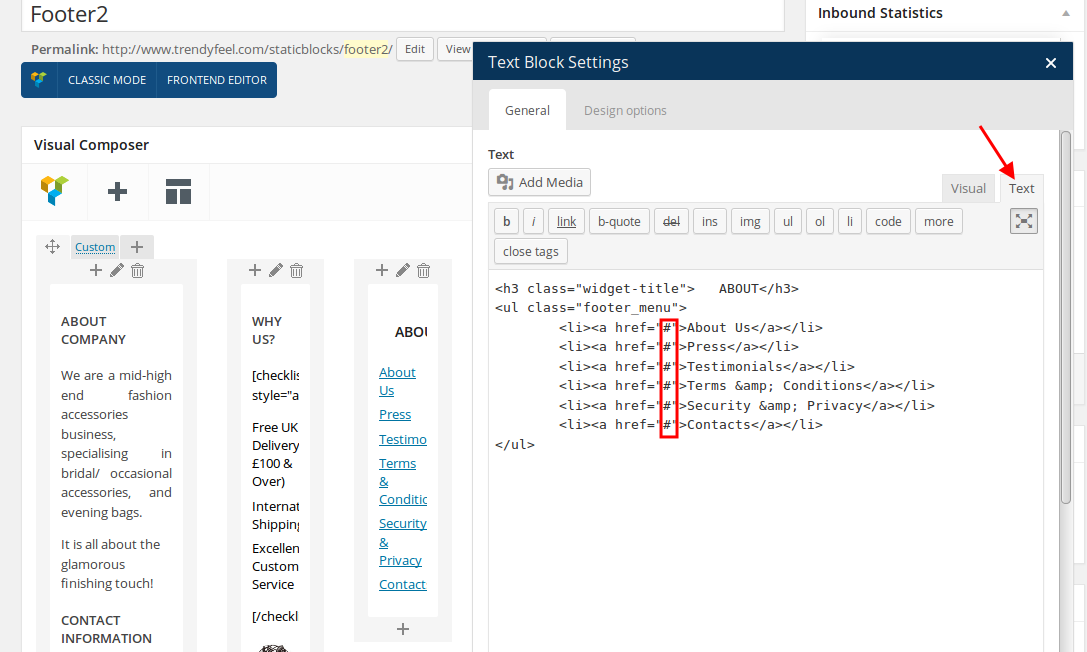
2. Sorry, but this Woocommerce configuration and should contact them concerning this query.
Thank you.
Regards,
Eva Kemp.
Hello,
Have you checked the site on iPad using another Internet provider?
Perhaps some styles can’t be loaded fully.
Please check it.
Thank you.
Regards,
Eva Kemp.
Hello,
I’ve regenerated thumbnails with the plugin mentioned in the previous post.
Please clear your browser cache and check the images now.
Thank you.
Regards,
Eva Kemp.
Hello,
Sorry, but there are no other images for shopping cart. You can replace it with a link to your own image.
Thank you.
Regards,
Eva Kemp.
Hello,
You had an empty Text element on the Home page between Revolution Slider and Products elements. I’ve removed it to get rid of the space. Clear your browser cache and check it.
Also I’ve added this code in custom.css file:
.content-page {
    margin-bottom: 0px;
}
Thank you.
Regards,
Eva Kemp.
Hello,
You’re using old plugins versions. Please update them https://www.8theme.com/download-plugins/ as well as the theme to 1.6.1 version.
Don’t forget to create back up before the update.
Thank you.
Regards,
Eva Kemp.
Hello,
You’re welcome.
Regards,
Eva Kemp.
Hello,
Try to use this code in custom.css to make the siteseal image bigger:
span#siteseal img {
width: 150px;
}
Do you want to remove sidebar or just products categories widget from the sidebar?
Please provide us with wp-admin panel credentials in Private Content.
Thank you.
Regards,
Eva Kemp.
Hello,
I’ve disabled debug mode in wp-config.php file and the notices have disappeared.
Please check it.
Thank you.
Regards,
Eva Kemp.
Hello,
As I see some files weren’t uploaded for Visual Composer during update.
Please provide us with FTP credentials.
Thank you.
Regards,
Eva Kemp.
Hello,
I’ve edited the code for button and add this code to center the phone number text:
.header-type-8 .menu-wrapper .languages-area .widget-title {
    padding-top: 5px;
}
Clear your browser cache and check again.
Thank you.
Regards,
Eva Kemp.









