Hello,
Please provide us with FTP credentials in Private Content.
Thank you.
Regards,
Eva Kemp.

Hello,
Please provide us with FTP credentials in Private Content.
Thank you.
Regards,
Eva Kemp.
Hello @ballyhoopro,
As we’ve already mentioned there is compatibility issue with our theme and Wishlist plugin. We’ll produce a new theme soon where wishlist bug is fixed.
Please take our apologies for inconveniences.
Thank you for your patience.
Regards,
Eva Kemp.
Hello,
The problem is caused by permalinks. If you change permalinks settings to default, the “View Order” link is working fine. The same problem persists with default WordPress theme too. So you have to contact Woocommerce support or visit some WordPress forums as Permalinks configuration is related to WordPress.
Thank you.
Regards,
Eva Kemp.
Hello,
We’re sorry for a delay.
This is VC bug. They redesigned some elements and even deleted some of them.
We contacted their support team and they promised to fix this bug in the next update, so we’re waiting for the update to check it.
Please take our apologies for inconveniences.
Thank you.
Regards,
Eva Kemp.
Hello,
As I told you in the previous post there is a compatibility issue with Wishlist plugin and our theme.
We’ll fix it in the nearest theme update.
Please take our apologies for inconveniences.
Regards,
Eva Kemp.
Hello @Jimbo,
So, is your problem resolved now?
Thank you.
Regards,
Eva Kemp.
Hello,
Could you please show a screenshot how you want footer to be displayed?
Thank you.
Regards,
Eva Kemp.
Hello,
You’re welcome.
Regards,
Eva Kemp.
Hello,
There was an error:
Strict Standards: call_user_func_array() expects parameter 1 to be a valid callback, non-static method WooCommerce_Product_Finder_Admin::init() should not be called statically
I’ve fixed it but widgets aren’t shown. So, I’ve deactivated other plugins and activated default WordPress theme. The problem was present there too. So the issue isn’t caused by our theme, but the plugin WooCommerce Product Finder. You can check it yourself. Change the theme to the default WordPress one and you’ll see the problem with widgets persists there as well.
So you have to contact Woocommerce support team to investigate the issue. Tell them to check the plugin with default theme.
Thank you.
Regards,
Eva Kemp.
Hello @stevhong,
The problem is you didn’t specify email address where to send offline messages.
Go to Chat Console > Options > General Settings tab > “Where should offline messages go?” > write your email address.
Thank you.
Regards,
Eva Kemp.
Hello,
You’re welcome.
Regards,
Eva Kemp.
Hello @osy,
I’ve checked VC editor on your site and it’s working fine, it’s loading quite fast and all elements are opened successfully.
Do you have the same issue with other Internet provider?
Thank you.
Regards,
Eva Kemp.
Hello,
Yes, 1425px × 1900px approximately. It can be 1000px × 1300px or so.
Thank you.
Regards,
Eva Kemp.
Hello,
There is an error when trying to import pages manually:
Fatal error: Allowed memory size of 67108864 bytes exhausted (tried to allocate 1836393 bytes)
Please contact your host and them to increase memory_limit value.
Thank you.
Regards,
Eva Kemp.
Hello,
I logged in successfully via the form on My Account page.
Please describe what issues you are experiencing when trying to log in.
Are you getting any errors?
Thank you.
Regards,
Eva Kemp.
Hello,
As I see “Comment” is translated:
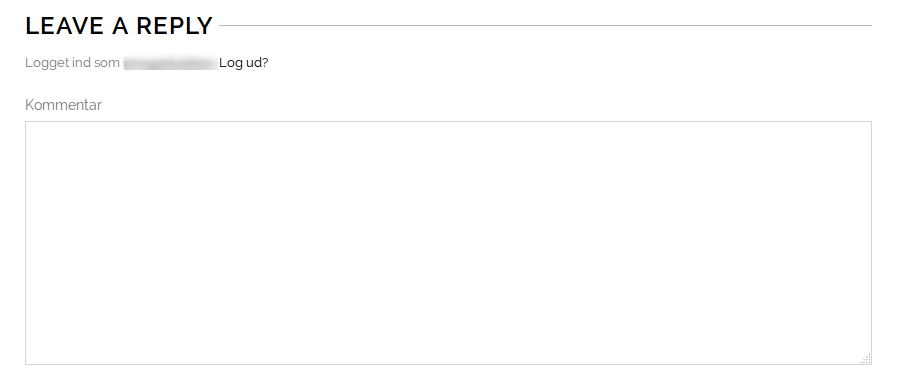
Please clear your browser cache and check.
“Continue reading” text was loaded from SEO Ultimate plugin. I’ve deactivated it and original “Read more” button is shown now, which is translated.
Please check.
Thank you.
Regards,
Eva Kemp.
Hello @Trendyfeel,
Please update Woocommerce plugin to the latest version.
Thank you.
Regards,
Eva Kemp.
Hello @Ian Welham,
As I see the arrows are shown fine and quantity number is visible.
Could you please show a screenshot of the issue you have?
Thank you.
Regards,
Eva Kemp.
Hello,
Those pages are already present in Pages menu in wp-admin panel. Please check. You can add them to your menu in Appearance > Widgets.
To change font family for the menu items you need add this code in custom.css file:
.main-nav .menu > li > a {
    font-family: Georgia !important;
}
How to create custom.css you can watch in this tutorial.
Thank you.
Regards,
Eva Kemp.
Hello,
You need translate the widgets via WPML > String Translation.
Please check it.
Thank you.
Regards,
Eva Kemp.
Hello,
There are only ru and kr .po files in the directory wp-content/themes/legenda/languages, but no es .po and .mo files.
You need translate our default.po file there too.
https://www.8theme.com/demo/docs/legenda/index.html#!/how_to_translate
Thank you.
Regards,
Eva Kemp.
Hello,
I’ve edited header.php file, but you also need add this code in custom.css file:
.logo img {
 margin-left: 80px;
}
#top-cart {
   margin-top: 40px;
}
#search {
  margin-top: 50px !important;
}
To create custom.css you need rename default.custom.css to custom.css in wp-content/themes/blanco directory via FTP and enable it in Blanco – Theme Settings, tick “Enable Custom CSS file”.
Thank you.
Regards,
Eva Kemp.
Hello,
Please provide us with wp-admin panel credentials in Private Content.
Thank you.
Regards,
Eva Kemp.
Hello,
FTP credentials are incorrect.
Please check them.
Thank you.
Regards,
Eva Kemp.
Hello,
You can try to change encoding in the file wp-content/themes/idstore/code/functions.php (line 596), edit the code $headers .= "Content-Type: text/html; charset=ISO-8859-1\r\n"; and replace ISO-8859-1\r\n with UTF-8.
Thank you.
Regards,
Eva Kemp.
Hello,
Please check your site now.
Thank you.
Regards,
Eva Kemp.
Hello,
I’ve just tested registration form and have been successfully registered.
I’ve been emailed with username and password.
Did you check Spam folder in your email account if there are any registration emails?
Thank you.
Regards,
Eva Kemp.
Hello,
When the icons are at the bottom the content is displayed fine.
Please clear your browser cache and check.
Thank you.
Regards,
Eva Kemp.
Hello,
Are you talking about this section?
https://s3.amazonaws.com/fvd-data/notes/168674/1424765664-mzGKLI/screen.png
I’ve just checked it and information is updated when other option is chosen.
Try to clear your browser cache or check in another browser.
Thank you.
Regards,
Eva Kemp.