
Hello,
You can change it in Appearance > Widgets > Prefooter area and drag the desired widgets into there.
If you have any problems please provide us with admin panel credentials in Private Content.
Regards,
Eva Kemp.

Hello,
You can change it in Appearance > Widgets > Prefooter area and drag the desired widgets into there.
If you have any problems please provide us with admin panel credentials in Private Content.
Regards,
Eva Kemp.
Hello,
You need make the changes not only for your posts but also for the blog page. Your blog page is called “News”, so you need go to Pages > select News page and choose “Right Sidebar” for Sidebar Position in Page Layout box.
Regards,
Eva Kemp.
Sorry but your question is a bit unclear.
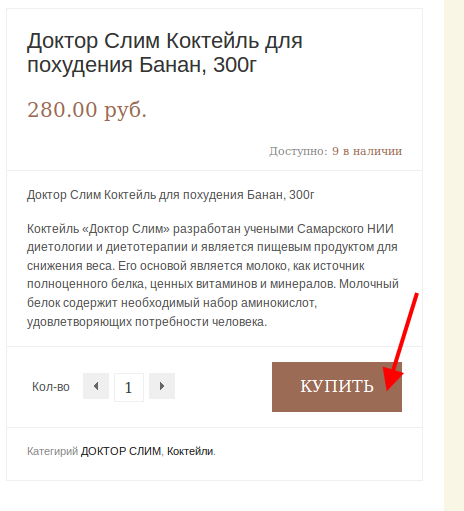
Do you want to change the hover color of the button that is showed on the screenshot and the text color of the button?
Regards,
Eva Kemp.
Hello @MauroAC,
As I see you don’t have Visual Composer plugin installed.
You can find it in the directory /wp-content/themes/legenda/framework/plugins. Unpack the archive js_composer.zip and upload it to /wp-content/plugins, then you’ll be able to activate it in admin panel > Plugins.
If there are still some problems please provide us with FTP login details.
Regards,
Eva Kemp.
Hello,
Thank you, we appreciate your interest to our theme.
If you have more questions feel free to contact us.
Regards,
Eva Kemp.
Hello,
You’re welcome.
Regards,
Eva Kemp.
Hello,
We’re working on http://thingstodoedinburgh.com/.
Please provide us with admin credentials for the other site.
Regards,
Eva Kemp.
Hello @Francisco Ramirez,
Are you also experiencing the problem with import/export or VC?
Please provide us with FTP and wp-admin panel credentials as well.
We’ll check what the reason is.
Regards,
Eva Kemp.
Hello @MauroAC,
Please provide us with FTP and wp-admin panel credentials and we’ll check the issue.
Regards,
Eva Kemp.
Hello,
I’ve modified custom.css. Please check your site now.
Regards,
Eva Kemp.
Hello,
We’ve received your ticket. The conversation will be continued via ticket system. The reply will be sent to your email. So please wait a little.
Thank you for your patience.
Regards,
Eva Kemp.
Hello @MauroAC,
As I understood you have Legenda version 2.2.
Have you deleted wpbakery folder from wp-content/themes/legenda before update?
Please read the documentation carefully: https://www.8theme.com/demo/docs/legenda/index.html#!/upgrade
Regards,
Eva Kemp.
Hello,
As I see the slider is working fine on the home page.
Are you still experiencing any issues?
Please provide us with FTP and admin panel credentials in Private Content.
Regards,
Eva Kemp.
Hello,
You’re welcome.
Regards,
Eva Kemp.
Hello,
1. You can use Brands widget of Woocommerce http://docs.woothemes.com/document/wc-brands/ or you may create all the brand names as product attributes. Then use woocommerce layered nav widgets for filtering.
2. I’ve modified custom.css, please check the header now.
3. To change price color add this code into custom.css:
.amount { color: #41186C; }
and change the color value to yours.
4. Here is the code you need to change the button color:
.button { background-color: #DFDFDF; } and again change the color value to yours.
Regards,
Eva Kemp.
Hello,
You need make changes in Pages > News > Page Layout (on the right side) > select “Right Sidebar” for Sidebar Position.
Regards,
Eva Kemp.
Hello,
Please provide us with the link where images should be displayed and the credentials to FTP and admin panel in Private Content.
Regards,
Eva Kemp.
Hello,
Sorry, could you please clarify what exactly you need to modify? Please provide us with the link to that page.
Regards,
Eva Kemp.
Hello,
Please provide us with the link to your portfolio page and login credentials to FTP and wp-admin panel in Private Content.
Regards,
Eva Kemp.
Hello,
You’re welcome.
Regards,
Eva Kemp.
Hello,
The problem was you set Contact page for Posts page in Settings > Reading > Front page displays. I’ve changed it and Contact page has started working. Please check and create other page for your blog. You can read our documentation: https://www.8theme.com/demo/docs/leader/index.html#!/demo_data_installation > Blog.
Regards,
Eva Kemp.
Hello,
Sorry, but we haven’t received your email. Are you writing the text in Private Content as shown on the screenshot in the previous post?
Regards,
Eva Kemp.
Hello,
1. You can create a banner using Visual Composer editor. Please refer to our documentation: https://www.8theme.com/demo/docs/legenda/index.html#!/visual_composer
2. Could you please clarify what problems you have with slider?
3. 5. Please clarify with more details what issues you’re experiencing.
4. You can translate the “Сart” text in /wp-content/themes/legenda/framework/woo.php, find the code <?php _e('Cart', ETHEME_DOMAIN) ?> (line 925) and change “Cart” to your text.
Thank you.
Regards,
Eva Kemp.
Hello,
1. 2. You need add the following code into custom.css:
.product-information .product-name-price {
    height: 120px;
}
3. Could you please provide us with the link where you want the button to be displayed?
To create custom.css you can rename default.custom.css file that is located in the theme directory and enable it in XMarket – Theme Settings > Enable Custom CSS.
Regards,
Eva Kemp.
Sorry, but what email address have you sent your email to?
Please write the login credentials in Private Content for this topic.
Thank you.
Regards,
Eva Kemp.
Please send the details in Private Content. It will be visible only to our staff.
Thank you.
Regards,
Eva Kemp.
Hello @kambriyen,
Please provide us with FTP and admin panel credentials in Private Content.
Regards,
Eva Kemp.
Hello,
You may try to install the plugin, but we don’t guarantee its full compatibility with our theme as we didn’t test the theme with 3rd-party plugins.
Regards,
Eva Kemp.
Hello,
Please provide us with FTP access as well.
Regards,
Eva Kemp.
Hello,
I’ve changed the value for .header-type-3 .logo-with-menu img and set the width 500px. The logo image has been increased. Please check from your side. And clear browser cache before.
Regards,
Eva Kemp.









