
Hello,
What is the FTP host of your ftp account? I’m unable to log in with the credentials you provided and ftp host as shoptrends.gr.
Also it’d be better if you give us read/write access to be able to check any modifications.
Regards,
Eva Kemp.

Hello,
What is the FTP host of your ftp account? I’m unable to log in with the credentials you provided and ftp host as shoptrends.gr.
Also it’d be better if you give us read/write access to be able to check any modifications.
Regards,
Eva Kemp.
Hello,
1. Please read these articles carefully regarding the fonts issue: http://www.templatemonster.com/help/wordpress-how-to-change-a-google-web-font.html
http://wordpress.org/support/topic/font-family-open-sans-russian-lang-text
2. To change background color you have to edit custom.css as there are a lot of blocks need to be modified. To find what element to edit you can use “Inspect element” in Firefox or Chrome browser. Just right click on the element in your site and select “Inspect element” from the menu.
3. I’ve disabled search form in Theme Options and edited custom.css to center the logo.
According to the blank space displayed on your site, you’ll receive a reply in the ticket you’ve already created. So please wait a little.
Regards,
Eva Kemp.
As I understood you correctly you’re trying to change the translation but there is no effect, aren’t you?
Please provide us with FTP and admin panel credentials to check it.
Regards,
Eva Kemp.
Hello,
Try to add this code in custom.css:
select { padding-left: 20px; }
If the issue is still there please provide us with admin panel access.
Regards,
Eva Kemp.
Hello @sjhgeary@gmail.com,
You had some files missed in VC plugin folder. Did you make any changes in the plugins directory?
I’ve reuploaded the VC plugin and activated it.
Please check your site now.
Regards,
Eva Kemp.
Hello,
As I see the first option under “Φίλτρα” is translated:
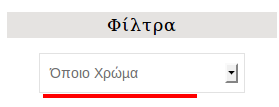
Could you please specify what text you’re unable to translate?
Regards,
Eva Kemp.
Hello,
As I see you’ve already added site name in the header. To make the text color changed as on the demo site you need edit the file code/functions.php in Appearance > Editor, find the code <a href="<?php echo home_url(); ?>"><span class="logo-text-red">ID</span>Store</a> (line 214) and replace the IDStore text with yours.
Regards,
Eva Kemp.
Hello,
We’re sorry, but this problem is related to woocommerce plugin. We recommend you to contact Woocommerce support. They should advise you how to resolve it.
Regards,
Eva Kemp.
Hello,
Yes, after update you can replace the original functions.php file with the one you modified. But having child theme you don’t need replace anything after update as the files from child theme won’t be overwritten.
This is up to you how you wish to proceed.
Regards,
Eva Kemp.
Hello,
Please activate the plugin and provide us with the page link where the issue occurs.
Also please give us FTP access.
Regards,
Eva Kemp.
You’re welcome.
If you need more help let us know.
Regards,
Eva Kemp.
Hello,
Ok, that’s great!
If you need more help let us know.
Regards,
Eva Kemp.
As you can see the default styles from style.css are rewritten by the ones in custom.css:

Seems you have to wait till the cache is updated on your side.
Regards,
Eva Kemp.
You’re welcome.
Regards,
Eva Kemp.
Hello,
You can change it in /wp-content/themes/legenda/woocommerce directory. Open the file content-single-product.php, find the code <h4><?php _e('Product Information', ETHEME_DOMAIN) ?></h4> (line 55) and change the text to your own.
We recommend you to make any changes in a child theme not to lose all modifications after update.
Just move the directory /woocommerce/content-single-product.php into the child theme folder.
Regards,
Eva Kemp.
Hello,
Sorry for misunderstanding.
As I see there are no border lines in menu section:

Do you want to remove them for footer too?
Regards,
Eva Kemp.
Hello,
Please provide us with the link where that widget is located and your admin panel credentials as well.
Regards,
Eva Kemp.
Hello,
Please provide us with the links where some text isn’t translated. We’ll look into this issue.
Regards,
Eva Kemp.
Hello,
You’re welcome.
1. Please provide us with FTP and panel credentials in Private Content to check the issue.
2. You can change the site color in Theme Options > Color Scheme.
3. To remove search form from the header you need go to Theme Options > Header > Enable Search form in header > Off.
Regards,
Eva Kemp.
Hello,
We’re glad the issue has been resolved.
If there are any questions feel free to contact us.
Regards,
Eva Kemp.
Hello,
Sorry but unfortunately you have to edit php files in order to translate all words.
We can guide you what files to edit if you provide us with the exact links and text you want to translate.
Regards,
Eva Kemp.
Hello,
1. I’ve added 4 products into cart and Subtotal box is under the products. Please look at the screenshot:
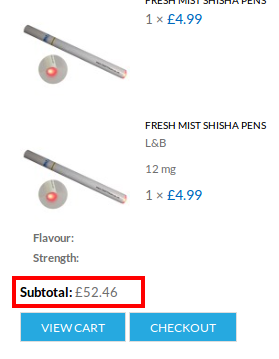
Please specify what is wrong with variable products.
2. You have to contact Woocommerce support regarding that questions. They should advise you how to customize their plugin.
Regards,
Eva Kemp.
Hello,
You’re welcome.
Regards,
Eva Kemp.
Hello,
This is logo. You can change it in Theme Options > Header > Logo image.
Regards,
Eva Kemp.
You can change the hover background color for the button in XMarket – Theme Settings > Color Scheme > Active button hover Color.
To change text color of the button on single product page please use this code in custom.css:
.button.active span { color: #FFF; }
and this one to change the text color on the main page:
#products-grid.products_grid .product-grid .btn-cont .button {color: #FFF;}
Change the color value to yours.
Regards,
Eva Kemp.
Hello,
Sorry, but unfortunately this requires additional customization. We recommend you to create a ticket at http://support.8theme.com/ and our specialists will look into it.
Regards,
Eva Kemp.
Hello,
We’ve checked the site and Shipping methods are visible on our side. Please provide us with the link of the exact page where the problem is and a screenshot of what you’re getting.
Regards,
Eva Kemp.
Hello,
Yes, you can do this via admin panel > Products > Categories, select the category you want to edit and insert your image in the “Category Header” field.
Unfortunately there’s no such feature for brands widget.
Regards,
Eva Kemp.
Hello,
Could you please provide us with the link where you want to make changes and your admin panel credentials?
Regards,
Eva Kemp.
Hello,
Please refer to Woocommerce documentation regarding related products: http://docs.woothemes.com/document/related-products-up-sells-and-cross-sells/
Regards,
Eva Kemp.









