
Hello,
We’ve edited form-checkout.php file in idstore/woocommerce/checkout directory.
Please check the site now.
Regards,
Eva Kemp.

Hello,
We’ve edited form-checkout.php file in idstore/woocommerce/checkout directory.
Please check the site now.
Regards,
Eva Kemp.
Hello,
Please read this article: http://support.8theme.com/index.php?/Knowledgebase/Article/View/9/0/how-to-mark-products-as-featured-and-new-ones
It may help you to resolve the issue.
Regards,
Eva Kemp.
You’re welcome.
Regards,
Eva Kemp.
You’re welcome.
Regards,
Eva Kemp.
Hello,
I’ve made changes in custom.css file. Please check it now.
Regards,
Eva Kemp.
Hello,
I’ve modified custom.css file. Please check the footer now.
Regards,
Eva Kemp.
Hello,
You have the following code in style.css file of child theme:
@media only screen and (max-width: 769px) {
.widget_shopping_cart {
display:none;
}}
Please remove it to display the cart.
Regards,
Eva Kemp.
Hello,
You can upload your logo image via Theme Options > Header > Logo image.
Regards,
Eva Kemp.
You’re welcome.
Regards,
Eva Kemp.
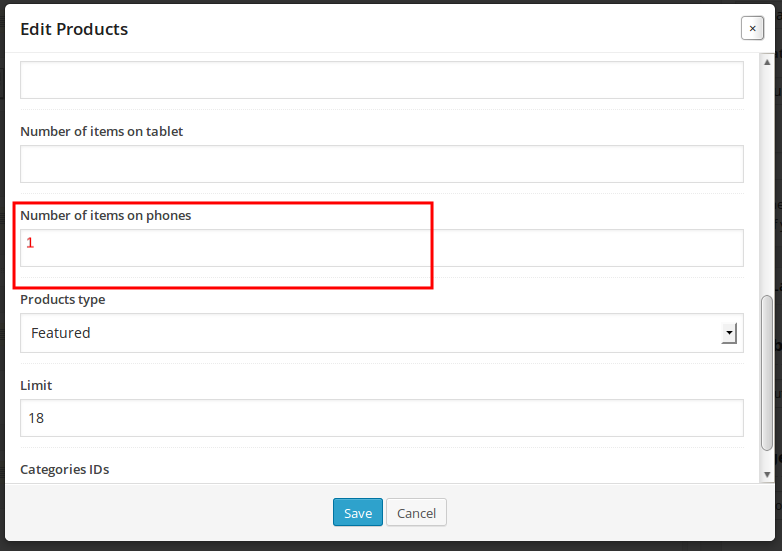
You can make only one product to display in Pages > Home page > select Products element, find the field “Number of items on phones” and write the number of products you want to be shown in slider on phone devices.
Please view the screenshot:
Regards,
Eva Kemp.
As I see the site http://juegosdigital.com is working fine.
Try to contact your hosting provider and ask if they have a back up of your site. Perhaps they will restore it.
Please note you should always wait till upgrade is finished. Also we recommend to create a back up before every update.
Regards,
Eva Kemp.
You’re welcome.
Regards,
Eva Kemp.
Hello,
Sorry, but there is no such possibility to keep slider and show only 2 products one after another. There are 2 products shown due to responsiveness. For example, if you check on ipad you’ll see 3 products displayed in the slider.
If you have necessary skills you may try to customize theme files to your needs.
Regards,
Eva Kemp.
You’re welcome.
Regards,
Eva Kemp.
Hello,
Please read this article regarding favicon: http://codex.wordpress.org/Creating_a_Favicon
Yes, you can upgrade Woocommerce to the latest version.
Regards,
Eva Kemp.
Hello,
You need add an empty text widget into Main sidebar widget area in Appearance > Widgets.
Regards,
Eva Kemp.
Hello,
You can change products display in admin panel > Pages > select your Home page, edit Products element in Visual Composer and select Display Type > Grid.
If the problem is still there please provide us with wp-admin panel credentials.
Regards,
Eva Kemp.
Hello,
You can remove the first four widgets dragging empty text widget into The First (Second, Third, Fourth) Footer Widget Area in Appearance > Widgets.
Also you can read our documentation about footer widgets: https://www.8theme.com/demo/docs/idstore/#!/widgets
Regards,
Eva Kemp.
Hello,
You’re welcome.
Regards,
Eva Kemp.
Hello,
Does the issue persist with default theme too? If so you need ask your host regarding this problem. If it is only with our theme please create a ticket at support.8theme.com and our specialists will look into this problem. Don’t forget to provide correct login details to FTP and admin panel in the ticket.
Regards,
Eva Kemp.
Hello,
You need use wpml plugin http://wpml.org/ to create multilingual site.
After installing it you’ll be able to add languages via its settings.
Regards,
Eva Kemp.
Hello,
Please refer to this topic https://www.8theme.com/forums/topic/slow-site-loading/ that was created specially for such troubles.
Also you can create a ticket at support.8theme.com where our specialists will look deeply into this problem.
Regards,
Eva Kemp.
Hello,
Please provide us with 2 purchase codes as you can use the theme only for 1 domain name. If you have 2 sites with the same theme then you need have 2 license keys.
Also you can compare the changes made for http://juegosdigital.com and look through custom.css file in Appearance > Editor, and make similar modifications yourself.
Regards,
Eva Kemp.
Hello,
Could you please provide us with the access to FTP and admin panel in Private Content?
Regards,
Eva Kemp.
Hello,
Did you use 8theme – Brands filter widget from Appearance > Widgets or some plugin? Try to create brands with our widget. Here is the instruction: https://www.8theme.com/demo/docs/legenda/index.html#!/single_product_page > Brands.
Regards,
Eva Kemp.
Hello,
Sorry, but you need contact Woocommerce support regarding this question as we provide support only for the issues related to our theme.
Regards,
Eva Kemp.
Hello @oscargama,
This solution is also related to LayerSlider issue.
And we recommend to use the latest version of the theme if you still haven’t got it.
Regards,
Eva Kemp.
Hello,
You can download the latest theme version at this link http://themeforest.net/item/blanco-responsive-wordpress-wooecommerce-theme/2755246 , just log in to your themeforest account.
If the problems persist after update, please provide us with the FTP and admin panel credentials in Private Content.
Regards,
Eva Kemp.
Hello,
Please provide us with FTP and admin panel credentials in Private Content.
Regards,
Eva Kemp.
Hello,
Please refer to this article which may help you in resolving the issue:
http://fivera.net/hatom-feed-hatom-entry-error-wordpress-solution/
Regards,
Eva Kemp.









