

Hello,
Thank you for the question.
Unfortunately, there is no such functionality in WooCommerce plugin. You can find information about all product types here https://docs.woothemes.com/document/managing-products/
Regards

Hello,
Thank you for the question.
Unfortunately, there is no such functionality in WooCommerce plugin. You can find information about all product types here https://docs.woothemes.com/document/managing-products/
Regards
You can do it in the way you described in your first message, we can’t say why it doesn’t work while don’t see your web-site.
If you want to remove breadcrumbs itself try to add the following CSS code
.breadcrumbs { display:none; }
Hello,
Thank you for contacting us.
It is difficult to provide you a fix at the moment, we need to see your web-site firstly. Please provide the link so we could take a look at your issue live.
Hello,
1. What do you mean by remove the breadcrumbs text color?
2. You can use this custom CSS code to add title here
.single-post .page-heading .title { display:block; }
Regards
Hello,
Could you provide us your web-site link and admin panel so we could take a look at your problem?
Hi,
Try to edit all “Banners” elements on the home page and uncheck option “Use custom font” for Title field.
Thank you
Hi,
If you are talking about this query “wp-admin/admin-ajax.php?action=etheme_wishlist_fragments” so no it is not normal when Wishlist is disabled. We will fix this issue in the next theme update.
Hello,
Thank you for contacting us.
We see that this error occurs only on the home page. Probably it is caused by some misconfiguration of “Custom heading” element. Could you please double check them, in case you can’t fix this please provide your admin access we will take a look ourselves.
Regards
1. It seems that button is already inline with the input.
3. Please update the theme to the latest version 1.4 to see this option.
Hello,
Thank you for the question.
Here is tutorial from WooCommerce that will help you to disable reviews for products https://support.woothemes.com/hc/en-us/articles/203447633-How-to-Disable-Product-Reviews
Regards
Hello,
1. You can add the following CSS code to fix the issue with the plugin
.post-password-form {
   max-width: 700px;
   margin: 30px auto;
}
2. Shop page displays all products and categories, you can’t exclude category from your the main shop page in WooCommerce.
3. You can increase it’s font size in Theme Options -> General -> Breadcrumbs -> “Breadcrumbs font”
4. This is actually products navigation and it can’t move to the category page.
5. All revolution slider settings (including video) you can find in their documentation here https://www.themepunch.com/revslider-doc/video-layers/
We tried to enter the password and we are able to see the product after this. As for double password it seems to be some problem with “WooCommerce Products widgets” currently you have it the prefooter. When you go to single product page this widget also displays password field. You can check how it will work when you will add this widget to the sidebar and switch to some standard theme.
Hello there,
Thank you for contacting us.
We are glad that you have found the solution, of course we will add this to our documentation. Thank you.
If you are using child theme so you won’t loose any changes made in child files after parent theme update.
Hello,
Thank you for purchasing our theme.
You can set this header layout in Theme Options -> General -> Header type -> “Variant xstore”. And also disable the option “Header overlaps the content” in Theme Options -> General -> Header Settings.
Regards
Hello,
Thank you so much for this bug report.
It seems to be our theme issues that will be fixed in the future theme update. As for your web-site you can fix it by adding a few lines of code to your custom CSS
.my_account_orders td {
    color: white;
}
Regards
Hello,
Thank you for your question.
It depends on what changes you have made. If you changed any files from the parent theme “Xstore” so obviously you will loose all the changes after update since you will replace all theme files. To prevent this situation you should use child theme and do all your changes there. If you made some changes in the Dashboard (adding pages, products, theme options etc.) you won’t loose anything after update.
Also, note that after activating the other theme in WordPress (switching to child theme for example) your widgets configuration may be lost. So after doing this you will need to go to Appearance -> Widgets add widgets to your widgets areas.
Regards
You are welcome.
Hi,
Thank you for contacting our support center.
It seems to be a small CSS issue with our theme, we will try to fix it in the next theme update. You will be able to download new version with the fix in a few days.
Regards
Hi, AmirPoor,
We just tried to connect to your server using FTP you provided but get the following error
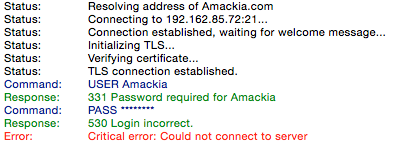
Could you please double check your FTP access?
Hello, @candaceljoseph,
Take our apologies for such a long delay. We have made some improvements, check your site now.
Regards
Hello,
Problem related to changes in category header editor. Just go to Products > Categories > open category and re-save it. Errors will disappear.
Regards,
Olga Barlow
Hello,
We have fixed. Check, please.
Regards,
Olga Barlow
Hello,
You are welcome!
Regards,
Olga Barlow
Hello,
I have checked your site on mobile and don’t see issues with responsive 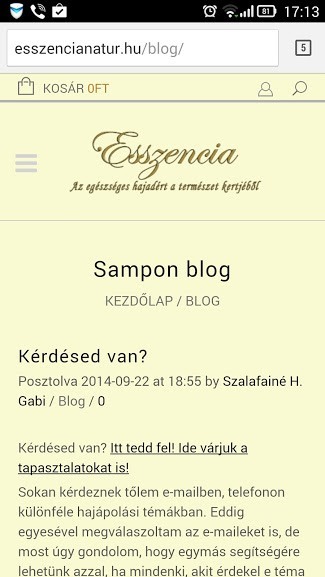
I have added border, just edit your row http://gyazo.com/67bdad2d595378044f64bf3be1a3fa39
Regards,
Olga Barlow
Hello, @macolez,
Menu background image size depends on your menu size, I mean if there are lot of menu subitems you can use bigger image, if few items only than smaller image will be more suitable, but all depends on your wish. I have created menu item Blog on your site the same way as on our demo, did you see it? Or we should create the same number of pages too?
Regards
Hello,
Pay attention to this image from our documentation  .
.
We can also create an example on your site if it helps you to understand how it works. Just provide admin panel access in Private Content.
Regards,
Olga Barlow
Hello,
We have created menuas an example, check, please. In our documentation you can find how to add image into menu, read Menu images item https://www.8theme.com/demo/docs/royal/index.html#!/primary_menu
Regards,
Olga Barlow
Hello,
You are welcome! Feel free to contact us once you need any help.
Would be very appreciate if you change a rating and leave a comment about our theme on ThemeForest. Thanks.
Regards,
Olga Barlow









