

Hello,
you are welcome!
Regards,
Stan Russell.

Hello,
You need to edit the file shortcodes.php
in ‘wp-content/themes/royal/framework’
Regards,
Stan Russell.
Hello,
you are welcome!
Regards,
Stan Russell.
Hello,
1) The content you are asking about is ‘SIMPLE PAGE CORPORATE’ theme variant
2) Unfortunately our theme does not have this feature.
Regards,
Stan Russell.
Hello,
please provide us with admin and FTP credentials for your site in private content.
Regards,
Stan Russell.
Hello,
please navigate to Dashboard > Settings > Reading > ‘Blog pages show at most’ and set needed value.
Regards,
Stan Russell.
Hello,
unfortunately we can not log in your Dashboard. Please check.
Regards,
Stan Russell.
Hello,
you can easily import our demo slider using this part of theme documentation: https://www.8theme.com/demo/docs/legenda/index.html#!/slideshow
Regards,
Stan Russell.
Hello,
in our theme link ‘Log in’ is redirecting to ‘My account’ page of Woocommerce plugin.
This page can be set in Dashboard > Woocommerce > Settings > Accounts > My account page
That’s why when you disable Woocommerce plugin, Woocommerce ‘log in’ page is switched to default wordpress wp-login.
Do you have any suggestions how to improve this functional and make it better? We will be happy to hear from you.
Regards,
Stan Russell.
Hello,
unfortunately third-party ‘Like 2 Discount’ and ‘WPsite Background Takeover’ plugins are not officially supported by our theme. If you want to use these plugins, please contact plugin developers for assistance.
You can check list of compatible plugins here: http://themeforest.net/item/royal-multipurpose-wordpress-theme/8611976?WT.oss_phrase=&WT.oss_rank=3&WT.z_author=8theme&WT.ac=search_list
Regards,
Stan Russell.
Hello,
you are welcome!
Regards,
Stan Russell.
Hello,
please provide us with admin credentials for your site in private content and specify where does this problem appear.
Regards,
Stan Russell.
Hello,
you are welcome!
Regards,
Stan Russell.
Hello,
there was a problem with new version of Wishlist plugin. We have restored Wishlist 1.1.7 and it started to work.
Now you need to set Wishlist page in Dashboard > Woocommerce > Settings > Wishlist > Wishlist page
Regards,
Stan Russell.
Hello,
please provide us with admin and FTP credentials for your site in private content.
Regards,
Stan Russell.
Hello,
this error is caused by one of your third-party plugins.
We have temporary disabled all plugins except bundled with theme and homepage started to work

Please disable all third-party plugins, check your site and enable them one by one to find which is causing errors. We recommend you to update all bundled plugins too.
You can download them here: http://www.8theme.com/download-plugins/
We have already updated Revolution slider for you.
Regards,
Stan Russell.
Hello,
unfortunately our theme does not have this feature.
Please accept our apologies for the inconvenience. We recommend you to try third-party plugin to add this functionality but we can not guarantee that it will work with our theme.
Regards,
Stan Russell.
Hello,
our themes use modified woocommerce template files. Thats why versions of these files may be different from default Woocommerce ones. It is not bug and does not affect frontend. You may just skip this notification.
If you need to update theme, please check this part of documentation:
https://www.8theme.com/demo/docs/woopress/index.html#!/installation_upgrade
Regards,
Stan Russell.
Hello,
unfortunately our theme does not have this feature.
Regards,
Stan Russell.
Hello,
you are welcome!
Hello,
please accept our apologies for the inconvenience. We have sent you Royal PSD zip archive on your e-mail.
Regards,
Stan Russell.
Hello,
you need to set fullwidth column, then add Text block with title and ‘Brands’ element of Visual composer

or just add following code to your text editer:
[vc_row][vc_column width="1/1"][vc_column_text]
<h3 class="title">Our Brand</h3>
[/vc_column_text][brands display_type="slider" columns="2" order="DESC"][/vc_column][/vc_row]
If you will encounter difficulties with setting this – please provide us with admin credentials for your site in private content and we will make this for you.
Regards,
Stan Russell.
Hello ychow2010,
we are happy that you have solved your problem.
Have a nice day!
Regards,
Stan Russell.
Hello,
we are happy that you have solved all your problems.
Have a nice day!
Regards,
Stan Russell.
Hello ijedlickova,
please check this part of theme documentation to set user registration: https://www.8theme.com/demo/docs/legenda/index.html#!/registration_page
You can list all registered users in Dashboards > Users
For ‘Home’ red color problem:
please open your custom.css file and change line
.main-nav .menu > li > a {
   color: white;
}
to
.main-nav .menu > li > a {
   color: white!important;
}
Regards,
Stan Russell.
Hello dryurix,
please change permissions for file /wp-content/themes/legenda/framework/theme-functions.php on your server or provide us with FTP access in private content.
To change footer color please add following code to your custom.css file:
.footer-top,
.footer{
background-color:grey
}
Regards,
Stan Russell.
Hello,
please provide us with admin credentials for your site in private content. We will check your site and respond to you shortly.
Regards,
Stan Russell.
Hello,
please add following css code to yours custom.css file:
.header-type-6 .top-bar{
background-color:green
}
Here is video tutorial ‘How to create custom css’
https://www.youtube.com/watch?v=Qok2zRedRMY&feature=youtu.be
Regards,
Stan Russell.
Hello,
we have tested your site and have not found any error with ‘Add to cart’ button neither on shop nor single product page. Please provide us with more information about this issue if it still appear.
What browser and OS are you using?
Regards,
Stan Russell.
Hello,
while trying connect your FTP we encountered following error:
Response: 530 IP access denied.
Error: Critical error: Could not connect to server.
Do you have any IP restrictions on your hosting?
We are sorry but support expert working on your problem can not connect to your server due this IP blocking error.
In addition, please rename file woocommerce/checkout/review-order.php back.
Please accept our apologies for the inconvenience
Regards,
Stan Russell.
Hello,
you need to navigate to Dashboard > Revolution slider > Edit Slider > Main slider settings, select Slider Layout to ‘Custom’ and set Responsive Sizes for different Screen Width:
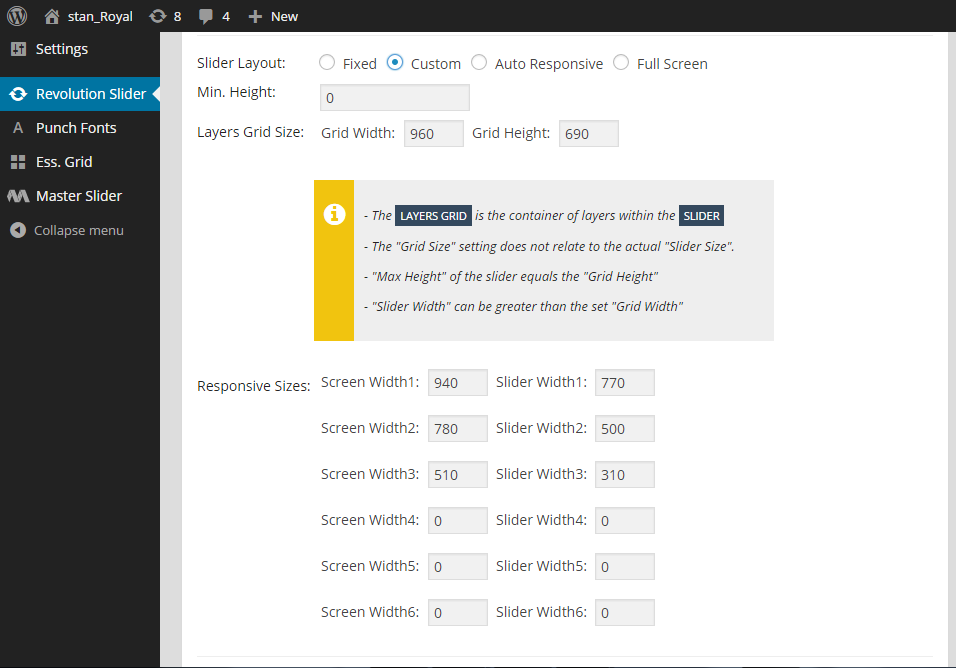
Regards,
Stan Russell.

Free AI store scan · SalesMax
Paste your store address. SalesMax AI shows which upsell moments are missing. No signup.

Free AI speed test · FlashMax
Paste your site address. FlashMax runs Google Lighthouse for phone and desktop, checks Core Web Vitals and lists what to fix. No signup.
 Transportation and LogisticsCars & bikes
(live demo, opens in a new tab)
 Minimal StoreFashion
(live demo, opens in a new tab)
 InteriorFurniture
(live demo, opens in a new tab)
 Gym StoreSports & travel
(live demo, opens in a new tab)
 CleaningWPBakery
(live demo, opens in a new tab)
 Games StoreToys & games
(live demo, opens in a new tab)
 Architecture StudioPortfolio
(live demo, opens in a new tab)
 Pizza StoreFood & drinks
(live demo, opens in a new tab)
 Landing WatchElectronics
(live demo, opens in a new tab)
 Luxury Jewelry StoreJewellery
(live demo, opens in a new tab)
 MedicalWPBakery
(live demo, opens in a new tab)
 Underwear StoreFashion
(live demo, opens in a new tab)
 DesignersWPBakery
(live demo, opens in a new tab)
 Fashion StoreFashion
(live demo, opens in a new tab)
 Industrial Power Tools StoreElementor
(live demo, opens in a new tab)
 Classic Fashion Store (Dark)Fashion
(live demo, opens in a new tab)