

Hello,
you can add images to main menu as described in this tutorial:
https://www.youtube.com/watch?v=xC8pLwU-6n0
Regards,
Stan Russell.

Hello,
please check part of theme documentation called ‘4.2.1 Parallax effect’:
https://www.8theme.com/demo/docs/royal/index.html#!/visual_composer
Regards
Stan Russell.
Hello,
you can add images to main menu as described in this tutorial:
https://www.youtube.com/watch?v=xC8pLwU-6n0
Regards,
Stan Russell.
Hello,
you are welcome!
Regards,
Stan Russell.
Hello,
we have disabled all your plugins and then enabled plugins required for our theme + WPML. Please check your site.
Regards
Stan Russell.
Hello,
please enable custom.css file in Theme options > Custom css > Enable.
If this will not help – please provide us with admin credentials for your site in private content and we will fix that.
Regards,
Stan Russell.
Hello,
no we haven’t done anything more.
Regards,
Stan Russell.
Hello,
I went to Dashboard > YIT plugins > Wishlist > General settings > Position and changed its value to ‘use shortcode’.
Regards,
Stan Russell.
Hello,
you are welcome.
Regards,
Stan Russell.
Hello,
Please provide us with admin panel credentials and show us any example on screenshot.
Regards,
Stan Russell.
Hello,
please check your site now.
Regards,
Stan Russell.
Hello,
we have checked your shop page and Brands widget works as it supposed to.
When you click on any Brand from widget’s list it will show all products that belong to that brand.
You can check our demo here: https://www.8theme.com/demo/legenda/shop/ and see that widget works pretty much the same way.
Regards,
Stan Russell.
Hello,
we are happy that problem is solved! Have a nice day!
Regards,
Stan Russell.
Hello,
Right now title for Newsletter is displayed in red color:
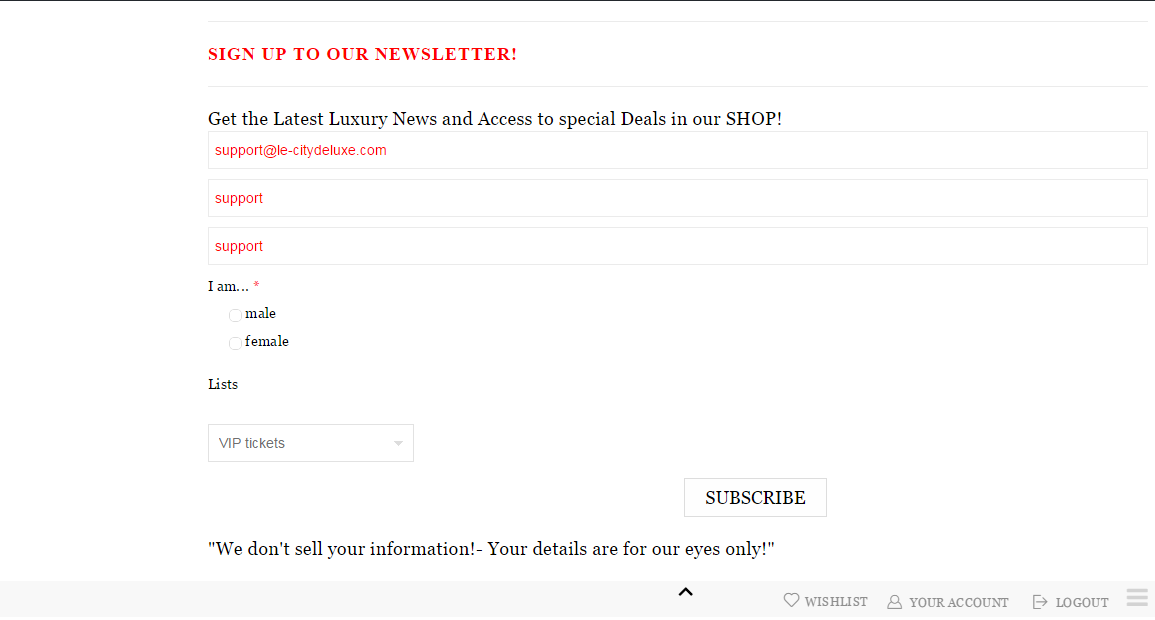
Please clear your browser cache and check. If this does not help – let us know what browser you are using.
Regards,
Stan Russell.
Hello,
please provide us with admin credentials for your site in private content as we can only see ‘Coming soon’ page.
Hello,
we have added following css code to your custom.css file:
.copyright{background-color:black!important}
.copyright.text-color-light .row-copyrights{border-top:black!important}
Please check.
Regards,
Stan Russell.
Hello,
you can find default .PO and .MO files in royal\languages\ folder.
Regards,
Stan Russell.
Hello,
please add following css code to yours custom.css file:
.header-type-7 .header .tbs {
display:none
}
Regards,
Stan Russell.
Hello,
we are glad that you have solved your problem. Have a nice day!
Regards,
Stan Russell.
Hello,
please specify – do you want to have different sidebar for every product category page?
Regards,
Stan Russell.
Hello,
You need to disable product page sidebar in Theme options > Products page layout > Sidebar position > no sidebar.
Please do not forget to save your options!
Regards,
Stan Russell.
Hello,
to hide big ‘Add to wishlist’ button on single product page please use following code:
.single-product-page .product-info .single_add_to_wishlist {display:none}
Regards,
Stan Russell.
Hello,
you have provided us with link to page that has ‘ERR_TOO_MANY_REDIRECTS’ error. We can not reach it so please check.
Regards,
Stan Russell.
Hello,
plase use following code to change font color for hidden top area:
.top-panel.show-panel{color:red!important}
.top-panel.show-panel .mymail-form .input {color:red}
Our theme does not have feature to add background to this menu but you can try to achieve this using this code
.top-panel.show-panel{background-image:url('image.png')}
simply replace image.png with correct path to needed image.
Read here for more details: http://www.w3schools.com/cssref/pr_background-image.asp
Regards,
Stan Russell.
Hello,
please show us on screenshot what white space do you want to hide.
Regards,
Stan Russell.
Hello TeeDev,
thank you for your reply. We’ve taken your notice into our account and will try to improve these features in future release if possible.
Hello soporteaddis,
latest Woopress v1.5(May 19, 2015) does not have known compatibility problems with WordPress 4.2.1.
Regards,
Stan Russell.
Hello,
because these files are from theme package and are modified woocommerce templates. Thats why they need to be translated manually.
Regards,
Stan Russell.
Hello,
please show us on screenshot what shop images you want to change and how.
Regards,
Stan Russell.
Hello,
have you updated theme and plugins using FTP and deleted old ‘woocommerce’ folder?
Regards,
Stan Russell.
Hello,
you are welcome!
Regards,
Stan Russell.
Hello,
unfortunately ‘use custom footer’ option does not work for Blog or Product pages in our theme due some coding limitations. Please accept our apologies for inconvenience.
Regards,
Stan Russell.

Free AI store scan · SalesMax
Paste your store address. SalesMax AI shows which upsell moments are missing. No signup.

Free AI speed test · FlashMax
Paste your site address. FlashMax runs Google Lighthouse for phone and desktop, checks Core Web Vitals and lists what to fix. No signup.
 Minimal Fashion 02 StoreFashion
(live demo, opens in a new tab)
 Phone ServiceElementor
(live demo, opens in a new tab)
 Animals StorePets
(live demo, opens in a new tab)
 Hosting StoreWPBakery
(live demo, opens in a new tab)
 Organic Store 02Food & drinks
(live demo, opens in a new tab)
 Drinks StoreFood & drinks
(live demo, opens in a new tab)
 DeliveryWPBakery
(live demo, opens in a new tab)
 Games DarkToys & games
(live demo, opens in a new tab)
 Pet ShopPets
(live demo, opens in a new tab)
 Plants StoreElementor
(live demo, opens in a new tab)
 Organic Store 01Food & drinks
(live demo, opens in a new tab)
 MedicalWPBakery
(live demo, opens in a new tab)
 Kids Toys StoreToys & games
(live demo, opens in a new tab)
 SEO AgencyElementor
(live demo, opens in a new tab)
 Industrial Power Tools StoreElementor
(live demo, opens in a new tab)
 HotelBusiness
(live demo, opens in a new tab)