

Hello PESCAMAR SADA,
thank you for understanding! Have a nice day!
Regards,
Stan Russell.

Hello oleg.andiuk,
you are welcome!
Regards,
Stan Russell.
Hello PESCAMAR SADA,
thank you for understanding! Have a nice day!
Regards,
Stan Russell.
Hello,
please use following css code:
.single-product .title, .product-navigation {
display:none;
}
Regards,
Stan Russell.
Hello,
you do not need any license keys to use plugins bundled with our theme.
Please visit our downloads section here: http://www.8theme.com/download-plugins/ , download needed plugins and update them via FTP.
Regards,
Stan Russell.
Hello jamiedesigns,
there were some errors with files but now they are all fixed. Is your problem solved now?
Regards,
Stan Russell.
Hello,
please use following css code:
.single-post .comment-respond {
display:none;
}
Regards,
Stan Russell.
Hello,
please use following css code to hide it on product categories pages:
.woocommerce-page .type-product{
list-style:none
}
Regards,
Stan Russell.
Hello sande410,
is your problem solved?
Regards,
Stan Russell.
Hello queenb123,
you are welcome!
Regards,
Stan Russell.
Hello nmpp,
unfortunately your reply does not have any attachment with screenshot.
You can create your own footer as described here:
https://8theme.com/demo/docs/woopress/index.html#!/0_footer
Regards,
Stan Russell.
Hello,
please add this css code to your ‘custom.css’ file:
.page-id-129 .type-product{
list-style:none
}
Regards,
Stan Russell.
Hello beals,
please show on screenshot what content do you want to change and which color do you want to have for it. We will provide you with needed css code.
Regards,
Stan Russell.
Hello fashione,
please provide us with correct admin credentials for your site and we will set Shop page for you.
Regards,
Stan Russell.
Hello,
please use following css code:
.mobile-nav .menu-item a{
color:white!important
}
Regards,
Stan Russell.
Hello fashione,
please describe your request with more details – what Woocommerce demo pages do you want us to install for you?
Regards,
Stan Russell.
Hello mykjones,
please use following css code:
.mobile-nav .links{
display:none
}
.mobile-nav-heading{
display:none!important
}
Regards,
Stan Russell.
Hello nuts,
we expect new version of Royal theme to be released in a week.
Regards,
Stan Russell.
Hello,
please use following code instead:
.tooltipster-default {
background-color:red
}
Regards,
Stan Russell.
Hello queenb123,
we are happy that you have solved your problem!
Regards,
Stan Russell.
Hello queenb123,
you are welcome! Have a nice day!
Regards,
Stan Russell.
Hello maria jesus de santisteban,
please show us screenshot of ‘black dot on top right corner’ on product images
and provide us with admin credentials for your site in private content.
Regards,
Stan Russell.
Hello rair,
we have checked your site and mobile menu is displayed correct:

Menu items are shown and clickable. Please specify what are the problems with menu?
Regards,
Stan Russell.
Hello stavroch,
is your problem solved now?
Regards,
Stan Russell.
Hello,
please use following css code:
.woocommerce-cart .btn.gray:hover{
background:green;
}
Regards,
Stan Russell.
Hello Vadim,
we have checked your site load speed and it loads normally. Please check your site with Web Page Performance Test tools like:
https://developers.google.com/speed/pagespeed/insights/
http://www.webpagetest.org/
Regards,
Stan Russell.
Hello Unrankedz,
please list all your questions(or problems) in one ordered list. This will help us a lot to check problems one by one.
Footer content must be manually created using Static Blocks as described here:
https://8theme.com/demo/docs/woopress/index.html#!/0_footer
Demo footer content is used for demonstration purposes only and is not editable.
In addition please provide us with admin access for your site in ‘private content’ field.
Regards,
Stan Russell.
Hello fuster,
please describe with more details what is the problem with woocommerce templates?
Provide us with screenshot of issue if possible.
Regards,
Stan Russell.
Hello ElitaSharpe,
as we can see – your Shop page is not working at the moment. At the back-end we can see that your Shop page has some code: 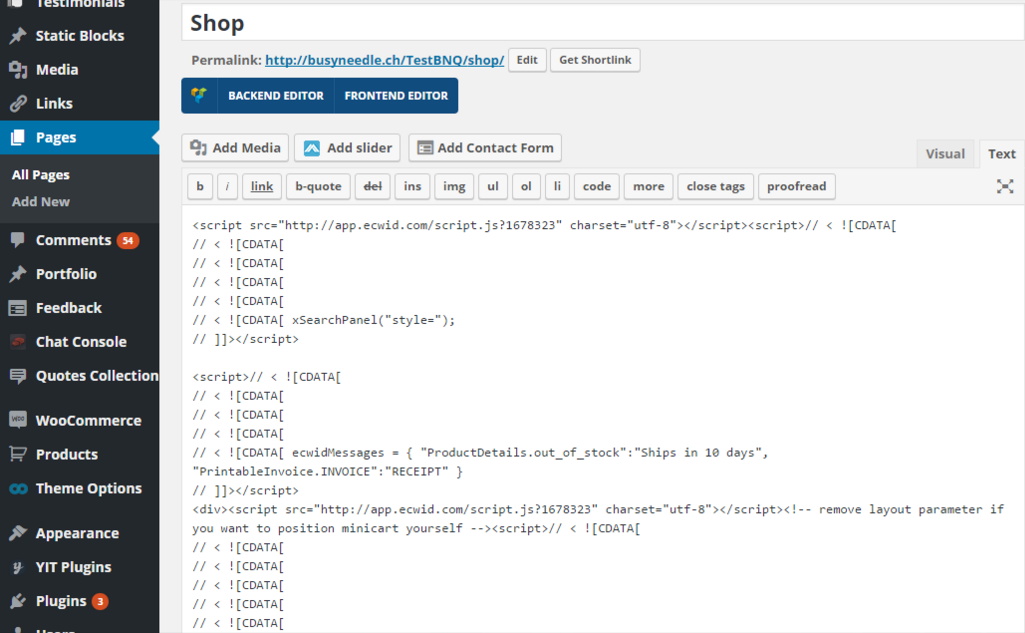
May we remove it and recreate the page?
In addition your site has JS error caused by third-party ‘Google Plus Widget’ plugin.
Regards,
Stan Russell.
Hello kallepedersen,
we have temporary disabled third-party plugins on your site – ‘cart’ and ‘search’ features on mobile view began to work correct.
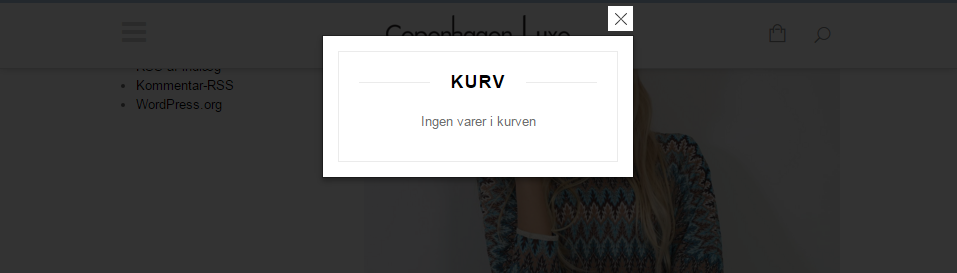
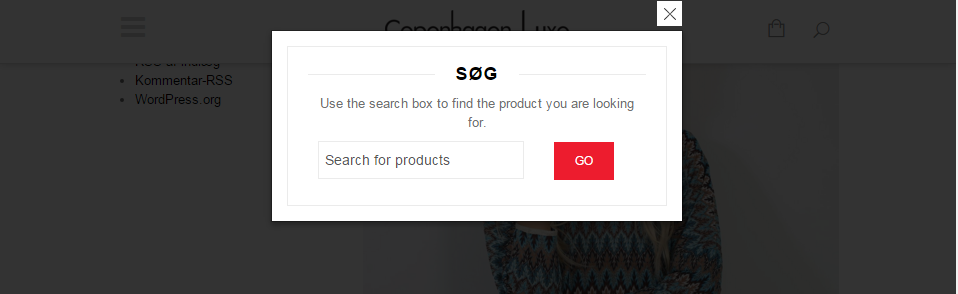
Please check your third-party plugins.
Regards,
Stan Russell.

Free AI store scan · SalesMax
Paste your store address. SalesMax AI shows which upsell moments are missing. No signup.

Free AI speed test · FlashMax
Paste your site address. FlashMax runs Google Lighthouse for phone and desktop, checks Core Web Vitals and lists what to fix. No signup.
 GamingBusiness
(live demo, opens in a new tab)
 Marseille 03Fashion
(live demo, opens in a new tab)
 Bike StoreSports & travel
(live demo, opens in a new tab)
 Furniture StoreFurniture
(live demo, opens in a new tab)
 Real EstateElementor
(live demo, opens in a new tab)
 Niche MarketMarketplace
(live demo, opens in a new tab)
 Plumbing StoreWPBakery
(live demo, opens in a new tab)
 Sport StoreSports & travel
(live demo, opens in a new tab)
 PosterPortfolio
(live demo, opens in a new tab)
 NFT Crypto MarketplaceElementor
(live demo, opens in a new tab)
 Pizza StoreFood & drinks
(live demo, opens in a new tab)
 Organic StoreFood & drinks
(live demo, opens in a new tab)
 DeliveryWPBakery
(live demo, opens in a new tab)
 CorporateBusiness
(live demo, opens in a new tab)
 Furniture Store 02Furniture
(live demo, opens in a new tab)
 Electron Store 01Electronics
(live demo, opens in a new tab)