Hello, shounak_65753,
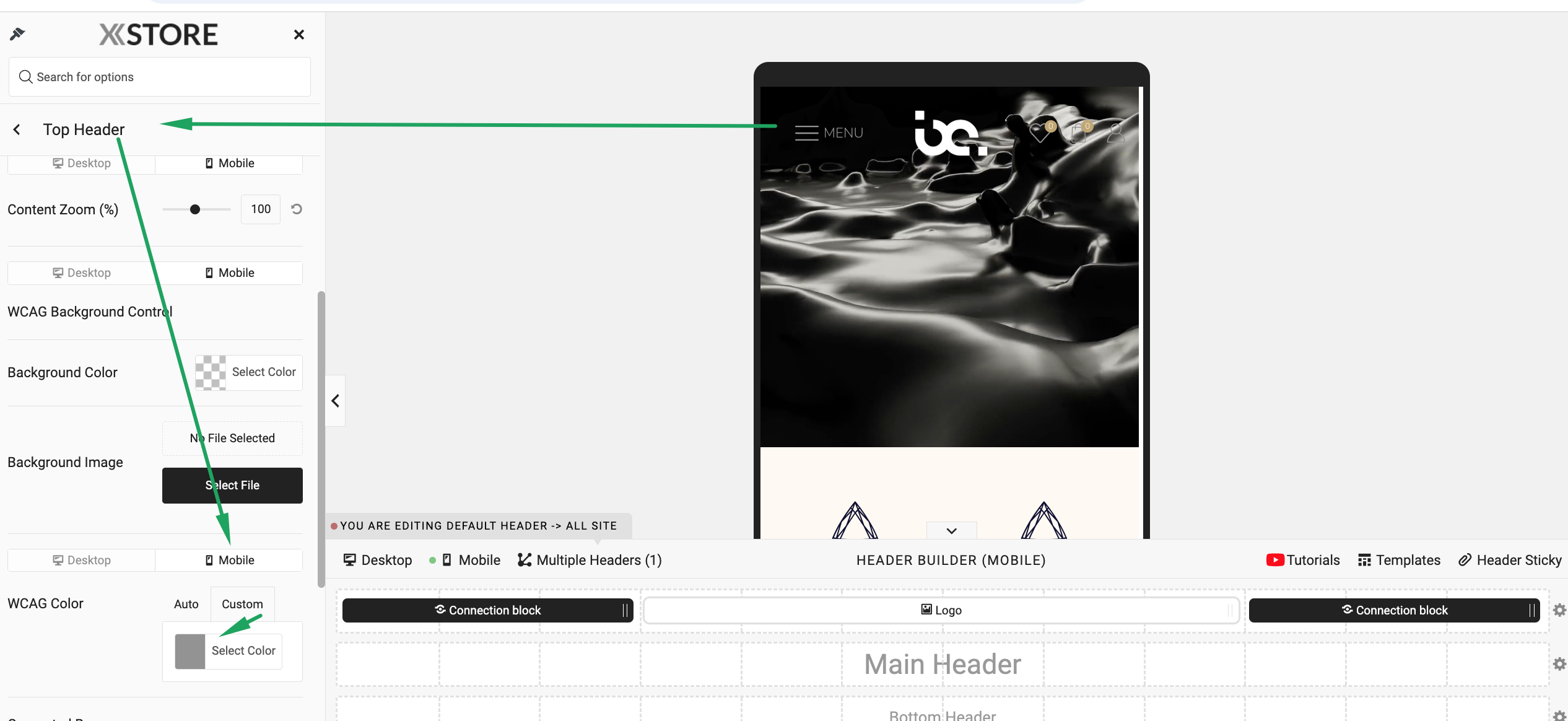
Header Builder > Sticky header > Color on mobile – https://prnt.sc/jUn1IE_6fNOg
Warm Regards,
The 8Theme Team

Hello, shounak_65753,
Header Builder > Sticky header > Color on mobile – https://prnt.sc/jUn1IE_6fNOg
Warm Regards,
The 8Theme Team
Hello, Vaibhav,
Thank you for reaching out to us.
Please read this article – https://www.8theme.com/documentation/xstore/woocommerce/product-images/
It is recommended to use a graphics editor and prepare product images (make them the same size) before uploading images to your media gallery and for products. In other cases, images may have different heights on the frontend, and the Crop option can be useful in this case.
Best Regards,
8Theme’s Team
Hello, Cheyingtan,
Could you please record a video demonstrating how the menu functions for you so that we can better understand the issue? Additionally, kindly let us know which browser you are using.
Upload the video on a filesharing service, for example – https://wetransfer.com/ , and provide us with the URL.
Best regards,
8Theme Team
Hello, Martijntje,
Thank you for reaching out to us.
You can find available settings in Woocomemrce > Settings > Shipping > Shipping settings
Best regards,
8Theme’s Team
Hello, GNC,
There is no ready option, custom CSS code can be used.
Best regards,
8Theme’s Team
Hello, Cheyingtan,
Thank you for reaching out to us.
For your convenience, navigate to the following path within the theme settings: Theme Options > Header Builder > Mobile Menu > Dropdown Opening Action
Best regards,
8Theme’s Team
Dear @Stanley87,
If you have any other questions or concerns, please do not hesitate to reach out to us.
Warm Regards,
The 8Theme Team
Hello, GNC,
Thank you for reaching out to us.
Have you solved the request already – https://img001.prntscr.com/file/img001/IZsSil-YQXCKuxGf_VKz0g.png ?
Best regards,
8Theme’s Team
Hello, shounak_65753,
Thank you for contacting us and for using XStore.
Color can be changed here https://img001.prntscr.com/file/img001/Oc9DYYpYTeinsp1eGYhYtQ.png and for the sticky header – https://img001.prntscr.com/file/img001/qIgs28–R1qPXeSMvOw3rw.png
Warm Regards,
The 8Theme Team
Hello, Digiklick,
We appreciate your prompt response.
Could you kindly let us know which browser you are using? Additionally, please ensure that it is not operating in incognito mode.
To assist us in better understanding the issue, we kindly request that you record a video demonstrating the problem and share it with us.
Thank you for your cooperation.
Best Regards,
8Theme’s Team
Hello, Greg,
You’re welcome!
Best Regards,
8Theme’s Team
Hello, Nakasa,
You’re welcome!
Best regards,
8Theme’s Team
Hello, Nakasa,
Thank you for reaching out to us.
Theme Options > WooCommerce > Shop > Catalog Mode > Off.
Best regards,
8Theme’s Team
Hello, Ramy1900,
Thank you for reaching out to us.
Please watch this video about theme installation – https://youtu.be/i7STFGZapx8?feature=shared
RTL styles are applied once you enable RTL language in Settings > General, no matter what demo you imported.
Just for note, electronic-mega-market demo was created using Elementor, there is no WPBakery version.
To add two languages, such as Arabic and English, to your website using Elementor, you will need to use a multilingual plugin. One of the most popular options is **WPML (WordPress Multilingual Plugin)** https://www.8theme.com/documentation/xstore/theme-translation/translation-with-wpml/ or **Polylang**. These plugins allow you to create and manage content in multiple languages, including RTL (Right-to-Left) languages like Arabic.
Regarding the multi-vendor functionality, you can use the above demo with multi-vendor plugins such as Dokan, WCFM, or other supported plugins. These plugins are compatible with our theme and can help you create a multi-vendor marketplace.
We hope this information is helpful.
Warm Regards,
The 8Theme Team
Hello, Greg,
We appreciate your prompt response.
Theme Options > Styling > Alerts> Edit colors.
Edit page using Elementor > add Notice element there.
Best Regards,
8Theme’s Team
Hello, MonnaChu,
Thank you for reaching out to us.
We understand your concern regarding the inconvenience of searching for specified product IDs one by one through the content index, as well as the challenges in displaying products in a specified order within a category in WooCommerce.
We would recommend you contact support of the Elementor plugin – https://wordpress.org/support/plugin/elementor/
Best regards,
8Theme’s Team
Hello, Digiklick,
Could you please provide temporary wp-admin access? We need to check your settings.
To grant WP-Admin access, please proceed to create a new user account with an administrator role through your WordPress Dashboard. Once the account is established, you may securely transmit the username and password to us via the Private Content section designated for this purpose.
Best Regards,
8Theme’s Team
Hello,
Thank you for reaching out to us.
Could you kindly provide the URL of the page containing the carousel, along with temporary wp-admin access? This will allow us to thoroughly review the issue and assist you more effectively.
Best Regards,
8Theme’s Team
Hello, Digiklick,
Could you kindly confirm if you are using a cache plugin? If so, could you please share its name? Additionally, is it correct to assume that the issue does not occur when the cache plugin is disabled?
If this is the case, it suggests that when the plugin is enabled, you may need to access the cache plugin settings and add the following cookie, “etheme_cookies,” to the “Reject Cookies” section.
Should you require any further assistance, please do not hesitate to reach out.
Best regards,
8Theme Team
Hello, Digiklick,
Thank you for reaching out to us with your concern.
It looks like the problem is caused by caching of some sort. Please check this topic – https://www.8theme.com/topic/age-verification-popup-not-able-to-disable/#post-362034
etheme_cookies
Best Regards,
8Theme’s Team
Hello, Alicengiz,
Thank you for reaching out to us.
We suggest disabling all third-party plugins (including cache plugins and disable CDN on your site) that do not come bundled with XStore (https://www.8theme.com/documentation/xstore/plugins/included-plugins/ ). After that, clear the cache of the browser, and then check the result. It is possible that one of the additional plugins is causing the issue.
Could you please provide specific examples of the words for which the search function works and does not work?
Additionally, provide temporary wp-admin and FTP access. We will check what can be done to help you.
To grant WP-Admin access, please proceed to create a new user account with an administrator role through your WordPress Dashboard. Once the account is established, you may securely transmit the username and password to us via the Private Content section designated for this purpose.
For FTP access, we require the following details: FTP host, FTP username, FTP password, FTP port, and FTP encryption type. If you need assistance in creating these credentials, please reach out to your hosting provider who will guide you through the process
Best regards,
8Theme’s Team
Hello, Pageantapp,
You’re welcome!
Warm Regards,
The 8Theme Team
Hello,
We have already completed this for you. All that is required from your side is to review how the text button element has been utilized in the footer.
Best regards,
8Theme’s Team
Hello, Pageantapp,
Save content as a template https://prnt.sc/znUqSZ7jn1g7 , then create a new Mega menu > import template ( https://prnt.sc/5VxLQcrOQqJd > https://prnt.sc/SDb7AAYF8b-H ) > make changes according to your needs.
Warm Regards,
The 8Theme Team
Hello, Regencycigaremporium,
Thank you for reaching out to us.
Please read this article – https://www.8theme.com/documentation/xstore/xstore-builders/xstore-products-archive-builder-with-elementor/
If you have any additional questions or concerns, please do not hesitate to reach out to us. Our support team is always available to assist you.
Best regards,
8Theme’s Team
Hello,
You can use any email to create a temporary account.
Our email was added in the Private Content area.
Yours Sincerely,
8Themes Team.
Hello, JiPanditJI,
You can test the My Account page > registration form with the Storefront theme.
Additionally, please check this topic – https://www.8theme.com/topic/woocommerce-login-form-how-to-edit/#post-216217
Best regards,
8Theme’s Team
Hello,
Thank you for reaching out to us.
The text button element can be used.
Best regards,
8Theme’s Team
Hello, Pageantapp,
Thank you for reaching out to us.
Could you please provide temporary wp-admin access?
To grant WP-Admin access, please proceed to create a new user account with an administrator role through your WordPress Dashboard. Once the account is established, you may securely transmit the username and password to us via the Private Content section designated for this purpose.
Best Regards,
8Theme’s Team
Hello, Greg,
Thank you for reaching out to us.
Your site is under maintenance mode, so we can’t check your site.
Could you please provide temporary wp-admin access?
Best Regards,
8Theme’s Team