

Forum Replies Created

Viewing 30 posts - 29,971 through 30,000 (of 30,391 total)
  • Avatar: Olga Barlow
    Olga Barlow
    Participant
    March 30, 2015 at 13:20

    Hello,

    1), 3) You are using Essential Grid plugin to display products. Please, update plugin to latest version 2.0.8 and check if it fix your issue. Latest version of plugin you can find here
    4) You need to click on arrow to open subitem.

    Regards,
    Olga Barlow
    Avatar: Olga Barlow
    Olga Barlow
    Participant
    March 30, 2015 at 12:51

    Hello,

    Sorry for delay. Check your site now, please.

    Regards,
    Olga Barlow

    Avatar: Olga Barlow
    Olga Barlow
    Participant
    March 26, 2015 at 14:12

    Hello,

    Check now, please.

    Regards,
    Olga Barlow

    Avatar: Olga Barlow
    Olga Barlow
    Participant
    March 26, 2015 at 08:30

    Hello,

    Yes, you can use that tip to add zoom and we’ll also add such feature in our next theme update. Edit royal/header.php, replace line 7
    <meta name="viewport" content="width=device-width, initial-scale=1, maximum-scale=1"/>
    with
    <meta name="viewport" content="width=device-width, initial-scale=1, maximum-scale=2.0"/>

    Regards,
    Olga Barlow

    Avatar: Olga Barlow
    Olga Barlow
    Participant
    March 25, 2015 at 13:59

    Hello,

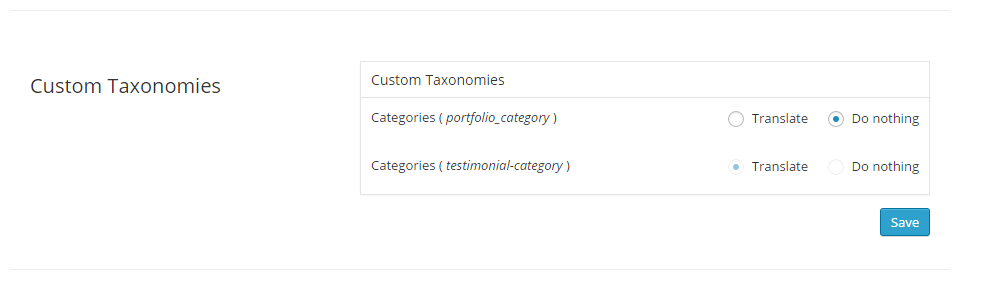
    It was related to WPML settings .
    Translation for Portfolio Categories should be activated. Check now, please.

    Regards,
    Olga Barlow

    Avatar: Olga Barlow
    Olga Barlow
    Participant
    March 23, 2015 at 19:09

    Hello,

    You need to translate parent theme first, because this is main part. I don’t see files in child theme that require translation. How to translate our theme you can read here https://www.8theme.com/demo/docs/woopress/index.html#!/1_how_to_translate
    Translate only strings you need, you don’t need to translate all the strings included in .po file.

    If you want to use CodeStyling Localization just ignore that notice.

    Regards,
    Olga Barlow

    Avatar: Olga Barlow
    Olga Barlow
    Participant
    March 23, 2015 at 18:43

    Hello,

    Very likely this is plugin bug. You need to contact with plugin author to solve the problem, because it does not work even with default theme.

    Regards,
    Olga Barlow

    Avatar: Olga Barlow
    Olga Barlow
    Participant
    March 23, 2015 at 14:48

    Hello,

    Edit woopress/framework/portfolio.php , line 9, find add_action('init', 'etheme_portfolio_init'); and replace by add_action('init', 'etheme_portfolio_init', 1);

    We’ll also include this fix in our next update.

    Regards,
    Olga Barlow

    Avatar: Olga Barlow
    Olga Barlow
    Participant
    March 19, 2015 at 15:46

    Hello,

    Could you, please, update theme to latest version 3.0?
    Current version of your theme is not compatible with WooCommerce 2.3.x. Delete wp-content/themes/blanco/woocommerce folder before theme update.

    Regards,
    Olga Barlow

    Avatar: Olga Barlow
    Olga Barlow
    Participant
    March 18, 2015 at 16:37

    Hello,

    We have checked your site and see that 2-d select does not work even with default theme and disabled Visual Composer plugin. This is WooCommerce problem, update WooCommerce plugin, this problem was fixed.

    Regards,
    Olga Barlow

    Avatar: Olga Barlow
    Olga Barlow
    Participant
    March 18, 2015 at 14:03

    Hello,

    We have checked your site and there is no any problem with Mozilla and our theme from our side. Try to check site from other PC, very likely it’s your local machine problem, not our theme!

    Regards,
    Olga Barlow

    Avatar: Olga Barlow
    Olga Barlow
    Participant
    March 18, 2015 at 12:47

    Hello,

    Ok, let’s solve your issues step by step.

    1. Screenshot you provided show not fully loaded page. You should see the following tabs there http://gyazo.com/8d14a456d5696ff4b6be170c80d898bd
    WooCommerce admin pages loads 17,24s with default theme http://gyazo.com/7b8438e6fd1749464bf88db82e58fcb9 this is very bad result! Also problems on frontend http://gyazo.com/fc7779f9acd0d7178a3055a70955c908
    Anyway when product page is loaded everything works file, I mean checkbox.
    2. You did not create variations for that draft product. Where did you add price? For all simple products I can see the prices.
    3. May assume it’s related to the previous problem, because I did not face this bug when checked your site.
    4. You have created attribute, but did not create term. Did you follow WooCommerce documentation? http://docs.woothemes.com/document/variable-product/
    I have created test attribute and added it and don’t see any issue, you can check your KAOS 1 product.
    6. Didn’t see this problem http://gyazo.com/bd9136f36a62147983d8a1ed8a771faa
    7. Didn’t face any problem http://gyazo.com/5ec40d2914c2847fe07a2c88559dc770

    Don’t see problem with checkout settings http://gyazo.com/b34e35117167419d663ba742182c7da2

    Also don’t see problem with custom.css http://gyazo.com/6f251235f719237f75403a269995bdc6

    Regards,
    Olga Barlow

    Avatar: Olga Barlow
    Olga Barlow
    Participant
    March 18, 2015 at 10:28

    Hello,

    First of check if you have these problems with our theme only or with default woocommerce theme http://www.woothemes.com/storefront/ too. Our theme should not affect backend! Then try to disable third-party plugins and check if problem still persists.

    Reply back in case all third-party plugins are disabled and problems persists with our theme only. We are able to provide support only for issues related strictly to our theme, we don’t provide support for WP or WooCommerce plugin configurations.

    Regards,
    Olga Barlow

    Avatar: Olga Barlow
    Olga Barlow
    Participant
    March 17, 2015 at 16:33

    Hello,

    Sorry, my bad. Check again.

    Regards,
    Olga Barlow

    Avatar: Olga Barlow
    Olga Barlow
    Participant
    March 17, 2015 at 16:33

    Hello,

    If you don’t plan to use this function you can comment out it.

    Regards,
    Olga Barlow

    Avatar: Olga Barlow
    Olga Barlow
    Participant
    March 17, 2015 at 15:23

    You are welcome!

    Regards,
    Olga Barlow

    Avatar: Olga Barlow
    Olga Barlow
    Participant
    March 17, 2015 at 15:21

    Hello,

    We took into account your proposition and maybe we’ll add such type of hover.

    Regards,
    Olga Barlow

    Avatar: Olga Barlow
    Olga Barlow
    Participant
    March 16, 2015 at 16:33

    Hello,

    1) Don’t know why, but changes we have made in your rtl.css were lost.
    You need to add the following code in rtl.css:
    To fix carousel

    .owl-carousel {
      direction: ltr;
    }

    To fix quantity
    .quantity input[type="number"]{padding:0 6px;font-size:16px;}

    You have added unexciting background-image: url(images/qr-bg-rtl.png); (rtl.css, line 305), that’s why you don’t see QR code image. Either create image or remove this code.

    Add also

    .etheme_widget_qr_code .widget-title {
      text-align: right;
    }

    2) Fixed. We have added following code in rtl.css

    .rtl .st-pusher{
     right: 0;
    }
    
    .st-menu-open .hide-filters-block .st-pusher{
     -webkit-transform: translate3d(-350px, 0, 0);
        -moz-transform: translate3d(-350px, 0, 0);
         -ms-transform: translate3d(-350px, 0, 0);
          -o-transform: translate3d(-350px, 0, 0);
             transform: translate3d(-350px, 0, 0);
    }
    
    .st-menu.hide-filters-block{
     -webkit-transform: translateX(350px);
        -moz-transform: translateX(350px);
         -ms-transform: translateX(350px);
          -o-transform: translateX(350px);
             transform: translateX(350px);
    }
    

    3) Don’t understand your problem. At present I see the same order you want. Would like to recommend just to add the following in rtl.css to align quick view icon

    .show-quickly:before {
      margin: 0 0 -2px 10px;
    }

    4) Add the following code in rtl.css

    .top-links li.popup_link:before {
      left: 5px;
    }

    Regards,
    Olga Barlow

    Avatar: Olga Barlow
    Olga Barlow
    Participant
    March 16, 2015 at 15:16

    Hello,

    You are welcome!

    Regards

    Avatar: Olga Barlow
    Olga Barlow
    Participant
    March 16, 2015 at 15:14

    Hello,

    Yes, all the template files will be updated. I was working on your site and fixed this problem. So, don’t worry about next theme update.

    Regards

    Avatar: Olga Barlow
    Olga Barlow
    Participant
    March 16, 2015 at 15:10

    Hello,

    You are welcome.

    Regards

    Avatar: Olga Barlow
    Olga Barlow
    Participant
    March 16, 2015 at 15:09

    Hello,

    Try this one

    .product-details .btn.etheme_add_to_cart_button:hover {
      background-color: #719400 !important;
    }

    But, dear Jimbo, such type of questions is additional customization and is beyond the scope of our support. Our base support includes the fixing of theme bugs and providing detailed information about theme settings and options. Please take this into account and keep in mind when create new topic.

    Regards

    Avatar: Olga Barlow
    Olga Barlow
    Participant
    March 16, 2015 at 14:50

    Hello,

    Check now.

    Regards

    Avatar: Olga Barlow
    Olga Barlow
    Participant
    March 16, 2015 at 14:47

    Hello,

    At present there are 3 types of hover effect in our theme:
    – Swap image (you need to upload product hover image)
    – Image Slider (if you have a product gallery)
    – Mask with information

    If you want to have just opacity you can add it

    .content-product .product-content-image:hover {
      opacity: 0.7;
    }

    Regards

    Avatar: Olga Barlow
    Olga Barlow
    Participant
    March 16, 2015 at 14:38

    Hello,

    I have fixed the problem. Check, please.

    Regards,
    Olga Barlow

    Avatar: Olga Barlow
    Olga Barlow
    Participant
    March 16, 2015 at 14:19

    Hello,

    I don’t see any additional code for shortcut icon.

    If you want to change Facebook Open Graph Meta Data you need to edit woopress/framework/theme-functions.php (lines 1305 – 1370).

    Regards,
    Olga Barlow

    Avatar: Olga Barlow
    Olga Barlow
    Participant
    March 16, 2015 at 11:56

    Hello,

    You can use both custom.css and child theme style.css. In this case you don’t need to copy code from custom to child. Also you may use only custom or only style.css. Then you need to place all the necessary code in one file depending on which one you want to use.

    Use the following code to add margin instead of that one:

    .sidebar .widget_product_categories {
      margin-top: 44px;
    }

    Regards,
    Olga Barlow

    Avatar: Olga Barlow
    Olga Barlow
    Participant
    March 16, 2015 at 11:01

    Hello,

    You will need to delete this file only before the next theme update and only this file! Don’t delete out of date files every time when you see that message, because some files are necessary. Also we recommend to update WooCommerce only if you see compatibility in theme changelog on themeforest.

    Regards,
    Olga Barlow

    Avatar: Olga Barlow
    Olga Barlow
    Participant
    March 14, 2015 at 12:06

    Hello,

    I think to solve this problem I need to clarify how custom.css file works. Custom.css file was created to change theme styles, that’s why it should be placed in parent theme only! It does not work if you move it in child theme. If you need to add changes in child theme we recommend to use child theme styles.css. You may use custom.css too, but this file should be located in wp-content/themes/woopress/ folder!

    Also you need to be very attentive when you add your styles, because if there is a misprint or any other mistake, all the css styles added after this misprint won’t work, as it already was before. So, please, follow these recommendations, check your files and styles and everything will work.

    Regards,
    Olga Barlow

    Avatar: Olga Barlow
    Olga Barlow
    Participant
    March 14, 2015 at 10:54

    Hello,

    Sorry, but we don’t provide css tutorials. I see you are using two different menus for mobile and desktop versions. In this case you can just add icon code as navigation label, check Home item.

    Regards,
    Olga Barlow

  • 1 2 3 999 1,000 1,001 1,012 1,013 1,014
    Viewing 30,000 results - 29,971 through 30,000 (of 30,391 total)
Viewing 30 posts - 29,971 through 30,000 (of 30,391 total)
We're using our own and third-party cookies to improve your experience and our website. Keep on browsing to accept our cookie policy.









