Forum Replies Created

Viewing 30 posts - 17,671 through 17,700 (of 17,791 total)
  • Avatar: Jack Richardson
    Jack Richardson
    Support staff
    May 27, 2014 at 13:05

    Hello,

    To make some changes in custom.css you should rename default.custom.css to custom.css and enable it in Theme Options -> Custom CSS -> Enable Custom CSS file -> ON.

    You can use different number of columns. For this add new row and there change number of columns.

    Please provide us with FTP credentials as well.

    Regards,
    Jack Richardson
    Avatar: Jack Richardson
    Jack Richardson
    Support staff
    May 27, 2014 at 12:49

    Hello,

    Please provide us also with FTP access.

    Regards,
    Jack Richardson

    Avatar: Jack Richardson
    Jack Richardson
    Support staff
    May 27, 2014 at 12:02

    Hello,

    We’ve add the code into your custom.css. Check please, is it works fine now?

    Regards,
    Jack Richardson

    Avatar: Jack Richardson
    Jack Richardson
    Support staff
    May 27, 2014 at 11:11

    Hello,

    You can find all product order variants in WooCommerce > Settings > Products > Default Product Sorting.
    If you want to display some particular products you can use WooCommerce shortcodes to display products by their SKU or ID: http://docs.woothemes.com/document/woocommerce-shortcodes/.
    But don’t forget to add “etheme_” prefix as it were mentioned in our documentation: https://www.8theme.com/demo/docs/xmarket/#!/xmarket_shortcodes.

    Regards,
    Jack Richardson

    Avatar: Jack Richardson
    Jack Richardson
    Support staff
    May 27, 2014 at 10:48

    Hello,

    Please create a ticket on support.8theme.com and our Russian-speaking expert will continue to help you. We think it will be much easier for you.

    Also include in your ticket wp-admin and FTP credentials.

    Regards,
    Jack Richardson

    Avatar: Jack Richardson
    Jack Richardson
    Support staff
    May 27, 2014 at 10:11

    Hello,

    Yes, brands are stored in the wp_terms table. But we don’t know will it works in another theme or not. About this information you should contact developers of the theme, which you want to install.

    Regards,
    Jack Richardson

    Avatar: Jack Richardson
    Jack Richardson
    Support staff
    May 27, 2014 at 09:38

    Hello,

    First of all thank you for more detailed explanation.
    Please try to add this code into your custom.css:

    .fixed-header .menu > li > a, .main-nav .menu>li>a {
    color: #ccc;
    }

    Also change “#ccc” to your desired color.
    Here is a video tutorial how to create custom.css: https://www.youtube.com/watch?v=Qok2zRedRMY&feature=youtu.be.

    Regards,
    Jack Richardson

    Avatar: Jack Richardson
    Jack Richardson
    Support staff
    May 27, 2014 at 09:30

    Hello,

    With every theme update we include the newest version of Visual Composer that is available at that moment. If you don’t want to wait theme update and need to update VC plugin right now you should buy license.

    Regards,
    Jack Richardson

    Avatar: Jack Richardson
    Jack Richardson
    Support staff
    May 27, 2014 at 09:18

    Hello,

    Please check the Revolution Slider with default theme. In the case if it doesn’t work with default theme too you should contact Revolution Slider support.

    Regards,
    Jack Richardson

    Avatar: Jack Richardson
    Jack Richardson
    Support staff
    May 27, 2014 at 09:04

    Hello,

    We’ve made some changes in home page code. Please check it now.

    Regards,
    Jack Richardson

    Avatar: Jack Richardson
    Jack Richardson
    Support staff
    May 27, 2014 at 08:48

    Hello,

    Yes, unfortunately there is a bug with images in pop-up window after adding to cart, it will be fixed in our next update. But this pop-up appears for simple products only (variable products do not have this feature). So, we recommend you go to Theme Options > Single product page > Ajax Add to Cart > Off and you will get green notice for all your products.

    Regards,
    Jack Richardson

    Avatar: Jack Richardson
    Jack Richardson
    Support staff
    May 27, 2014 at 08:24

    Hello,

    You’re welcome!

    Regards,
    Jack Richardson

    Avatar: Jack Richardson
    Jack Richardson
    Support staff
    May 27, 2014 at 08:22

    Hello,

    Yes, you can create static block using Visual Composer and then assign it to the desired widget area.

    Regards,
    Jack Richardson

    Avatar: Jack Richardson
    Jack Richardson
    Support staff
    May 27, 2014 at 07:52

    Hello,

    We didn’t test this plugin, but as this plugin is for shipping calculation and our theme doesn’t affect this functionality, that’s why we think that problems shouldn’t arise.

    Regards,
    Jack Richardson

    Avatar: Jack Richardson
    Jack Richardson
    Support staff
    May 27, 2014 at 07:42

    Hello,

    There is no such functionality by default in our theme as Newsletters or Subscription. But you can use additional plugin to implement it. This an example how it is implemented in our demo: https://www.8theme.com/demo/docs/legenda/index.html#!/newsletters.

    Regards,
    Jack Richardson

    Avatar: Jack Richardson
    Jack Richardson
    Support staff
    May 27, 2014 at 07:22

    Hello,

    Add the following code into your custom.css to remove the double border:

    .main-nav, .main-nav .double-border {
    border-top: none;
    border-bottom: none;
    }

    Regards,
    Jack Richardson

    Avatar: Jack Richardson
    Jack Richardson
    Support staff
    May 27, 2014 at 07:14

    Hello,

    Unfortunately, this plugin is not compatible with AJAX add to cart feature. That’s why if you want to use this plugin you should go to Theme Options > Single Product Page > Ajax Add to cart > set OFF.

    Regards,
    Jack Richardson

    Avatar: Jack Richardson
    Jack Richardson
    Support staff
    May 27, 2014 at 07:06

    Hello,

    Please provide us with FTP and wp-admin access.

    Regards,
    Jack Ricardson

    Avatar: Jack Richardson
    Jack Richardson
    Support staff
    May 26, 2014 at 16:04

    Hello,

    We’ve sent you a mail and waiting for your response.

    Regards,
    Jack Richardson

    Avatar: Jack Richardson
    Jack Richardson
    Support staff
    May 26, 2014 at 15:55

    Hello,

    You’re welcome.

    Regards,
    Jack Richardson

    Avatar: Jack Richardson
    Jack Richardson
    Support staff
    May 26, 2014 at 14:55

    Hello,

    We’ve made some changes. Please check, is it works fine now?

    Regards,
    Jack Richardson

    Avatar: Jack Richardson
    Jack Richardson
    Support staff
    May 26, 2014 at 12:47

    Hello,

    To display categories you should use woocommerce shortcode [product_categories number="12" parent="0"]: http://docs.woothemes.com/document/woocommerce-shortcodes/

    Regards,
    Jack Richardson

    Avatar: Jack Richardson
    Jack Richardson
    Support staff
    May 26, 2014 at 12:31

    Hello,

    Please provide us with FTP and wp-admin credentials. We’ll check your problem.

    Regards,
    Jack Richardson

    Avatar: Jack Richardson
    Jack Richardson
    Support staff
    May 26, 2014 at 12:25

    Hello,

    Yes, it is possible. For this you need:
    1) Create new static block.
    2) Using Visual Composer add to created static block “Posts Grid” or “Posts Slider” element and select “etheme_portfolio” posts type in “Posts Grid” or “Posts Slider” settings.
    3) Add created static block to the desired widget area.

    Regards,
    Jack Richardson

    Avatar: Jack Richardson
    Jack Richardson
    Support staff
    May 26, 2014 at 11:28

    Hello,

    Glad to hear that! If you have some questions feel free to contact us.

    Regards,
    Jack Richardson

    Avatar: Jack Richardson
    Jack Richardson
    Support staff
    May 26, 2014 at 11:16

    Hello,


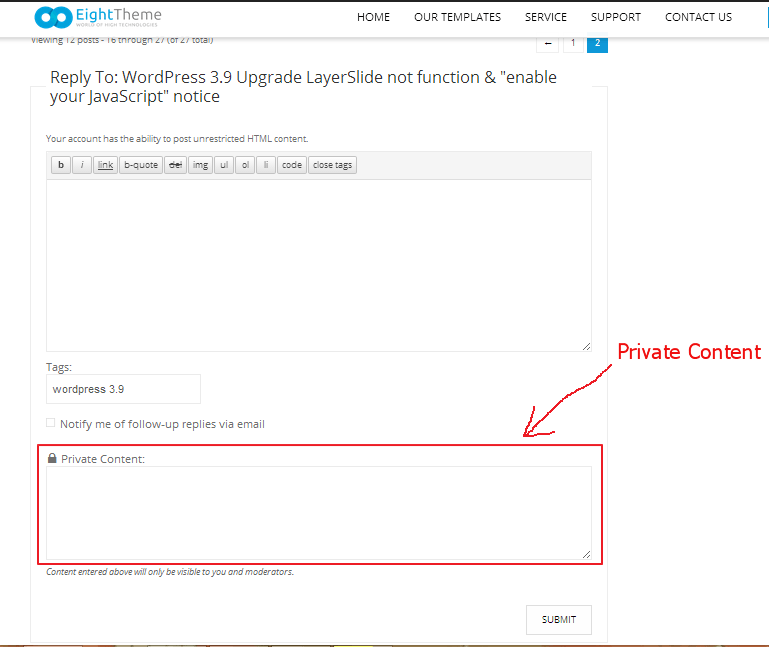
    In the reply form there is a field, which is called Private Content. Please use it to send us your site credentials.

    Regards,
    Jack Richardson

    Avatar: Jack Richardson
    Jack Richardson
    Support staff
    May 26, 2014 at 11:10

    Hello,

    1) Edit your homepage and there find shortcode for product slider (“[etheme_new title=”Latest Products” ]”) and change it’s title.
    2) Active menu item in our theme is allocated in different color by default. There is no such option in Theme Options to change it. It only can be done using CSS, but not only for first load of main page.

    Regards,
    Jack Richardson

    Avatar: Jack Richardson
    Jack Richardson
    Support staff
    May 26, 2014 at 10:39

    Hello,

    You have old theme version 1.4.1, which is not compatible with 2.1.x WooCommerce version. That’s why you should update your theme to the latest version.

    Before theme upgrading, please remove woocommerce folder from the theme directory and read instructions how to upgrade: https://www.8theme.com/demo/docs/legenda/index.html#!/upgrade

    Regards,
    Jack Richardson

    Avatar: Jack Richardson
    Jack Richardson
    Support staff
    May 26, 2014 at 10:11

    Hello,

    We’re unable to enter in Administration panel. Please check provided wp-admin and FTP credentials.

    Regards,
    Jack Richardson

    Avatar: Jack Richardson
    Jack Richardson
    Support staff
    May 26, 2014 at 09:46

    Hello,

    We’ve made some changes in your Child theme. Please check it now.

    Regards,
    Jack Richardson

  • 1 2 3 … 589 590 591 592 593 594
    Viewing 17,700 results - 17,671 through 17,700 (of 17,791 total)
Viewing 30 posts - 17,671 through 17,700 (of 17,791 total)
We're using our own and third-party cookies to improve your experience and our website. Keep on browsing to accept our cookie policy.