Forum Replies Created

Viewing 30 posts - 29,161 through 29,190 (of 31,382 total)
  • Avatar: Eva
    Eva Kemp
    Participant
    July 18, 2014 at 09:58

    Hello,

    The contact form works fine with our email addresses, including gmail.com. We recommend you to check logs on the server of your email account.
    Are you checking your mail with some mail client or web interface?
    Try to use web interface.

    Regards,
    Eva Kemp.
    Avatar: Eva
    Eva Kemp
    Participant
    July 18, 2014 at 08:59

    Hello,

    All your products have the same price – $40, that’s why price filter isn’t working as there is nothing to filter.
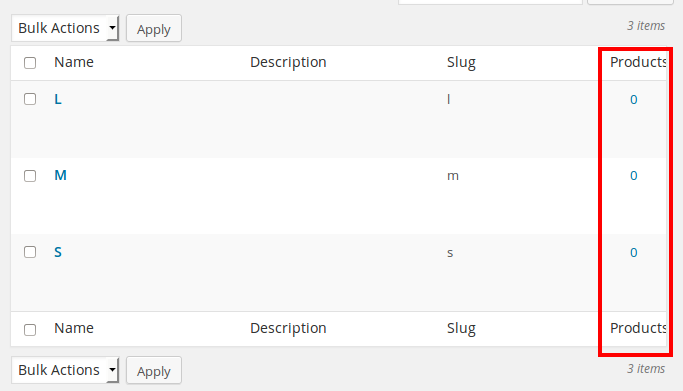
    Woocommerce Layered Nav widget isn’t working because there are no products for the attributes “Size” and “Color”. At first you need set products for these attributes to make layered nav widget work.

    Regards,
    Eva Kemp.

    Avatar: Eva
    Eva Kemp
    Participant
    July 18, 2014 at 08:44

    Hello,

    Have you checked Spam folder of your email account?
    Please try to send an email from your site again and check that folder.
    Thank you.

    Regards,
    Eva Kemp.

    Avatar: Eva
    Eva Kemp
    Participant
    July 18, 2014 at 08:39

    Hello,

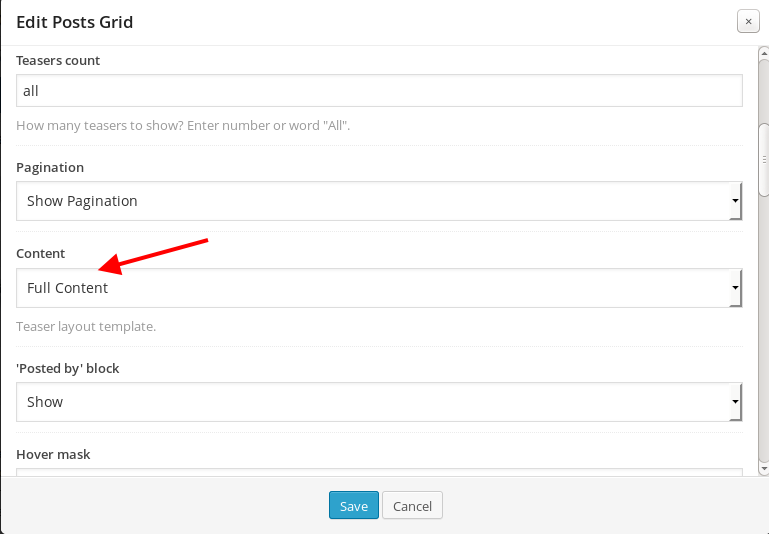
    You need edit Posts grid element in VC editor and select “Content” > “Teaser (Excerpt)”:

    Regards,
    Eva Kemp.

    Avatar: Eva
    Eva Kemp
    Participant
    July 17, 2014 at 21:20

    Hello,

    You’re welcome.
    If you have any questions feel free to contact us.

    Regards,
    Eva Kemp.

    Avatar: Eva
    Eva Kemp
    Participant
    July 17, 2014 at 20:21

    You’re welcome.
    I’ve removed the VC folder of old version and uploaded a new version of the plugin.
    To create a double border you need add this code in custom.css file:

    .testimonials-slider {
        border: double;
    }

    Please show us a screenshot of how you want to center vertically the testimonials slider.
    Thank you.

    Regards,
    Eva Kemp.

    Avatar: Eva
    Eva Kemp
    Participant
    July 17, 2014 at 20:10

    Hello,

    You can change this text in the file wp-content/themes/blanco/woocommerce/single-product/short-description.php (line 20).

    Regards,
    Eva Kemp.

    Avatar: Eva
    Eva Kemp
    Participant
    July 17, 2014 at 19:23

    Hello,

    This article contains the needed information: http://codex.wordpress.org/Child_Themes

    Regards,
    Eva Kemp.

    Avatar: Eva
    Eva Kemp
    Participant
    July 17, 2014 at 19:21

    I’ve updated VC to the latest version.
    Please check it now.

    Regards,
    Eva Kemp.

    Avatar: Eva
    Eva Kemp
    Participant
    July 17, 2014 at 18:54

    Hello,

    You’re welcome.

    Regards,
    Eva Kemp.

    Avatar: Eva
    Eva Kemp
    Participant
    July 17, 2014 at 18:27

    Hello,

    As I see you still have old version of Visual Composer – Version 4.1.2.
    Please provide us with FTP credentials in Private Content and we’ll check the issue.

    Regards,
    Eva Kemp.

    Avatar: Eva
    Eva Kemp
    Participant
    July 17, 2014 at 18:20

    Hello,

    That error means ReallySimpleCaptcha class has already been declared and you can’t declare it twice. I’ve fixed it in this way: Under Plugins menu clicked “Edit” for Really Simple Captcha plugin and changed the line 30 “class ReallySimpleCaptcha” to “class ReallySimpCaptcha”. So just renamed it. After that the plugin has been activated successfully.

    Please check.

    Regards,
    Eva Kemp.

    Avatar: Eva
    Eva Kemp
    Participant
    July 17, 2014 at 18:08

    Hello,

    We’re glad the solution has been found.
    Enjoy your work!

    Regards,
    Eva Kemp.

    Avatar: Eva
    Eva Kemp
    Participant
    July 17, 2014 at 18:07

    Hello,

    To update the Visual Composer plugin you need re-download the theme archive at http://themeforest.net/item/legenda-responsive-multipurpose-wordpress-theme/5888906 where we’ve recently included the updated versions of plugins VC and Revolution Slider. After you unzip the archive you’ll find another archive Legenda_v2.2.zip, extract it as well and open this folder “legenda”. The plugins are placed inside of “legenda” folder under framework/plugins directory. Upload the new version via FTP and remove the old one.

    Regards,
    Eva Kemp.

    Avatar: Eva
    Eva Kemp
    Participant
    July 17, 2014 at 17:56

    Hello,

    Please provide us with your domain name and login details to FTP and wp-admin panel in Private Content.

    Regards,
    Eva Kemp.

    Avatar: Eva
    Eva Kemp
    Participant
    July 17, 2014 at 17:54

    Hello,

    Have you tested the plugin with some other theme? Please check it.
    Also please provide us with the link where we can reproduce the issue from our side.
    Thank you.

    Regards,
    Eva Kemp.

    Avatar: Eva
    Eva Kemp
    Participant
    July 17, 2014 at 17:49

    Unfortunately we don’t have such possibility to disable sidebar for specific categories. It can be disabled for all categories though.
    Please specify what buttons (on which pages) you want to change.
    Thank you.

    Regards,
    Eva Kemp.

    Avatar: Eva
    Eva Kemp
    Participant
    July 17, 2014 at 16:24

    Hello,

    You’ve provided the link of the Checkout page, not Cart page.
    I’ve disabled Sidebar in Pages > Checkout page > selected Sidebar Position “Without Sidebar” in the “Page Layout” box on the right side.
    Please check the Checkout page now and clear browser cache before.

    Regards,
    Eva Kemp.

    Avatar: Eva
    Eva Kemp
    Participant
    July 17, 2014 at 15:48

    Hello,

    Please read the instruction how to create footer described in our documentation:
    https://www.8theme.com/demo/docs/legenda/index.html#!/footer
    Also you can read about custom widget area here: https://www.8theme.com/demo/docs/legenda/index.html#!/custom_widget_areas

    Regards,
    Eva Kemp.

    Avatar: Eva
    Eva Kemp
    Participant
    July 17, 2014 at 15:08

    You’re welcome.

    Regards,
    Eva Kemp.

    Avatar: Eva
    Eva Kemp
    Participant
    July 17, 2014 at 15:02

    Ok, keep us informed.
    Thank you.

    Regards,
    Eva Kemp.

    Avatar: Eva
    Eva Kemp
    Participant
    July 17, 2014 at 14:32

    The permissions should be 644. If it doesn’t work yet please try 777 permissions.

    Regards,
    Eva Kemp.

    Avatar: Eva
    Eva Kemp
    Participant
    July 17, 2014 at 12:47

    Hello,

    You can remove the title adding the code below into custom.css file.

    .page-heading h1 {
        display: none;
    }

    Please note the title will be removed for all pages such way.

    Regards,
    Eva Kemp.

    Avatar: Eva
    Eva Kemp
    Participant
    July 17, 2014 at 11:02

    Hello,

    Please check the site via proxy: http://anonymouse.org/cgi-bin/anon-www.cgi/http://novikovrestaurant.co.uk/orders/checkout/order-pay/9011/?pay_for_order=true&key=wc_order_53c681b439e25
    If it’s showing fine, then the site has been cached on your side.

    Regards,
    Eva Kemp.

    Avatar: Eva
    Eva Kemp
    Participant
    July 16, 2014 at 22:35

    Hello,

    You should add an image as a separate menu item, not including it in the Product Category sub item.
    Please watch our tutorial how to create different types of menu:
    http://www.youtube.com/watch?v=9cj6o9ZRovY#t=335 (the info about image item is after 4th minute).

    Regards,
    Eva Kemp.

    Avatar: Eva
    Eva Kemp
    Participant
    July 16, 2014 at 16:35

    Hello,

    I’ve changed Permalinks settings: “Product permalink base” set to “Default” and now the Shop page is being showed fine.
    Please check it and clear browser cache before.

    Regards,
    Eva Kemp.

    Avatar: Eva
    Eva Kemp
    Participant
    July 16, 2014 at 16:06

    Hello,

    I’ve just checked the site with the default theme and Revolution Slider isn’t working there too.
    We recommend you to contact Revolution Slider support team. They should advise you some solution.

    Regards,
    Eva Kemp.

    Avatar: Eva
    Eva Kemp
    Participant
    July 16, 2014 at 15:37

    Hello,

    To get rid of the changes that have been made you need just remove the code you were provided in previous posts.
    We’ve sent an email with the price details to your email address.
    Please check it.

    Regards,
    Eva Kemp.

    Avatar: Eva
    Eva Kemp
    Participant
    July 16, 2014 at 15:15

    Hello,

    Have you watched the video tutorial how to use custom.css file? I’ve provided you with the link in the previous post: http://www.youtube.com/watch?v=Qok2zRedRMY&list=PLMqMSqDgPNmD4uhGI1IBhr1iaEy81TMff&feature=share&index=1
    You didn’t rename default.custom.css file in the theme folder.
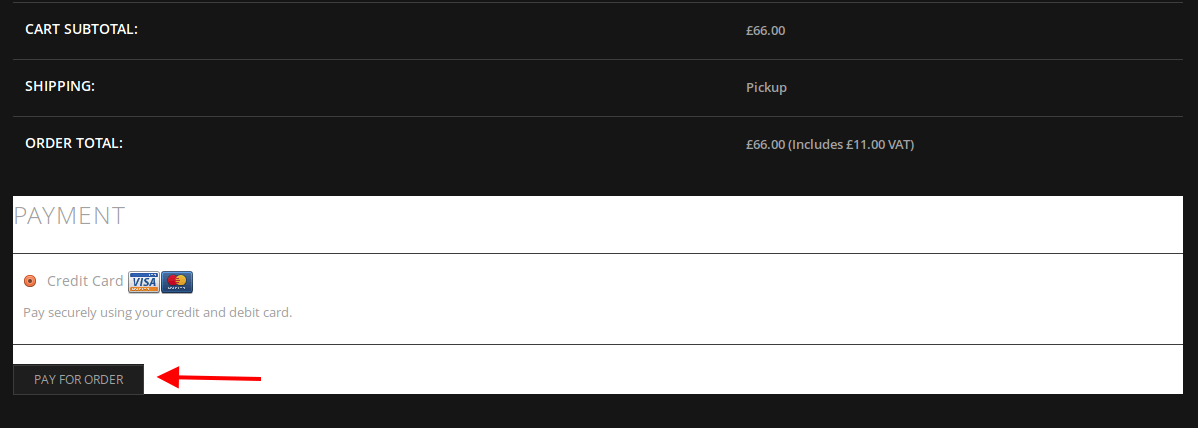
    I’ve renamed it to custom.css and now Cart is visible. Please check and clear browser cache before.

    Seems woocommerce template form-pay.php in the wp-content/themes/legenda/woocommerce/checkout folder hadn’t been updated with woocommerce plugin. So I’ve replaced the old file with the new version from the directory wp-content/plugins/woocommerce/templates/checkout and now the button is working:

    Regards,
    Eva Kemp.

    Avatar: Eva
    Eva Kemp
    Participant
    July 16, 2014 at 13:52

    Hello,

    1. To create page links in the top header area you can use Text widget with the code of your links in “Place in header top bar” widget area in Appearance > Widgets. All customizations concerning styles can be done in custom.css file

    2. You can change background color of the dropdown submenu adding this code into custom.css:

    .main-nav .menu > li .nav-sublist-dropdown {
        background-color: #FFF !important;
    }

    Change the color value to yours.

    3. To make font bold and subcategories font title the same as for main menu items please add the code into custom.css:

    .main-nav .menu > li.menu-full-width .nav-sublist-dropdown .container > ul > li a {
        font-weight: bold; 
       font-family: helvetica;}

    4. You can change background color of the header with this code:

    div.header-wrapper.header-type-7 {background: #FFF;}
    .main-nav {
        background: #FFF;
    } 

    Change the color value for “div.header-wrapper.header-type-7” to yours.

    Regards,
    Eva Kemp.

  • 1 2 3 972 973 974 1,045 1,046 1,047
    Viewing 29,190 results - 29,161 through 29,190 (of 31,382 total)
Viewing 30 posts - 29,161 through 29,190 (of 31,382 total)
We're using our own and third-party cookies to improve your experience and our website. Keep on browsing to accept our cookie policy.