
Hello,
Please specify what problems you’re experiencing with Woocommerce and our theme? Are there any errors or warnings from Woocommerce plugin?
Please be more specific.
Thank you.
Regards,
Eva Kemp.

Hello,
Please specify what problems you’re experiencing with Woocommerce and our theme? Are there any errors or warnings from Woocommerce plugin?
Please be more specific.
Thank you.
Regards,
Eva Kemp.
Hello,
There are no images added for many products. For example edit the product “Baba Ghanouj & Pita” and you’ll see no images are there neither for gallery, nor featured image.
Please check all your products.
Regards,
Eva Kemp.
Hello,
Your page http://tnstriperfishing.webcandywebsites.com/blog/ has title “Fish We Caught” and this page is selected as your Blog page in Settings > Reading for the posts to be shown on.
Could you please clarify step by step what you’re trying to achieve?
As I see your Home page displays posts using “Posts Grid” element of Visual Composer. Do you want to add “Read More” buttons to the posts on the Home page? If so you need do this such way:
– add excerpt with “Read more” link for each post as showed on the screenshot:
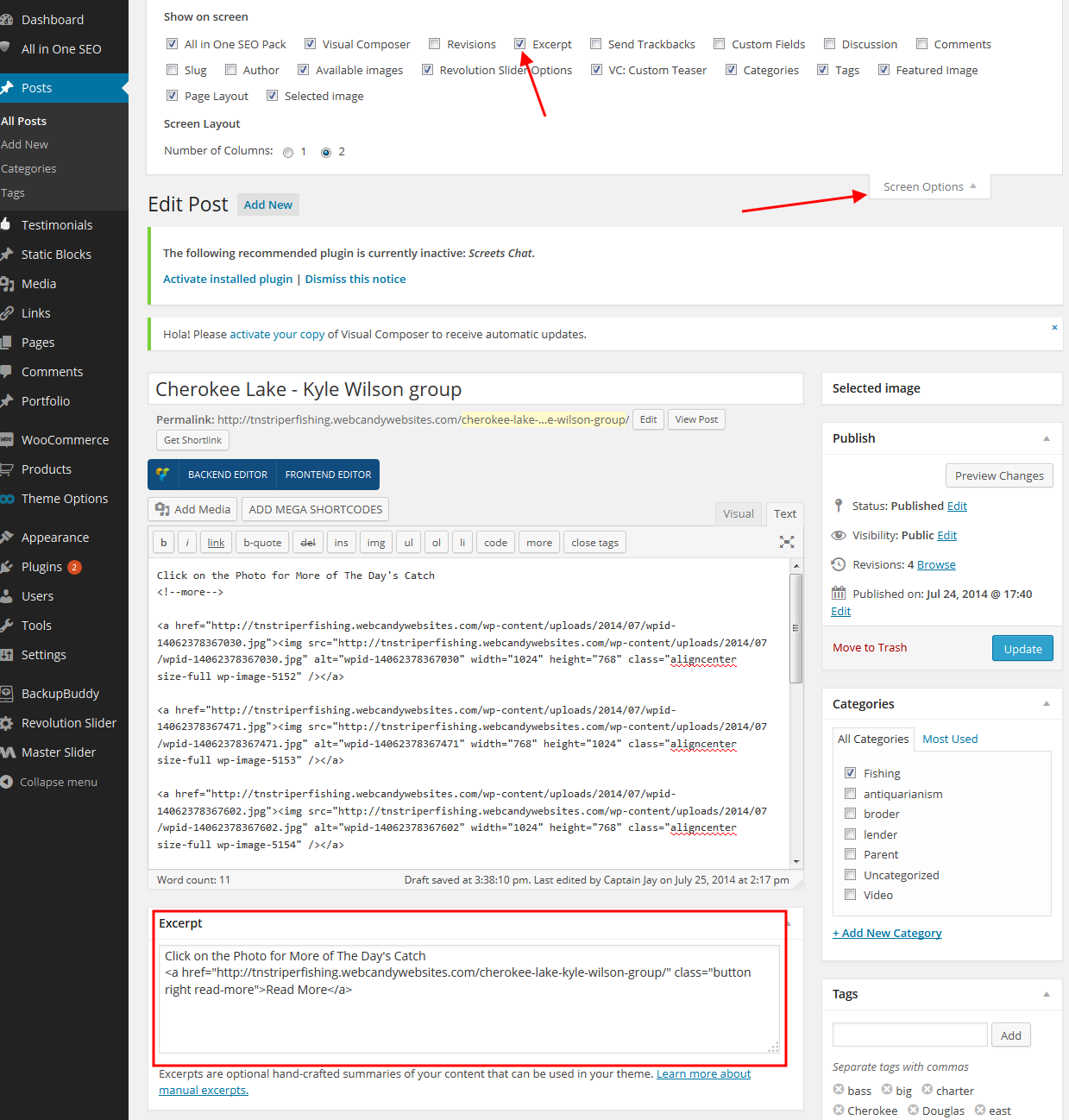
I’ve done this for one post – “Cherokee Lake – Kyle Wilson group” and added some code into custom.css file in wp-content/themes/legenda directory . Please check your home page now and clear browser cache before.
Regards,
Eva Kemp.
Hello,
Are you talking about the products that are displayed on the Home page? Please provide us with the link to the product page where you see the issue.
Also you can change image sizes again in Woocommerce settings and use this plugin to regenerate thumbnails http://wordpress.org/plugins/regenerate-thumbnails/
Regards,
Eva Kemp.
Hello,
As this customization is related to Woocommerce we recommend you to contact their support regarding your question.
Regards,
Eva Kemp.
Hello,
Yes, you need create a new template for archive pages or you can edit the current archive.php in wp-content/themes/idstore directory, find the line 42 with the code <?php get_sidebar(); ?> and comment it or create your own template with your modifications.
Regards,
Eva Kemp.
Hello,
As I see in your admin panel > Settings > bbPress WP Tweaks you’ve selected the default template – page.php for your forum. If you want to remove sidebar you need create your own template without sidebar and select it from the settings.
Regards,
Eva Kemp.
You’re welcome.
Regards,
Eva Kemp.
Hello,
Do you mean fixed header background color? If so here is the code for its background:
.fixed-header { background: none repeat scroll 0% 0% rgba(255, 255, 255, 0.95); }
Regards,
Eva Kemp.
Hello,
Please provide us with the correct login credentials and site url in Private Content.
Regards,
Eva Kemp.
Hello,
You can change background color in custom.css file using this code:
.main-nav .menu > li .nav-sublist-dropdown .container > ul > li a {
    background-color: blue;
}
Just change the color value to yours.
Regards,
Eva Kemp.
Hello,
Please check Woocommerce system status now. If there are still some errors please provide us with wp-admin panel credentials.
Thank you.
Regards,
Eva Kemp.
Hello,
If you want to use “Read More” buttons for your posts, please read this article
https://www.8theme.com/knowladge-base/using-read-more-button-on-wordpress-blog/
Regards,
Eva Kemp.
You’re welcome.
Regards,
Eva Kemp.
Hello,
You’re welcome.
Enjoy your work!
Regards,
Eva Kemp.
You’re always welcome!
Thank you for such kind words.
If you need more help don’t hesitate to contact us.
Enjoy your work!
Regards,
Eva Kemp.
Hello @rachelelnar,
We’re glad you were able to resolve the issue.
If you have any questions feel free to ask us.
Regards,
Eva Kemp.
Hello @melyy3,
I was unable to log in to wp-admin panel as login credentials are incorrect.
The problem with your site was caused by the plugin “taxonomy-metadata”. I’ve renamed its folder to “taxonomy-metadata_old” via FTP in the /public_html/wp-content/plugins directory and the site has started working. Please check and clear browser cache before.
Regards,
Eva Kemp.
Hello @melyy3,
Please read carefully our documentation: https://www.8theme.com/demo/docs/legenda/index.html#!/installation and retry installing the theme to the clean wordpress.
If you’re still getting the error please provide us with wp-admin panel and FTP credentials in Private Content and upload the theme archive into some folder (themes, for example) via FTP.
Regards,
Eva Kemp.
Hello,
Sidebar widgets will be displayed with default template, not “Contact page” template which is currently selected. I’ve added the image you want to use in sidebar via Visual Composer editor on “Contacto” page. Please check if it suits you. But if you want to be able to choose sidebars from Page Layout box you need select default template and use some contact form plugin (for example, Contact Form 7).
Regards,
Eva Kemp.
Hello,
I’ve added the following code into custom.css file to make the background image display with the wide layout:
.page-wrapper, .container { background-color: transparent !important; }
Please check the site and clear browser cache before.
Regards,
Eva Kemp.
Hello,
Cross-sells are shown on the Cart page after the product is added into there.
To get up-sells shown you need go to Theme Options > Single Product Page > Location of upsell products > select “After Content” instead of “Sidebar”.
Regards,
Eva Kemp.
Hello,
I’ve just checked the site load speed and currently it’s 2.16s.
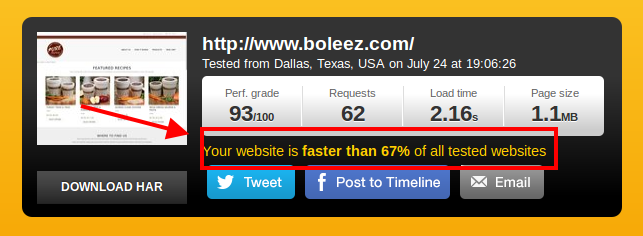
We recommend you to contact your hosting provider regarding this issue. Also try to check the trace from your PC to your host.
Regards,
Eva Kemp.
In this case please use this code in custom.css file:
img.hide-image {
height: 300px;
}
How to create custom.css you can watch at this link: http://www.youtube.com/watch?v=Qok2zRedRMY&list=PLMqMSqDgPNmD4uhGI1IBhr1iaEy81TMff&feature=share&index=1
Regards,
Eva Kemp.
Hello,
Images for variation products used dimensions 300px*300px from Woocommerce settings. I’ve regenerated thumbnails with the plugin http://wordpress.org/plugins/regenerate-thumbnails/ which I’ve installed for you and now the images are showing fine.
Please check from your side and clear browser cache before.
Regards,
Eva Kemp.
You’re welcome.
Ok. Looking forward to your reply.
Regards,
Eva Kemp.
You can changes the values in Woocommerce settings as well.
Also you need regenerate thumbnails after the changes. You can use this plugin: https://wordpress.org/plugins/regenerate-thumbnails/
Regards,
Eva Kemp.
Try to set another value 300 or 400 or 500 and enable “image cropping”. If it doesn’t help use this code in custom.css file:
img.hide-image {
height: 300px;
}
How to create custom.css you can watch at this link: http://www.youtube.com/watch?v=Qok2zRedRMY&list=PLMqMSqDgPNmD4uhGI1IBhr1iaEy81TMff&feature=share&index=1
Regards,
Eva Kemp.
Hello,
Please try to change the height of images in Theme Options > Products Page Layout > Product Images Height.
Regards,
Eva Kemp.
Hello,
As it’s described in wp-editor:
“Here you can customize teaser block design. It will be used instead of default settings in “Posts Grid” or “Carousel” content elements.” These elements can be added via Visual Composer editor. For example, if you use Posts Grid element and select “Teaser (Excerpt)” content type, it means only part of your post will be shown (excerpt), not full post content.
Regards,
Eva Kemp.









