Forum Replies Created

Viewing 30 posts - 28,861 through 28,890 (of 31,382 total)
  • Avatar: Eva
    Eva Kemp
    Participant
    July 31, 2014 at 13:32

    Hello,

    Sorry, but we need to see the site to have clear meaning what code to provide you with.
    Which page you want the custom menu to be displayed on? You can create a new sidebar area in Appearance > Widgets and drag Custom Menu widget in there. After that select the created widget area in the page editor as described in our documentation: https://www.8theme.com/demo/docs/legenda/index.html#!/custom_widget_areas

    Regards,
    Eva Kemp.
    Avatar: Eva
    Eva Kemp
    Participant
    July 31, 2014 at 12:59

    Thank you for your feedback!

    Please add the following code in custom.css file:

    .with-sidebar #products-grid.products_grid.rows-count4 .product-image img {
        max-width: 160px !important;
    }

    Regards,
    Eva Kemp.

    Avatar: Eva
    Eva Kemp
    Participant
    July 31, 2014 at 11:42

    Please add this code into custom.css:

    #product-page .product-shop {
        margin-left: 50px;
    }

    Regards,
    Eva Kemp.

    Avatar: Eva
    Eva Kemp
    Participant
    July 31, 2014 at 11:28

    Hello,

    You haven’t given any links to your screenshots.
    Please provide us with them.

    Regards,
    Eva Kemp.

    Avatar: Eva
    Eva Kemp
    Participant
    July 31, 2014 at 11:07

    Hello,

    You’re welcome.
    Sorry, but we don’t recommend to change width of images as they will be stretched and displayed distorted. If you wish you can try it with this code adding in custom.css:

    .product-image .img-wrapper img {
        width: 600px !important;
        max-width: 600px !important;
    }

    Regards,
    Eva Kemp.

    Avatar: Eva
    Eva Kemp
    Participant
    July 31, 2014 at 10:58

    Hello,

    Please try to disable all 3rd-party plugins one by one to check if some is causing the issue.
    Thank you.

    Regards,
    Eva Kemp.

    Avatar: Eva
    Eva Kemp
    Participant
    July 30, 2014 at 20:15

    Hello,

    Please add this code into custom.css file:

    img.hide-image {
    height: 370px;
    }

    Here is the tutorial how to create custom.css.

    Regards,
    Eva Kemp.

    Avatar: Eva
    Eva Kemp
    Participant
    July 30, 2014 at 20:08

    Ok. Looking forward to your reply.

    Regards,
    Eva Kemp.

    Avatar: Eva
    Eva Kemp
    Participant
    July 30, 2014 at 20:07

    You’re welcome.

    Regards,
    Eva Kemp.

    Avatar: Eva
    Eva Kemp
    Participant
    July 30, 2014 at 20:05

    Hello,

    Please provide us with FTP and admin panel credentials in Private Content.

    Regards,
    Eva Kemp.

    Avatar: Eva
    Eva Kemp
    Participant
    July 30, 2014 at 20:05

    Hello,

    The error means the link http://oxygenproducts.org/wp-content/themes/idstore/images/chosen-sprite.png should be loaded with https as well. Please make sure you’ve changed all links to https.
    The second error – 404 (Not Found) – means there is no such image “chosen-sprite.png” in the directory wp-content/themes/idstore/images/. You should also check if you’ve uploaded it or its permissions.

    Regards,
    Eva Kemp.

    Avatar: Eva
    Eva Kemp
    Participant
    July 30, 2014 at 19:41

    Thank you for the screenshots.
    As Product Add-ons plugin is related to Woocommerce we recommend you to contact their support team. They should suggest you some solution for your issue.

    Regards,
    Eva Kemp.

    Avatar: Eva
    Eva Kemp
    Participant
    July 30, 2014 at 17:09

    Hello,

    Is the provided code not working?
    Sorry, but without seeing the site it’s difficult to provide with the correct code.

    Regards,
    Eva Kemp.

    Avatar: Eva
    Eva Kemp
    Participant
    July 30, 2014 at 16:51

    You’re welcome.

    Regards,
    Eva Kemp.

    Avatar: Eva
    Eva Kemp
    Participant
    July 30, 2014 at 16:50

    Hello,

    As I see you’re using old theme version. Please update it to the latest one – 2.9.2. We recommend to upgrade it as some bugs are fixed in the new version.
    Thank you.

    Regards,
    Eva Kemp.

    Avatar: Eva
    Eva Kemp
    Participant
    July 30, 2014 at 16:34

    You can upload your screenshots to some image storage and provide us with the links.

    Regards,
    Eva Kemp.

    Avatar: Eva
    Eva Kemp
    Participant
    July 30, 2014 at 16:32

    Hello,

    Visual Composer was separated from the theme and now is a separate plugin which you can activate/deactivate in your admin panel.
    Yes, you need wait for the theme update where all plugins will be updated to the latest versions.

    Regards,
    Eva Kemp.

    Avatar: Eva
    Eva Kemp
    Participant
    July 30, 2014 at 16:29

    Hello,

    Please try to use this code in custom.css file:

    .widget_nav_menu {
        overflow-y: scroll !important ;
        overflow-x: hidden !important;
        height: 500px;
    }

    Change the height value to the one you need.
    Here you can watch the tutorial how to create custom.css.

    Regards,
    Eva Kemp.

    Avatar: Eva
    Eva Kemp
    Participant
    July 30, 2014 at 16:20

    Hello @presise1,

    Please provide us with wp-admin panel credentials in Private Content.

    Regards,
    Eva Kemp.

    Avatar: Eva
    Eva Kemp
    Participant
    July 30, 2014 at 15:19

    Hello,

    The image is being displayed without any problems:

    Please provide us with the screenshot of what you’re getting on your side.
    Thank you.

    Regards,
    Eva Kemp.

    Avatar: Eva
    Eva Kemp
    Participant
    July 30, 2014 at 15:14

    We’re very sorry, but there is a bug in our theme with the Checkout page.
    Our developers are working on its resolving and it should be fixed soon. Unfortunately you have to wait a bit more. Meanwhile to remove the error you can disable password generation in WooCommerce > Settings > Accounts > uncheck “Automatically generate customer password”
    Please take our apologies for inconveniences.

    Regards,
    Eva Kemp.

    Avatar: Eva
    Eva Kemp
    Participant
    July 30, 2014 at 15:10

    Hello,

    Please provide us with FTP and wp-admin panel credentials in Private Content.

    Regards,
    Eva Kemp.

    Avatar: Eva
    Eva Kemp
    Participant
    July 30, 2014 at 12:53

    Hello,

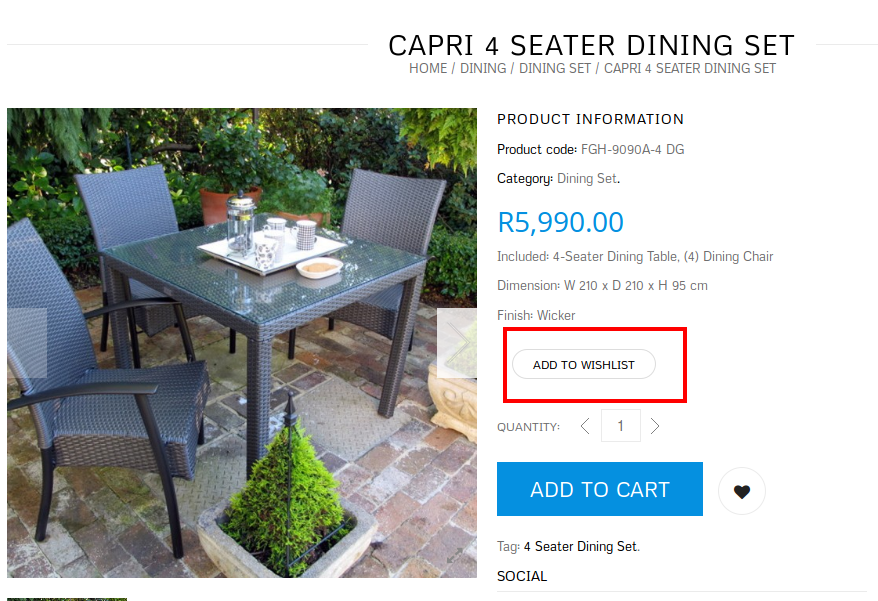
    As I see “Add to Wishlist” button is showing on the site:

    Please clear your browser cache or check in some other browser.

    Regards,
    Eva Kemp.

    Avatar: Eva
    Eva Kemp
    Participant
    July 30, 2014 at 12:09

    Hello,

    Those are the recommended settings.
    Please provide us with the link your categories page and wp-admin panel credentials in Private Content.
    Thank you.

    Regards,
    Eva Kemp.

    Avatar: Eva
    Eva Kemp
    Participant
    July 30, 2014 at 12:06

    Hello,

    The ids for sidebars are:
    ‘name’ => __(‘Main Sidebar’, ETHEME_DOMAIN),
    ‘id’ => ‘main-sidebar’,

    ‘name’ => __(‘Shop Sidebar’, ETHEME_DOMAIN),
    ‘id’ => ‘shop-sidebar’,

    ‘name’ => __(‘Single product page Sidebar’, ETHEME_DOMAIN),
    ‘id’ => ‘single-sidebar’,

    Regards,
    Eva Kemp.

    Avatar: Eva
    Eva Kemp
    Participant
    July 30, 2014 at 11:27

    Hello,

    To remove white space at the bottom, please add this code into custom.css file:

    html {
        overflow: hidden;
    }

    Concerning the error on the Checkout page, we’re still investigating it. We’ll update you as soon as possible.

    Thank you.

    Regards,
    Eva Kemp.

    Please, contact administrator
    for this information.
    Avatar: Eva
    Eva Kemp
    Participant
    July 30, 2014 at 10:35

    Hello,

    To have VC editor for static block you need enable it in admin panel > Settings > Visual Composer > General Settings tab > Content Types, and check which content types Visual Composer should be available during post creation/editing.
    To add widgets in static block as in our documentation you need use “Widgetised sidebar” element from VC editor:

    Regards,
    Eva Kemp.

    Avatar: Eva
    Eva Kemp
    Participant
    July 30, 2014 at 10:06

    Hello,

    Thank you for the credentials.
    Could you please show a screenshot of how you’d like the images to be shown?

    Regards,
    Eva Kemp.

    Avatar: Eva
    Eva Kemp
    Participant
    July 30, 2014 at 10:01

    Hello,

    Please refer to our documentation how to create footer:
    https://www.8theme.com/demo/docs/legenda/index.html#!/footer

    Regards,
    Eva Kemp.

    Avatar: Eva
    Eva Kemp
    Participant
    July 30, 2014 at 08:57

    We’re looking forward to your reply.
    Thank you.

    Regards,
    Eva Kemp.

  • 1 2 3 962 963 964 1,045 1,046 1,047
    Viewing 28,890 results - 28,861 through 28,890 (of 31,382 total)
Viewing 30 posts - 28,861 through 28,890 (of 31,382 total)
We're using our own and third-party cookies to improve your experience and our website. Keep on browsing to accept our cookie policy.