
Hello,
Please create a ticket and our developers will look into this issue more deeper.
Thank you.
Regards,
Eva Kemp.

Hello,
Please create a ticket and our developers will look into this issue more deeper.
Thank you.
Regards,
Eva Kemp.
Hello,
You’re welcome.
Regards,
Eva Kemp.
Hello,
Please provide us with wp-admin panel and FTP credentials in Private Content to check the issue.
Thank you.
Regards,
Eva Kemp.
Hello,
You need edit “Prefooter Area” in Appearance > Widgets. Just drag the desired widgets into this area.
Regards,
Eva Kemp.
Hello @walkerpark,
As I see you still have old theme version.
Please update it to the latest one – 2.9.2
https://www.8theme.com/demo/docs/blanco/index.html#!/upgrade
Thank you.
Regards,
Eva Kemp.
Hello,
Could you please clarify what exactly you want to edit?
Do you wish to change the links for languages?
If you want to use some widget in top header area you can insert it into “Place in header top bar” widget area in Appearance > Widgets.
Regards,
Eva Kemp.
Hello @tommyrockett,
The new version of VC plugin have been sent to your email address. Please check it.
Regards,
Eva Kemp.
Hello,
Please provide us with your site and wp-admin panel credentials in Private Content.
Thank you.
Regards,
Eva Kemp.
Hello,
There is a bug in the theme and VC. Please add the image link img_link="your_link_to_the_image" into the VC shortcode via classic editor.
Regards,
Eva Kemp.
Hello,
You’re welcome.
Regards,
Eva Kemp.
Dear @catlynngriffith,
Thank you for the credentials.
I’ve installed the theme, you can check it http://www.nextgennutritionals.com/
As I’ve told you the reason was you provided us with wrong FTP account (for this subfolder http://www.nextgennutritionals.com/nextgennutritionals/)
Please pay attention: in public_html folder you have “nextgennutritionals” subfolder (url is http://www.nextgennutritionals.com/nextgennutritionals/ ) and you were trying to install the theme there, but were checking wp-admin of nextgennutritionals.com.
You need ask your host for the correct FTP details for the site nextgennutritionals.com, not for nextgennutritionals.com/nextgennutritionals which you were using.
Now you can proceed working on your site. Don’t forget to refer to our documentation if you have some questions: https://www.8theme.com/demo/docs/legenda/index.html#!/demo_data_installation
Regards,
Eva Kemp.
Hello @catlynngriffith,
Are you using any control panel at your hosting provider? May we have access to it?
Thank you.
Regards,
Eva Kemp.
Hello,
You’ve provided us with FTP account for nextgennutritionals@nextgennutritionals.com, which means we’ll manage this site with subfolder: http://www.nextgennutritionals.com/nextgennutritionals/
Please check ttp://www.nextgennutritionals.com/nextgennutritionals/wp-admin if there is legenda theme in Appearance > Themes.
Regards,
Eva Kemp.
Hello,
You can change the banners in wp-admin panel > Pages > Home page as described in our documentation:
https://www.8theme.com/demo/docs/xmarket/index.html#!/demo_data_installation > Home page
Regards,
Eva Kemp.
Hello,
Where have you sent it to? Please write the credentials on this forum in Private Content. It will be visible to administrators only.
Regards,
Eva Kemp.
Hello @bazzer7rose,
Please provide us with FTP and wp-admin panel details in Private Content and we’ll check the issue.
Thank you.
Regards,
Eva Kemp.
Hello,
Please specify to what exactly you want to change banners and show us a screenshot of “Demo Camera” you want to change as well.
Thank you.
Regards,
Eva Kemp.
Hello @catlynngriffith,
As I see memory limit value is the same:
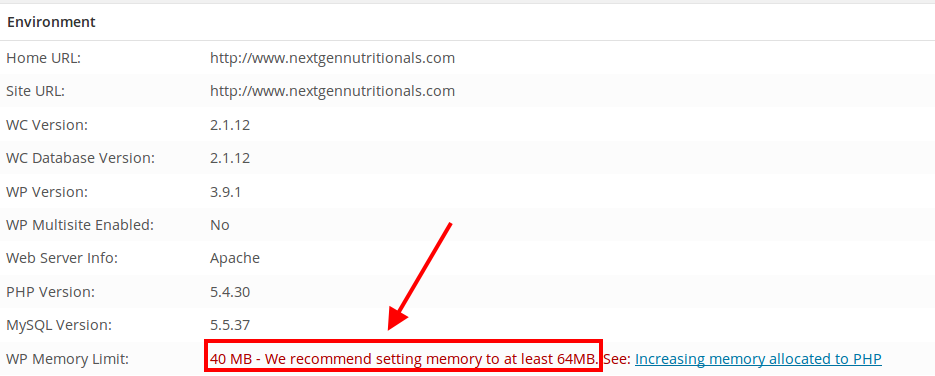
Please contact your host to increase it.
Regards,
Eva Kemp.
Hello,
The problem is caused by memory limit. You need increase it at your hosting provider. Please contact them and ask to change memory limit value.
Regards,
Eva Kemp.
Hello @catlynngriffith,
Sorry, but login credentials are incorrect. Please check them. Also please provide us with the site URL as well.
Thank you.
Regards,
Eva Kemp.
Hello,
The script file that calls ajax is wp-content/themes/theleader/js/etheme.js.
If you experience problems after making changes to the file please create a ticket at http://support.8theme.com/ and our developers will investigate it further.
Thank you.
Regards,
Eva Kemp.
Could you please clarify?
Are you trying to change the height of the header?
Thank you.
Regards,
Eva Kemp.
You’re welcome.
Regards,
Eva Kemp.
Hello,
In this case we recommend you to contact our developers at https://support.8theme.com/ and they will look into your issue. Don’t forget to provide them with FTP/wp-admin panel credentials in the ticket.
Regards,
Eva Kemp.
Hello @catlynngriffith,
Please provide us with FTP and wp-admin panel credentials in Private Content.
Also please upload the theme archive (legenda_v2.2.zip) to the themes folder via FTP.
Regards,
Eva Kemp.
Hello,
Please use this code for fixed header manu:
.fixed-header .menu > li .nav-sublist-dropdown .container > ul > li a {
   height: 40px;
   padding-top: 7px;
}
Regards,
Eva Kemp.
Hello,
You’re welcome.
Yes, you’re right.
Enjoy your work!
Regards,
Eva Kemp.
Hello,
Have you recovered functions.php file? If no, please provide us with FTP and wp-admin panel cerdentials in Private Content. Concerning the custom fields for a single product you need contact Woocommerce support. They should give you some advice.
Regards,
Eva Kemp.
Hello,
You need add this code in custom.css:
.page-heading h1 {
    display: none;
}
Please note the title will be removed from all pages, not only on Contact page.
Regards,
Eva Kemp.
I’ve added the following code into custom.css file:
p.stars span a.active {
    background: url('woocommerce/images/star.png') repeat-x scroll left -32px transparent !important;
}
Please check rating stars now.
Regards,
Eva Kemp.









