
Hello,
I’ve updated Visual Composer via FTP, but unable to access wp-admin panel, getting the error:
“You must log in to access the admin area.”
Please check it.
Thank you.
Regards,
Eva Kemp.

Hello,
I’ve updated Visual Composer via FTP, but unable to access wp-admin panel, getting the error:
“You must log in to access the admin area.”
Please check it.
Thank you.
Regards,
Eva Kemp.
Hello,
Could you please clarify what exactly you want to change in LayerSlider?
Regards,
Eva Kemp.
Hello,
To change font of menu items you need add this code into custom.css file:
.main-nav .menu > li > a {
    font-family: Georgia;
}
and change font family to the desired one.
“Featured Products, On Sale, Recent Posts” items are related to Footer.
To change their font you need use this code in custom.css:
.footer-top .widget-title {
   font-family: sans serif;
}
How to create custom.css you can watch in this video tutorial.
Regards,
Eva Kemp.
Hello,
We’re sorry, but currently our developers are unable to assist on additional service due to a lot amount of work.
Please take our apologies for inconveniences.
Thank you for understanding.
Regards,
Eva Kemp.
Hello,
Please specify what else you need to edit. Is something wrong with the alignment that needs to be styled?
If you changed the dimensions in the theme files and the images are shown fine, then you don’t need to edit custom.css file.
Regards,
Eva Kemp.
Hello,
I’ve replaced the previous code with this one:
a.shopping-cart-link small {
display: none;
}
Please check the Cart now and clear browser cache before.
Regards,
Eva Kemp.
Hello,
Please provide us with FTP and wp-admin panel credentials in Private Content.
Regards,
Eva Kemp.
Hello,
Unfortunately the whole background of the container has to be changed in this case. You may try to change Site Layout to Wide in Blanco – Theme Settings to hide the box in the header.
Regards,
Eva Kemp.
Hello,
Do you want to have menu items written in white, but keep the menu background black?
Also when the item is hovered it has white background and black text now. Should it be left the same?
Regards,
Eva Kemp.
Hello,
Please specify font of what elements you want to change and to which one.
Thank you.
Regards,
Eva Kemp.
Hello,
Could you please clarify what you’re trying to achieve?
Also please provide us with the link where the problem occurs.
Thank you.
Regards,
Eva Kemp.
Hello,
Please provide us with FTP credentials as well.
Thank you.
Regards,
Eva Kemp.
Hello,
You need edit line 46 in the file wp-content/themes/legenda/content-portfolio.php.
Regards,
Eva Kemp.
Hello,
Please provide us with wp-admin panel credentials.
Thank you.
Regards,
Eva Kemp.
Hello,
Could you please clarify with more details what exactly you want to do and show us screenshots?
Thank you.
Regards,
Eva Kemp.
Hello,
I’ve added the following code into custom.css for the fixed header:
 .fixed-header .menu > li.menu-full-width .nav-sublist-dropdown .container > ul > li {
width:20%;
}
 .fixed-header .menu > li.menu-full-width .nav-sublist-dropdown .container > ul > li {
float:none;
display:inline-block;
vertical-align:top;
margin-left: 0px;
}
Please check if it’s fine now and clear browser cache before.
Regards,
Eva Kemp.
Hello @brazuka,
We’ve tested the theme with the latest WordPress version 4.0 and they are compatible.
So you can update WordPress to 4.0 version without any worries.
Regards,
Eva Kemp.
Hello,
I’ve added the following code into custom.css file:
li.menu-item.menu-item-type-taxonomy.menu-item-object-product_cat.menu-item-has-children.menu-parent-item.menu-item-8600 {
margin-top: 10px;
}
Please check the menu now.
Regards,
Eva Kemp.
Hello,
You’re welcome.
Regards,
Eva Kemp.
Hello,
Please provide us with FTP and wp-admin panel credentials in Private Content.
Also please show us the link of the product page where image isn’t displayed.
Thank you.
Regards,
Eva Kemp.
Hello,
We’re still working on this issue.
We’ll let you know as soon as there are any results.
Thank you for your patience.
Regards,
Eva Kemp.
Hello,
You’re welcome and thank you for the suggestion.
Regards,
Eva Kemp.
Hello @arahmati1,
You’ve already had Revolution Slider updated, so we’ve updated VC plugin for you.
Please check.
Regards,
Eva Kemp.
Hello @arahmati1,
Please provide us with FTP credentials as well.
Thank you.
Regards,
Eva Kemp.
Hello,
This error may be related to php version or missing php modules:
http://www.sitepoint.com/forums/showthread.php?431662-Fatal-error-Call-to-undefined-function-imagettftext%28%29
http://stackoverflow.com/questions/7290958/php-fatal-error-call-to-undefined-function-imagettftext
So please ask your host to check it.
Thank you.
Regards,
Eva Kemp.
Hello,
You need add Read more button to your posts. In this article you can read how to do this:
https://www.8theme.com/knowledge-base/using-read-more-button-on-wordpress-blog/
Regards,
Eva Kemp.
You’re welcome.
Regards,
Eva Kemp.
You’re welcome.
Regards,
Eva Kemp.
Hello,
We understand your dissatisfaction and are very sorry for the inconveniences you have to experience.
We’ve improved our theme as much as we could. And we have already emphasized if someone of our customers has experience in development and has proposals concerning changes in the theme (we mean only specific changes in the code in particular files, rather than general phrases like “Reduce CSS File” etc), we are asking to declare them here or contact us via the contact form https://www.8theme.com/contact-us/
If the recommended changes are effective and reduce time load of the theme, you will receive financial compensation.
Thank you for understanding.
Regards,
Eva Kemp.
Hello,
As you can see on the theme page http://themeforest.net/item/legenda-responsive-multipurpose-wordpress-theme/5888906 the compatible browsers are IE9, IE10, IE11, Firefox, Safari, Opera, Chrome
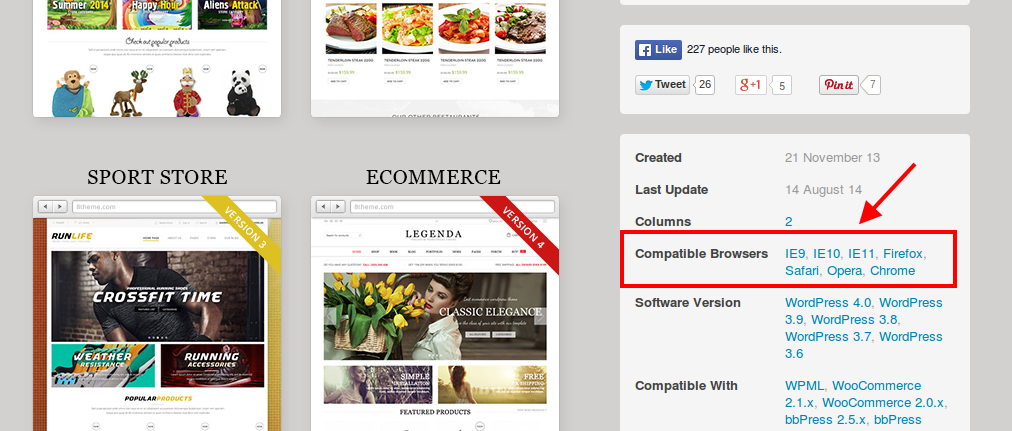
Please update your browser.
Thank you.
Regards,
Eva Kemp.









